







On paper, a virtual machine is a virtual machine. In practice, each hypervisor has its own snapshot APIs, its own change-tracking mechanisms, its own way of handling application consistency, and its own management plane. A backup tool that talks natively to VMware vCenter via VADP does not automatically know how to talk to a Hyper-V cluster or a Proxmox VE node. Those require different integration points entirely.
The result, in most organizations, is a balancing act. The goal is to minimize the number of backup solutions in play, but not at the cost of using tools that do not fit the workload. Different platforms genuinely benefit from purpose-built protection, and forcing a single tool to cover everything usually means covering some things poorly. At Catalogic Software, we build solutions for exactly this reality. DPX focuses on hypervisor and physical workload protection, while CloudCasa addresses Kubernetes and cloud-native environments. Each is purpose-built for its domain, and organizations choose based on what their infrastructure actually looks like.
There are also practical day-to-day issues. How do you enforce a consistent RPO across a mixed environment? How do you ensure ransomware protection applies equally to a VMware VM and a Hyper-V workload? How do you report on coverage across all platforms without pulling data from separate systems? These are not edge cases. They are the daily reality for teams running mixed infrastructure.
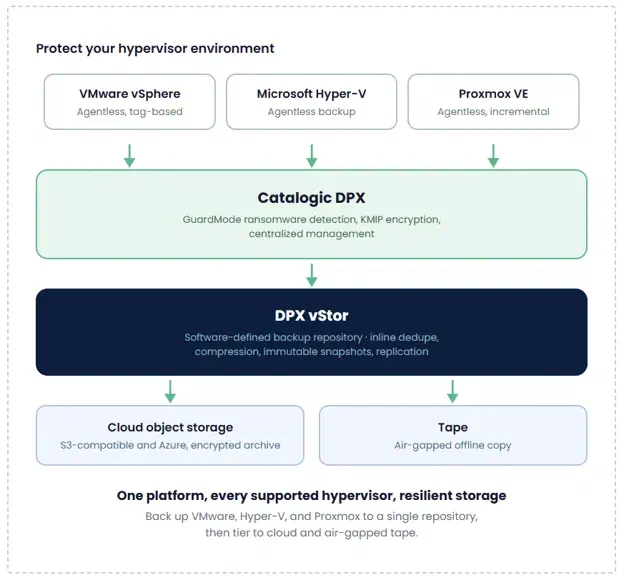
Catalogic DPX is built to protect heterogeneous environments through native integration with each supported hypervisor, rather than generic agent-based fallback. Its vStor software-defined backup repository works as a unified storage target regardless of where the data is coming from. Here is how it handles each supported platform.
DPX is a VMware Technology Alliance Partner with over a decade of vSphere experience. It uses VMware’s agentless data protection API (VADP) to back up VMs without installing agents on each guest, reducing management overhead and minimizing performance impact on running workloads.
DPX 4.15 introduced VMware backup by vCenter tag, with 4.16 building further on VMware protection for hybrid environments. Instead of building static job definitions around specific VMs or folders, teams can scope backup jobs by tag. When a new VM is created in vCenter and tagged appropriately, it is automatically picked up by the right backup job. No manual update required. For environments where VMs are provisioned frequently, this removes a common gap in coverage that is easy to miss until something goes wrong. When recovery is needed, options range from Instant Virtualization and Instant VMDK mapping through to a full VM restore, depending on what the situation calls for.
For organizations running Windows Server infrastructure, Hyper-V is often a significant part of the estate. Like VMware, DPX protects Hyper-V environments agentlessly, without installing agents on each guest, with consistent policies that apply across all supported platforms.
The same recovery capabilities available for VMware, including granular file and application object recovery, apply equally to Hyper-V VMs. There is no second-class citizen treatment based on which hypervisor a VM runs on.
Proxmox VE has seen significant adoption as organizations look for cost-effective alternatives to commercial hypervisors, and many are running it alongside their existing VMware or Hyper-V infrastructure. DPX integrates directly with Proxmox VE for agentless Proxmox VE backup, with snapshot management handled automatically across schedule and retention. No separate tooling or manual intervention required, which matters in environments where Proxmox is often running on lean infrastructure with limited IT overhead.
Having per-platform coverage is necessary but not sufficient. What makes multi-hypervisor backup manageable at scale is a common storage and protection layer underneath.
DPX vStor is a software-defined backup repository that works as a unified target for all supported platforms:
Built on open-source components with no proprietary hardware dependency
Supports inline deduplication and compression
Provides point-to-point replication for disaster recovery
KMIP-compliant key management enforces separation between encryption key management and storage, which matters for organizations with compliance requirements
A team protecting VMware, Hyper-V, and Proxmox environments does not need separate backup storage for each. They all feed into vStor, where data can then be tiered to tape or cloud object storage as needed.
DPX GuardMode adds a proactive layer of ransomware detection across the environment. It monitors for suspicious file activity and signs of encryption at the source, and when a threat is detected, it identifies the affected files and provides multiple recovery points to roll back to a clean state. Backups are stored as immutable snapshots, with archive copies on tape or cloud object storage kept air-gapped from the network. This protection applies consistently regardless of which hypervisor a workload runs on.
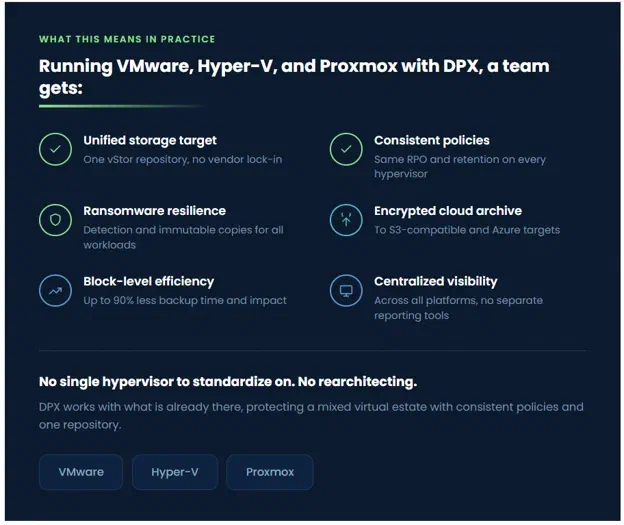
A team running VMware, Hyper-V, and Proxmox with DPX gets:
A unified backup storage target in vStor, with no vendor lock-in
Consistent RPO and retention policies regardless of hypervisor
Ransomware detection and immutable backup copies covering all workloads
Cloud archive with encryption to S3-compatible and Azure targets
Block-level efficiency with up to 90% reduction in backup time and impact
Centralized visibility across all supported platforms without separate reporting tools
None of this requires standardizing on a single hypervisor or rearchitecting the environment. DPX works with what is already there.
Multi-hypervisor environments are a reality, not a temporary situation to be cleaned up later. The backup strategy needs to reflect that. A solution that handles VMware well but treats everything else as an afterthought introduces exactly the kind of gap that surfaces during an incident.
The goal is not to run as few tools as possible at any cost, but to be deliberate about the ones you do run. That means minimizing unnecessary overlap while making sure each solution is genuinely purpose-built for its domain. Catalogic DPX covers the hypervisor and physical workload side of that equation, with native integration for each supported platform, a consistent storage and protection layer through vStor, and ransomware detection across all workloads.
Learn more about Catalogic DPX at catalogicsoftware.com/products/dpx
DPX support for additional hypervisors is on the roadmap. If you are running something we have not covered yet, we would love to hear about your environment. Let’s talk!
此内容由惯性聚合(RSS阅读器)自动聚合整理,仅供阅读参考。 原文来自 — 版权归原作者所有。