








表单的数据验证往往枯燥无味,又不可避免.
在一个如下表单只有两个输入框,和确定按钮的情况下,正常我们需要做哪些工作呢? 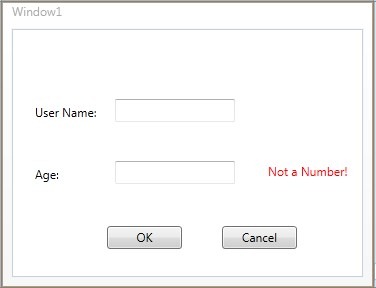
1. 如果年龄输入框输入了非数字的字符串,输入框失去焦点后,后面错误消息应当能立即提示出来
2.错误的提示的内容如果变化,你可能需要修改整个UI设计.(如显示在输入框下方)
3.点击OK按钮,需要遍历Window所有输入框,如果有输入数据验证不符合,需要提示错误,并将对应的控件获取焦点.
这很容易么?当这个输入框再多一些呢?
下面的Demo,看在WPF如何轻松处理这些:
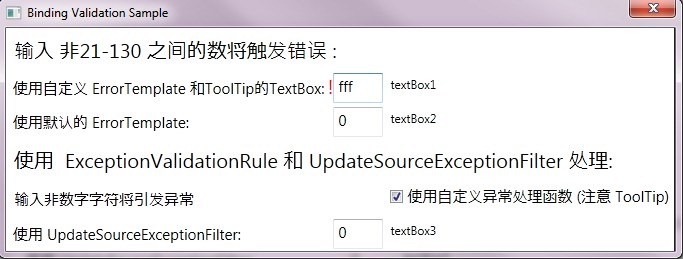
Window里,textBox1,textBox2,textBox3 绑定的数据为:

DataSource
<TextBox Name="textBox1" Width="50" FontSize="15"
         Validation.ErrorTemplate="{StaticResource validationTemplate}"
         Style="{StaticResource textBoxInError}"
         Grid.Row="1" Grid.Column="1" Margin="2">
  <TextBox.Text>
    <Binding Path="Age" Source="{StaticResource ods}"
             UpdateSourceTrigger="PropertyChanged" >
      <Binding.ValidationRules>
        <c:AgeRangeRule Min="21" Max="130"/>
      </Binding.ValidationRules>
    </Binding>
  </TextBox.Text>
</TextBox>
textBox1 绑定了Age ,并且使用的验证的规则为 AgeRangeRule ,规则中指定了最小值和最大值,当PropertyChanged时验证规则将触发,也就是该控件失去焦点之时. 提示的信息样式定义在ErrorTemplate里,让我们再来看一看ErrroTemplate的内容:
      <ControlTemplate x:Key="validationTemplate">
        <DockPanel>
          <TextBlock Foreground="Red" FontSize="20">!</TextBlock>
          <AdornedElementPlaceholder/>
        </DockPanel>
      </ControlTemplate>
AdornedElementPlaceholder 才是这里的点睛之处,此处放置了待验证的控件,而整个ErrorTemplate正是使用神奇的Adoner实现了错误的提示的位置和原排版布局的无关性. 验证规则和整个代码完全解耦:
rule
     <Style x:Key="textBoxInError" TargetType="{x:Type TextBox}">
        <Style.Triggers>
          <Trigger Property="Validation.HasError" Value="true">
            <Setter Property="ToolTip"
              Value="{Binding RelativeSource={x:Static RelativeSource.Self},
                              Path=(Validation.Errors)[0].ErrorContent}"/>
          </Trigger>
        </Style.Triggers>
      </Style>
另一种方法,不自定义Rule,如:
 <TextBox Name="textBox3" Width="50" FontSize="15"
             Grid.Row="5" Grid.Column="1" Margin="2"
             Validation.ErrorTemplate="{StaticResource validationTemplate}"
             Style="{StaticResource textBoxInError}">
      <TextBox.Text>
        <Binding Path="Age3" Source="{StaticResource ods}"
                 UpdateSourceTrigger="PropertyChanged">
          <Binding.ValidationRules>
            <ExceptionValidationRule/>
          </Binding.ValidationRules>
        </Binding>
      </TextBox.Text>
    </TextBox>
在后台代码中:
        BindingExpression myBindingExpression = textBox3.GetBindingExpression(TextBox.TextProperty);
            Binding myBinding = myBindingExpression.ParentBinding;
            myBinding.UpdateSourceExceptionFilter = new UpdateSourceExceptionFilterCallback(ReturnExceptionHandler);
            myBindingExpression.UpdateSource();
因为Age3 是Int类型,在textBox3 输入非int类型,将会引发异常,此时使用Rule的正是系统的ExceptionValidationRule,同样错误信息的模块不变.
代码: 下载
此内容由惯性聚合(RSS阅读器)自动聚合整理,仅供阅读参考。 原文来自 — 版权归原作者所有。