


惯性聚合 高效追踪和阅读你感兴趣的博客、新闻、科技资讯
阅读原文 在惯性聚合中打开

推荐订阅源

人人都是产品经理
人人都是产品经理
OSCHINA 社区最新新闻
OSCHINA 社区最新新闻
月光博客
月光博客
雷峰网
雷峰网
Google DeepMind News
Y
Y Combinator Blog
Microsoft Security Blog
M
MIT News - Artificial intelligence
WordPress大学
WordPress大学
MongoDB | Blog
MongoDB | Blog
V
V2EX
博客园 - 【当耐特】
GbyAI
GbyAI
Stack Overflow Blog
Stack Overflow Blog
I
InfoQ
Martin Fowler
Martin Fowler
钛媒体:引领未来商业与生活新知
钛媒体:引领未来商业与生活新知
Hugging Face - Blog
Hugging Face - Blog
B
Blog
V
Visual Studio Blog
D
DataBreaches.Net
C
Check Point Blog
freeCodeCamp Programming Tutorials: Python, JavaScript, Git & More
F
Fortinet All Blogs

博客园 - Haozes

新Blog 拼写检查算法 Golang 版 Windbg 离线调试.Net 程序入门 (译)你必须知道的位运算技巧 Low Level Bit Hacks You Absolutely Must Know Windows 下 命令行增强工具 WPF Layout & Image异步加载 几篇文章了解编译原理 WPF Binding Validation 数据验证 推荐一个.NET 命令行参数Parser 库 常用开发工具介绍 使用.Net Memory Profiler 分析.Net程序内存泄露 使用Mdbg.exe 调试.Net 程序 WPF 多语言方案 .Net 2 Tip :捕获CSE和Thread.Timer与Thread.Sleep比较 使用CSharp Driver操作Mongodb介绍 使用Python操作MSSQL数据库. 运行.Net4.0程序是否要安装之前的.Net版本 javascript Disable <div> or other tag in Other Browser like FF,Chrome Delphi 无类型参数传递动态数组和静态数组
WPF 实现Loading效果
Haozes · 2012-06-19 · via 博客园 - Haozes

项目中如下实现遮盖的加载效果,代码不统一,且实现的耦合性比较多,封装了一个加载的控件.
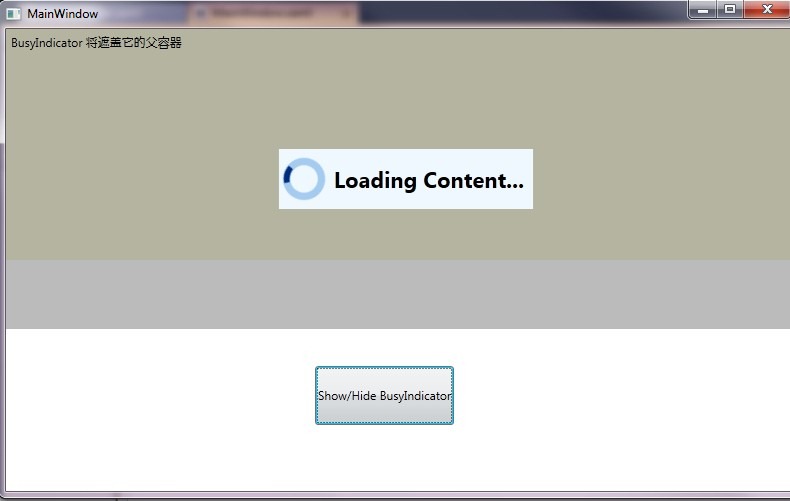
snap

使用方法:

1.添加:

 <ResourceDictionary Source="/BusyIndicatorCtrl;Component/BusyIndicator.xaml"/>

2.在所要的容器中插入 BusyIndicator :

  <Grid Grid.Row="0" Width="800" Height="300" Background="Beige">
            <s:BusyIndicator x:Name="busyCtrl"  />
            <Label Content="BusyIndicator 将遮盖它的父容器"></Label>
        </Grid>

设置加载内容的文件并显示:
                this.busyCtrl.IsBusy = true;

                this.busyCtrl.Text = "Loading Content...";


代码下载