


惯性聚合 高效追踪和阅读你感兴趣的博客、新闻、科技资讯
阅读原文 在惯性聚合中打开

推荐订阅源

S
Schneier on Security
cs.AI updates on arXiv.org
T
Threat Research - Cisco Blogs
C
Cyber Attacks, Cyber Crime and Cyber Security
C
CXSECURITY Database RSS Feed - CXSecurity.com
A
Arctic Wolf
Security Latest
Security Latest
Simon Willison's Weblog
I
Intezer
cs.CV updates on arXiv.org
T
Troy Hunt's Blog
Latest news
Latest news
Help Net Security
Help Net Security
S
Security Affairs
Webroot Blog
Webroot Blog
The Hacker News
The Hacker News
AI
AI
cs.CL updates on arXiv.org
T
Tor Project blog
Forbes - Security
Forbes - Security
Google DeepMind News
AWS News Blog
AWS News Blog
Attack and Defense Labs
P
Proofpoint News Feed
www.infosecurity-magazine.com
H
Help Net Security
L
Lohrmann on Cybersecurity
S
SegmentFault 最新的问题
Google Online Security Blog
MongoDB | Blog
MongoDB | Blog
Cyberwarzone
Cyberwarzone
The Last Watchdog
The Last Watchdog
S
Securelist
N
News and Events Feed by Topic
S
Secure Thoughts
F
Fortinet All Blogs
博客园_首页
C
Cybersecurity and Infrastructure Security Agency CISA
量子位
M
MIT News - Artificial intelligence
F
Full Disclosure
T
The Blog of Author Tim Ferriss
T
Tailwind CSS Blog
Recent Commits to openclaw:main
Microsoft Security Blog
I
InfoQ
P
Privacy International News Feed
L
LangChain Blog
Know Your Adversary
Know Your Adversary
C
CERT Recently Published Vulnerability Notes

博客园 - Haozes

新Blog 拼写检查算法 Golang 版 Windbg 离线调试.Net 程序入门 (译)你必须知道的位运算技巧 Low Level Bit Hacks You Absolutely Must Know Windows 下 命令行增强工具 WPF Layout & Image异步加载 几篇文章了解编译原理 WPF Binding Validation 数据验证 WPF 实现Loading效果 推荐一个.NET 命令行参数Parser 库 常用开发工具介绍 使用Mdbg.exe 调试.Net 程序 WPF 多语言方案 .Net 2 Tip :捕获CSE和Thread.Timer与Thread.Sleep比较 使用CSharp Driver操作Mongodb介绍 使用Python操作MSSQL数据库. 运行.Net4.0程序是否要安装之前的.Net版本 javascript Disable <div> or other tag in Other Browser like FF,Chrome Delphi 无类型参数传递动态数组和静态数组
使用.Net Memory Profiler 分析.Net程序内存泄露
Haozes · 2012-03-01 · via 博客园 - Haozes

.Net 内存泄露无外乎那几类:
引用未消除,事件未删除

如果是WPF应用程序,常见的有Image 对象释放问题,绑定到非依赖属性或未实现INotifyPropertyChanged 接口的对象属性.这里不细述.

本文介绍如何使用强大的.Net Memory Profiler 分析.Net 应用程序内存泄露. 使用的Demo 是 使用Mdbg.exe 调试.net 程序 中的Demo.

Sample Code:

namespace MemLeakProfileDemo
{

public partial class Form1 : Form
{
private Fool fool;
private FoolBrother brother;

public Form1()
{
InitializeComponent();
fool = new Fool();
brother = new FoolBrother();
//引用fool
brother.YoungFool = fool;
}

private void btnAlloc_Click(object sender, EventArgs e)
{
var i = 10;
//AllocalHugeMem 会申请10M的内存
fool.AllocalHugeMem();
}

private void btnWrongRelease_Click(object sender, EventArgs e)
{
//虽然fool 指向null,但 brother保留了对fool的引用,GC无效果.内存泄露
fool = null;
GCRelease();
}

private void btnRightRelease_Click(object sender, EventArgs e)
{
//消除 brother 对fool的引用,GC效果明显
fool = null;
brother = null;
GCRelease();
}

private void GCRelease()
{
GC.Collect();
GC.WaitForPendingFinalizers();
GC.Collect();
}
}

public class Fool
{
private IList<byte[]> list = new List<byte[]>();

public void AllocalHugeMem()
{
var buffer = new byte[10 * 1024 * 1024];
for (int i = 0; i < buffer.Length; i++)
{
buffer[i] = 1;
}
list.Add(buffer);
}
}

public class FoolBrother
{
public Fool YoungFool
{
get;
set;
}
}
}
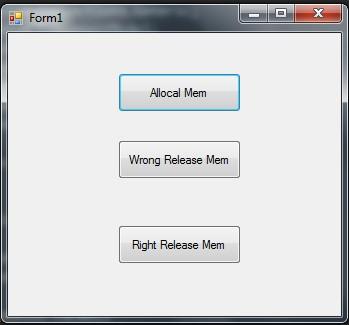
  • 使用.Net Memory Profiler 启动 Demo.exe,

  • 先抓个快照(Collect Snapshot)
  • 多点击几次 Allocal Mem 按钮,申请内存,再点击 Wrong Release Mem 按钮.再抓个快照.

此时:

            //虽然fool 指向null,但 brother保留了对fool的引用,GC无效果.内存泄露
fool = null;
GCRelease();

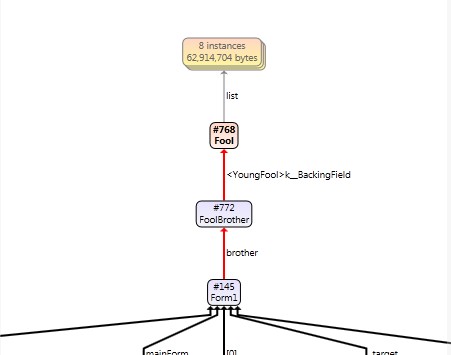
由于有个 FoolBrother 对象强引用了fool对象,fool对象无法被GC掉. 通过强大的工具,我们可以直观的看到:

mem2

有一个Fool 对象instance 未被释放.双击该行查看:

可以看到该对象引用的计数是1,GC 的Age,右边是创建该对象的堆栈.

双击Instances 行.出现清晰的引用关系图:
mem4

一切尽在眼前! 

反之,可以点击 Right Release Mem 按钮,将FoolBrother 对象清除,再抓快照,对比效果.

回头有时间再用此Demo 介绍如何使用Windbg SOS扩展找出内存泄露.