

惯性聚合 高效追踪和阅读你感兴趣的博客、新闻、科技资讯
阅读原文 在惯性聚合中打开

推荐订阅源

让小产品的独立变现更简单 - ezindie.com
U
Unit 42
Google DeepMind News
博客园 - 司徒正美
Y
Y Combinator Blog
F
Fortinet All Blogs
云风的 BLOG
云风的 BLOG
T
Tailwind CSS Blog
G
Google Developers Blog
酷 壳 – CoolShell
酷 壳 – CoolShell
罗磊的独立博客
D
DataBreaches.Net
T
The Blog of Author Tim Ferriss
Cyber Security Advisories - MS-ISAC
MyScale Blog
MyScale Blog
N
Netflix TechBlog - Medium
Microsoft Security Blog
GbyAI
GbyAI
P
Proofpoint News Feed
Jina AI
Jina AI
B
Blog RSS Feed
腾讯CDC
阮一峰的网络日志
阮一峰的网络日志
D
Docker

博客园 - 小镇

初识大数据(五. 大数据平台基本架构) 初识大数据(四. 大数据与人工智能的关系) 初识大数据(三. Hadoop与MPP数据仓库) 初识大数据(二. Hadoop是什么) 初识大数据(一. 什么是大数据) 我的微博 微软官方中文新书《Windows Phone 7应用开发指南 》出版 wp7.1 联系人 WP7.1 应用程序发布到Marketplace windows phone 7.1 RC 版 SDK Background Agent and Scheduled Task 自定义控件库Daisy.WP7.Controls1.2版 wp7.1 使用本地数据库 Windows Phone 7.1 新增Task XNA绘制Silverlight控件 windows phone 7.1 XNA in Silverlight Wp7.1新增API windows phone 7.1 中两个新增控件 Windows Phone 7.1 发布了
wp7.1 VideoBrush
小镇 · 2011-10-11 · via 博客园 - 小镇
 

这是一个非常有趣的画刷,可以产生视频的蒙板效果,这个画刷在Silverlight中早就有的,但是Windows Phone中却一直没有引入,不过在WP7.1 SDK正式版中这个特性被加入进来了,手机上也可以制做这种效果了。

一.原理
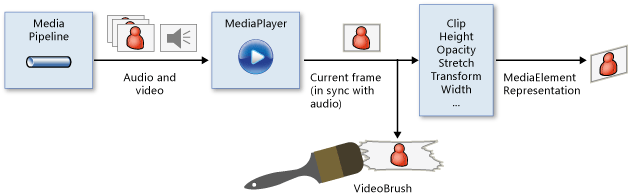
   

这里需要用到MediaElement控件来做为Video 的载体,也就是说由这个控件来播放Video,然后将这个控件做为VideoBrush的源来使用,而VideBrush又以型状控件、容器控件或文字控件的ForegroundBackgroundPath形式加入到这些控件中,从而利用这些控件的形状或内容做为蒙板产生笔刷效果。

注意:在模拟器上无法看到效果,只有用真机才可以。

二.实现

1.产生文字蒙板效果

<MediaElement x:Name="meVideo" IsHitTestVisible="False" Source="Wildlife.wmv" AutoPlay="True"/>

            <TextBlock Text="Video" FontSize="150" FontWeight="Bold">

                <TextBlock.Foreground>

                    <VideoBrush SourceName="meVideo"/>

                </TextBlock.Foreground>

            </TextBlock>

2. 形状蒙板效果

         <Ellipse Width="200" Height="200" VerticalAlignment="Top">

                <Ellipse.Fill>

                    <VideoBrush SourceName="meVideo"/>

                </Ellipse.Fill>

            </Ellipse>

3. 容器蒙板效果

<StackPanel Width="200" Height="200">

                <StackPanel.Background>

                    <VideoBrush SourceName="meVideo"/>

                </StackPanel.Background>

            </StackPanel>

4. 按钮控件效果

<Button Width="300" Height="150" Content="Video">

                <Button.Background>

                    <VideoBrush SourceName="meVideo"/>

                </Button.Background>

            </Button>

5. 按钮控件文字蒙板效果

<Button Width="300" Height="150">

                <Button.Content>

                    <TextBlock Text="Video" FontSize="100" FontWeight="Bold">

                <TextBlock.Foreground>

                    <VideoBrush SourceName="meVideo"/>

                </TextBlock.Foreground>

                    </TextBlock>

                </Button.Content>

            </Button>

由以上效果可以看出,这个笔刷和其他的笔刷使用起来基本上一样,可以用于多种控件上,也可以产生多种蒙板效果。