





Silverlight表面返回的错误是:“远程服务没发现”很不友好。同事说是我写的POST的组件有问题,问我是不是限制了POST数据大小了,小数据POST不出错,大数据POST就出错。
开始还真以为是自己写的代码有问题,查啊。。。。。。被误导了。没去找错误的本质。
排错过程:
由于Silverlight是客户端程序,POST数据又是异步的,首先使用Fiddler2进行请求跟踪。

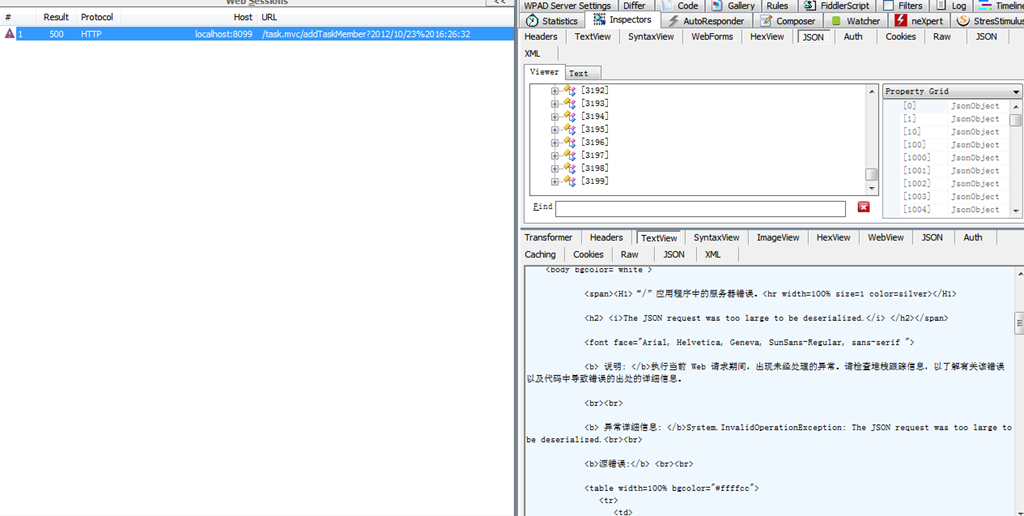
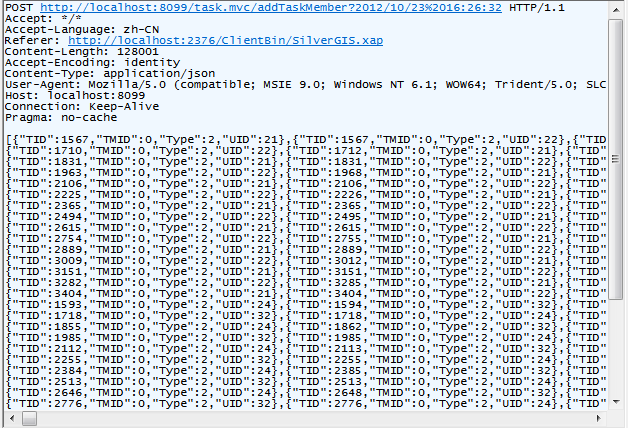
数据量确实挺大,3700多个对象
一跟踪,找到错误的本质了。“System.InvalidOperationException: The JSON request was too large to be deserialized.”
字面是对象太大,不能反序列化,那也不是POST数据有限制啊。
缺省POST的内容长度,Content-Length > 10000就出错了。
堆栈
[InvalidOperationException: The JSON request was too large to be deserialized.]
System.Web.Mvc.EntryLimitedDictionary.Add(String key, Object value) +455077
System.Web.Mvc.JsonValueProviderFactory.AddToBackingStore(EntryLimitedDictionary backingStore, String prefix, Object value) +403
System.Web.Mvc.JsonValueProviderFactory.AddToBackingStore(EntryLimitedDictionary backingStore, String prefix, Object value) +150
System.Web.Mvc.JsonValueProviderFactory.AddToBackingStore(EntryLimitedDictionary backingStore, String prefix, Object value) +364
System.Web.Mvc.JsonValueProviderFactory.GetValueProvider(ControllerContext controllerContext) +104
System.Web.Mvc.<>c__DisplayClassc.<GetValueProvider>b__7(ValueProviderFactory factory) +34
System.Linq.WhereSelectEnumerableIterator`2.MoveNext() +145
System.Linq.WhereSelectEnumerableIterator`2.MoveNext() +171
System.Collections.Generic.List`1..ctor(IEnumerable`1 collection) +460
System.Linq.Enumerable.ToList(IEnumerable`1 source) +58
System.Web.Mvc.ValueProviderFactoryCollection.GetValueProvider(ControllerContext controllerContext) +281
System.Web.Mvc.ControllerBase.get_ValueProvider() +40
System.Web.Mvc.ControllerActionInvoker.GetParameterValue(ControllerContext controllerContext, ParameterDescriptor parameterDescriptor) +60
System.Web.Mvc.ControllerActionInvoker.GetParameterValues(ControllerContext controllerContext, ActionDescriptor actionDescriptor) +117
GDEIC.AppFx.Mvc.JsonControllerActionInvoker.GetParameterValues(ControllerContext controllerContext, ActionDescriptor actionDescriptor) +812
System.Web.Mvc.Async.<>c__DisplayClass25.<BeginInvokeAction>b__1e(AsyncCallback asyncCallback, Object asyncState) +446
System.Web.Mvc.Async.WrappedAsyncResult`1.Begin(AsyncCallback callback, Object state, Int32 timeout) +130
System.Web.Mvc.Async.AsyncControllerActionInvoker.BeginInvokeAction(ControllerContext controllerContext, String actionName, AsyncCallback callback, Object state) +302
System.Web.Mvc.<>c__DisplayClass1d.<BeginExecuteCore>b__17(AsyncCallback asyncCallback, Object asyncState) +30
System.Web.Mvc.Async.WrappedAsyncResult`1.Begin(AsyncCallback callback, Object state, Int32 timeout) +130
System.Web.Mvc.Controller.BeginExecuteCore(AsyncCallback callback, Object state) +382
System.Web.Mvc.Async.WrappedAsyncResult`1.Begin(AsyncCallback callback, Object state, Int32 timeout) +130
System.Web.Mvc.Controller.BeginExecute(RequestContext requestContext, AsyncCallback callback, Object state) +317
System.Web.Mvc.Controller.System.Web.Mvc.Async.IAsyncController.BeginExecute(RequestContext requestContext, AsyncCallback callback, Object state) +15
System.Web.Mvc.<>c__DisplayClass8.<BeginProcessRequest>b__2(AsyncCallback asyncCallback, Object asyncState) +71
System.Web.Mvc.Async.WrappedAsyncResult`1.Begin(AsyncCallback callback, Object state, Int32 timeout) +130
System.Web.Mvc.MvcHandler.BeginProcessRequest(HttpContextBase httpContext, AsyncCallback callback, Object state) +249
System.Web.Mvc.MvcHandler.BeginProcessRequest(HttpContext httpContext, AsyncCallback callback, Object state) +50
System.Web.Mvc.MvcHandler.System.Web.IHttpAsyncHandler.BeginProcessRequest(HttpContext context, AsyncCallback cb, Object extraData) +16
System.Web.CallHandlerExecutionStep.System.Web.HttpApplication.IExecutionStep.Execute() +301
System.Web.HttpApplication.ExecuteStep(IExecutionStep step, Boolean& completedSynchronously) +155
都是MVC内部的错误。确定了和我写的没关系
原因应该是POST数据不完整,估计是被截断了。后来也被其他搜索到的信息误导了。从写了JsonDotNetValueProviderFactory也不管用,JsonDotNetValueProviderFactory具体什么用,可以自己Go下。
以下是重写代码,其他地方可能会有用留着备用
public sealed class JsonDotNetValueProviderFactory : ValueProviderFactory
{
   public override IValueProvider GetValueProvider(ControllerContext controllerContext)
   {
        if (controllerContext == null)
            throw new ArgumentNullException("controllerContext");

        if (!controllerContext.HttpContext.Request.ContentType.StartsWith("application/json", StringComparison.OrdinalIgnoreCase))
            return null;

        var reader = new StreamReader(controllerContext.HttpContext.Request.InputStream);
        var bodyText = reader.ReadToEnd();

        return String.IsNullOrEmpty(bodyText) ? null : new DictionaryValueProvider<object>(JsonConvert.DeserializeObject<ExpandoObject>(bodyText, new ExpandoObjectConverter()) , CultureInfo.CurrentCulture);
    }
}
ValueProviderFactories.Factories.Remove(ValueProviderFactories.Factories.OfType<JsonValueProviderFactory>().FirstOrDefault());
ValueProviderFactories.Factories.Add(new JsonDotNetValueProviderFactory());
解决办法:
web.config增加下面2段,必须都增加,否则解决不了,我就是开始只增加了一个,搞了大半天,才发现是要2个都加。
<system.web.extensions>
    <scripting>
        <webServices>
            <jsonSerialization maxJsonLength="2147483644"/>
        </webServices>
    </scripting>
</system.web.extensions>

<appSettings>
  <add key="aspnet:MaxJsonDeserializerMembers" value="150000" />
</appSettings>
总结:别人的信息误导太多,走了很多弯路,首先要找问题的本质,找到报错的根源,不要一出现问题就说不是自己的问题,都推到别人写的问题上。这个问题就是个简单的小配置问题。
作者:Bruce Lee
出处:http://www.cnblogs.com/BruceLee521
本博原创文章版权归博客园和本人共有,欢迎转载,但未经作者同意必须保留此段声明,且在文章页面明显位置给出作者名称和原文连接,否则保留追究法律责任的权利。
此内容由惯性聚合(RSS阅读器)自动聚合整理,仅供阅读参考。 原文来自 — 版权归原作者所有。