惯性聚合 高效追踪和阅读你感兴趣的博客、新闻、科技资讯
阅读原文 在惯性聚合中打开

推荐订阅源

D
Docker
爱范儿
爱范儿
T
The Exploit Database - CXSecurity.com
量子位
T
Tailwind CSS Blog
T
Threatpost
The GitHub Blog
The GitHub Blog
AWS News Blog
AWS News Blog
云风的 BLOG
云风的 BLOG
K
Kaspersky official blog
P
Proofpoint News Feed
博客园 - 司徒正美
L
LangChain Blog
T
Threat Research - Cisco Blogs
C
CERT Recently Published Vulnerability Notes
罗磊的独立博客
酷 壳 – CoolShell
酷 壳 – CoolShell
博客园 - 叶小钗
S
Secure Thoughts
The Last Watchdog
The Last Watchdog
Spread Privacy
Spread Privacy
H
Hacker News: Front Page
T
Troy Hunt's Blog
Cyber Security Advisories - MS-ISAC
Google DeepMind News
W
WeLiveSecurity
A
Arctic Wolf
Apple Machine Learning Research
cs.AI updates on arXiv.org
P
Proofpoint News Feed
T
Tor Project blog
T
The Blog of Author Tim Ferriss
I
Intezer
P
Privacy & Cybersecurity Law Blog
美团技术团队
N
Netflix TechBlog - Medium
博客园_首页
OSCHINA 社区最新新闻
OSCHINA 社区最新新闻
V
Vulnerabilities – Threatpost
Application and Cybersecurity Blog
G
Google Developers Blog
Attack and Defense Labs
T
Tenable Blog
月光博客
月光博客
Stack Overflow Blog
Stack Overflow Blog
J
Java Code Geeks
腾讯CDC
Microsoft Security Blog
A
About on SuperTechFans
Last Week in AI
Last Week in AI

博客园 - 迪克猪

发布一款vscode仓颉文件图标显示插件Mosmmy Cangjie Icons 在 Mac、Linux、Windows 下Go交叉编译 用户中心 - 博客园 golang字节数组拷贝BlockCopy函数实现 go module下golang.org如何处理被墙 go: writing stat cache:, permission denied mac os下不同工具go env下gopath显示不同 异类查询要求为连接设置ANSI_NULLS和ANSI_WARNINGS选项 SetProcessWorkingSetSize减少内存占用 mac os系统go安装:go install github.com/nsf/gocode: open /usr/local/go/bin/gocode: permission denied vscode打造最佳的markdown编辑器 "title_activity_dist" is not translated in "zh-rCN" (Chinese: China) vscode圣诞帽 阿里java代码检测工具p3c elasticsearch 二、elasticsearch-head安装 elasticsearch 一、环境配置 针对json的查询--alibaba的开源项目jsonq macos下golang 1.9配置 此请求已被阻止,因为当用在 GET 请求中时,会将敏感信息透漏给第三方网站。若要允许 GET 请求,请将 JsonRequestBehavior 设置为 AllowGet。
android sdk manager更新地址
迪克猪 · 2017-12-30 · via 博客园 - 迪克猪

参考:http://www.oschina.net/question/1399261_195245

android sdk 用久了,想更新到最新的SDK包:

大连东软信息学院镜像服务器地址:
- http://mirrors.neusoft.edu.cn 端口:80
北京化工大学镜像服务器地址:
- IPv4: http://ubuntu.buct.edu.cn/ 端口:80
- IPv4: http://ubuntu.buct.cn/ 端口:80
- IPv6: http://ubuntu.buct6.edu.cn/ 端口:80
上海GDG镜像服务器地址:
- http://sdk.gdgshanghai.com 端口:8000

mirrors.neusoft.edu.cn 端口:80

使用方法:

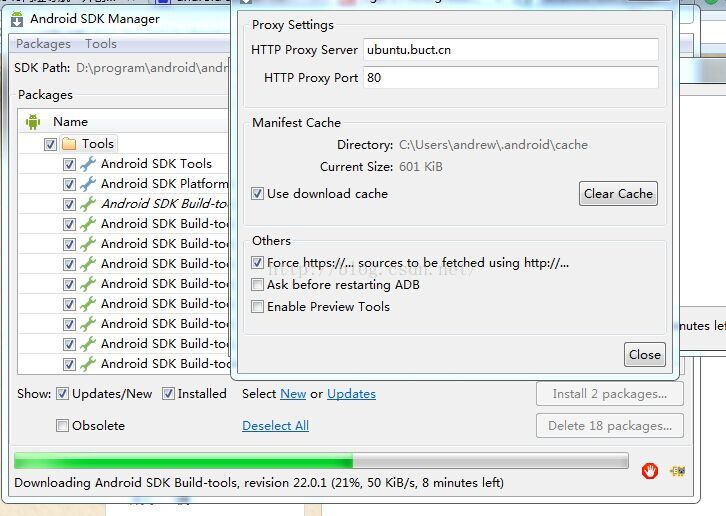
Android sdk manager——>Tools——>options 添加url地址与端口号

选中 Force https://......项

注意: url地址要删除http://开头。 改完地址后重启Android sdk manager,开始更新sdk有效

虽然能连接更新了,但是速度还很慢,最快的ubuntu.buct.cn,速度为50K。好慢啊。早上九点前下载速度很快,可以达到1.5MKiB/S