


It is quite annoying when a .net program try to update user interface control from a seperate long run task thread.
The runtime give me exception “Control control name accessed from a thread other than the thread it was created on.”
If it is in visual studio 2005, a lot of place recommend use "BackgroundWorker" to solve the problem.
But it is also not flexiable, It works fine with progressbar control only. If I need to display something on textbox, It is not straigt forward. For example, I want to change textbox background color.
I created my own skeleton code which can easily access any user interface control from seperate thread.
The key part is in UpdateUI_handler subroutine.
And if you want to access one control, you just need tell
That is very easy approach to solve the problem.
Below is my sample application snapshot
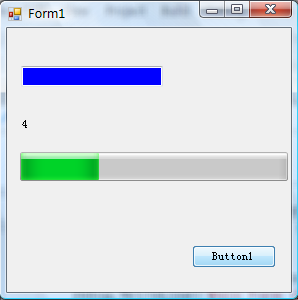
You can follow 3 steps below to create the project
1: Imports System
2: Imports System.Threading
3: Imports system.reflection
4: Public Class Form1
5: Delegate Sub UpdateUI(ByVal UpdateParameter As UIUpdateParameter)
6: Private Sub Button1_Click(ByVal sender As System.Object, ByVal e As System.EventArgs) Handles Button1.Click
7: Dim index As Int32
8: index = 10
9: Me.ProgressBar1.Maximum = index
10: Debug.WriteLine("Main Form thread: " & AppDomain.GetCurrentThreadId)
11: Dim thread As Thread
12: thread = New Thread(AddressOf DoTask)
13: thread.IsBackground = True
14: thread.Start()
15: End Sub
16:
17: Private Sub UpdateUI_handler(ByVal UpdateParameter As UIUpdateParameter)
18: Debug.WriteLine("Update progress bar thread: " & AppDomain.GetCurrentThreadId)
19: Dim theControlType As Object = Nothing
20: Dim theControl As Control = Nothing
21: For Each p As System.Reflection.PropertyInfo In Me.Controls(UpdateParameter.controlName).GetType().GetProperties()
22: theControl = Me.Controls(UpdateParameter.controlName)
23: theControlType = Convert.ChangeType(theControl, theControl.GetType)
24: If Not IsNothing(p.GetValue(theControlType, Nothing)) Then
25: If UCase(p.Name.ToString) = UCase(UpdateParameter.PropertyName) Then
26: p.SetValue(theControlType, Convert.ChangeType(UpdateParameter.value, p.PropertyType), Nothing)
27: End If
28: End If
29: Next
30: End Sub
31: Private Sub DoTask(ByVal t)
32: For i As Integer = 1 To 10
33: Thread.Sleep(500)
34: Debug.WriteLine("Do Task thread: " & AppDomain.GetCurrentThreadId)
35:
36: Dim uiUpdate2 As UpdateUI
37: uiUpdate2 = New UpdateUI(AddressOf UpdateUI_handler)
38:
39: Dim UpdateParameter As New UIUpdateParameter
40: UpdateParameter.controlName = "ProgressBar1"
41: UpdateParameter.PropertyName = "value"
42: UpdateParameter.value = i
43: Me.Invoke(uiUpdate2, UpdateParameter)
44:
45: UpdateParameter.controlName = "Label1"
46: UpdateParameter.PropertyName = "Text"
47: UpdateParameter.value = i
48: Me.Invoke(uiUpdate2, UpdateParameter)
49:
50: UpdateParameter.controlName = "Textbox1"
51: UpdateParameter.PropertyName = "backcolor"
52: If i Mod 2 = 0 Then
53: UpdateParameter.value = Color.Blue
54: Else
55: UpdateParameter.value = Color.Yellow
56: End If
57:
58: Me.Invoke(uiUpdate2, UpdateParameter)
59: Next i
60: End Sub
61: End Class
62:
63: Public Class UIUpdateParameter
64: Public controlName As String
65: Public PropertyName As String
66: Public value As Object
67: End Class
此内容由惯性聚合(RSS阅读器)自动聚合整理,仅供阅读参考。 原文来自 — 版权归原作者所有。