




惯性聚合 高效追踪和阅读你感兴趣的博客、新闻、科技资讯
阅读原文 在惯性聚合中打开

推荐订阅源

Apple Machine Learning Research
J
Java Code Geeks
让小产品的独立变现更简单 - ezindie.com
freeCodeCamp Programming Tutorials: Python, JavaScript, Git & More
Last Week in AI
Last Week in AI
雷峰网
雷峰网
博客园_首页
小众软件
小众软件
美团技术团队
奇客Solidot–传递最新科技情报
奇客Solidot–传递最新科技情报
腾讯CDC
P
Proofpoint News Feed
MongoDB | Blog
MongoDB | Blog
Google DeepMind News
MyScale Blog
MyScale Blog
U
Unit 42
The Cloudflare Blog
钛媒体:引领未来商业与生活新知
钛媒体:引领未来商业与生活新知
Microsoft Security Blog
大猫的无限游戏
大猫的无限游戏
Engineering at Meta
Engineering at Meta
N
Netflix TechBlog - Medium
Microsoft Azure Blog
博客园 - 叶小钗

博客园 - IT 笔记

Subversion Revert File will not be shown in Modification Surprise vb.net WinForm don't require instance to access the instance value Properties.Settings show error 'System.Windows.Forms.PropertyStore' does not contain a definition for 'Settings' 王爽汇编 Lab 13 Question 1, 用两个程序实现 Spring.NET Installation and setup the first program 王爽汇编语言 实验11 王爽汇编语言 检测点11.2 王爽 汇编语言程序课程设计1 王爽 汇编语言程序设计实验10,题三,数值转换。(Assembly experiment Convert HEX to Decimal and Show on screen ) 王爽 汇编语言程序设计 实验9 (Assembly Language Study) 王爽 汇编语言程序设计 检测点9.1 第2题 The NTVDM CPU has encountered an illegal instruction. CS:0006 IP:130a .... select files by multiple extension name Access Denied when running Spring.IocQuickStart.MovieFinder using vb.net read unix style text file How to install autotrace in fontforge My first postscript program .net 2 config A generic winform skeleton support interactive UI during large job process
Add Image in MS Report RDLC by using Embedded Image
IT 笔记 · 2011-12-28 · via 博客园 - IT 笔记

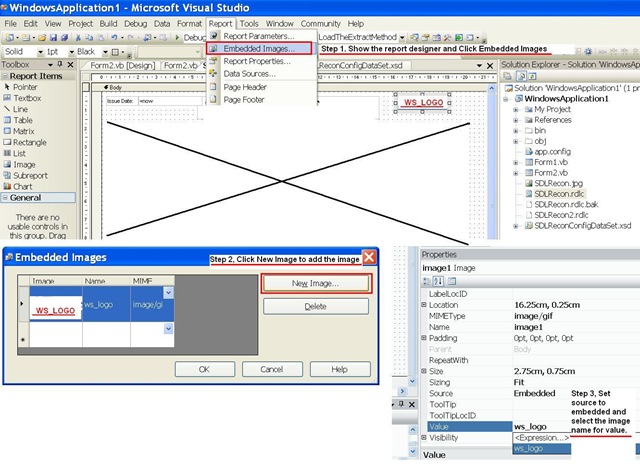
In ReportViewer, you have 2 options for Images: External or Embedded. I prefer to use embedded 

Stage 1  Open the RDLC File in Designer and Click Menu Item: Report > Embedded Images.

Stage 2  Click on : New Image

Stage 3 Drag the image to the report and change source to embedded and change value to the image you add in step 2.

 untitled