









效果图:
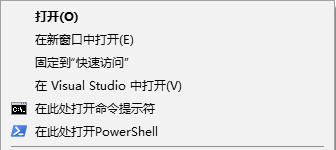
1.增加命令提示符
Windows Registry Editor Version 5.00

[HKEY_CLASSES_ROOT\Directory\shell\OpenCmdHere]
@="在此处打开命令提示符"
"Icon"="cmd.exe"

[HKEY_CLASSES_ROOT\Directory\shell\OpenCmdHere\command]
@="cmd.exe /s /k pushd "%V""

[HKEY_CLASSES_ROOT\Directory\Background\shell\OpenCmdHere]
@="在此处打开命令提示符"
"Icon"="cmd.exe"

[HKEY_CLASSES_ROOT\Directory\Background\shell\OpenCmdHere\command]
@="cmd.exe /s /k pushd "%V""

[HKEY_CLASSES_ROOT\Drive\shell\OpenCmdHere]
@="在此处打开命令提示符"
"Icon"="cmd.exe"

[HKEY_CLASSES_ROOT\Drive\shell\OpenCmdHere\command]
@="cmd.exe /s /k pushd "%V""

[HKEY_CLASSES_ROOT\LibraryFolder\background\shell\OpenCmdHere]
@="在此处打开命令提示符"
"Icon"="cmd.exe"

[HKEY_CLASSES_ROOT\LibraryFolder\background\shell\OpenCmdHere\command]
@="cmd.exe /s /k pushd "%V""
2.增加PowerShell
Windows Registry Editor Version 5.00

[HKEY_CLASSES_ROOT\Directory\shell\OpenPsHere]
@="在此处打开PowerShell"
"Icon"="powershell.exe"

[HKEY_CLASSES_ROOT\Directory\shell\OpenPsHere\command]
@="powershell.exe -noexit -command Set-Location -literalPath '%V'"

[HKEY_CLASSES_ROOT\Directory\Background\shell\OpenPsHere]
@="在此处打开PowerShell"
"Icon"="powershell.exe"

[HKEY_CLASSES_ROOT\Directory\Background\shell\OpenPsHere\command]
@="powershell.exe -noexit -command Set-Location -literalPath '%V'"

[HKEY_CLASSES_ROOT\Drive\shell\OpenPsHere]
@="在此处打开PowerShell"
"Icon"="powershell.exe"

[HKEY_CLASSES_ROOT\Drive\shell\OpenPsHere\command]
@="powershell.exe -noexit -command Set-Location -literalPath '%V'"

[HKEY_CLASSES_ROOT\LibraryFolder\background\shell\OpenPsHere]
@="在此处打开PowerShell"
"Icon"="powershell.exe"

[HKEY_CLASSES_ROOT\LibraryFolder\background\shell\OpenPsHere\command]
@="powershell.exe -noexit -command Set-Location -literalPath '%V'"
以上内容保存为缀名为OpenCmdHere.reg,双击OpenCmdHere.reg文件运行,弹出的提示点确认,修改注册表就大功告成了!
此内容由惯性聚合(RSS阅读器)自动聚合整理,仅供阅读参考。 原文来自 — 版权归原作者所有。