惯性聚合 高效追踪和阅读你感兴趣的博客、新闻、科技资讯
阅读原文 在惯性聚合中打开

推荐订阅源

aimingoo的专栏
aimingoo的专栏
S
Securelist
博客园 - Franky
Cyber Security Advisories - MS-ISAC
IT之家
IT之家
GbyAI
GbyAI
Microsoft Azure Blog
The Cloudflare Blog
云风的 BLOG
云风的 BLOG
N
News and Events Feed by Topic
AI
AI
cs.AI updates on arXiv.org
Schneier on Security
Attack and Defense Labs
Vercel News
Vercel News
腾讯CDC
Google DeepMind News
K
KPMG report finds enterprise disconnect between AI and its ROI | CIO
M
MIT News - Artificial intelligence
WordPress大学
WordPress大学
freeCodeCamp Programming Tutorials: Python, JavaScript, Git & More
N
Netflix TechBlog - Medium
量子位
S
Schneier on Security
Hacker News: Ask HN
Hacker News: Ask HN
Cyberwarzone
Cyberwarzone
S
Security Affairs
钛媒体:引领未来商业与生活新知
钛媒体:引领未来商业与生活新知
N
News and Events Feed by Topic
T
Tenable Blog
PCI Perspectives
PCI Perspectives
MyScale Blog
MyScale Blog
L
Lohrmann on Cybersecurity
cs.CL updates on arXiv.org
C
Cyber Attacks, Cyber Crime and Cyber Security
W
WeLiveSecurity
N
News | PayPal Newsroom
P
Proofpoint News Feed
O
OpenAI News
C
CERT Recently Published Vulnerability Notes
B
Blog
Cisco Talos Blog
Cisco Talos Blog
Microsoft Security Blog
V
Visual Studio Blog
MongoDB | Blog
MongoDB | Blog
大猫的无限游戏
大猫的无限游戏
A
Arctic Wolf
Y
Y Combinator Blog
OSCHINA 社区最新新闻
OSCHINA 社区最新新闻
Spread Privacy
Spread Privacy

博客园 - 生如夏花之灿烂

本人讲课时录制的Android应用开发技术教学视频 jsoup使用样式class抓取数据时空格的处理 我的第一款anroid软件作品--短信精灵1.0 (原创)Android入门教程(三十六)------实现手机联系人的全选 Android入门教程(三十五)------在Android上使用ZXing识别条形码/二维码(转) Android入门教程(三十四)------之多级树形菜单的实现 (转) Android入门教程(三十三)------之ListView自适应实现表格(转) Android入门教程(三十二)------之SQLite分页表格(转) Android入门教程(三十一)------SQLite分页读取(转) Android入门教程(三十)------之XML解析与生成(转) Android入门教程(二十九)------之BroadcastReceiver (转) Android入门教程(二十八)------之Service(转) Android入门教程(二十七)------之Style与Theme (转) Android入门教程(二十六)------之ActivityGroup + GridView 实现Tab分页标签(转) Android入门教程(二十五)------之画图(转) Android入门教程(二十三)------之Gallery(转) Android入门教程(二十二)------之TabHost,TabWidget(转) Android入门教程(二十一)------之PopupWindow (转) Android入门教程(二十)之--之AlertDialog(转)
Android入门教程(二十四)------之Gallery + ImageSwitcher(转)
生如夏花之灿烂 · 2011-08-11 · via 博客园 - 生如夏花之灿烂

   本文来自http://blog.csdn.net/hellogv/ ,引用必须注明出处!

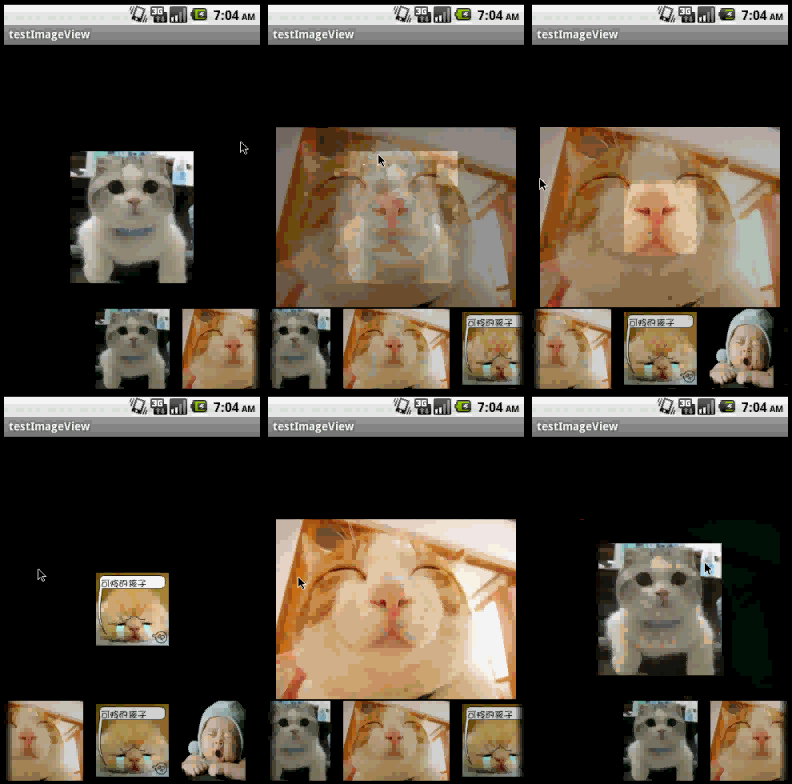
       上次讲了如何使用Gallery控件,这次就讲Gallery 与ImageSwitcher的结合使用,本文实现一个简单的浏览图片的功能。先贴出程序运行截图:

除了Gallery可以拖拉切换图片,我在ImageSwitcher控件加入了setOnTouchListener事件实现,使得ImageSwitcher也可以在拖拉中切换图片。本例子依然使用JAVA的反射机制来自动读取资源中的图片。

main.xml的源码如下:

  1. <?xml version="1.0" encoding="utf-8"?>  
  2. <RelativeLayout xmlns:android="http://schemas.android.com/apk/res/android"   
  3.     android:layout_width="match_parent"   
  4.     android:layout_height="match_parent">   
  5.       
  6.     <ImageSwitcher android:id="@+id/switcher"  
  7.         android:layout_width="match_parent" android:layout_height="match_parent"/>  
  8.       
  9.     <Gallery android:id="@+id/gallery"  
  10.         android:background="#55000000"  
  11.         android:layout_width="match_parent"  
  12.         android:layout_alignParentBottom="true"  
  13.         android:layout_alignParentLeft="true"  
  14.           
  15.         android:gravity="center_vertical"  
  16.         android:spacing="16dp" android:layout_height="100dp"/>  
  17. </RelativeLayout>  
  18.      

程序的源码如下:

  1. package com.testImageView;  
  2. import java.lang.reflect.Field;  
  3. import java.util.ArrayList;  
  4. import android.app.Activity;  
  5. import android.content.Context;  
  6. import android.os.Bundle;  
  7. import android.view.MotionEvent;  
  8. import android.view.View;  
  9. import android.view.View.OnTouchListener;  
  10. import android.view.ViewGroup;  
  11. import android.view.animation.AnimationUtils;  
  12. import android.widget.AdapterView;  
  13. import android.widget.BaseAdapter;  
  14. import android.widget.Gallery;  
  15. import android.widget.ImageSwitcher;  
  16. import android.widget.ImageView;  
  17. import android.widget.AdapterView.OnItemSelectedListener;  
  18. import android.widget.Gallery.LayoutParams;  
  19. import android.widget.ViewSwitcher.ViewFactory;  
  20. public class testImageView extends Activity implements ViewFactory {  
  21.     private ImageSwitcher is;  
  22.     private Gallery gallery;  
  23.     private int downX,upX;  
  24.     private ArrayList<Integer> imgList=new ArrayList<Integer>();  
  25.       
  26.     @Override  
  27.     protected void onCreate(Bundle savedInstanceState) {  
  28.           
  29.         super.onCreate(savedInstanceState);  
  30.         setContentView(R.layout.main);  
  31.           
  32.         Field[] fields = R.drawable.class.getDeclaredFields();  
  33.         for (Field field : fields)  
  34.         {  
  35.             if (!"icon".equals(field.getName()))  
  36.             {     
  37.                 int index = 0;  
  38.                 try {  
  39.                     index = field.getInt(R.drawable.class);  
  40.                 } catch (IllegalArgumentException e) {  
  41.                       
  42.                     e.printStackTrace();  
  43.                 } catch (IllegalAccessException e) {  
  44.                       
  45.                     e.printStackTrace();  
  46.                 }  
  47.                   
  48.                 imgList.add(index);  
  49.             }  
  50.         }  
  51.           
  52.           
  53.         is = (ImageSwitcher) findViewById(R.id.switcher);  
  54.         is.setFactory(this);  
  55.         is.setInAnimation(AnimationUtils.loadAnimation(this,  
  56.                 android.R.anim.fade_in));  
  57.         is.setOutAnimation(AnimationUtils.loadAnimation(this,  
  58.                 android.R.anim.fade_out));  
  59.         is.setOnTouchListener(new OnTouchListener(){  
  60.              
  61.  
  62.   
  63.             @Override  
  64.             public boolean onTouch(View v, MotionEvent event) {  
  65.                 if(event.getAction()==MotionEvent.ACTION_DOWN)  
  66.                 {  
  67.                     downX=(int) event.getX();  
  68.                     return true;  
  69.                 }  
  70.                 else if(event.getAction()==MotionEvent.ACTION_UP)  
  71.                 {  
  72.                     upX=(int) event.getX();  
  73.                     int index=0;  
  74.                     if(upX-downX>100)  
  75.                     {  
  76.                           
  77.                         if(gallery.getSelectedItemPosition()==0)  
  78.                            index=gallery.getCount()-1;  
  79.                         else  
  80.                             index=gallery.getSelectedItemPosition()-1;  
  81.                     }  
  82.                     else if(downX-upX>100)  
  83.                     {  
  84.                           
  85.                         if(gallery.getSelectedItemPosition()==(gallery.getCount()-1))  
  86.                             index=0;  
  87.                         else  
  88.                             index=gallery.getSelectedItemPosition()+1;  
  89.                     }  
  90.                       
  91.                     gallery.setSelection(index, true);  
  92.                     return true;  
  93.                 }  
  94.                 return false;  
  95.             }  
  96.               
  97.         });  
  98.           
  99.           
  100.         gallery = (Gallery) findViewById(R.id.gallery);  
  101.         gallery.setAdapter(new ImageAdapter(this));  
  102.         gallery.setOnItemSelectedListener(new OnItemSelectedListener(){  
  103.             @Override  
  104.             public void onItemSelected(AdapterView<?> arg0, View arg1,  
  105.                     int position, long arg3) {  
  106.                 is.setImageResource(imgList.get(position));  
  107.             }  
  108.             @Override  
  109.             public void onNothingSelected(AdapterView<?> arg0) {  
  110.                   
  111.             }  
  112.               
  113.         });  
  114.     }  
  115.       
  116.     @Override  
  117.     public View makeView() {  
  118.         ImageView i = new ImageView(this);  
  119.         i.setBackgroundColor(0xFF000000);  
  120.         i.setScaleType(ImageView.ScaleType.CENTER);  
  121.         i.setLayoutParams(new ImageSwitcher.LayoutParams(  
  122.                 LayoutParams.FILL_PARENT, LayoutParams.FILL_PARENT));  
  123.         return i;  
  124.     }  
  125.     public class ImageAdapter extends BaseAdapter {  
  126.         public ImageAdapter(Context c) {  
  127.             mContext = c;  
  128.         }  
  129.         public int getCount() {  
  130.             return imgList.size();  
  131.         }  
  132.         public Object getItem(int position) {  
  133.             return position;  
  134.         }  
  135.         public long getItemId(int position) {  
  136.             return position;  
  137.         }  
  138.         public View getView(int position, View convertView, ViewGroup parent) {  
  139.             ImageView i = new ImageView(mContext);  
  140.             i.setImageResource(imgList.get(position));  
  141.             i.setAdjustViewBounds(true);  
  142.             i.setLayoutParams(new Gallery.LayoutParams(  
  143.                     LayoutParams.WRAP_CONTENT, LayoutParams.WRAP_CONTENT));  
  144.             return i;  
  145.         }  
  146.         private Context mContext;  
  147.     }  
  148.   
  149. }