本文来自http://blog.csdn.net/hellogv/ ,引用必须注明出处!
前面分别讨论了Activity和Service,这次就轮到BroastcastReceiver,Broastcast是应用程序间通信的手段。BroastcastReceiver也是跟Intent紧密相连的,动态/静态注册了BroastcastReceiver之后,使用sendBroadcast把Intent发送之后,系统会自动把符合条件的BroastcastReceiver启动,跟嵌入式系统的中断类似。
本文主要演示了如何静态/动态注册BroastcastReceiver,向系统索取电量信息,以及枚举信息的字段。本文运行截图如下:
![]()
![]()
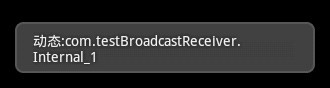
上图是发送Intent至内部动态注册的BroadcastReceiver,接收到之后显示消息名称。动态注册BroadcastReceiver用到registerReceiver()。
![]()
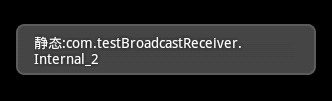
上图是发送Intent至内部静态注册的BroadcastReceiver,接收到之后显示消息名称。静态注册比动态注册麻烦点,先新建一个类继承BroadcastReceiver,然后到AndroidManifest.xml 添加
- <receiver android:name="clsReceiver2">
- <intent-filter>
- <action
- android:name="com.testBroadcastReceiver.Internal_2"/>
- </intent-filter>
- </receiver>
第一个name是类名,第二个是action的名称。
![]()
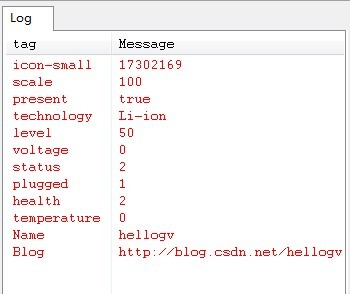
上图是枚举Intent消息的字段,这个功能比较适合懒人,把收到的Intent消息的字段全部分解了,再看看哪个需要的,懒得记住。实现这部分的代码如下:
-
- Bundle b=intent.getExtras();
- Object[] lstName=b.keySet().toArray();
-
- for(int i=0;i<lstName.length;i++)
- {
- String keyName=lstName[i].toString();
- Log.e(keyName,String.valueOf(b.get(keyName)));
- }
main.xml的代码如下:
- <?xml version="1.0" encoding="utf-8"?>
- <LinearLayout xmlns:android="http://schemas.android.com/apk/res/android"
- android:orientation="vertical" android:layout_width="fill_parent"
- android:layout_height="fill_parent">
-
- <Button android:id="@+id/Button01" android:layout_width="wrap_content"
- android:layout_height="wrap_content" android:text="发送至内部动态注册的BroadcastReceiver"></Button>
- <Button android:id="@+id/Button02" android:layout_width="wrap_content"
- android:layout_height="wrap_content" android:text="发送至内部静态注册BroadcastReceiver"></Button>
- <Button android:id="@+id/Button03" android:layout_width="wrap_content"
- android:layout_height="wrap_content" android:text="发送至系统BroadcastReceiver"></Button>
- </LinearLayout>
testBroadcastReceiver.java的代码如下:
- package com.testBroadcastReceiver;
-
- import android.app.Activity;
- import android.content.BroadcastReceiver;
- import android.content.Context;
- import android.content.Intent;
- import android.content.IntentFilter;
- import android.os.Bundle;
- import android.util.Log;
- import android.view.View;
- import android.widget.Button;
- import android.widget.Toast;
-
- public class testBroadcastReceiver extends Activity {
- Button btnInternal1,btnInternal2,btnSystem;
- static final String INTENAL_ACTION_1 = "com.testBroadcastReceiver.Internal_1";
- static final String INTENAL_ACTION_2 = "com.testBroadcastReceiver.Internal_2";
- static final String INTENAL_ACTION_3 = "com.testBroadcastReceiver.Internal_3";
- @Override
- public void onCreate(Bundle savedInstanceState) {
- super.onCreate(savedInstanceState);
- setContentView(R.layout.main);
- btnInternal1=(Button)this.findViewById(R.id.Button01);
- btnInternal1.setOnClickListener(new ClickEvent());
- btnInternal2=(Button)this.findViewById(R.id.Button02);
- btnInternal2.setOnClickListener(new ClickEvent());
- btnSystem=(Button)this.findViewById(R.id.Button03);
- btnSystem.setOnClickListener(new ClickEvent());
-
- registerReceiver(bcrIntenal1, new IntentFilter(INTENAL_ACTION_1));
- }
- class ClickEvent implements View.OnClickListener{
-
- @Override
- public void onClick(View v) {
- if(v==btnInternal1)
- {
- Intent intent = new Intent(INTENAL_ACTION_1);
- sendBroadcast(intent);
- }
- else if(v==btnInternal2)
- {
- Intent intent = new Intent(INTENAL_ACTION_2);
- sendBroadcast(intent);
- }
- else if(v==btnSystem)
- {
- IntentFilter filter = new IntentFilter();
- filter.addAction(Intent.ACTION_BATTERY_CHANGED);
- filter.addAction(INTENAL_ACTION_3);
- registerReceiver(batInfoReceiver, filter);
-
- Intent intent = new Intent(INTENAL_ACTION_3);
- intent.putExtra("Name", "hellogv");
- intent.putExtra("Blog", "http://blog.csdn.net/hellogv");
- sendBroadcast(intent);
- }
- }
-
- }
-
-
-
-
- private BroadcastReceiver bcrIntenal1 = new BroadcastReceiver() {
-
- public void onReceive(Context context, Intent intent) {
- String action = intent.getAction();
- Toast.makeText(context, "动态:"+action, 1000).show();
- }
- };
-
-
- private BroadcastReceiver batInfoReceiver = new BroadcastReceiver() {
-
- public void onReceive(Context context, Intent intent) {
- String action = intent.getAction();
-
- if (Intent.ACTION_BATTERY_CHANGED.equals(action)) {
-
- Bundle b=intent.getExtras();
- Object[] lstName=b.keySet().toArray();
-
- for(int i=0;i<lstName.length;i++)
- {
- String keyName=lstName[i].toString();
- Log.e(keyName,String.valueOf(b.get(keyName)));
- }
- }
-
- if (INTENAL_ACTION_3.equals(action)) {
-
- Bundle b=intent.getExtras();
- Object[] lstName=b.keySet().toArray();
-
- for(int i=0;i<lstName.length;i++)
- {
- String keyName=lstName[i].toString();
- Log.e(keyName,b.getString(keyName));
- }
- }
- }
- };
-
-
- }
clsReceiver2.java的代码如下:
- package com.testBroadcastReceiver;
-
- import android.content.BroadcastReceiver;
- import android.content.Context;
- import android.content.Intent;
- import android.widget.Toast;
-
-
-
-
-
-
-
-
-
-
-
-
-
- public class clsReceiver2 extends BroadcastReceiver{
- @Override
- public void onReceive(Context context, Intent intent) {
- String action = intent.getAction();
- Toast.makeText(context, "静态:"+action, 1000).show();
-
- }
- }