




I was going through the the workflow implementation with a client and could notice that there is a need of a check list for consultants users to configure the workflow and make it work . I have thought of the following points for the check list.
1. User options
a. Maintain the email address of the users .
b. Setup The parameters for receiving the notifications on the Notifications tab especially the two marked parameters for getting the notifications in client and or email.
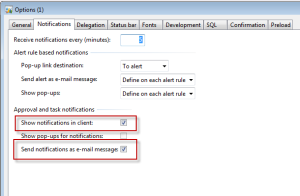
2. Administration>Setup>Email parameters must be setup so that emails can be sent through AX.

3. Basic>Setup>Setting for workflow>settings for workflow to be used by the system to send workflow emails.

4. Configuration of the email template as identified in step 3 above. Basic>Setup>Email templates. FOr setting templates refer to the AX help file. Its a good source of information.

5. Ensure that the batches to process the alerts and the email messages are active.
a. Email batches – Administration>Periodic>Email processing> Batch.

b. Alert batches – Basic>Periodic>Alerts

6. Workflow configuration is configured properly . There should one default configuration . Additional configurations may be maintained with specific conditions for becoming active.

e.g. workflow on purchase requisition may have following setup

One active version per configuration must be maintained.

7. Workflow rules should be defined properly. If the tasks are being assigned on hierarchy basis then there must be a stop condition maintained ( This is the general error that users do not maintained a stop condition.)

8. Setup events when to generate a notification in an approval process.

I think if above check list is cross checked during setup or troubleshooting most of the errors / problems would be solved related to workflow . For rest of the problems leave them for consultants/developers to investigate on case to case basis.
此内容由惯性聚合(RSS阅读器)自动聚合整理,仅供阅读参考。 原文来自 — 版权归原作者所有。

