





AI agents are rapidly becoming part of everyday development. They operate inside terminals, IDEs, and internal workflows, helping users write code, troubleshoot problems, and automate repetitive tasks. But their capabilities can extend far beyond what users see in the chat interface or terminal output. Agents may read files, execute commands, launch subprocesses, access credentials, call external tools, and transmit data to large language model providers.
The conversation that the user sees may therefore represent only a small part of what the agent is actually doing. Many of its actions take place quietly in the background, without being clearly presented to the user or the security team.
This creates a significant visibility challenge for security teams. Organizations may not know which AI-powered applications are active on developer machines, what those applications are doing, or whether their behavior aligns with company policies.
An agent does not need to be malicious to create risk. While trying to complete a task, it may interpret instructions too broadly and access information the user did not intend to expose or perform actions that extend beyond the original request.
Traditional endpoint security controls may capture individual parts of an agent’s activity without revealing their significance. An IDE or terminal process accessing a sensitive file, such as an .env file, may appear to be routine development activity. But if the process is controlled by an AI agent that has already communicated with an LLM provider, the same event has a very different security meaning. The developer may not have chosen to open the file at all. The agent may have accessed it autonomously while trying to complete a task.
Without connecting these events to the agent responsible for them, security teams may interpret autonomous agent behavior as ordinary user activity. This challenge is amplified by the fact that AI capabilities are not limited to a fixed set of recognizable applications. Traditional security controls can often map, classify, or restrict known software, but almost any Python script, IDE extension, command-line tool, or internal application can gain agentic capabilities by connecting to an LLM and acting on its responses. This makes application-based detection difficult. Blocking the underlying application or interpreter is usually not practical because the same software is also used for legitimate work.
As a result, application-based allowlists and blocklists cannot provide sufficient visibility or control on their own.
The real challenge is therefore not just detecting a process, file access event, command execution, or network connection. It’s determining whether that activity was initiated by the developer or autonomously by an AI agent.
Identifying an AI-enabled process is only the first step. Security teams must also understand how its behavior develops throughout the session.
After receiving instructions or model output, an agent may create child processes, execute shell commands, inspect local files, access sensitive directories, or initiate additional network connections. The sequence of these actions can reveal how the agent interpreted its task and whether its behavior moved beyond what the user expected.
This behavioral context becomes especially important during an investigation. A single command, file access event, or outbound connection may appear legitimate when viewed alone. When these events are connected chronologically, however, they may reveal a very different story: the agent encountered new input, changed its behavior, accessed a sensitive resource, and then attempted to communicate with an external destination.
The goal is not only to identify that an AI agent was active, but to reconstruct its activity and understand the relationship between the agent, its subprocesses, the resources it accessed, and the destinations it contacted.
This is why we created ShadowAI-Watch, an open-source runtime discovery and behavioral monitoring tool for AI-powered applications and agents.
ShadowAI-Watch runs independently on the user’s machine and does not require changes to the monitored application. It provides a host-level view of AI agent activity by correlating processes with outbound LLM connections and tracing the actions that follow.
The tool is designed to identify custom AI agents, coding agents, browser agents, LLM-powered applications, and locally hosted models, including applications that may not have an obvious AI-related process name.
ShadowAI-Watch supports multiple privilege levels, ranging from a low-privileged user to full administrative access. With limited privileges, it inspects process information available through /proc to discover agentic applications. With elevated privileges, it enables its full eBPF-based monitoring mechanism, providing deeper and more precise visibility into process and system activity.
ShadowAI-Watch runs locally on the user’s machine and continuously monitors outbound network activity across running processes. When a process connects to a known large language model provider, the tool identifies it as AI-related and traces the process tree to determine which application initiated the connection.
It then continues observing the session and correlates subsequent commands, child processes, file access, and network activity with the identified application.
Together, these events create a chronological record of the agent’s runtime activity and the sequence that led to each action.
These events are written to a JSON Lines audit file and displayed live in the terminal using color-coded output. The audit data can also be sent to a remote dashboard for visualization and risk analysis. This gives security teams both immediate visibility while the agent is operating and a structured audit trail that can be examined after the session.
The released repository includes the components responsible for generating logs and structured audit records. Organizations can use this data to build their own dashboards, monitoring workflows, or integrations based on their specific requirements.
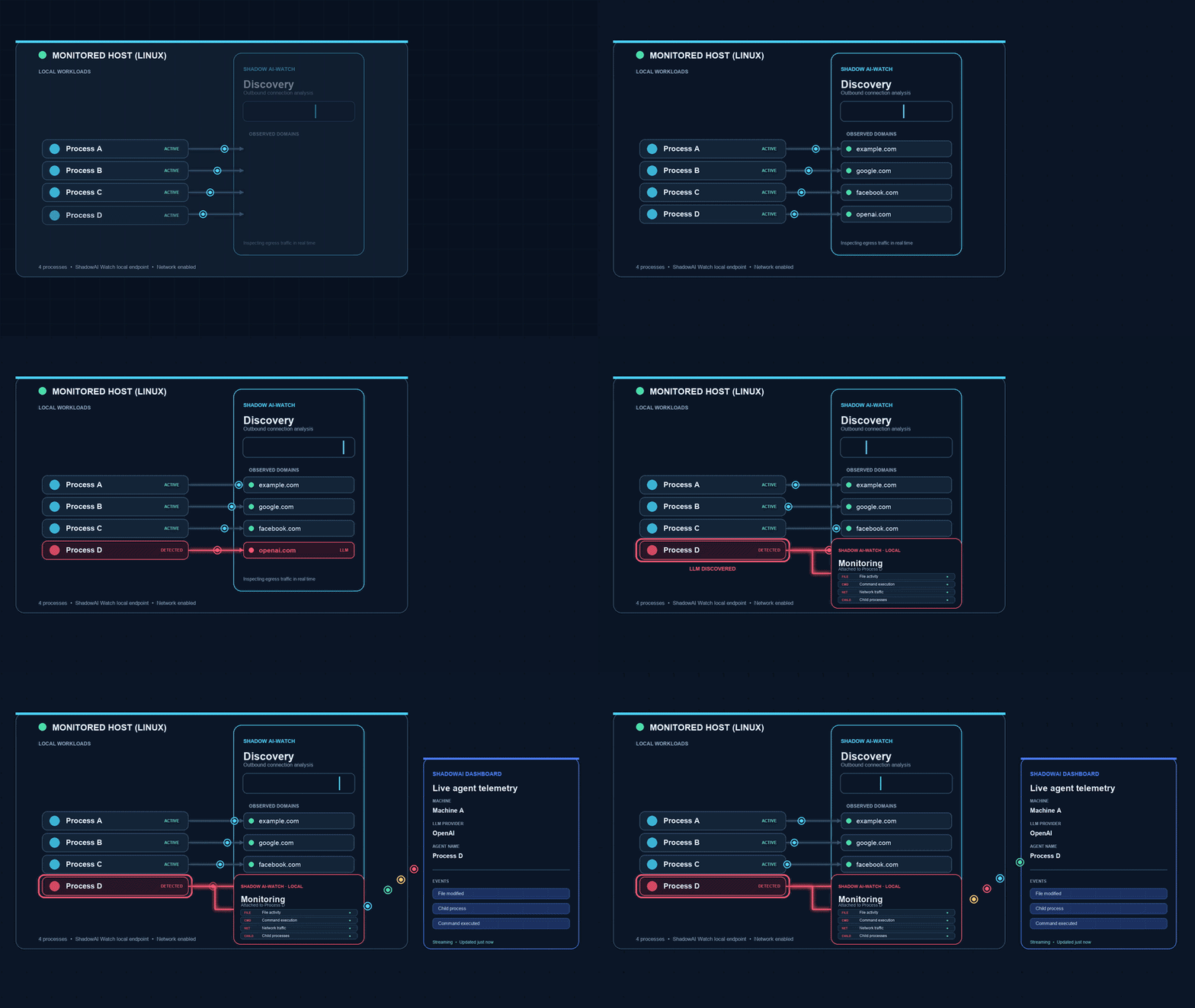
ShadowAI-Watch workflow
The demo begins with a simple request: summarize a website by opening a URL and following the links it contains.
To the user, this looks like an ordinary browsing task. The BrowserUse agent opens the site, moves between pages, and gathers the information it needs. In the background, ShadowAI-Watch discovers the agent, identifies it as BrowserUse, and begins tracing its activity in real time.
At first, everything proceeds as expected.
Then the agent reaches a page containing an instruction that did not come from the user. It was placed there by an attacker and attempts to convince the agent to open an external URL and transmit session data to an attacker-controlled endpoint.
The agent follows the instruction.
From the developer’s perspective, the agent still appears to be navigating the website as requested. The malicious request is hidden within the normal browsing flow and could easily go unnoticed.
ShadowAI-Watch sees a different story.
It sees the agent reach the page containing the indirect prompt injection. It then observes the agent’s behavior change and detects its attempt to connect to a destination unrelated to the original task. Instead of treating the request as isolated browser traffic, ShadowAI-Watch links it to the active BrowserUse session and to the attacker-controlled content that preceded it.
What appeared to be routine browsing is revealed as an agent hijacking sequence: a legitimate task, exposure to a malicious instruction, a change in behavior, and an attempted transmission of sensitive data.
The video below shows that sequence unfolding in real time, from the discovery of the BrowserUse agent to the detection of the malicious outbound connection.
Our team will present ShadowAI-Watch in the AppSec Village Arsenal at DEF CON 34 during the session, “The Agent Asked. We Allowed. Now What?”
ShadowAI-Watch is available as an open-source project for Linux, with macOS support coming soon. Access the repository and learn how to get started here: https://github.com/ThalesGroup/shadowai-watch
Protect your business for 30 days on Imperva.
此内容由惯性聚合(RSS阅读器)自动聚合整理,仅供阅读参考。 原文来自 — 版权归原作者所有。