








在CSDN上有人问如何设置一个Label控件上文字的字体样式和字体大小随机的代码,觉得比较有意思,
http://community.csdn.net/Expert/topic/3162/3162272.xml?temp=.8220941
随便写了一个,难点在于MSDN上有一段话:
由于 Font 对象是不可变的(意思是说,无法调整它的任何属性),只能给 Font 属性分配一个新 Font 对象。但是,可以使新的字体基于现有字体。其次要使用定时器和随机数。
code:
 using System;using System.IO;using System.Drawing;using System.Timers;using System.Windows.Forms;namespace SKY.RandLabel
 {
{ class App
 { public static void Main(String[] args) { MainForm form = new MainForm(); Application.Run(form);
 } } class MainForm : Form { public Random rnd = null; private Label lb1 = null; private Label lb2 = null; public MainForm() { //for test string s1 =""; string s2 =""; string s3 ="由于 Font 对象是不可变的(意思是说,无法调整它的任何属性),只能给 Font 属性分配一个新 Font 对象。但是,可以使新的字体基于现有字体。"; rnd = new Random(); foreach(string s in Enum.GetNames(typeof(FontStyle))) s1+=" "+s; foreach(int i in Enum.GetValues(typeof(FontStyle))) s2+=" "+System.Convert.ToString(i); lb1 = new Label(); lb2 = new Label(); lb1.BorderStyle = BorderStyle.FixedSingle; lb1.AutoSize = false; lb2.Dock = DockStyle.Bottom; lb1.Dock = DockStyle.Fill; lb1.Font = new Font(lb1.Font, lb1.Font.Style | FontStyle.Bold); lb2.AutoSize = true; lb1.Text = s3; lb2.Text = s1; //安装timer System.Timers.Timer timer = new System.Timers.Timer(2000); timer.Elapsed+=new ElapsedEventHandler(OnTimedEvent); timer.AutoReset = true; timer.Enabled = true; Controls.AddRange(new Control[] {lb1,lb2}); } public void SetLabelP() { FontStyle[] styles = (FontStyle[]) Enum.GetValues(typeof(FontStyle)); int index = rnd.Next(0,styles.Length); //清除原来得Font属性 lb1.Font = new Font(lb1.Font, styles[index]); } public void OnTimedEvent(object source, ElapsedEventArgs e) { SetLabelP(); } }
 }
}
屏幕快照如下: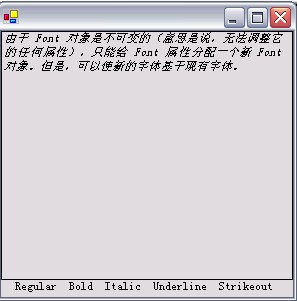
此内容由惯性聚合(RSS阅读器)自动聚合整理,仅供阅读参考。 原文来自 — 版权归原作者所有。