






比如存在订单系统,用户进行下单,下单完成之后调用物流系统、调用通知系统。
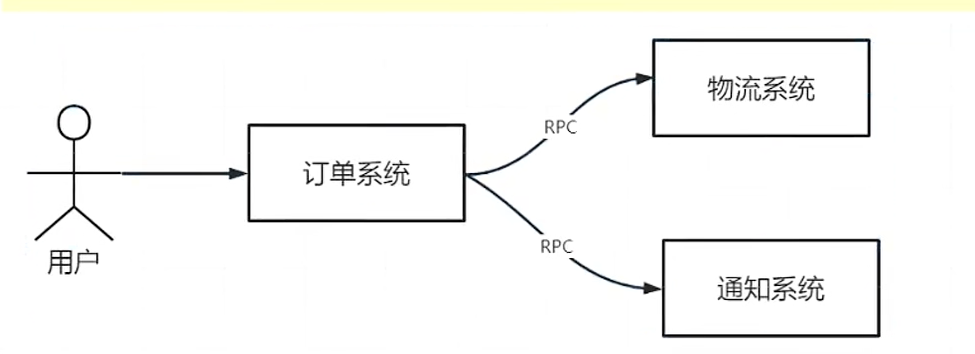
这样有没有什么问题?
1.比如物流系统是第三方的,可能响应慢,或者宕机,这时当你采用rpc接口调用物流系统时会失败,而导致用户下单也失败了。也就是耦合的,非高可用的。
所谓的MQ就是接收生产者的消息,进行存储,这时如果物流系统是消费者,会不断的拿消息进行消费。在分布式系统中,MQ完成消息的流转,MQ的特点是稳定、高效、存储机制,确保整个系统的异步解耦,削峰平谷。
采用消息中间件进行重新架构:
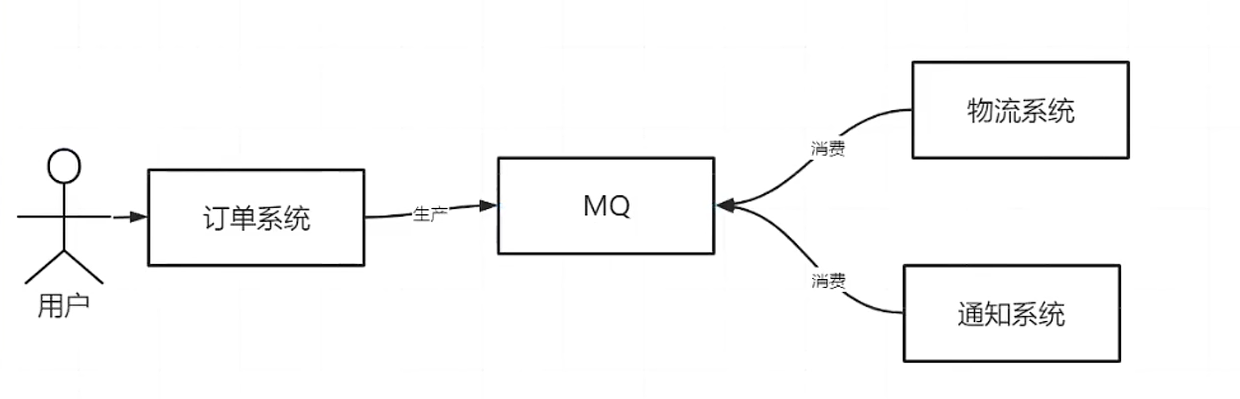
这样做的好处就是,当用户下单完毕之后,订单系统会往MQ中发消息,整个用户下单的流程就结束了。然后物流系统、通知系统会从MQ中拿消息进行消费。
生活中常见的例子是充话费,很多年前在微信上冲玩花费马上就到账了,那时候可能微信还是通过调电信、或者移动接口的形式进行充话费。这种方式,如果电信的接口有问题,或者网络有问题,等等,这时候话费就充值失败了。体验非常不好。现在都是不立马返回充话费的结果,改成了异步机制,冲完话费发消息到MQ中,结束。电信来消费这个消息,如果电信宕机了,没有关系。等电信恢复了,再次消费成功。
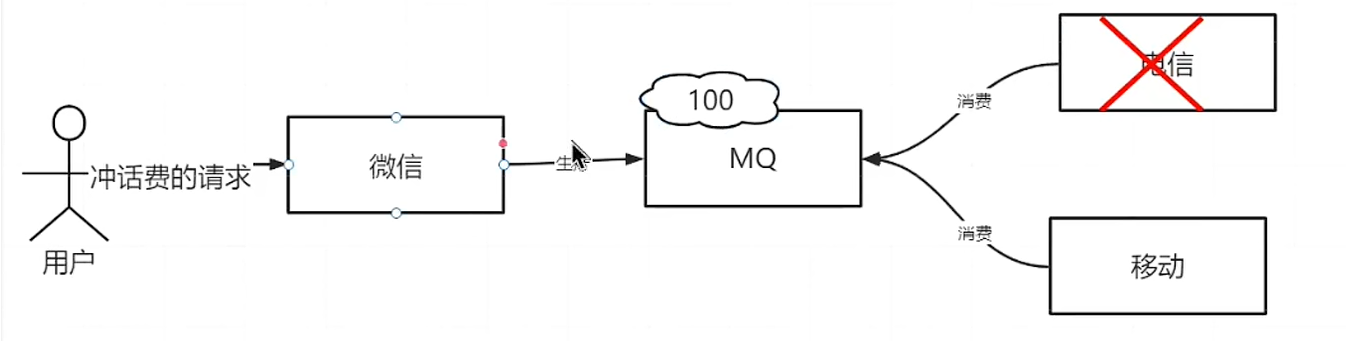
2.MQ的第二个作用,流量削峰。
当遇到秒杀、大促活动时,用户进行下单,比如tps达到1w/s,按照原来的方式,调用RPC接口的形式,接口最大并发量为1000tps,电信和移动的充话费接口最大tps只能为1000。如果不采用MQ,很多请求就会失败了,或者超时了。假如超时时间为30s,1w的充话费请求并发量过来,而电信接口只能承载1000tps,势必很多请求就会超时,用户充值请求30s后收不到响应,就会充值失败了。
但是中间加入MQ作为消息中间件的话,可以接收这1w个请求,MQ可以存储消息,再慢慢进行消费。达到流量削峰的目的。
老的:IBM --MQ (收费) -> ActiveMQ Java开发,没落了
主流:RabbitMQ、Kafka、RocketMQ
新的:Pulsar
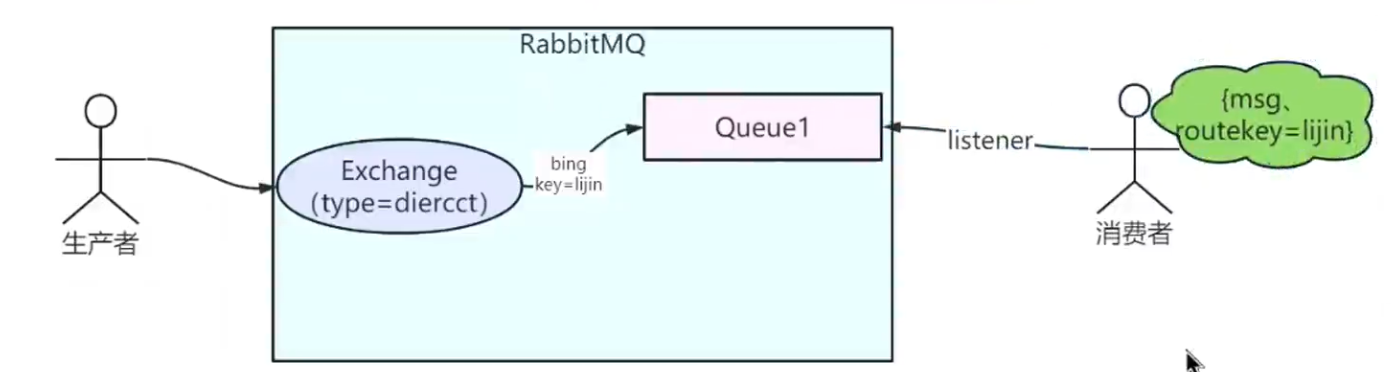
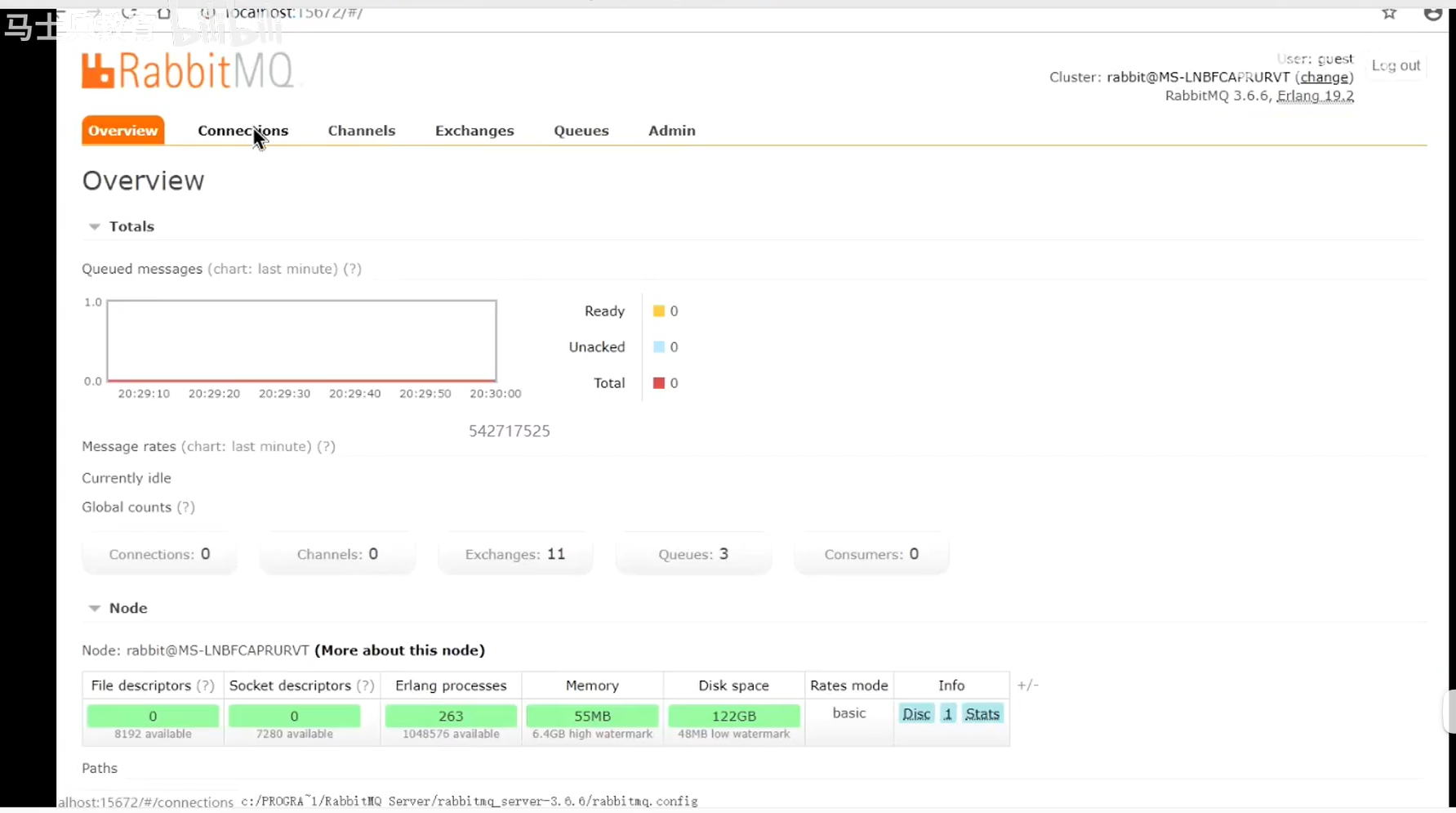
RabbitMQ后端控制端:
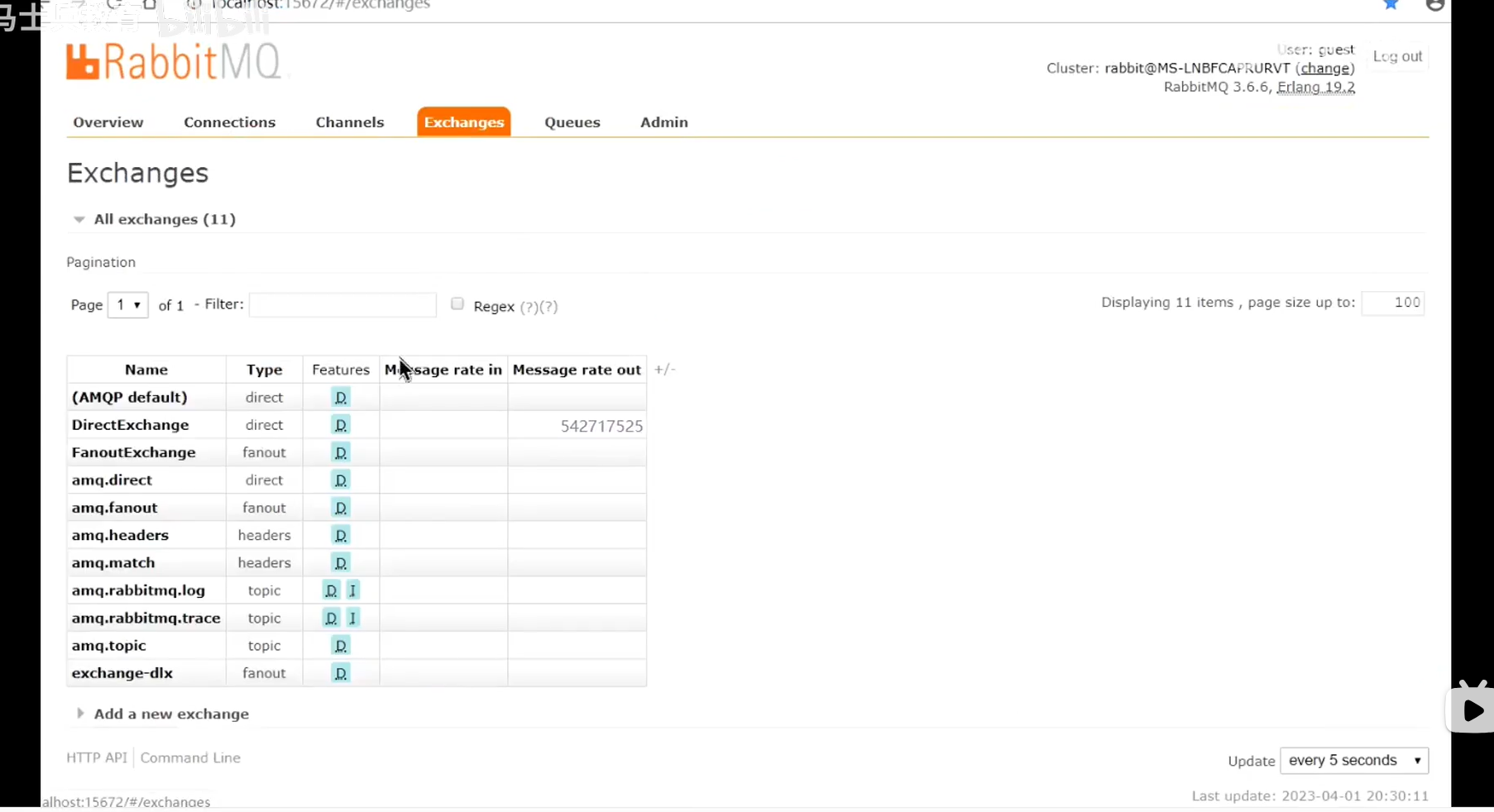
Exchanges:
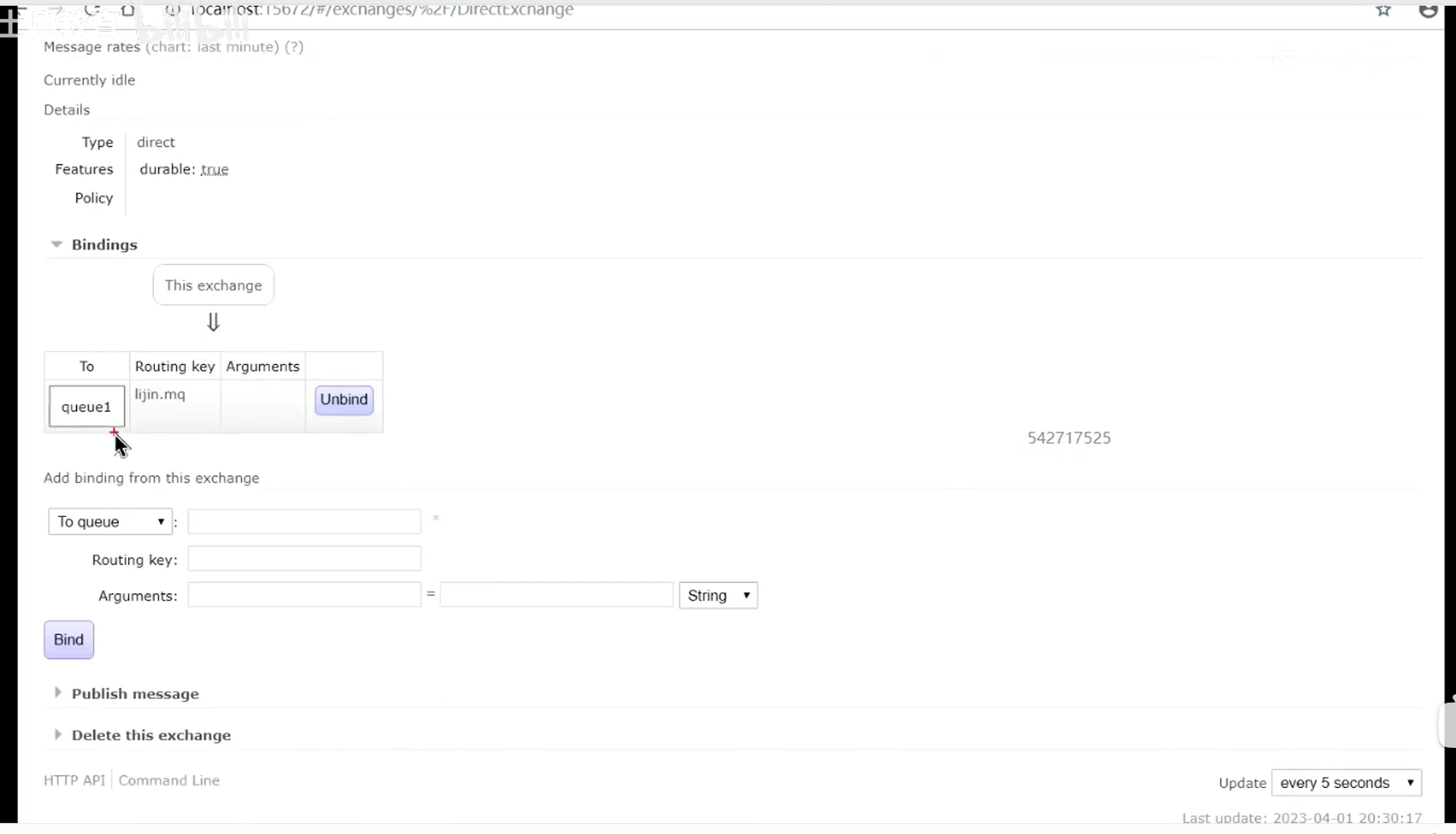
DirectExchange:
convertAndSend方法是void类型的,如果调用这个方法,执行到一半失败了,网络断了怎么办?怎么才能知道我有没有发成功呢?
RabbitMQ:AMQP的最经典的实现。
RabbitMQ如何解决消息的丢失:
1、生产者发送到Exchange丢失 --> 引入发送者确认机制 connectionFacory.setPublisherConfirms(true)
2、消息正确的路由 --> 消息没有正确的路由导致消息丢失 --> 加入失败者通知 template.setMandatory(true)
3、在Queue中丢失了 -->mq宕机、断电 --> 持久化
4、消费者也有可能丢失 -->尽量使用手动确认机制,来确保在消费端不丢失
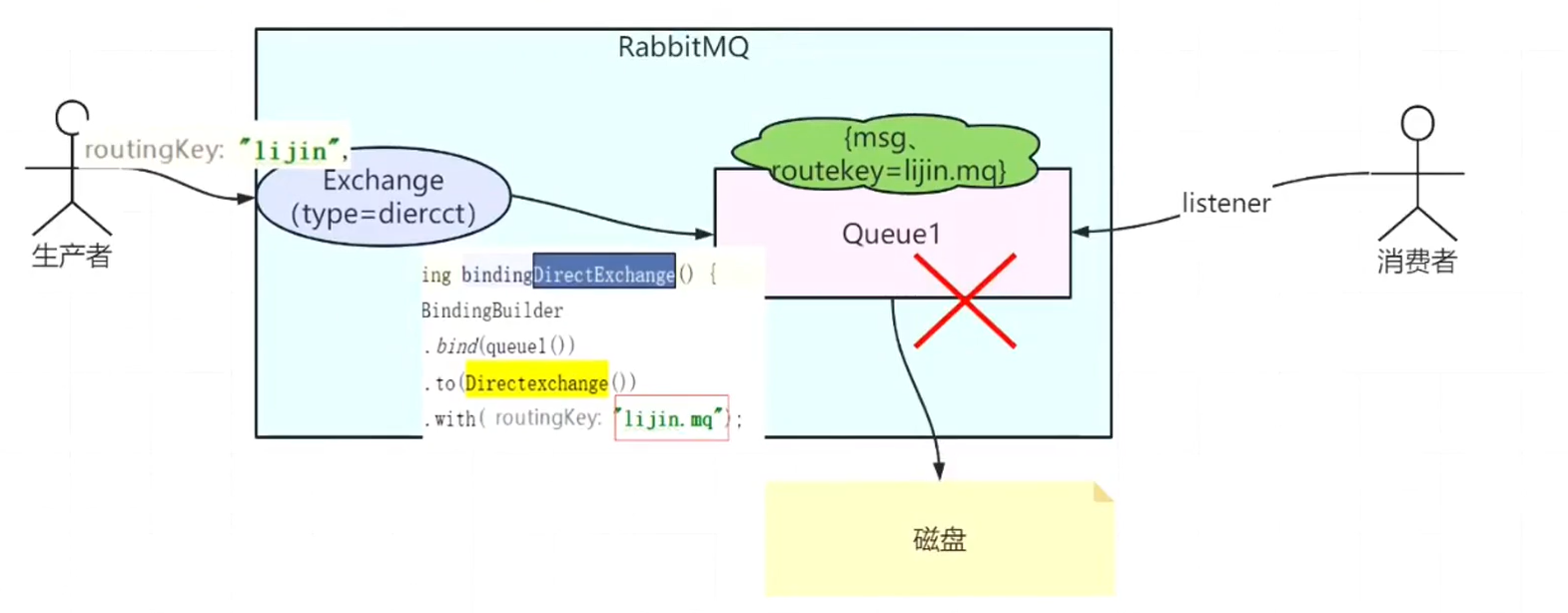
消息发送成功,消费者消费成功,console打印:

路由失败console打印:

代码实现:
RabbitMQ的配置类:
package com.cy.mq.config;

import com.cy.mq.service.rabbit.Receiver;
import org.springframework.amqp.core.AcknowledgeMode;
import org.springframework.amqp.core.Binding;
import org.springframework.amqp.core.BindingBuilder;
import org.springframework.amqp.core.DirectExchange;
import org.springframework.amqp.core.FanoutExchange;
import org.springframework.amqp.core.Message;
import org.springframework.amqp.core.Queue;
import org.springframework.amqp.rabbit.connection.CachingConnectionFactory;
import org.springframework.amqp.rabbit.connection.ConnectionFactory;
import org.springframework.amqp.rabbit.connection.CorrelationData;
import org.springframework.amqp.rabbit.core.RabbitAdmin;
import org.springframework.amqp.rabbit.core.RabbitTemplate;
import org.springframework.amqp.rabbit.listener.SimpleMessageListenerContainer;
import org.springframework.beans.factory.annotation.Autowired;
import org.springframework.beans.factory.annotation.Value;
import org.springframework.context.annotation.Bean;
import org.springframework.context.annotation.Configuration;

import java.util.HashMap;
import java.util.Map;

/**
 * RabbitMQ的配置类
 */
@Configuration
public class RabbitConfig {

    @Value("${spring.rabbitmq.host}")
    private String addresses;

    @Value("5672")
    private String port;

    @Value("guest")
    private String username;

    @Value("guest")
    private String password;

    @Value("/")
    private String virtualHost;

    @Autowired
    private Receiver receiver;

    /**
     * 连接工厂
     * @return
     */
    @Bean
    public ConnectionFactory connectionFactory() {
        CachingConnectionFactory connectionFactory = new CachingConnectionFactory();
        connectionFactory.setAddresses(addresses + ":" + port);
        connectionFactory.setUsername(username);
        connectionFactory.setPassword(password);
        connectionFactory.setVirtualHost(virtualHost);
        //如果要进行消息的回调,这里必须要设置为true
        connectionFactory.setPublisherConfirms(true);
        return connectionFactory;
    }

    /**
     * rabbitAdmin封装对RabbitMQ的管理操作
     */
    @Bean
    public RabbitAdmin rabbitAdmin(ConnectionFactory connectionFactory) {
        return new RabbitAdmin(connectionFactory);
    }

    /**
     * 使用template给生产者,消费者,方便发消息
     */
    @Bean
    public RabbitTemplate newRabbitTemplate() {
        RabbitTemplate template = new RabbitTemplate(connectionFactory());
        //发送确认的回调方法的设置
        template.setConfirmCallback(confirmCallback());
        //开启路由失败通知
        template.setMandatory(true);
        //路由失败的回调--这里只关注路由失败的
        template.setReturnCallback(returnCallback());
        return template;
    }

    @Bean
    public DirectExchange DirectExchange() {
        return new DirectExchange("DirectExchange");
    }
    @Bean
    public FanoutExchange FanoutExchange() {
        return new FanoutExchange("FanoutExchange");
    }

    /**
     * 声明死信交换器(Fanout交换器)
     */
    @Bean
    public FanoutExchange DlxExchange() {
        return new FanoutExchange("exchange-dlx");
    }

    @Bean
    public Queue queue1() {
        return new Queue("queue1");
    }

    /**
     * 声明消息过期队列 --队列ttl
     */
    @Bean
    public Queue queueTTL() {
        Map<String, Object> arguments = new HashMap<>();
        arguments.put("x-message-ttl", 30*1000);
        arguments.put("x-dead-letter-exchange", "exchange-dlx");
        arguments.put("x-dead-letter-routing-key", "*");
        return new Queue("queue_ttl", true, false, false, arguments);
    }

    /**
     * 声明专门存放死信消息的队列
     */
    @Bean
    public Queue queueDLX() {
        return new Queue("queue_dlx");
    }

    /**
     * 绑定关系 绑定直连direct交换器
     */
    @Bean
    public Binding bindingDirectExchange() {
        return BindingBuilder.bind(queue1())
                .to(DirectExchange())
                .with("lijin.mq");
    }

    /**
     * 生产者发送确认
     */
    @Bean
    public RabbitTemplate.ConfirmCallback confirmCallback() {
        return new RabbitTemplate.ConfirmCallback() {
            @Override
            public void confirm(CorrelationData correlationData, boolean ack, String cause) {
                if (ack) {
                    System.out.println("发送者确认发送给mq-(Exchange)成功");
                } else {
                    System.out.println("发送者发送给mq-(Exchange)失败,考虑重发:" + cause);
                }
            }
        };
    }

    /**
     * 失败通知
     */
    @Bean
    public RabbitTemplate.ReturnCallback returnCallback() {
        return new RabbitTemplate.ReturnCallback() {
            @Override
            public void returnedMessage(Message message, int replyCode, String replyText, String exchange, String routingKey) {
                System.out.println("无法路由的消息,需要考虑另外处理");
                System.out.println("Returned replyText:" + replyText);
                System.out.println("Returned exchange:" + exchange);
                System.out.println("Returned routingKey:" + routingKey);
                String msgJson = new String(message.getBody());
                System.out.println("Returned message:" + msgJson);
            }
        };
    }

    /**
     * 手动消费者确认
     */
    @Bean
    public SimpleMessageListenerContainer messageContainer() {
        SimpleMessageListenerContainer container = new SimpleMessageListenerContainer(connectionFactory());
        //绑定了这个队列
        container.setQueues(queue1());
        //手动提交
        container.setAcknowledgeMode(AcknowledgeMode.MANUAL);
        container.setMessageListener(receiver);
        return container;
    }

}
发送MQ消息:
package com.cy.mq.controller;

import org.springframework.amqp.rabbit.core.RabbitTemplate;
import org.springframework.beans.factory.annotation.Autowired;
import org.springframework.web.bind.annotation.GetMapping;
import org.springframework.web.bind.annotation.RequestMapping;
import org.springframework.web.bind.annotation.RestController;

/**
 * @description com.cy.mq.controller
 * @author: chengyu
 * @date: 2025-05-11 16:10
 */
@RestController
@RequestMapping("/rabbit")
public class RabbitProducer {

    @Autowired
    private RabbitTemplate rabbitTemplate;

    /**
     * 普通直接交换器的测试
     * DirectExchange: 交换器的名字
     * lijin:路由键
     * sendMsg:消息内容,可以是字符串,可以是json串等。
     */
    @GetMapping("/direct")
    public String direct() {
        String sendMsg = "direct msg:" + System.currentTimeMillis();
        this.rabbitTemplate.convertAndSend("DirectExchange", "lijin.mq", sendMsg);
        return "发送direct消息成功!";
    }
}
RabbitMQ监听类:
package com.cy.mq.service.rabbit;

import org.springframework.amqp.rabbit.annotation.RabbitHandler;
import org.springframework.amqp.rabbit.annotation.RabbitListener;
import org.springframework.stereotype.Component;

/**
 * RabbitMQ监听类
 */
@Component
@RabbitListener(queues = "queue1")
public class Consumer1 {

    @RabbitHandler
    public void process(String msg) {
        int i = 0;
        System.out.println("Consumer1-Receiver: " + msg);
        //业务代码,异常 怎么办? 调用其他接口 返回值0代表处理失败

    }
}
Receiver:
package com.cy.mq.service.rabbit;

import com.rabbitmq.client.Channel;
import org.springframework.amqp.core.Message;
import org.springframework.amqp.rabbit.listener.api.ChannelAwareMessageListener;
import org.springframework.stereotype.Component;

/**
 * 消费Queue
 */
@Component
public class Receiver implements ChannelAwareMessageListener {

    /**
     *
     * @param message
     * @param channel
     * @throws Exception
     */
    @Override
    public void onMessage(Message message, Channel channel) throws Exception {
        String msg = new String(message.getBody());

        try {
            System.out.println("Receiver>>>>消息已消费");
            //参数1:消息的唯一性  参数2:是否批量处理
            channel.basicAck(message.getMessageProperties().getDeliveryTag(), false);
        } catch (Exception e) {
            System.out.println(e.getMessage());
            //参数3:消息是否重新发送
            channel.basicNack(message.getMessageProperties().getDeliveryTag(), false, true);
            System.out.println("Receiver>>>>拒绝消息,要求MQ重新派发");
            throw e;
        }
    }

}
application.yml:
spring:
  rabbitmq:
    host: 127.0.0.1
    port: 5672
    username: guest
    password: guest
virtual-host: / <?xml version="1.0" encoding="UTF-8"?>
<project xmlns="http://maven.apache.org/POM/4.0.0" xmlns:xsi="http://www.w3.org/2001/XMLSchema-instance"
xsi:schemaLocation="http://maven.apache.org/POM/4.0.0 https://maven.apache.org/xsd/maven-4.0.0.xsd">
<modelVersion>4.0.0</modelVersion>
<groupId>com.example</groupId>
<artifactId>mq-springboot</artifactId>
<version>0.0.1-SNAPSHOT</version>
<name>mq-springboot</name>
<description>mq project for Spring Boot</description>
<properties>
<java.version>1.8</java.version>
<project.build.sourceEncoding>UTF-8</project.build.sourceEncoding>
<project.reporting.outputEncoding>UTF-8</project.reporting.outputEncoding>
<spring-boot.version>2.6.13</spring-boot.version>
</properties>
<dependencies>
<dependency>
<groupId>org.springframework.boot</groupId>
<artifactId>spring-boot-starter</artifactId>
</dependency>
<dependency>
<groupId>org.springframework.boot</groupId>
<artifactId>spring-boot-starter-web</artifactId>
</dependency>
<dependency>
<groupId>org.springframework.boot</groupId>
<artifactId>spring-boot-starter-test</artifactId>
<scope>test</scope>
</dependency>
<!-- springboot引入rabbitMq -->
<dependency>
<groupId>org.springframework.boot</groupId>
<artifactId>spring-boot-starter-amqp</artifactId>
</dependency>
</dependencies>
<dependencyManagement>
<dependencies>
<dependency>
<groupId>org.springframework.boot</groupId>
<artifactId>spring-boot-dependencies</artifactId>
<version>${spring-boot.version}</version>
<type>pom</type>
<scope>import</scope>
</dependency>
</dependencies>
</dependencyManagement>
<build>
<plugins>
<plugin>
<groupId>org.apache.maven.plugins</groupId>
<artifactId>maven-compiler-plugin</artifactId>
<version>3.8.1</version>
<configuration>
<source>1.8</source>
<target>1.8</target>
<encoding>UTF-8</encoding>
</configuration>
</plugin>
<plugin>
<groupId>org.springframework.boot</groupId>
<artifactId>spring-boot-maven-plugin</artifactId>
<version>${spring-boot.version}</version>
<configuration>
<mainClass>com.MqSpringbootApplication</mainClass>
<skip>true</skip>
</configuration>
<executions>
<execution>
<id>repackage</id>
<goals>
<goal>repackage</goal>
</goals>
</execution>
</executions>
</plugin>
</plugins>
</build>
</project>--
此内容由惯性聚合(RSS阅读器)自动聚合整理,仅供阅读参考。 原文来自 — 版权归原作者所有。