惯性聚合 高效追踪和阅读你感兴趣的博客、新闻、科技资讯
阅读原文 在惯性聚合中打开

推荐订阅源

S
Secure Thoughts
罗磊的独立博客
T
The Blog of Author Tim Ferriss
人人都是产品经理
人人都是产品经理
博客园 - 叶小钗
Last Week in AI
Last Week in AI
美团技术团队
Google Online Security Blog
Application and Cybersecurity Blog
D
Docker
G
Google Developers Blog
大猫的无限游戏
大猫的无限游戏
酷 壳 – CoolShell
酷 壳 – CoolShell
小众软件
小众软件
月光博客
月光博客
L
LINUX DO - 最新话题
cs.AI updates on arXiv.org
CTFtime.org: upcoming CTF events
W
WeLiveSecurity
H
Heimdal Security Blog
Vercel News
Vercel News
SecWiki News
SecWiki News
Forbes - Security
Forbes - Security
Blog — PlanetScale
Blog — PlanetScale
Google DeepMind News
Exploit-DB.com RSS Feed
www.infosecurity-magazine.com
TaoSecurity Blog
TaoSecurity Blog
T
Troy Hunt's Blog
A
About on SuperTechFans
C
Check Point Blog
S
Security Affairs
Hacker News - Newest:
Hacker News - Newest: "LLM"
AI
AI
WordPress大学
WordPress大学
K
KPMG report finds enterprise disconnect between AI and its ROI | CIO
Help Net Security
Help Net Security
博客园_首页
The Last Watchdog
The Last Watchdog
S
SegmentFault 最新的问题
Hugging Face - Blog
Hugging Face - Blog
Security Archives - TechRepublic
Engineering at Meta
Engineering at Meta
cs.CV updates on arXiv.org
I
Intezer
K
Kaspersky official blog
M
MIT News - Artificial intelligence
J
Java Code Geeks
G
GRAHAM CLULEY
P
Palo Alto Networks Blog

博客园 - 布里

chrome浏览器扩展“猫抓” Premiere调整画布尺寸 blob视频地址如何下载 ffmpeg视频分割 ffmpeg合并视频+音频 You-Get和youtube-dl 【会声会影】初装会声会影时,必要的设置 【会声会影】视频导出、输出时,如何设置参数 【会声会影】导入的srt字幕文件,如何快速批量调整字体及大小 把h264文件快速包装成mp4格式 Notepad++正则表达式——去掉srt字幕文件的时间轴 百度地图API的网页使用 ASPCMS_判断语句if标签的使用 ASS字幕制作 批处理修改Hosts文件 Outlook2013修改数据文件默认存放目录 获取【酷我音乐】歌曲URL地址 Win7远程桌面的多用户连接破解 Print Spooler 服务自动停止
foobar2000歌词插件使用方法
布里 · 2022-10-24 · via 博客园 - 布里

foobar2000(目前我知)有两款歌词插件:

openlyrics (目前版本v1.3)(foobar2000官网有)

eslyric(目前版本v0.5.3.1015)(国人开发。某著名代码托管平台有作者的发布主页,我就从那下载的)

我用的是 ESLyric 。下面就介绍一下使用方法:

首先把下载的插件放到foobar2000根目录下的components文件夹,然后运行foobar2000。

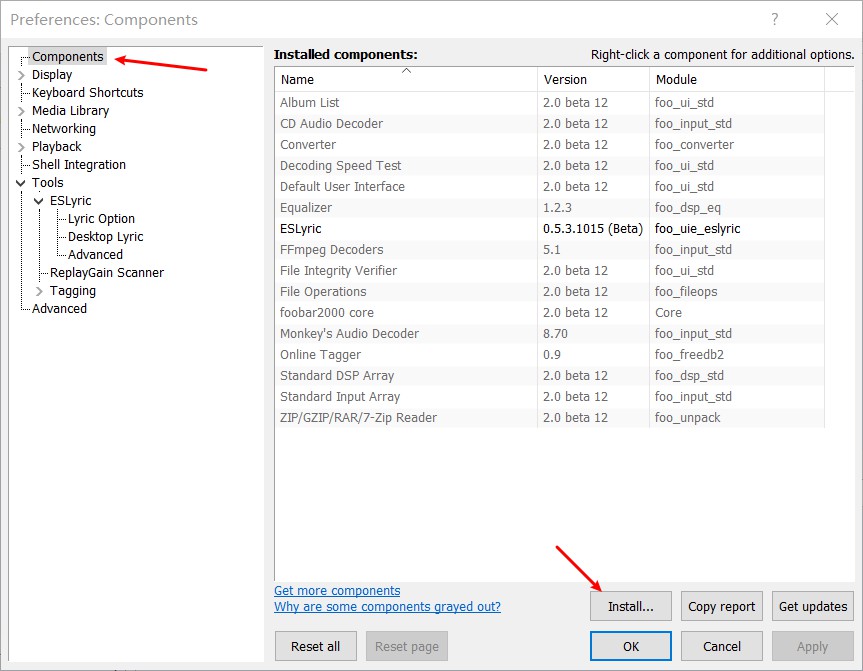
主菜单File→preferences,左侧栏选择components,components对应的右侧栏点击“Install”,选择你刚才下载的插件进行安装。安装完后,点击“Apply”。
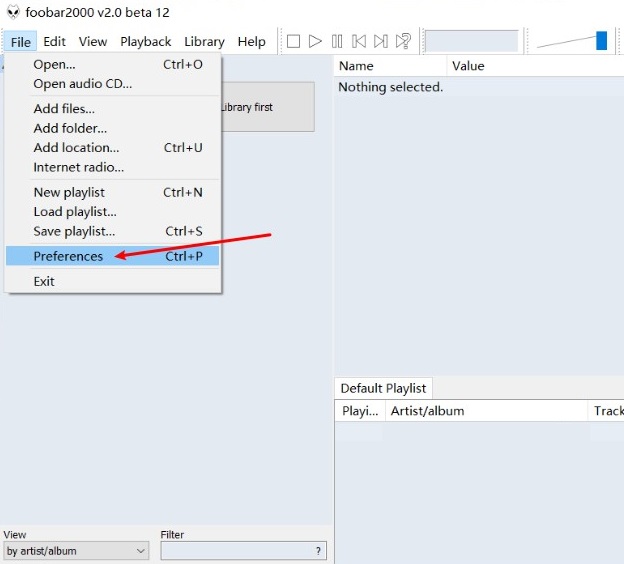
返回程序主界面。主菜单View下就会出现ESLyric项目,并含有子菜单,在子菜单中可以勾选在桌面显示歌词的选项“Show desktop lyric”等。

此时打开歌曲文件,ESLyric就会自动到音乐平台搜索对应的歌词,然后显示。(歌曲文件的属性中要有正确的标题、艺术家才能搜到歌词)

如果想保存ESLyric显示的歌词文件,可以右击显示的歌词,然后点击 “Save lyric” ,lrc歌词文件会默认保存到 profile\lyrics 文件夹下。

Tips:

有些音乐文件无法编辑属性中的“详细信息”,在foobar2000中竟可以编辑:右击音乐标题点击“propertys”,打开文件属性信息框就可以双击value一栏编辑了。