


惯性聚合 高效追踪和阅读你感兴趣的博客、新闻、科技资讯
阅读原文 在惯性聚合中打开

推荐订阅源

S
Security Affairs
freeCodeCamp Programming Tutorials: Python, JavaScript, Git & More
CTFtime.org: upcoming CTF events
Jina AI
Jina AI
P
Palo Alto Networks Blog
GbyAI
GbyAI
大猫的无限游戏
大猫的无限游戏
A
Arctic Wolf
Hugging Face - Blog
Hugging Face - Blog
小众软件
小众软件
Y
Y Combinator Blog
T
The Blog of Author Tim Ferriss
Blog — PlanetScale
Blog — PlanetScale
S
Schneier on Security
V
Vulnerabilities – Threatpost
C
Cybersecurity and Infrastructure Security Agency CISA
雷峰网
雷峰网
T
Tenable Blog
人人都是产品经理
人人都是产品经理
T
Tor Project blog
C
Cyber Attacks, Cyber Crime and Cyber Security
AWS News Blog
AWS News Blog
Microsoft Security Blog
J
Java Code Geeks
Scott Helme
Scott Helme
SecWiki News
SecWiki News
C
CERT Recently Published Vulnerability Notes
Recorded Future
Recorded Future
I
InfoQ
Security Archives - TechRepublic
Help Net Security
Help Net Security
Cloudbric
Cloudbric
C
Check Point Blog
Engineering at Meta
Engineering at Meta
TaoSecurity Blog
TaoSecurity Blog
B
Blog
Cyber Security Advisories - MS-ISAC
博客园_首页
N
News and Events Feed by Topic
云风的 BLOG
云风的 BLOG
MyScale Blog
MyScale Blog
腾讯CDC
量子位
Application and Cybersecurity Blog
K
Kaspersky official blog
Vercel News
Vercel News
F
Full Disclosure
T
Troy Hunt's Blog
Forbes - Security
Forbes - Security
S
Security @ Cisco Blogs

博客园 - r1ch4rd_L

RAX3000Z路由器开启telnet功能并在互联网侧实现持久化控制 “Chrome139.0.7258.128版本GPU硬件加速错误导致UI加载失败”问题临时解决方案 明源相关漏洞自查清单(2025) 用友相关漏洞自查表(2025年) 亿邮相关漏洞总结 突发,广东广州电信把github地址解析成为127.0.0.1 Sysmon立大功,分析短进程,阻止右下角芒果TV弹框 分析一个Steam钓鱼骗局,附带相关恶意样本 分析一个steam假入库行为,附带相关恶意样本 辣鸡CSDN 捕获挖矿脚本分析 apache2.4.49RCE漏洞抓鸡(CVE-2021-41773_CVE-2021-42013) 多种shiro利用方式总结 【钓鱼可用】文件名反转字符串 SonicWALL SSL-VPN Web Server Vulnerable Exploit - r1ch4rd_L ES文件浏览器4.1.9.7.4任意文件浏览漏洞 SUID提权之python的os.setuid(0)提权 PHP-8.1.0-dev 后门命令执行 windows命令行工具导出系统日志——wevtutil 金蝶EAS接口未授权 (蓝队4月10日捕捉疑似0day)
内网搭建KMS激活windows与office
r1ch4rd_L · 2025-08-25 · via 博客园 - r1ch4rd_L
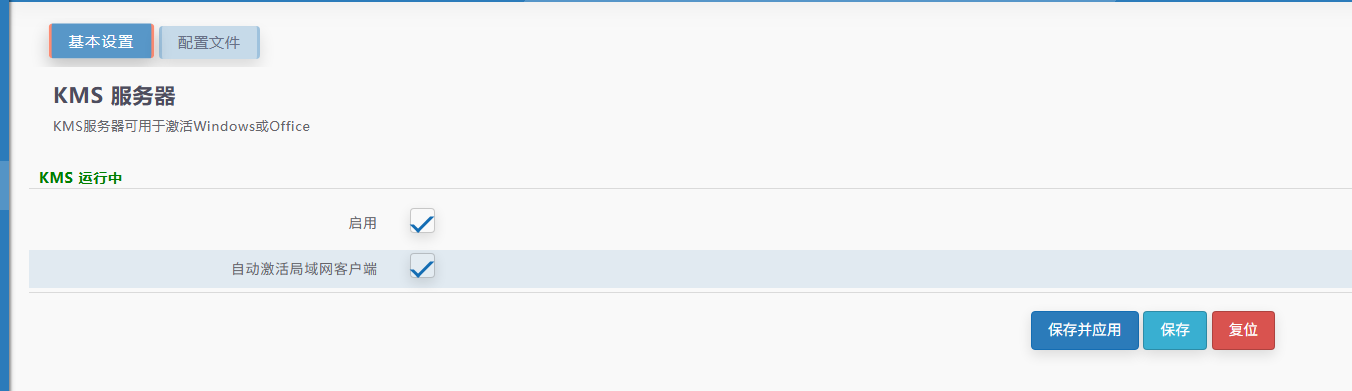
  1. 搭建KMS

    1.   这里使用iStoreOS一键搭建KMS

    2. image

  2. 激活windows

    1. slmgr.vbs -upk
      slmgr.vbs -ipk XXXXX-XXXXX-XXXXX-XXXXX-XXXXX //设置windows密钥
      slmgr.vbs -skms KMS_IP  //设置kms服务器地址
      slmgr.vbs -ato //自动激活
      slmgr.vbs -dlv //查看激活信息
      
    2. Windows离线KMS服务器适用密钥

      附:windows离线KMS服务器适用秘钥
    3. 预览版需先切换为正式版(以Windows server 2022和2019为例)
Windows Server 2022 Standard
dism /online /set-edition:serverstandard /productkey:VDYBN-27WPP-V4HQT-9VMD4-VMK7H /accepteula
Windows Server 2022 Datacenter:
dism /online /set-edition:serverdatacenter /productkey:WX4NM-KYWYW-QJJR4-XV3QB-6VM33 /accepteula
Windows Server 2019 Standard
dism /online /set-edition:ServerStandard /productkey:N69G4-B89J2-4G8F4-WWYCC-J464C /accepteula
Windows Server 2019 Datacenter:
dism /online /set-edition:ServerDatacenter /productkey:WMDGN-G9PQG-XVVXX-R3X43-63DFG /accepteula
  1. 激活Office

    1. # 进入到Office的安装目录
      cd C:\Program Files\Microsoft Office\Office14
      
      # 替换KMS激活地址,根据实际情况替换
      cscript ospp.vbs /sethst:xx.xx.xx
      
      # 开始激活
      cscript ospp.vbs /act
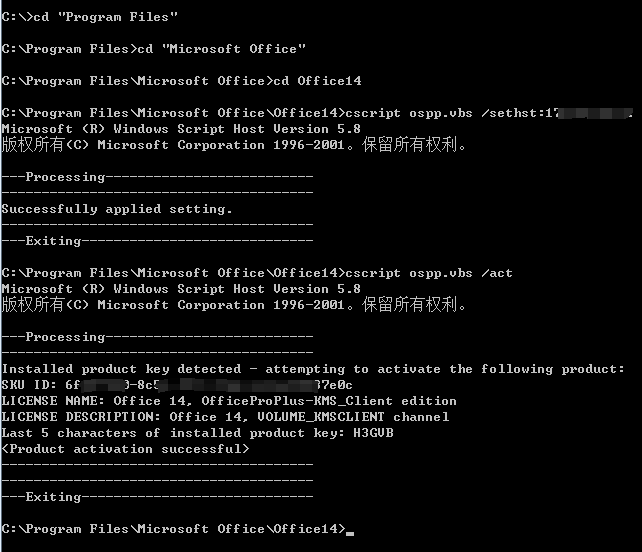
      
    2. image

posted @ 2025-08-25 00:18  r1ch4rd_L  阅读(819)  评论()    收藏  举报