



threejs之利用shape通过线绘制面和体
            var smileyShape = new THREE.Shape();
            smileyShape.moveTo(80, 40);
            smileyShape.absarc(40, 40, 40, 0, Math.PI * 2, false);// 主模型

            var smileyEye1Path = new THREE.Path();
            smileyEye1Path.moveTo(35, 20);
            smileyEye1Path.absellipse(25, 20, 10, 10, 0, Math.PI * 2, true);

            smileyShape.holes.push(smileyEye1Path);// 挖洞

            var smileyEye2Path = new THREE.Path();
            smileyEye2Path.moveTo(65, 20);
            smileyEye2Path.absarc(55, 20, 10, 0, Math.PI * 2, true);
            smileyShape.holes.push(smileyEye2Path);// 挖洞

            var smileyMouthPath = new THREE.Path();
            smileyMouthPath.moveTo(20, 40);
            smileyMouthPath.quadraticCurveTo(40, 60, 60, 40);
            smileyMouthPath.bezierCurveTo(70, 45, 70, 50, 60, 60);
            smileyMouthPath.quadraticCurveTo(40, 80, 20, 60);
            smileyMouthPath.quadraticCurveTo(5, 50, 20, 40);

            // smileyShape.holes.push(smileyMouthPath);// 挖洞
            // 创建面
            const geometryShape = new THREE.ShapeGeometry(smileyShape);
            // 拉伸厚度
            // const extrudeSettings = { depth: 10, bevelEnabled: false };
            // const geometryShape = new THREE.ExtrudeGeometry(smileyShape, extrudeSettings);
            const materialShape = new THREE.MeshBasicMaterial({
                color: 0x00ffff,
                side: THREE.DoubleSide,
                transparent: true,
                opacity: 0.5,
            });
            const smileymesh = new THREE.Mesh(geometryShape, materialShape);
            scene.add(smileymesh)
效果:
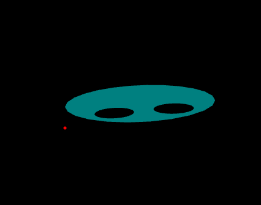

。。。。。钻研不易转载请注明出处
此内容由惯性聚合(RSS阅读器)自动聚合整理,仅供阅读参考。 原文来自 — 版权归原作者所有。