






openlayer之添加带箭头的线
样式代码:
resolution参数用于控制箭头之间的间距
var styles = function(resolution) {
                    var geometry = this.getGeometry();
                    var length = geometry.getLength(); //获取线段长度
                    var radio = (25 * resolution) / length;
                    var dradio = 1; //投影坐标系,如3857等,在EPSG:4326下可以设置dradio=10000
                    var styles = [
                        new ol.style.Style({
                            stroke: new ol.style.Stroke({
                                color: "green",
                                width: 10,
                            })
                        })
                    ];
                    for (var i = 0; i <= 1; i += radio) {
                        var arrowLocation = geometry.getCoordinateAt(i);
                        geometry.forEachSegment(function(start, end) {
                            if (start[0] == end[0] || start[1] == end[1]) return;
                            var dx1 = end[0] - arrowLocation[0];
                            var dy1 = end[1] - arrowLocation[1];
                            var dx2 = arrowLocation[0] - start[0];
                            var dy2 = arrowLocation[1] - start[1];
                            if (dx1 != dx2 && dy1 != dy2) {
                                if (Math.abs(dradio * dx1 * dy2 - dradio * dx2 * dy1) < 0.001) {
                                    var dx = end[0] - start[0];
                                    var dy = end[1] - start[1];
                                    var rotation = Math.atan2(dy, dx);
                                    styles.push(new ol.style.Style({
                                        geometry: new ol.geom.Point(arrowLocation),
                                        image: new ol.style.Icon({
                                            src: 'static/icon/routearrow.png',
                                            anchor: [0.5, 0.5],
                                            scale: 0.075,
                                            rotateWithView: false,
                                            rotation: -rotation + 0.5* Math.PI
                                        })
                                    }));
                                }
                            }
                        });
                    }
                    return styles;
                }
样式调用:
图片文件:

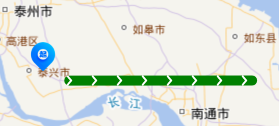
效果:
钻研不易,转载请注明出处。。。。。。
此内容由惯性聚合(RSS阅读器)自动聚合整理,仅供阅读参考。 原文来自 — 版权归原作者所有。