












ffmpeg的nvdec解码结果数据格式为 AV_PIX_FMT_CUDA,实际使用中后续接算法需要转为RGB。算法跑在显卡上,解码也在显卡上,所以转换也定为直接在显卡上进行。
关于ffmpeg的nvdec解码的网上博客写的比较多,个人参考的一个比较好的 https://blog.csdn.net/qq_40116098/article/details/120704340
这里只记录解码出来的AV_PIX_FMT_CUDA格式的AVFrame数据转为RGB数据。
基于CUDA的代码实现:
#include "cuda_kernels.h"

#include <builtin_types.h>
#include "common/inc/helper_cuda_drvapi.h"

typedef unsigned char   uint8;
typedef unsigned int    uint32;
typedef int             int32;

#define COLOR_COMPONENT_MASK            0x3FF
#define COLOR_COMPONENT_BIT_SIZE        10

namespace cuda_common
{

#define MUL(x,y)    ((x)*(y))

    __constant__ float  constHueColorSpaceMat2[9];  //默认分配到0卡上,未找到分配到指定卡上设置方法,当前也未用到,先注释

    __device__ void YUV2RGB2(uint32 *yuvi, float *red, float *green, float *blue)
    {
        float luma, chromaCb, chromaCr;

        // Prepare for hue adjustment
        luma = (float)yuvi[0];
        chromaCb = (float)((int32)yuvi[1] - 512.0f);
        chromaCr = (float)((int32)yuvi[2] - 512.0f);


        // Convert YUV To RGB with hue adjustment
        *red = MUL(luma, constHueColorSpaceMat2[0]) +
            MUL(chromaCb, constHueColorSpaceMat2[1]) +
            MUL(chromaCr, constHueColorSpaceMat2[2]);
        *green = MUL(luma, constHueColorSpaceMat2[3]) +
            MUL(chromaCb, constHueColorSpaceMat2[4]) +
            MUL(chromaCr, constHueColorSpaceMat2[5]);
        *blue = MUL(luma, constHueColorSpaceMat2[6]) +
            MUL(chromaCb, constHueColorSpaceMat2[7]) +
            MUL(chromaCr, constHueColorSpaceMat2[8]);

    }

    __device__ unsigned char clip_v(int x, int min_val, int  max_val) {
        if (x>max_val) {
            return max_val;
        }
        else if (x<min_val) {
            return min_val;
        }
        else {
            return x;
        }
    }

        // CUDA kernel for outputing the final RGB output from NV12;

    extern "C"
        __global__ void CUDAToBGR_drvapi(uint32 *dataY, uint32 *dataUV, size_t pitchY, size_t pitchUV, unsigned char *dstImage, int width, int height)
    {

        int32 x, y;

        // Pad borders with duplicate pixels, and we multiply by 2 because we process 2 pixels per thread
        x = blockIdx.x * (blockDim.x << 1) + (threadIdx.x << 1);
        y = blockIdx.y *  blockDim.y + threadIdx.y;

        if (x >= width)
        {
            return;
        }

        if (y >= height)
        {
            return;
        }

        uint32 yuv101010Pel[2];
        uint8 *srcImageU8_Y = (uint8 *)dataY;
        uint8 *srcImageU8_UV = (uint8 *)dataUV;

        // Read 2 Luma components at a time, so we don't waste processing since CbCr are decimated this way.
        // if we move to texture we could read 4 luminance values
        yuv101010Pel[0] = (srcImageU8_Y[y * pitchY + x]) << 2;
        yuv101010Pel[1] = (srcImageU8_Y[y * pitchY + x + 1]) << 2;

        int32 y_chroma = y >> 1;

        if (y & 1)  // odd scanline ?
        {
            uint32 chromaCb;
            uint32 chromaCr;

            chromaCb = srcImageU8_UV[y_chroma * pitchUV + x];
            chromaCr = srcImageU8_UV[y_chroma * pitchUV + x + 1];

            if (y_chroma < ((height >> 1) - 1)) // interpolate chroma vertically
            {
                chromaCb = (chromaCb + srcImageU8_UV[(y_chroma + 1) * pitchUV + x] + 1) >> 1;
                chromaCr = (chromaCr + srcImageU8_UV[(y_chroma + 1) * pitchUV + x + 1] + 1) >> 1;
            }

            yuv101010Pel[0] |= (chromaCb << (COLOR_COMPONENT_BIT_SIZE + 2));
            yuv101010Pel[0] |= (chromaCr << ((COLOR_COMPONENT_BIT_SIZE << 1) + 2));

            yuv101010Pel[1] |= (chromaCb << (COLOR_COMPONENT_BIT_SIZE + 2));
            yuv101010Pel[1] |= (chromaCr << ((COLOR_COMPONENT_BIT_SIZE << 1) + 2));
        }
        else
        {
            yuv101010Pel[0] |= ((uint32)srcImageU8_UV[y_chroma * pitchUV + x] << (COLOR_COMPONENT_BIT_SIZE + 2));
            yuv101010Pel[0] |= ((uint32)srcImageU8_UV[y_chroma * pitchUV + x + 1] << ((COLOR_COMPONENT_BIT_SIZE << 1) + 2));

            yuv101010Pel[1] |= ((uint32)srcImageU8_UV[y_chroma * pitchUV + x] << (COLOR_COMPONENT_BIT_SIZE + 2));
            yuv101010Pel[1] |= ((uint32)srcImageU8_UV[y_chroma * pitchUV + x + 1] << ((COLOR_COMPONENT_BIT_SIZE << 1) + 2));
        }

        // this steps performs the color conversion
        uint32 yuvi[6];
        float red[2], green[2], blue[2];

        yuvi[0] = (yuv101010Pel[0] & COLOR_COMPONENT_MASK);
        yuvi[1] = ((yuv101010Pel[0] >> COLOR_COMPONENT_BIT_SIZE)       & COLOR_COMPONENT_MASK);
        yuvi[2] = ((yuv101010Pel[0] >> (COLOR_COMPONENT_BIT_SIZE << 1)) & COLOR_COMPONENT_MASK);

        yuvi[3] = (yuv101010Pel[1] & COLOR_COMPONENT_MASK);
        yuvi[4] = ((yuv101010Pel[1] >> COLOR_COMPONENT_BIT_SIZE)       & COLOR_COMPONENT_MASK);
        yuvi[5] = ((yuv101010Pel[1] >> (COLOR_COMPONENT_BIT_SIZE << 1)) & COLOR_COMPONENT_MASK);

        // YUV to RGB Transformation conversion
        YUV2RGB2(&yuvi[0], &red[0], &green[0], &blue[0]);
        YUV2RGB2(&yuvi[3], &red[1], &green[1], &blue[1]);


        dstImage[y * width * 3 + x * 3] = clip_v(blue[0] * 0.25,0 ,255);
        dstImage[y * width * 3 + x * 3 + 3] = clip_v(blue[1] * 0.25,0, 255);

        dstImage[width * y * 3 + x * 3 + 1] = clip_v(green[0] * 0.25,0 ,255);
        dstImage[width * y * 3 + x * 3 + 4] = clip_v(green[1] * 0.25,0, 255);

        dstImage[width * y * 3 + x * 3 + 2] = clip_v(red[0] * 0.25, 0, 255);
        dstImage[width * y * 3 + x * 3 + 5] = clip_v(red[1] * 0.25,0 ,255);
    }

    cudaError_t setColorSpace2(e_ColorSpace CSC, float hue)
    {

        float hueSin = sin(hue);
        float hueCos = cos(hue);

        float hueCSC[9];
        if (CSC == ITU601)
        {
            //CCIR 601
            hueCSC[0] = 1.1644f;
            hueCSC[1] = hueSin * 1.5960f;
            hueCSC[2] = hueCos * 1.5960f;
            hueCSC[3] = 1.1644f;
            hueCSC[4] = (hueCos * -0.3918f) - (hueSin * 0.8130f);
            hueCSC[5] = (hueSin *  0.3918f) - (hueCos * 0.8130f);
            hueCSC[6] = 1.1644f;
            hueCSC[7] = hueCos *  2.0172f;
            hueCSC[8] = hueSin * -2.0172f;
        }
        else if (CSC == ITU709)
        {
            //CCIR 709
            hueCSC[0] = 1.0f;
            hueCSC[1] = hueSin * 1.57480f;
            hueCSC[2] = hueCos * 1.57480f;
            hueCSC[3] = 1.0;
            hueCSC[4] = (hueCos * -0.18732f) - (hueSin * 0.46812f);
            hueCSC[5] = (hueSin *  0.18732f) - (hueCos * 0.46812f);
            hueCSC[6] = 1.0f;
            hueCSC[7] = hueCos *  1.85560f;
            hueCSC[8] = hueSin * -1.85560f;
        }

        cudaError_t cudaStatus = cudaMemcpyToSymbol(constHueColorSpaceMat2, hueCSC, 9 * sizeof(float), 0, cudaMemcpyHostToDevice);
        float tmpf[9];
        memset(tmpf, 0, 9 * sizeof(float));
        cudaMemcpyFromSymbol(tmpf, constHueColorSpaceMat2, 9 * sizeof(float), 0, ::cudaMemcpyDefault);
        cudaDeviceSynchronize();

        if (cudaStatus != cudaSuccess) {
            fprintf(stderr, "cudaMemcpyToSymbol failed: %s\n", cudaGetErrorString(cudaStatus));
        }

        return cudaStatus;
    }

    cudaError_t CUDAToBGR(CUdeviceptr dataY, CUdeviceptr dataUV, size_t pitchY, size_t pitchUV, unsigned char* d_dstRGB, int width, int height)
    {
        dim3 block(32, 16, 1);
        dim3 grid((width + (2 * block.x - 1)) / (2 * block.x), (height + (block.y - 1)) / block.y, 1);
        CUDAToBGR_drvapi << < grid, block >> >((uint32 *)dataY, (uint32 *)dataUV, pitchY, pitchUV, d_dstRGB, width, height);
        cudaError_t cudaStatus = cudaGetLastError();
        if (cudaStatus != cudaSuccess) {
            fprintf(stderr, "NV12ToRGB_drvapi launch failed: %s\n", cudaGetErrorString(cudaStatus));
            return cudaStatus;
        }

        cudaStatus = cudaDeviceSynchronize();
        if (cudaStatus != cudaSuccess) {
            fprintf(stderr, "cudaDeviceSynchronize returned error code %d after launching NV12ToRGB_drvapi !\n", cudaStatus);
            return cudaStatus;
        }

        return cudaStatus;
    }
}
对外接口为 CUDAToBGR 函数,核心实现在 CUDAToBGR_drvapi 函数中。
其中输入参数把Y和UV分开了,其原因是ffmpeg对 AV_PIX_FMT_CUDA 格式数据,在AVFrame中data[0]和data[1]都存在值,AV_PIX_FMT_CUDA 数据其实应该就是显卡上的NV12数据,所以个人推测data[0]是Y数据,data[1]是UV数据。实际转换的效果基本证明这个推测是对的。
调用以实现转换:
先设置颜色空间参数
cuda_common::setColorSpace2( ITU709, 0 );
然后调用以转换:
if (gpuFrame->format == AV_PIX_FMT_CUDA)
{
     cudaError_t cudaStatus;
    if(pHwRgb == nullptr){
        cudaStatus = cudaMalloc((void **)&pHwRgb, 3 * gpuFrame->width * gpuFrame->height * sizeof(unsigned char));
    }
    cudaStatus = cuda_common::CUDAToBGR((CUdeviceptr)gpuFrame->data[0],(CUdeviceptr)gpuFrame->data[1], gpuFrame->linesize[0], gpuFrame->linesize[1], pHwRgb, gpuFrame->width, gpuFrame->height);
    cudaDeviceSynchronize();
    if (cudaStatus != cudaSuccess) {
        cout << "CUDAToBGR failed !!!" << endl;
        return;
    }
    // saveJpeg("/home/cmhu/FFNvDecoder/a.jpg", pHwRgb, gpuFrame->width, gpuFrame->height);  // 验证 CUDAToRGB
}
其中 pHwRgb 是unsigned char* ,用cudaMalloc分配的在显卡上的数据。 gpuFrame 是 AVFrame *,是用cuvid硬解出来的帧数据。
转换后的数据保存下来的jpeg图片样例:
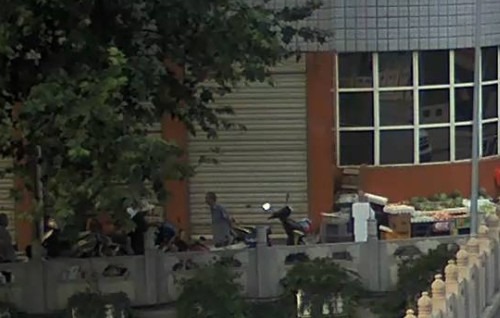
可以看到效果良好。
此内容由惯性聚合(RSS阅读器)自动聚合整理,仅供阅读参考。 原文来自 — 版权归原作者所有。