








nvjpeg是英伟达提供的一个可以将显存中的数据直接压缩成jpg图片的sdk,包含在cuda套件中。
官方接口文档 https://docs.nvidia.com/cuda/nvjpeg/index.html#nvjpeg-encode-image
一个写得挺好的博客 nvJPEG压缩图像, 本文代码基本来自该博客。
代码:
#include <nvjpeg.h>

#include <fstream>
#include <vector>
#include <iostream>


#define CHECK_NVJPEG(S) do {nvjpegStatus_t  status; \
        status = S; \
        if (status != NVJPEG_STATUS_SUCCESS ) std::cout << __LINE__ <<" CHECK_NVJPEG - status = " << status << std::endl; \
        } while (false)


int saveJpeg(const char * filepath, unsigned char* d_srcBGR, int width, int height)
{
    nvjpegHandle_t nvjpeg_handle;
    nvjpegEncoderState_t encoder_state;
    nvjpegEncoderParams_t encoder_params;

    cudaEvent_t ev_start, ev_end;
    cudaEventCreate(&ev_start);
    cudaEventCreate(&ev_end);

    nvjpegImage_t input;
    nvjpegInputFormat_t input_format = NVJPEG_INPUT_BGRI;
    int image_width = width;
    int image_height = height;

    // int channel_size = image_width * image_height;
    // for (int i = 0; i < 3; i++)
    // {
    //     input.pitch[i] = image_width;
    //     (cudaMalloc((void**)&(input.channel[i]), channel_size));
    //     (cudaMemset(input.channel[i], 50 * 40 * i, channel_size));
    // }

    input.channel[0] = d_srcBGR;
    input.pitch[0] = image_width * 3;

    nvjpegBackend_t backend = NVJPEG_BACKEND_DEFAULT;

    CHECK_NVJPEG(nvjpegCreate(backend, nullptr, &nvjpeg_handle));

    CHECK_NVJPEG(nvjpegEncoderParamsCreate(nvjpeg_handle, &encoder_params, NULL));
    CHECK_NVJPEG(nvjpegEncoderStateCreate(nvjpeg_handle, &encoder_state, NULL));

    // set params
    CHECK_NVJPEG(nvjpegEncoderParamsSetEncoding(encoder_params, nvjpegJpegEncoding_t::NVJPEG_ENCODING_PROGRESSIVE_DCT_HUFFMAN, NULL));
    CHECK_NVJPEG(nvjpegEncoderParamsSetOptimizedHuffman(encoder_params, 1, NULL));
    CHECK_NVJPEG(nvjpegEncoderParamsSetQuality(encoder_params, 70, NULL));
    CHECK_NVJPEG(nvjpegEncoderParamsSetSamplingFactors(encoder_params, nvjpegChromaSubsampling_t::NVJPEG_CSS_420, NULL));

    cudaEventRecord(ev_start);
    CHECK_NVJPEG(nvjpegEncodeImage(nvjpeg_handle, encoder_state, encoder_params, &input, input_format, image_width, image_height, NULL));
    cudaEventRecord(ev_end);

    std::vector<unsigned char> obuffer;
    size_t length;
    CHECK_NVJPEG(nvjpegEncodeRetrieveBitstream(
        nvjpeg_handle,
        encoder_state,
        NULL,
        &length,
        NULL));

    obuffer.resize(length);
    CHECK_NVJPEG(nvjpegEncodeRetrieveBitstream(
        nvjpeg_handle,
        encoder_state,
        obuffer.data(),
        &length,
        NULL));

    cudaEventSynchronize(ev_end);

    // 用完销毁,避免显存泄露
    nvjpegEncoderParamsDestroy(encoder_params);
    nvjpegEncoderStateDestroy(encoder_state);
    nvjpegDestroy(nvjpeg_handle);

    float ms;
    cudaEventElapsedTime(&ms, ev_start, ev_end);
    std::cout << "time spend " << ms << " ms" << std::endl;

    std::ofstream outputFile(filepath, std::ios::out | std::ios::binary);
    outputFile.write(reinterpret_cast<const char *>(obuffer.data()), static_cast<int>(length));
    outputFile.close();

    return 0;
}
需要说明的是,输入数据的形式由 input_format 指定,
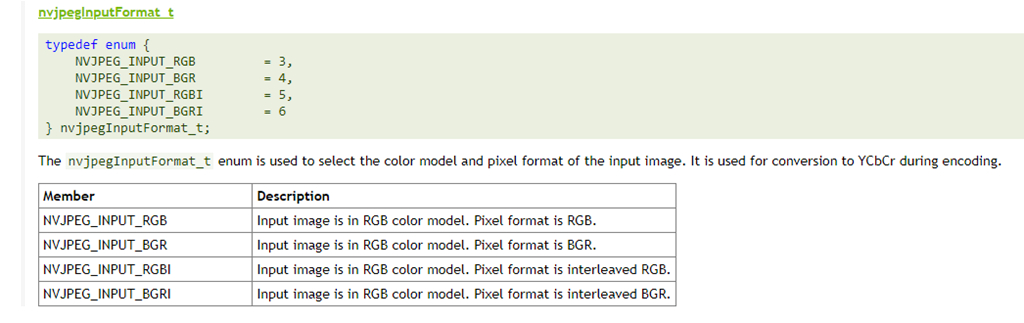

从文档可知, NVJPEG_INPUT_BGRI 和 NVJPEG_INPUT_RGBI 是单数组形式存放的数据,赋值给channel[0],指定pitch[0]作为输入;
NVJPEG_INPUT_BGR 和 NVJPEG_INPUT_RGB 是分通道分别存放R、G、B 数据,pitch也分别对应。
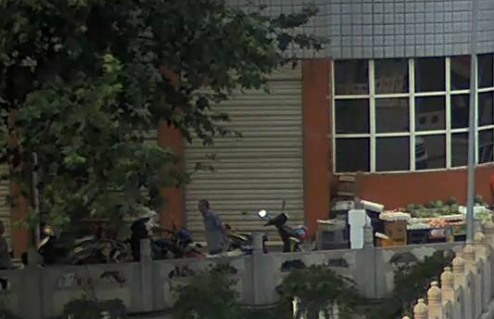
测试效果样例:

此内容由惯性聚合(RSS阅读器)自动聚合整理,仅供阅读参考。 原文来自 — 版权归原作者所有。