惯性聚合 高效追踪和阅读你感兴趣的博客、新闻、科技资讯
阅读原文 在惯性聚合中打开

推荐订阅源

S
Schneier on Security
博客园_首页
量子位
博客园 - 司徒正美
S
SegmentFault 最新的问题
J
Java Code Geeks
小众软件
小众软件
博客园 - 【当耐特】
The Register - Security
让小产品的独立变现更简单 - ezindie.com
Microsoft Azure Blog
G
Google Developers Blog
Blog — PlanetScale
Blog — PlanetScale
T
Tailwind CSS Blog
博客园 - Franky
cs.AI updates on arXiv.org
G
GRAHAM CLULEY
Cyberwarzone
Cyberwarzone
腾讯CDC
Apple Machine Learning Research
V
Visual Studio Blog
钛媒体:引领未来商业与生活新知
钛媒体:引领未来商业与生活新知
The Hacker News
The Hacker News
aimingoo的专栏
aimingoo的专栏
V
Vulnerabilities – Threatpost
P
Palo Alto Networks Blog
Scott Helme
Scott Helme
L
LINUX DO - 热门话题
F
Full Disclosure
D
DataBreaches.Net
Martin Fowler
Martin Fowler
Cisco Talos Blog
Cisco Talos Blog
L
LINUX DO - 最新话题
云风的 BLOG
云风的 BLOG
C
Check Point Blog
T
Threatpost
Google DeepMind News
WordPress大学
WordPress大学
W
WeLiveSecurity
K
KPMG report finds enterprise disconnect between AI and its ROI | CIO
有赞技术团队
有赞技术团队
Hugging Face - Blog
Hugging Face - Blog
freeCodeCamp Programming Tutorials: Python, JavaScript, Git & More
L
Lohrmann on Cybersecurity
Last Week in AI
Last Week in AI
T
Tor Project blog
T
Troy Hunt's Blog
OSCHINA 社区最新新闻
OSCHINA 社区最新新闻
S
Security Affairs
SecWiki News
SecWiki News

博客园 - 幸福的菜菜

windows下使用ACME申请SSL证书的办法 ElementPlus Radio 实现双击取消选择的效果 Windows10 LTSC版本 无法访问网络中部分的共享文件夹 SqlSugar : date绑定到XX失败,可以试着换一个类型,或者使用ORM自定义类型实现 VisualStudio Debug模式突然变慢 Visual Stadio 编译提示 The BaseOutputPath/OutputPath property is not set for project ... winform绘图与前端canvas绘图效率对比 node-sass编译不通过, 提示 “checking for Python executable "python2" in the PATH” c# async await的使用方式及为啥要用它 winform 实现对usb热拔插的监听 Laravel The only supported ciphers are AES-128-CBC and AES-256-CBC with the correct key lengths git credential for windows 总是弹出的问题 如何用B表的数据,更新A表的值 WampServer部署https 服务的过程 PHP 命名空间冲突解决方式 Windows下 Docker 简单部署 Django应用 C#实现后台格式化U盘的功能 Winform 实现断点续传的思路及代码 WAMPServer ServerName has syntax error 的问题(阿里云服务器上)
Wampserver 配置端口可访问服务
幸福的菜菜 · 2020-02-19 · via 博客园 - 幸福的菜菜

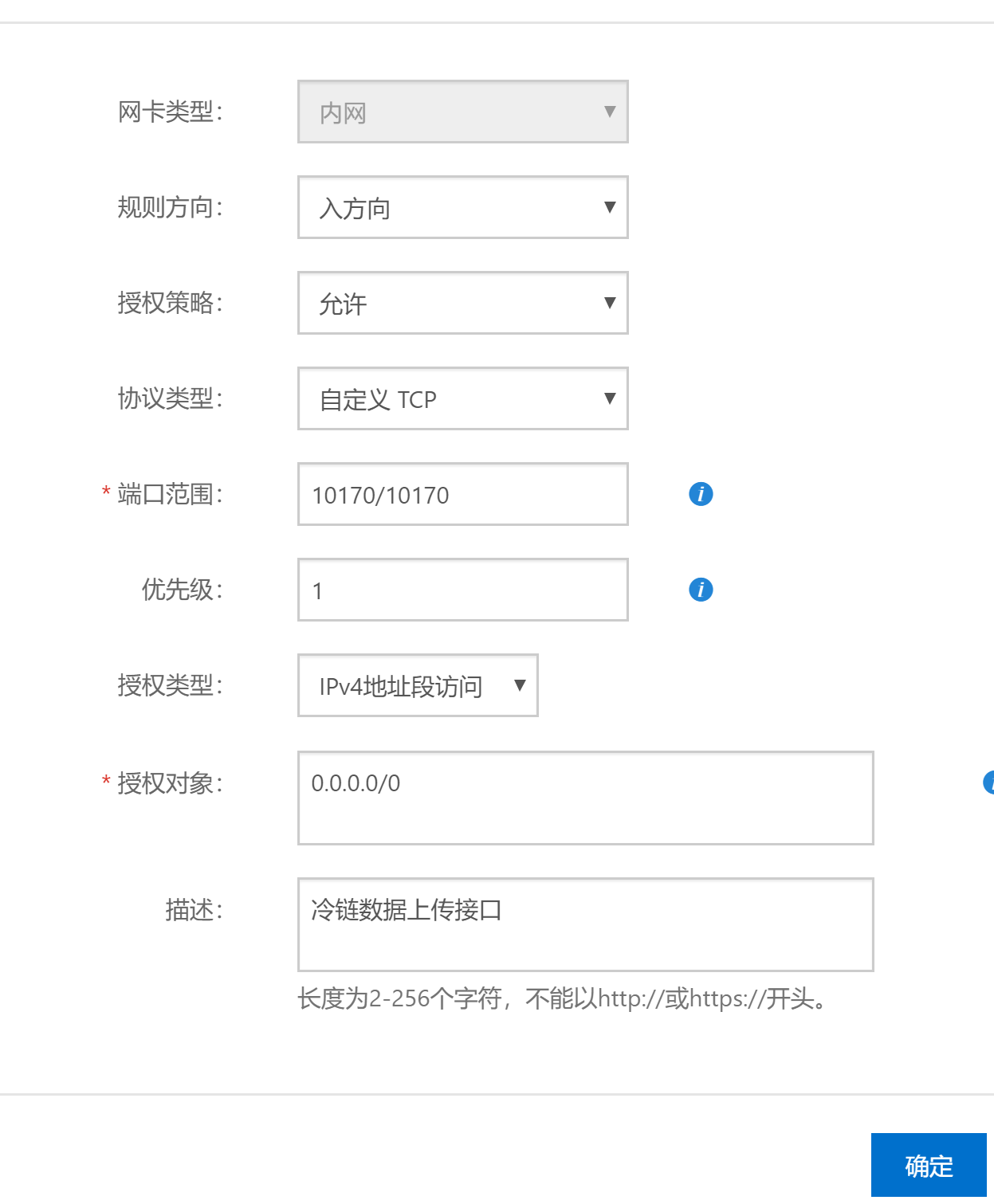
1.确保阿里已经添加了相应的安全组规则

步骤1.打开安全组配置规则,开放相应的端口访问
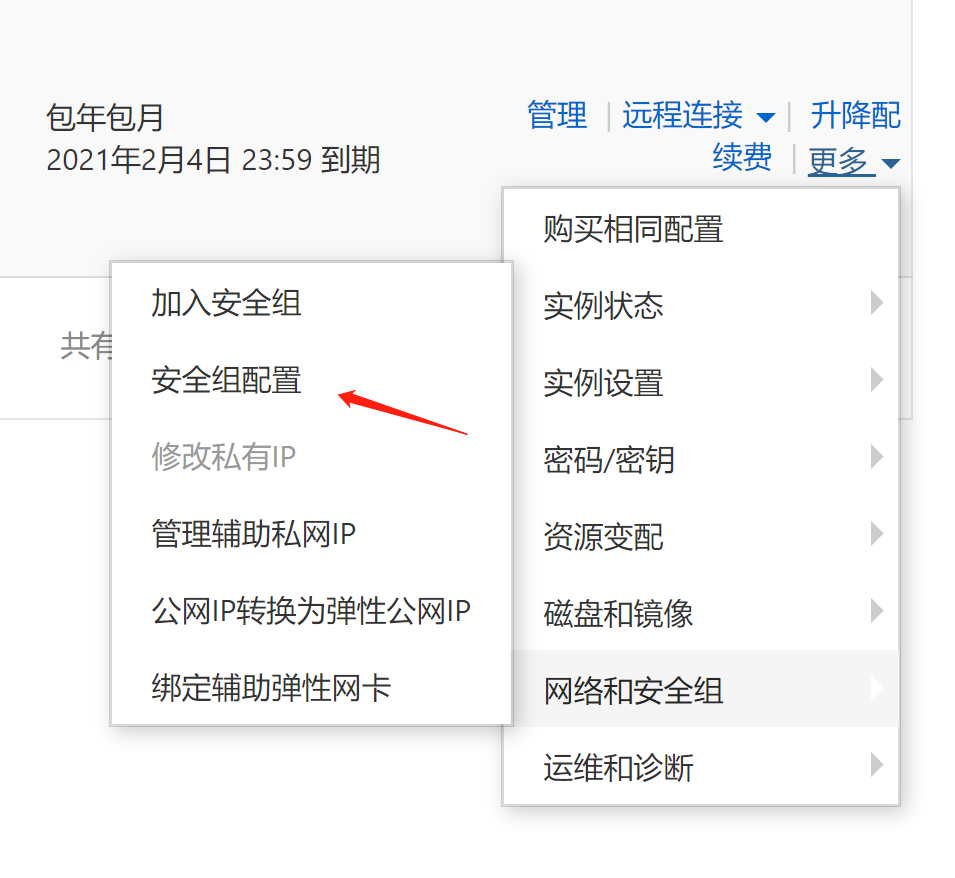
(再点击配置规则)添加相应的端口配置

2.wampserver配置

1.httpd.conf

添加端口的监听

    Listen 10170

2.httpd-vhost.conf

<VirtualHost *:10170>
    ServerName coldChain
    DocumentRoot "D:/www/cold_chain/public"
    <Directory "D:/www/cold_chain/public/">
        Options +Indexes +Includes +FollowSymLinks +MultiViews
        AllowOverride All
        Require all granted
    </Directory>
</VirtualHost>

至此,如果本地项目正确就已经能正常访问了。

但是外网可能会访问不了,因为被防火墙阻止了。如何判断是否被防火墙阻止了呢?

打开如下地址,对端口进行扫描。如果端口关闭,则关闭防火墙再次扫描

http://tool.chinaz.com/port/

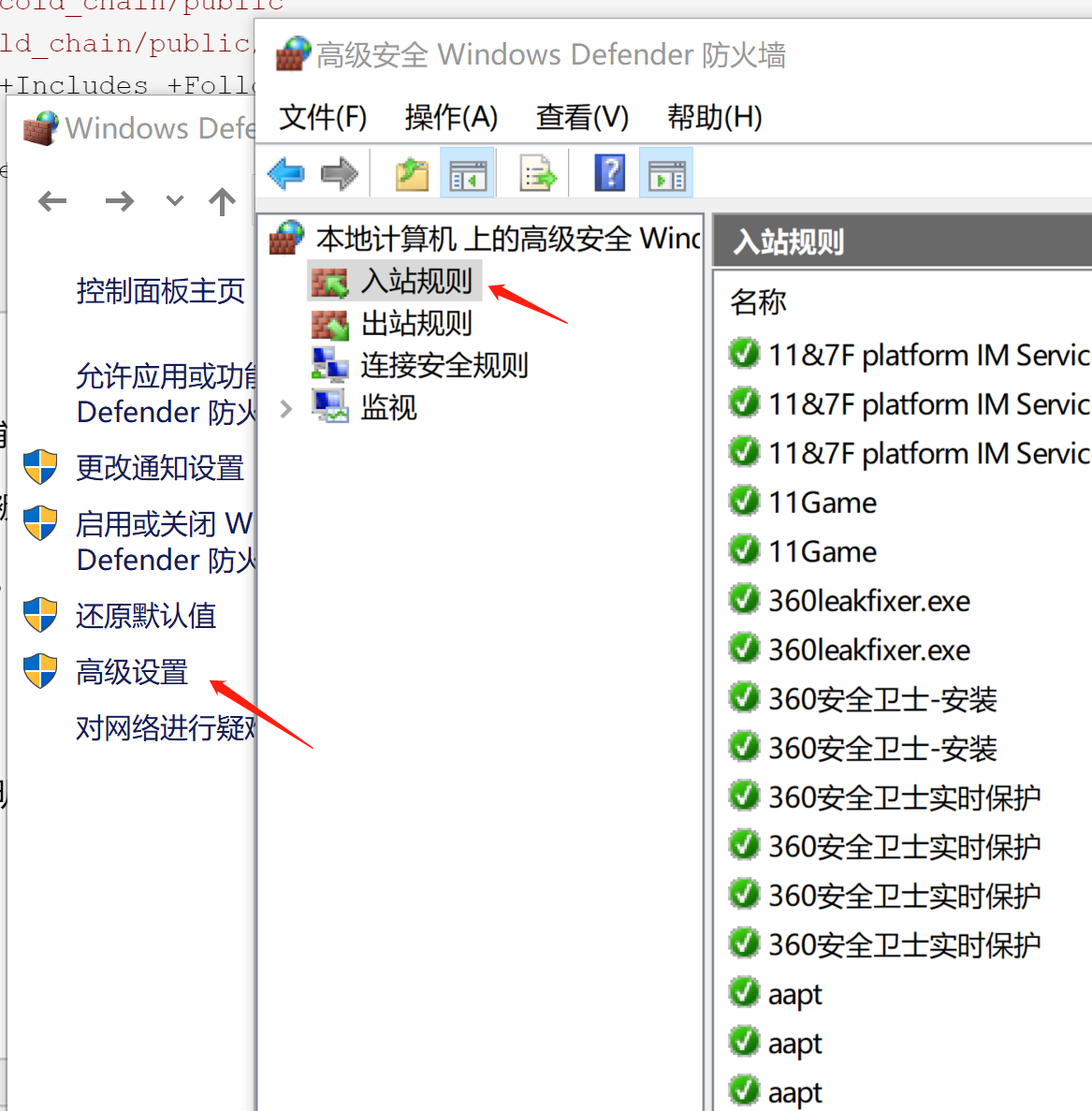
如果关闭防火墙能扫描到。则说明需要添加相应的防火墙规则:

打开控制面板,选择防火墙的---高级设置--入站规则---添加相应的端口即可