


先说结论:前端canas的绘图效率更高。
因为项目使用winform的缘故,最近要实现一些波形展示的功能。涉及到绘制,肯定离不开GDI+的内容,但是还有替代的方案吗? 当然是有的,可双用WebView2使用前端的技术去绘制。
那么问题来了,哪一种实现更好呢?所以做了一些测试对比
以下是使用GDI+绘制的方式,使用了双缓存加速,绘制100W条线,速度大概是3.4s左右完全渲染出来
    public partial class DrawMaxPointTestForm : Form
    {
        public DrawMaxPointTestForm()
        {
            InitializeComponent();
        }

        private void button2_Click(object sender, EventArgs e)
        {
            Task.Factory.StartNew(() =>
            {
                Random random = new Random();
                var pen = new Pen(Color.Black, 1);
                Stopwatch sw = new Stopwatch();
                sw.Start();

                var grap = this.CreateGraphics();
                var rect = new Rectangle(0, 0, this.Width, this.Height);
                using (BufferedGraphics bufferedGraphics = BufferedGraphicsManager.Current.Allocate(grap, rect))//创建缓冲 Graphics对象,区域
                {
                    bufferedGraphics.Graphics.Clear(Color.White);

                    List<float> widths = new List<float>();
                    List<float> heights = new List<float>();

                    List<PointF> points = new List<PointF>();
                    for (int i = 0; i < 1000000; i++)
                    {
                        points.Add(new PointF((float)(this.Width * random.NextDouble()), (float)(this.Height * random.NextDouble())));
                    }

                    bufferedGraphics.Graphics.DrawLines(pen, points.ToArray());

                    bufferedGraphics.Render(grap);
                }

                sw.Stop();
                Console.WriteLine(sw.ElapsedMilliseconds);
            });
        }
    }
那使用前端效率怎么样呢?
<!DOCTYPE html>
<html lang="en">

<head>
    <meta charset="UTF-8">
    <meta http-equiv="X-UA-Compatible" content="IE=edge">
    <meta name="viewport" content="width=device-width, initial-scale=1.0">
    <title>Document</title>
</head>

<body>

    <p>
        <button onclick="drawCanvas()">绘制图形</button>
    </p>
    <canvas id="drawCanvas" width="1500" height="1500"></canvas>


</body>

<script>

    function drawCanvas() {

        let bound = 1500;
        let canvasDom = document.getElementById("drawCanvas");
        let ctx = canvasDom.getContext("2d");

        ctx.clearRect(0, 0, bound, bound);

        let start = Date.now();
        let widths = [];
        let heights = [];
        ctx.beginPath();
        let x = 0;
        let y = 0;
        let maxCount = 100 * 10000;
        for (let i = 0; i < maxCount; i++) {

            x = Math.random() * bound;
            y = Math.random() * bound;

            ctx.lineTo(x, y);
        }
        ctx.lineWidth = 1;
        ctx.strokeStyle = "blue";
        ctx.stroke();
        ctx.closePath();
        console.log("time consume:", Date.now() - start);
    }

</script>

</html>
100W个点,在控制台输出显示只有
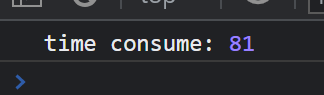
啥?81ms ? 这不可能,因为在界面上明显看到绘图有等待时间的,大约1s左右。
嘿嘿,这个就是chrome的线程优化相关的内容了。因为上面的计时只是把数据API丢给chrome后台去绘制,距离渲染完成还有些时间。即时这样,1s时间也是远超winform GDI+的效率的
但是上面是基于纯chrome测试的,要想把他集成到WebView2中还要考虑多个因素:
如果实际项目应用中,上述两点还是需要测试一下。(虽然对性能影响会很小,不过还是要注意排坑)
此内容由惯性聚合(RSS阅读器)自动聚合整理,仅供阅读参考。 原文来自 — 版权归原作者所有。