


惯性聚合 高效追踪和阅读你感兴趣的博客、新闻、科技资讯
阅读原文 在惯性聚合中打开

推荐订阅源

N
News | PayPal Newsroom
Security Archives - TechRepublic
Hacker News: Ask HN
Hacker News: Ask HN
H
Hacker News: Front Page
Apple Machine Learning Research
TaoSecurity Blog
TaoSecurity Blog
Help Net Security
Help Net Security
Threat Intelligence Blog | Flashpoint
V
V2EX
Hugging Face - Blog
Hugging Face - Blog
cs.CV updates on arXiv.org
cs.CL updates on arXiv.org
人人都是产品经理
人人都是产品经理
博客园 - 三生石上(FineUI控件)
Security Latest
Security Latest
Cloudbric
Cloudbric
WordPress大学
WordPress大学
S
SegmentFault 最新的问题
cs.AI updates on arXiv.org
www.infosecurity-magazine.com
Know Your Adversary
Know Your Adversary
A
Arctic Wolf
L
LangChain Blog
Application and Cybersecurity Blog
The GitHub Blog
The GitHub Blog
P
Proofpoint News Feed
W
WeLiveSecurity
freeCodeCamp Programming Tutorials: Python, JavaScript, Git & More
M
MIT News - Artificial intelligence
Google DeepMind News
奇客Solidot–传递最新科技情报
奇客Solidot–传递最新科技情报
The Cloudflare Blog
小众软件
小众软件
NISL@THU
NISL@THU
云风的 BLOG
云风的 BLOG
P
Privacy & Cybersecurity Law Blog
S
Security @ Cisco Blogs
博客园 - 【当耐特】
I
InfoQ
Vercel News
Vercel News
CTFtime.org: upcoming CTF events
P
Proofpoint News Feed
O
OpenAI News
Google DeepMind News
N
News and Events Feed by Topic
K
KPMG report finds enterprise disconnect between AI and its ROI | CIO
K
Kaspersky official blog
T
Threat Research - Cisco Blogs
量子位
宝玉的分享
宝玉的分享

博客园 - 三杯两盏淡酒

浏览器感染木马插件 访问overbridgenet.com恶意网站 升级windows 11 25h2的步骤(xjl456852原创) Dify纯内网dify插件离线安装支持多平台多架构跨架构(xjl456852原创) 2025骨传导 气传导耳机对比 Centos7 ubuntu 安装nginx 大模型chatgpt search联网搜索插件与默认搜索兼容设置 解决 OSError: [WinError -1066598274] Windows Error 0xc06d007e (xjl456852原创) TeraCloud国外WebDav服务器免费25GB空间 同步文档 同步数据 bandizip批量压缩解压(xjl456852原创) notepad3 替代windows自带文本编辑器(xjl456852原创) nextcloud 使用markdown editor 编辑器(xjl456852整理) win10 使用tracetcp.exe的错误问题解决(xjl456852原创) clickhouse 复杂查询时嵌套连接join可能存在的异常解决(xjl456852原创) EA逆向生成数据库E-R图(mysql,mariadb数据库-->ER图) v13 及以后的版本处理方式(xjl456852原创) pycharm 输入中文汉字重叠(xjl456852原创) webstrom破解-webstrom2018.2.4破解方法(xjl456852原创) 用户中心 - 博客园 前端跳转处理--房天下的访问页面部分ip自动跳转到登录页面的解决办法(xjl456852原创) maven项目运行tomcat7-maven-plugin:run时出现Caused by: java.lang.ClassNotFoundException: org.codehaus.plexus.util.Scanner(xjl456852原创)
windows10安装gvim的_vimrc不生效的处理方法(xjl456852原创)
三杯两盏淡酒 · 2019-08-31 · via 博客园 - 三杯两盏淡酒

在我Windows中安装的Gvim的路径为:

D:\soft\Vim

1

D:\soft\Vim

目录下结构为:

当我修改安装目录下的_vimrc这个配置时,再次启动Gvim,看不到效果,这个配置没有生效.

在网上查了各种方法,都没效果.最后再staticoverflow中有人提到需要设置几个环境变量就可以.

最后试验果然成功了.

解决方案:

增加三个环境变量:

第一个:

VIM

D:\soft\Vim

第二个:

VIMRUNTIME

D:\soft\Vim\vim81

第三个:

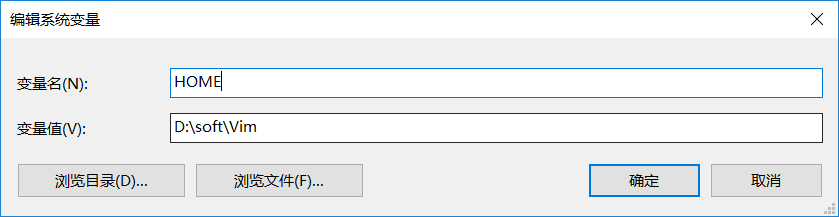
HOME

D:\soft\Vim

效果如下图所示:
在Path中将

D:\soft\Vim\vim81也添加进去.

现在修改安装目录的_vimrc就可以生效了.

参考: