



惯性聚合 高效追踪和阅读你感兴趣的博客、新闻、科技资讯
阅读原文 在惯性聚合中打开

推荐订阅源

cs.AI updates on arXiv.org
C
CERT Recently Published Vulnerability Notes
C
Cybersecurity and Infrastructure Security Agency CISA
P
Proofpoint News Feed
Security Latest
Security Latest
P
Privacy International News Feed
Threat Intelligence Blog | Flashpoint
AI
AI
Cisco Talos Blog
Cisco Talos Blog
K
Kaspersky official blog
S
Secure Thoughts
PCI Perspectives
PCI Perspectives
Simon Willison's Weblog
D
DataBreaches.Net
GbyAI
GbyAI
让小产品的独立变现更简单 - ezindie.com
大猫的无限游戏
大猫的无限游戏
T
Tailwind CSS Blog
The Cloudflare Blog
阮一峰的网络日志
阮一峰的网络日志
CTFtime.org: upcoming CTF events
罗磊的独立博客
V
Visual Studio Blog
aimingoo的专栏
aimingoo的专栏
H
Hackread – Cybersecurity News, Data Breaches, AI and More
IT之家
IT之家
V
V2EX
Last Week in AI
Last Week in AI
有赞技术团队
有赞技术团队
月光博客
月光博客
酷 壳 – CoolShell
酷 壳 – CoolShell
T
Tenable Blog
T
Threat Research - Cisco Blogs
T
Troy Hunt's Blog
V2EX - 技术
V2EX - 技术
S
Security @ Cisco Blogs
Security Archives - TechRepublic
Project Zero
Project Zero
The GitHub Blog
The GitHub Blog
Recent Commits to openclaw:main
L
Lohrmann on Cybersecurity
F
Full Disclosure
H
Help Net Security
博客园 - Franky
Stack Overflow Blog
Stack Overflow Blog
N
Netflix TechBlog - Medium
Engineering at Meta
Engineering at Meta
A
Arctic Wolf
O
OpenAI News
S
Securelist

博客园 - 三杯两盏淡酒

浏览器感染木马插件 访问overbridgenet.com恶意网站 升级windows 11 25h2的步骤(xjl456852原创) Dify纯内网dify插件离线安装支持多平台多架构跨架构(xjl456852原创) 2025骨传导 气传导耳机对比 大模型chatgpt search联网搜索插件与默认搜索兼容设置 解决 OSError: [WinError -1066598274] Windows Error 0xc06d007e (xjl456852原创) TeraCloud国外WebDav服务器免费25GB空间 同步文档 同步数据 bandizip批量压缩解压(xjl456852原创) notepad3 替代windows自带文本编辑器(xjl456852原创) nextcloud 使用markdown editor 编辑器(xjl456852整理) win10 使用tracetcp.exe的错误问题解决(xjl456852原创) clickhouse 复杂查询时嵌套连接join可能存在的异常解决(xjl456852原创) EA逆向生成数据库E-R图(mysql,mariadb数据库-->ER图) v13 及以后的版本处理方式(xjl456852原创) pycharm 输入中文汉字重叠(xjl456852原创) windows10安装gvim的_vimrc不生效的处理方法(xjl456852原创) webstrom破解-webstrom2018.2.4破解方法(xjl456852原创) 用户中心 - 博客园 前端跳转处理--房天下的访问页面部分ip自动跳转到登录页面的解决办法(xjl456852原创) maven项目运行tomcat7-maven-plugin:run时出现Caused by: java.lang.ClassNotFoundException: org.codehaus.plexus.util.Scanner(xjl456852原创)
Centos7 ubuntu 安装nginx
三杯两盏淡酒 · 2025-04-02 · via 博客园 - 三杯两盏淡酒

1.安装pcre,中文perl兼容正则,为了使nginx支持 http rewrite 模块

yum install pcre pcre-devel -y

2.安装 gcc, openssl

yum install gcc openssl openssl-devel -y

ubuntu安装:
sudo apt-get update 
sudo apt-get install libpcre3 libpcre3-dev  -y
sudo apt-get install openssl libssl-dev -y
sudo apt-get install zlib1g-dev -y

建立nginx用户

useradd nginx -s /sbin/nologin -M

echo $? 显示上一个命令退出的状态,0正常退出,其余都非正常

下载nginx,并解压:

wget http://nginx.org/download/nginx-1.27.1.tar.gz

注意:必须进入到Nginx目中:

nginx中看帮助

./configure --help

注意:必须进入到Nginx目中, --prefix为安装目录:

配置:

./configure --user=nginx --group=nginx --prefix=/opt/modules/nginx/ --with-http_stub_status_module --with-http_ssl_module --with-http_v2_module
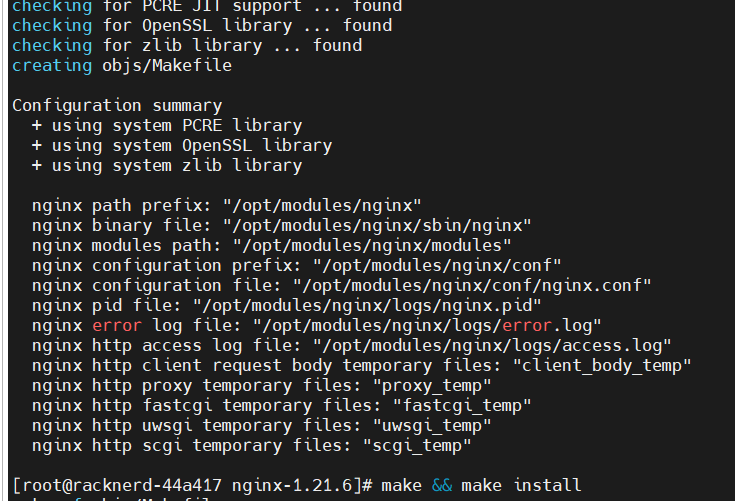
../../../../_resources/time/2024/09/25/1414f42e5992b506b9893b47f74be6a5_MD5.png*

make && sudo make install

检查语法:

/opt/modules/nginx/sbin/nginx -t

启动

sudo  /opt/modules/nginx/sbin/nginx

查看nginx启动情况:

netstat -ltunp | grep nginx

通过端口反查:

lsof -i :80

排错三部曲:

ping 192.168.176.100 物理是否通了

telnet 192.168.176.100 80 浏览器到web服务通不通

服务器本地是否正常 :curl 192.168.176.100

安装时可以查看安装错误:

cat /application/nginx/logs/error.log

发现centos7的防火墙阻挡80端口访问:

增加80端口访问:

firewall-cmd --zone=public --add-port=80/tcp

作为图片服务器:

先安装ftp服务器

Nginx配置:

location / {

    #root  html;

    root /home/ftpuser/www;

    index  index.html index.htm;

}

创建目录

sudo mkdir -p /home/ftpuser/www/images

sudo chown -R nginx:nginx /home/ftpuser/

sudo chmod -R 777 /home/ftpuser/

启动服务:

sudo sbin/nginx -c conf/nginx.conf

将图片上传至/home /ftpuser/www/images下,

就可以通过http://ip/image/图片.jpg  访问图片

修改export,修改了这个也没用,普通用户无权启动1024以下的端口:

export NGINX_HOME=/opt/modules/nginx  

export PATH=$NGINX_HOME/sbin:$PATH  

重启:
nginx -s reload

常见错误处理

提示

nginx 编译安装报错error: the HTTP rewrite module requires the PCRE library.

安装pcre.
[root@web_server01/usr/src/nginx-1.20.1]# yum -y install pcre

提示

./configure: error: C compiler cc is not found
源码和安装目录不能在同一目录,否则会有此错误

make[1]: *** [install] Error 1

make[1]: Leaving directory `/usr/local/nginx'

make: *** [install] Error 2