惯性聚合
高效追踪和阅读你感兴趣的博客、新闻、科技资讯
阅读原文
在惯性聚合中打开
即将跳转到惯性聚合
3
在聚合应用中查看完整内容和互动
立即跳转
取消
推荐订阅源
Google DeepMind News
C
Check Point Blog
J
Java Code Geeks
腾
腾讯CDC
Martin Fowler
MongoDB | Blog
H
Hackread – Cybersecurity News, Data Breaches, AI and More
博
博客园 - 三生石上(FineUI控件)
Apple Machine Learning Research
大猫的无限游戏
Engineering at Meta
罗
罗磊的独立博客
Last Week in AI
B
Blog
IT之家
S
SegmentFault 最新的问题
D
DataBreaches.Net
Cyber Security Advisories - MS-ISAC
GbyAI
博
博客园 - 聂微东
U
Unit 42
有赞技术团队
Y
Y Combinator Blog
MyScale Blog
博客园 - sunwugang
026.数据库Sqlserver解决远程连接问题
C# SqlSuger
C# DataTableToList
批处理自动删除指定文件夹中的文件夹以及文件
C# 开机自启动批处理bat文件
025.数据库下载&win10安装注意事项
024 数据库信息查询 + 连接串配置
C# Json操作
C# TextBox 新增文本并定位光标
C# base64转pdf + 上传至指定url
C# 猜字谜
C# 闲来笔记
StringHelper--字符串左右添加指定字符
Vue学习笔记72--element ui
Vue学习笔记71--histroy模式+hash模式
Vue学习笔记70--全局前置-路由守卫 + 后置路由守卫 + 独享守卫 + 组件内守卫
Vue学习笔记69--activated + deactivated
Vue学习笔记68--缓存路由组件
Vue学习笔记67--编程式路由导航
C# 将exe可执行程序设置为开机自启动
sunwugang
·
2025-01-06
·
via
博客园 - sunwugang
windows下将可执行exe设置为--开机自动运行程序
选中可执行程序(.exe)==》右键创建快捷方式
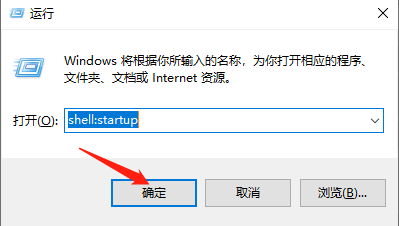
使用快捷键,win+r 输入: shell:startup
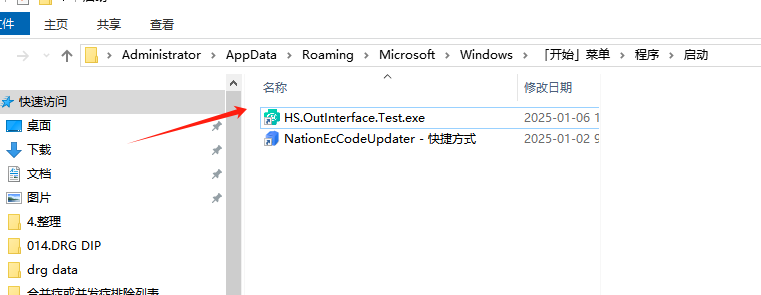
打开[启动文件夹]之后,将需要设置开机自启动的软件程序的快捷方式放入文件夹
电脑开机或者重启时,该【启动文件夹】下的软件则会自动开启运行
博客内容主要用于日常学习记录,内容比较随意,如有问题,还需谅解!!!
此内容由惯性聚合(RSS阅读器)自动聚合整理,仅供阅读参考。
原文来自
— 版权归原作者所有。