







Vue UI 组件库:https://element.eleme.cn
移动端常用UI组件库
PC端常用UI组件库
Element UI
第一步:安装,npm i element-ui -S
第二步:按需引入,npm install babel-plugin-component -D
第三步:babel.config.js配置
 1 module.exports = {
 2   presets: [
 3     '@vue/cli-plugin-babel/preset',
 4     // [["es2015", { "modules": false }]],  版本太老
 5     ["@babel/preset-env", { "modules": false }],
 6   ],
 7   "plugins": [
 8     [
 9       "component",
10       {
11         "libraryName": "element-ui",
12         "styleLibraryName": "theme-chalk"
13       }
14     ]
15   ]
16 }
第四步:按需引入 Element(请查看:https://element.eleme.cn/#/zh-CN/component/quickstart)
1 import Vue from 'vue';
2 import { Button } from 'element-ui';
3
4 Vue.prototype.$ELEMENT = { size: 'small', zIndex: 3000 };
5 Vue.use(Button);
。。。。。。
element ui 版本安装控制操作步骤:
示例如下所示:
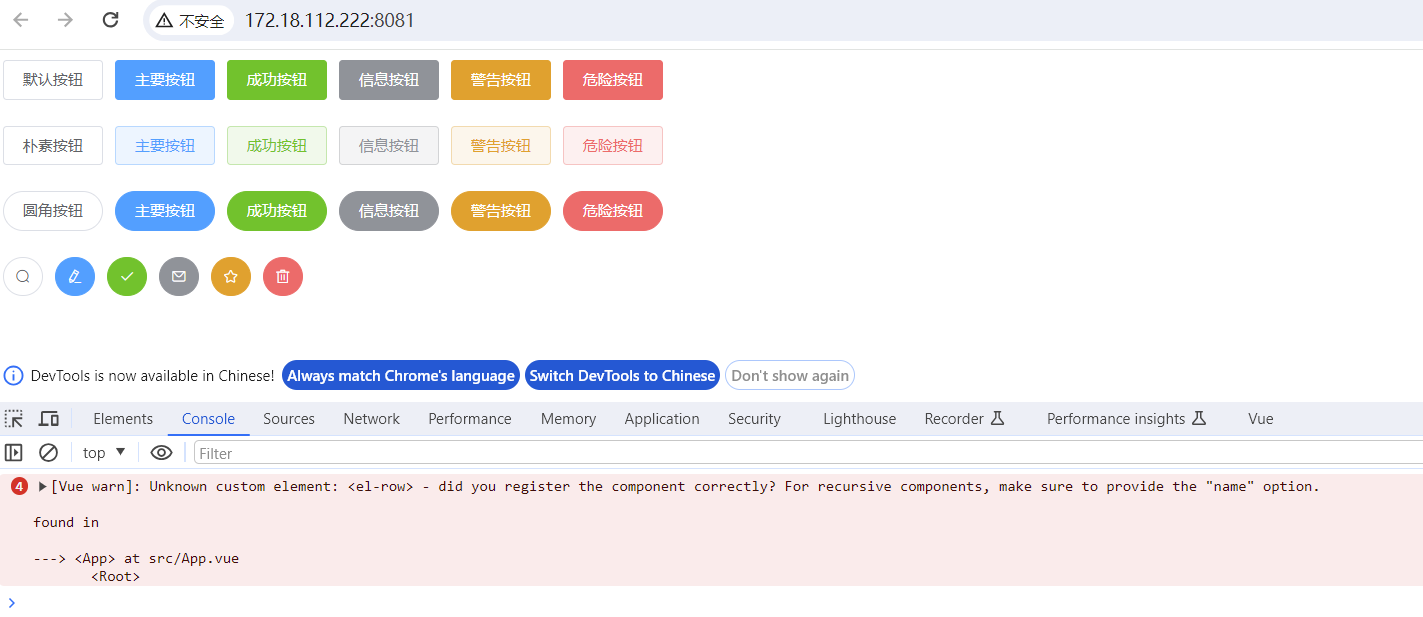
注:图中警告信息,是因为没有应用<el-row> 组件(该问题在示例代码中已处理)
main.js
 1 // 引入Vue
 2 import Vue from 'vue'
 3 // 引入App
 4 import App from './App.vue'
 5
 6 // 按需引入
 7 import { Button, Select, Row } from 'element-ui';
 8 /* Vue.component(Button.name, Button);
 9 Vue.component(Select.name, Select); */
10 Vue.use(Button)
11 Vue.use(Select)
12 Vue.use(Row)
13 Vue.prototype.$ELEMENT = { size: 'small', zIndex: 3000 };
14
15 /* 完整引入
16 import ElementUI from 'element-ui'
17 import 'element-ui/lib/theme-chalk/index.css'
18 Vue.use(ElementUI); */
19
20 // 配置提示
21 Vue.config.productionTip = false
22
23 new Vue({
24   render: h => h(App)
25 }).$mount('#app')
App.vue
 1 <template>
 2   <div>
 3     <el-row>
 4       <el-button>默认按钮</el-button>
 5       <el-button type="primary">主要按钮</el-button>
 6       <el-button type="success">成功按钮</el-button>
 7       <el-button type="info">信息按钮</el-button>
 8       <el-button type="warning">警告按钮</el-button>
 9       <el-button type="danger">危险按钮</el-button>
10     </el-row>
11     <br><br>
12     <el-row>
13       <el-button plain>朴素按钮</el-button>
14       <el-button type="primary"
15                  plain>主要按钮</el-button>
16       <el-button type="success"
17                  plain>成功按钮</el-button>
18       <el-button type="info"
19                  plain>信息按钮</el-button>
20       <el-button type="warning"
21                  plain>警告按钮</el-button>
22       <el-button type="danger"
23                  plain>危险按钮</el-button>
24     </el-row>
25     <br><br>
26     <el-row>
27       <el-button round>圆角按钮</el-button>
28       <el-button type="primary"
29                  round>主要按钮</el-button>
30       <el-button type="success"
31                  round>成功按钮</el-button>
32       <el-button type="info"
33                  round>信息按钮</el-button>
34       <el-button type="warning"
35                  round>警告按钮</el-button>
36       <el-button type="danger"
37                  round>危险按钮</el-button>
38     </el-row>
39     <br><br>
40     <el-row>
41       <el-button icon="el-icon-search"
42                  circle></el-button>
43       <el-button type="primary"
44                  icon="el-icon-edit"
45                  circle></el-button>
46       <el-button type="success"
47                  icon="el-icon-check"
48                  circle></el-button>
49       <el-button type="info"
50                  icon="el-icon-message"
51                  circle></el-button>
52       <el-button type="warning"
53                  icon="el-icon-star-off"
54                  circle></el-button>
55       <el-button type="danger"
56                  icon="el-icon-delete"
57                  circle></el-button>
58     </el-row>
59   </div>
60
61 </template>
62
63 <script>
64 export default {
65   name: 'App',
66   components: {}
67 }
68 </script>
69
70 <style scoped>
71 </style>
此内容由惯性聚合(RSS阅读器)自动聚合整理,仅供阅读参考。 原文来自 — 版权归原作者所有。