

惯性聚合 高效追踪和阅读你感兴趣的博客、新闻、科技资讯
阅读原文 在惯性聚合中打开

推荐订阅源

WordPress大学
WordPress大学
Microsoft Security Blog
Security Archives - TechRepublic
V
Visual Studio Blog
宝玉的分享
宝玉的分享
IT之家
IT之家
人人都是产品经理
人人都是产品经理
T
The Blog of Author Tim Ferriss
I
InfoQ
B
Blog RSS Feed
T
Threatpost
博客园_首页
M
MIT News - Artificial intelligence
Spread Privacy
Spread Privacy
cs.CL updates on arXiv.org
Know Your Adversary
Know Your Adversary
U
Unit 42
Engineering at Meta
Engineering at Meta
C
Cyber Attacks, Cyber Crime and Cyber Security
月光博客
月光博客
Scott Helme
Scott Helme
T
Tor Project blog
有赞技术团队
有赞技术团队
AWS News Blog
AWS News Blog
让小产品的独立变现更简单 - ezindie.com
Last Week in AI
Last Week in AI
S
Schneier on Security
Vercel News
Vercel News
博客园 - Franky
C
Cybersecurity and Infrastructure Security Agency CISA
L
LINUX DO - 热门话题
NISL@THU
NISL@THU
L
LangChain Blog
爱范儿
爱范儿
Google DeepMind News
The GitHub Blog
The GitHub Blog
雷峰网
雷峰网
Latest news
Latest news
C
CXSECURITY Database RSS Feed - CXSecurity.com
Hugging Face - Blog
Hugging Face - Blog
Exploit-DB.com RSS Feed
www.infosecurity-magazine.com
G
GRAHAM CLULEY
S
Security Affairs
A
About on SuperTechFans
K
KPMG report finds enterprise disconnect between AI and its ROI | CIO
大猫的无限游戏
大猫的无限游戏
W
WeLiveSecurity
Cisco Talos Blog
Cisco Talos Blog
罗磊的独立博客

博客园 - soar.pang

20260313 配置Python环境,执行导出批量数据到Excel,代码由Cursor 生成 metabase 在Ubuntu 20版本上的服务自动重启配置 python调度高德API,计算经度,维度距离 metabase 使用记录 OCI 2021.09.15-1 Kettle 公式 2021.03.03 Kettle 环境搭建--系统环境Ubuntu20.04 2020.12.31 Oracle 12c 服务器,PL/SQL连接访问提示不支持和用户密码不正确 2020.10.13 Python 处理数据生成多Sheet Excel Oracle 12C RAC环境搭建 Linux 环境中Oracle 安装遇的问题 Postgresql windows 环境安装一 小米智能驱蚊器体验 PowerBI 基础图表 企业单位 【第一周】三维可视之基础运用 测验(一) Python科学计算三维可视化 Pg数据库的基础安装 Windows Server 任务计划执行.exe 20200211 Oracle监听启动异常
metabase 搭建使用记录
soar.pang · 2022-03-11 · via 博客园 - soar.pang

官网:

1. https://www.metabase.com/

这个工具挺好的,解决了UI 设计问题。

安装前保证本机Java 包, java8以上

我采用的下载jar, 放入D盘,cmd进入目录

1. 命令:java  -jar metabase.jar

就能运行, 很方便。 

当然,考虑到以后, 网站自动运行, 后台运行。 请写 .bat 文件。

目前我这不是安装在linux系统上面的, 相对涉及权限,运行,启动等。

当然,我在windows环境也测试过运行如下:
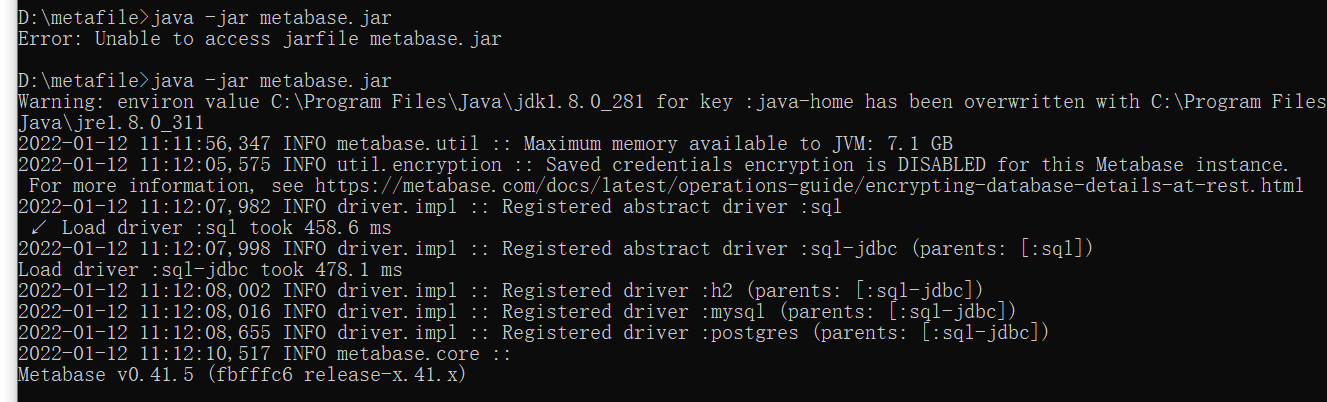
 更新还是很方便, 只需要替换jar包就能系统更新, 并且会影响之前已经创建的内容。 

在我搭建使用metabase相对比较困难的, 应该是对HTTPS证书的安装, 它提供了几种方式, 自己生成,或者把你的证书上传后编译成metabase认同的证书格式。才能使用。

关于从源文件去修改代码来实现功能,我不是很提倡了。 因为这样会影响日后更新。 

我这边还是直接实用为主, 有更新版本,就更新版本。

启动运行命令:

metabase 后台运行命令:
nohup java -jar /metabasefile/metabase.jar > metabase01.log 2>&1 &
java -jar metabase.jar

https运行模式命令:

export MB_JETTY_SSL="true"
export MB_JETTY_SSL_PORT="8443"
export MB_JETTY_SSL_KEYSTORE="/jetty2/keystore"
export MB_JETTY_SSL_KEYSTORE_PASSWORD="123456"
nohup java -jar /metabasefile/metabase.jar > metabase01.log 2>&1 &

生成相应证书文件的方式:

sudo openssl pkcs12 -export -inkey START-rmgch-cn.key -in cert-chain.txt -out START-rmgch-cn.pkcs12
sudo keytool -importkeystore -srckeystore START-rmgch-cn.pkcs12 -srcstoretype PKCS12 -destkeystore keystore

java -jar metabase.jar

sudo apt install openjdk-13-jre-headless

sudo cp /jetty2/jetty2.crt /usr/local/share/ca-certificates
sudo update-ca-certificates

网页运行后访问地址:

https://localhost:8443/
http://localhost:3000/

也许并不是你需要的内容,这只是我人生的一些痕迹. -- soar.pang