




转载:https://www.cnblogs.com/simon-xie/p/15730368.html Windows系统
一、下载地址
https://github.com/alibaba/nacos
二、新建数据库
新建一个实例名为nacos的数据库,并执行nacos/conf下的nacos-mysql.sql文件创建表
三、修改配置
打开conf下的application.properties文件,
修改ip和port:
nacos.inetutils.ip-address=192.168.1.199
server.port=8848
#*************** Spring Boot Related Configurations ***************#
### Default web context path:
server.servlet.contextPath=/nacos
### Include message field
server.error.include-message=ALWAYS
### Default web server port:
server.port=8848

#*************** Network Related Configurations ***************#
### If prefer hostname over ip for Nacos server addresses in cluster.conf:
# nacos.inetutils.prefer-hostname-over-ip=false

### Specify local server's IP:
nacos.inetutils.ip-address=192.168.1.199
修改数据库连接
 db.url.0=jdbc:mysql://127.0.0.1:3306/nacos?characterEncoding=utf8&connectTimeout=1000&socketTimeout=3000&autoReconnect=true&useUnicode=true&useSSL=false&serverTimezone=UTC
 db.user.0=root
 db.password.0=root
四、单机模式
1、直接修改配置文件
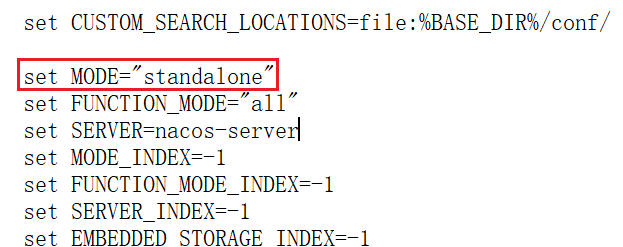
打开bin/startup.cmd 文件,将MODE从cluster改为 standalone,如下:
2、执行startup.cmd时追加standalone参数: ./startup.sh -m standalone &
五、将Nacos加入windows服务
1、从https://github.com/winsw/winsw/releases下载 WINSW.NET4.exe 和 sample-minimal.xml
2、把WINSW.NET4.exe 和 sample-minimal.xml的名字修改为相同的名字并放到nacos的bin目录下,如nacosService.exe和nacosService.xml
3、配置修改名称后的sample-minimal.xml

1 <service>
2   <id>nacos-id-000001</id>
3   <name>Nacos</name>
4   <description>Nacos2</description>
5   <executable>%BASE%\startup.cmd</executable>
6   <arguments>-m standalone</arguments>
7   <logpath>%BASE%\serviceLogs</logpath>
8 </service>
4、bin目录下:安装和卸载服务
 .\nacosService.exe install    生成windows服务
 nacosService.exe uninstall    卸载windows服务
六、访问Nacos
访问http://localhost:8848/nacos/index.html,用户名和口令均为nacos
要修改nacos默认的登陆密码,可以进入mysql数据库,打开users表进行新用户的添加,密码采用的是BCrypt加密,把加密后的密码存到数据库中即可。
Bcrypt密码在线生成计算器 http://www.ab126.com/goju/10822.html
添加后要重启Nacos服务
此内容由惯性聚合(RSS阅读器)自动聚合整理,仅供阅读参考。 原文来自 — 版权归原作者所有。