







https://www.jianshu.com/p/5262d7144651
同事那里搬过来的,防止丢失.
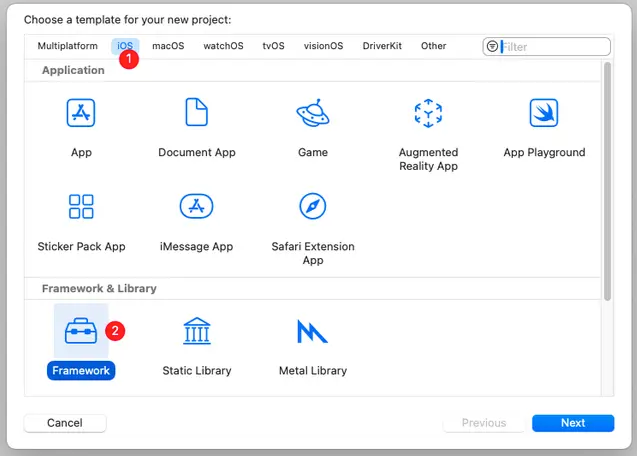
1、新建一个framework工程
2、添加代码
非本地集成的第三方
添加podfile文件后用Cocoapods集成
本地代码
把需要打包的项目文件直接拖进来
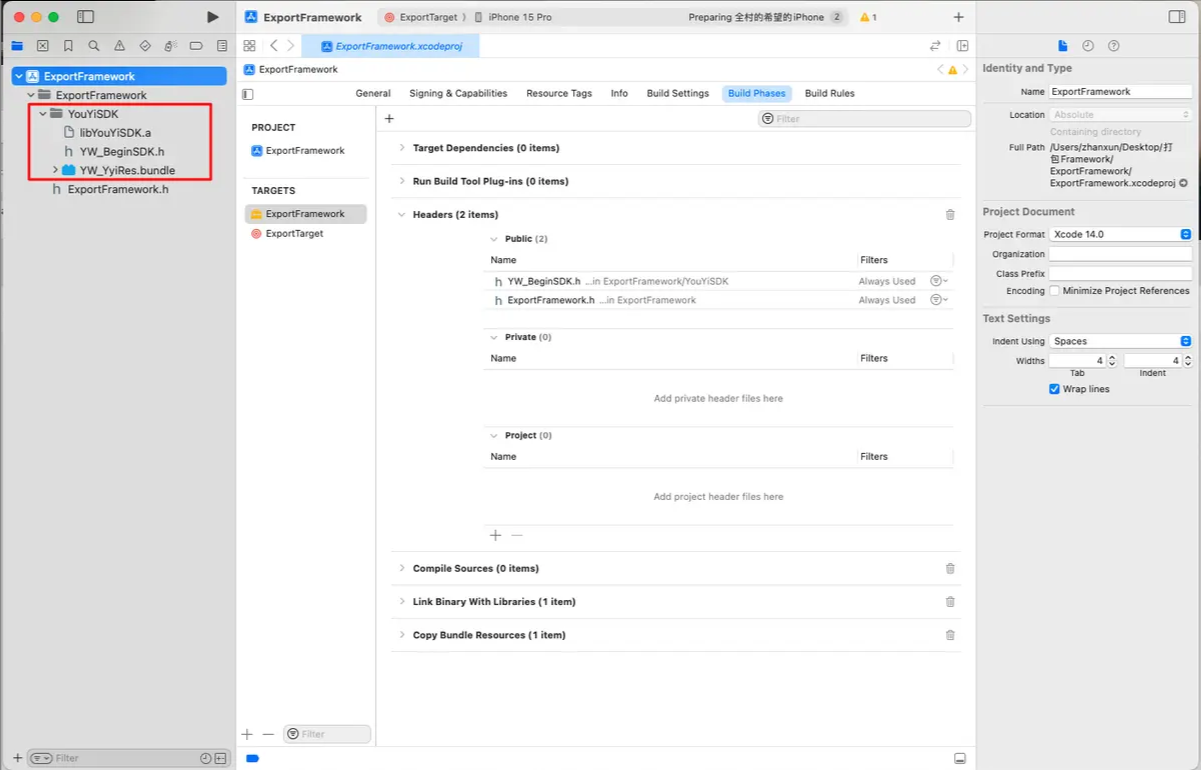
设置公开和需要隐藏的代码(需要公开的放Public,隐藏的放Project)

设置支持的版本

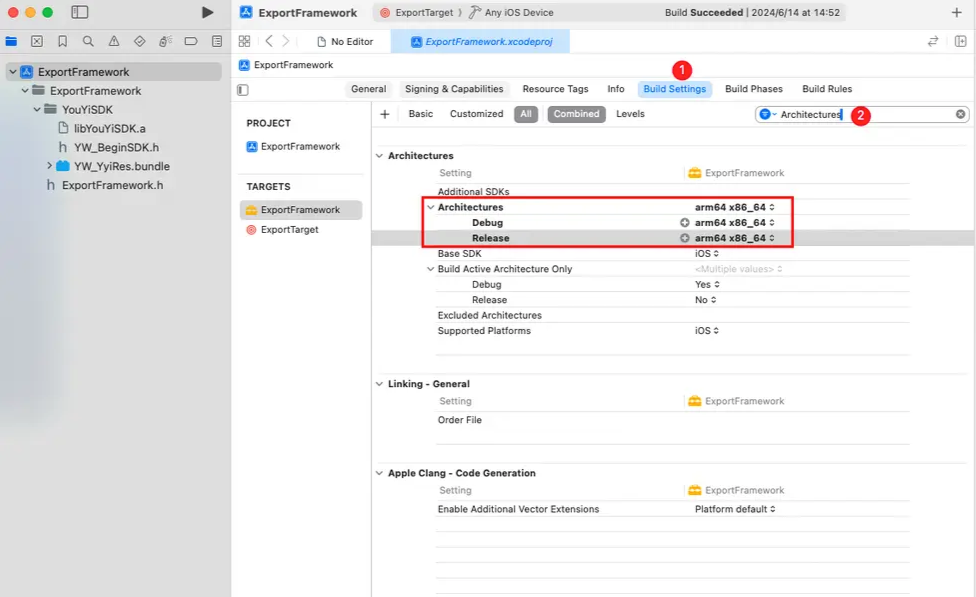
4、设置Architectures arm64 x86_64
5、设置Mach-O Type static 静态库
framework可以是动态库也可以是静态库,对于系统的framework是动态库,而用户制作的framework只能是静态库
普通framework 的Js代码

#!/bin/sh
#要build的target名
TARGET_NAME=${PROJECT_NAME}
if [[ $1 ]]
then
TARGET_NAME=$1
fi
UNIVERSAL_OUTPUT_FOLDER="${SRCROOT}/${PROJECT_NAME}/"

#创建输出目录,并删除之前的framework文件
mkdir -p "${UNIVERSAL_OUTPUT_FOLDER}"
rm -rf "${UNIVERSAL_OUTPUT_FOLDER}/${TARGET_NAME}.framework"

#分别编译模拟器和真机的Framework
xcodebuild -target "${TARGET_NAME}" ONLY_ACTIVE_ARCH=NO -configuration ${CONFIGURATION} -sdk iphoneos BUILD_DIR="${BUILD_DIR}" BUILD_ROOT="${BUILD_ROOT}" clean build
xcodebuild -target "${TARGET_NAME}" ONLY_ACTIVE_ARCH=NO -configuration ${CONFIGURATION} -sdk iphonesimulator BUILD_DIR="${BUILD_DIR}" BUILD_ROOT="${BUILD_ROOT}" clean build

#拷贝framework到univer目录
cp -R "${BUILD_DIR}/${CONFIGURATION}-iphonesimulator/${TARGET_NAME}.framework" "${UNIVERSAL_OUTPUT_FOLDER}"

lipo "${BUILD_DIR}/${CONFIGURATION}-iphonesimulator/${TARGET_NAME}.framework/${TARGET_NAME}" -remove arm64 -output "${BUILD_DIR}/${CONFIGURATION}-iphonesimulator/${TARGET_NAME}.framework/${TARGET_NAME}"


#合并framework,输出最终的framework到build目录
lipo -create -output "${UNIVERSAL_OUTPUT_FOLDER}/${TARGET_NAME}.framework/${TARGET_NAME}" "${BUILD_DIR}/${CONFIGURATION}-iphonesimulator/${TARGET_NAME}.framework/${TARGET_NAME}" "${BUILD_DIR}/${CONFIGURATION}-iphoneos/${TARGET_NAME}.framework/${TARGET_NAME}"

#删除编译之后生成的无关的配置文件
dir_path="${UNIVERSAL_OUTPUT_FOLDER}/${TARGET_NAME}.framework/"
for file in ls $dir_path
do
if [[ ${file} =~ ".xcconfig" ]]
then
rm -f "${dir_path}/${file}"
fi
done
#判断build文件夹是否存在,存在则删除
if [ -d "${SRCROOT}/build" ]
then
rm -rf "${SRCROOT}/build"
fi
rm -rf "${BUILD_DIR}/${CONFIGURATION}-iphonesimulator" "${BUILD_DIR}/${CONFIGURATION}-iphoneos"
#打开合并后的文件夹
open "${UNIVERSAL_OUTPUT_FOLDER}"


# 普通framework 合并 真机模拟器的包
1、终端执行命令:lipo -create 第一个framework文件下二进制文件的绝对路径 第二个framework文件下二进制文件的绝对路径 -output 最终的二进制文件路径   如:lipo -create **/真机/WYBasisKit.framework/WYBasisKit **/模拟器/WYBasisKit.framework/WYBasisKit -output WYBasisKit
2、将合并的二进制文件拖进任何一个framework,替换掉原来的,然后把这个新的framework拖进项目就可以使用了

# XCFramework
xcodebuild -create-xcframework \
-framework /path/to/Release-iphoneos/WYBasisKit.framework \
-framework /path/to/Release-iphonesimulator/WYBasisKit.framework \
-output /path/to/output/WYBasisKit.xcframework


 xcframework的脚本


#!/bin/sh

# 要 build 的 target 名称
TARGET_NAME=${PROJECT_NAME}
if [[ $1 ]]; then
  TARGET_NAME=$1
fi

# 输出目录
XCFRAMEWORK_OUTPUT_FOLDER="${SRCROOT}/${PROJECT_NAME}/"
ARCHIVE_PATH="${SRCROOT}/${PROJECT_NAME}/Archives"

# 创建输出目录并清理之前的文件
mkdir -p "${XCFRAMEWORK_OUTPUT_FOLDER}"
rm -rf "${XCFRAMEWORK_OUTPUT_FOLDER}/${TARGET_NAME}.xcframework"
rm -rf "${ARCHIVE_PATH}"

# 构建 iOS 真机(iphoneos)Framework
xcodebuild archive \
  -scheme "${TARGET_NAME}" \
  -sdk iphoneos \
  -configuration ${CONFIGURATION} \
  -archivePath "${ARCHIVE_PATH}/${TARGET_NAME}-iphoneos.xcarchive" \
  SKIP_INSTALL=NO \
  BUILD_LIBRARY_FOR_DISTRIBUTION=YES

# 构建 iOS 模拟器(iphonesimulator)Framework
xcodebuild archive \
  -scheme "${TARGET_NAME}" \
  -sdk iphonesimulator \
  -configuration ${CONFIGURATION} \
  -archivePath "${ARCHIVE_PATH}/${TARGET_NAME}-iphonesimulator.xcarchive" \
  SKIP_INSTALL=NO \
  BUILD_LIBRARY_FOR_DISTRIBUTION=YES

# 创建 XCFramework
xcodebuild -create-xcframework \
  -framework "${ARCHIVE_PATH}/${TARGET_NAME}-iphoneos.xcarchive/Products/Library/Frameworks/${TARGET_NAME}.framework" \
  -framework "${ARCHIVE_PATH}/${TARGET_NAME}-iphonesimulator.xcarchive/Products/Library/Frameworks/${TARGET_NAME}.framework" \
  -output "${XCFRAMEWORK_OUTPUT_FOLDER}/${TARGET_NAME}.xcframework"

# 清理临时文件
rm -rf "${ARCHIVE_PATH}"

# 打开生成的 XCFramework 文件夹
open "${XCFRAMEWORK_OUTPUT_FOLDER}"
此内容由惯性聚合(RSS阅读器)自动聚合整理,仅供阅读参考。 原文来自 — 版权归原作者所有。