惯性聚合 高效追踪和阅读你感兴趣的博客、新闻、科技资讯
阅读原文 在惯性聚合中打开

推荐订阅源

酷 壳 – CoolShell
酷 壳 – CoolShell
雷峰网
雷峰网
H
Hackread – Cybersecurity News, Data Breaches, AI and More
Spread Privacy
Spread Privacy
H
Hacker News: Front Page
PCI Perspectives
PCI Perspectives
Webroot Blog
Webroot Blog
罗磊的独立博客
H
Heimdal Security Blog
TaoSecurity Blog
TaoSecurity Blog
Exploit-DB.com RSS Feed
大猫的无限游戏
大猫的无限游戏
月光博客
月光博客
cs.CV updates on arXiv.org
Google Online Security Blog
Last Week in AI
Last Week in AI
美团技术团队
Help Net Security
Help Net Security
The Hacker News
The Hacker News
C
Cisco Blogs
T
The Blog of Author Tim Ferriss
J
Java Code Geeks
The Register - Security
IT之家
IT之家
WordPress大学
WordPress大学
Jina AI
Jina AI
Recent Commits to openclaw:main
H
Help Net Security
cs.CL updates on arXiv.org
T
Threat Research - Cisco Blogs
P
Proofpoint News Feed
NISL@THU
NISL@THU
爱范儿
爱范儿
The GitHub Blog
The GitHub Blog
Scott Helme
Scott Helme
V
Vulnerabilities – Threatpost
B
Blog
T
Tenable Blog
博客园 - 三生石上(FineUI控件)
T
The Exploit Database - CXSecurity.com
S
Security Affairs
小众软件
小众软件
Hacker News: Ask HN
Hacker News: Ask HN
Security Latest
Security Latest
Threat Intelligence Blog | Flashpoint
W
WeLiveSecurity
A
Arctic Wolf
L
LINUX DO - 热门话题
Google DeepMind News
M
MIT News - Artificial intelligence

博客园 - 衡子

Ubuntu24.04更改SSH端口 记录安装过程 Azure CLI创建管理员用户 创建VMSS中的instance 创建不带公网IP的VM Azure AD访问Azure Storage Azure Linux VM使用Managed Identity获取Key-vault的Secret Azure AD SSO with Google Cloud Identity 通过VM SWAP OS DISK升级VM 通过API获取Azure KeyVault Securet Azure Front Door添加自定义域名 VM间网络PPS和带宽测试 Azure获取access token的方法 VM间记录时延 Windows Terminal的一些配置 安装hping Azure解除不再使用Directory的关联 使用VSCode Remote Containers功能实现开发环境统一 Azure AKS容器网络详解
Azure LSv3系列VM 自动挂载NVMe本地磁盘
衡子 · 2022-08-16 · via 博客园 - 衡子

Azure 的Lsv3 系列虚拟机具有高吞吐量、低延迟、直接映射的本地 NVMe 存储。 这些 VM 采用第三代 Intel® Xeon® Platinum 8370C (Ice Lake) 处理器。Lsv3 系列 VM 的规格从 8 到 80 个 vCPU 不等。 每个 vCPU 分配了 8 GiB 内存,每 8 个 vCPU 分配一个 1.92TB 的 NVMe SSD 设备。如下表:

大小

vCPU

本地NVMe容量

NVMe性能读取IOPS/MBps

最大云盘数量

网络带宽Gbps

L8s_v3

8

1x1.92TB

400000/2000

16

12.5

L16s_v3

16

2x1.92TB

800000/4000

32

12.5

L32s_v3

32

4x1.92TB

1.5M/8000

32

16

L48s_v3

48

5x1.92TB

2.2M/14000

32

24

L64s_v3

64

8x1.92TB

2.9M/16000

32

30

L80s_v3

80

10x1.92TB

3.8M/20000

32

32

由于NVMe是本地盘,在机器关机等动作时,会造成VM被重新分配到新的硬件上。在每次VM停机-启动后,Disk是新的NVMe盘,需要重新挂载。

这里介绍两种方式,在VM重新启动后,自动挂载。

1 采用服务的模式

创建格式化、挂载脚本,位于目录/usr/bin/mystart.sh

如果挂载点不存在,创建挂载目录;如果disk没有格式化,格式化disk并挂载,并做相应的记录:

#!/bin/sh
echo "written via startup-script" + $(date) >> /tmp/myScript.txt
[ -d /data ] || mkdir /data
sudo mount /dev/nvme0n1 /data
ret=$?
if [ $ret -ne 0 ]; then
        sudo mkfs.xfs -f /dev/nvme0n1
        sudo mount /dev/nvme0n1 /data
        echo "format and mount to the folder" >> /tmp/myScript.txt
else
        echo "mount success" >> /tmp/myScript.txt
fi

在/etc/system/system/目录下创建服务文件:

cat /etc/systemd/system/my-service.service

[Unit]
Description=My custom startup script

[Service]
ExecStart=/usr/bin/mystart.sh start

[Install]
WantedBy=multi-user.target

创建完成后,创建开机启动项,并启动服务:

systemctl enable my-service
systemctl start my-service


2 采用crontab中定义启动脚本模式

编辑crontab:

@reboot /usr/bin/mystart.sh

每次启动时,都运行此脚本。

3 检查

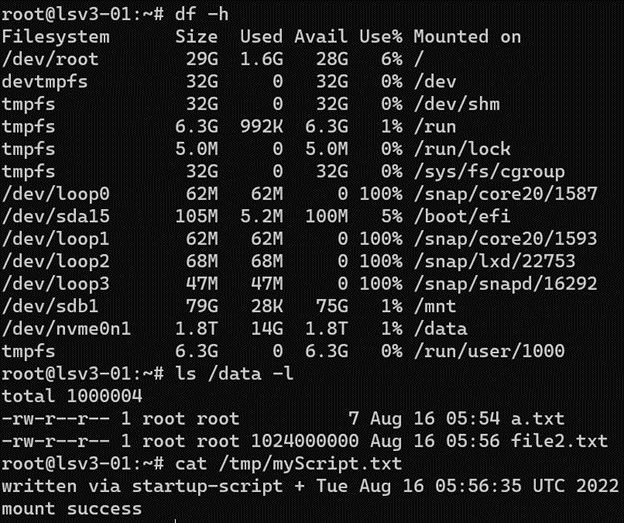
前面介绍的两种情况,分别在portal上stop VM,再start VM,模拟底层硬件更换场景,启动后,查看disk挂载情况:
 

查看脚本的日志:


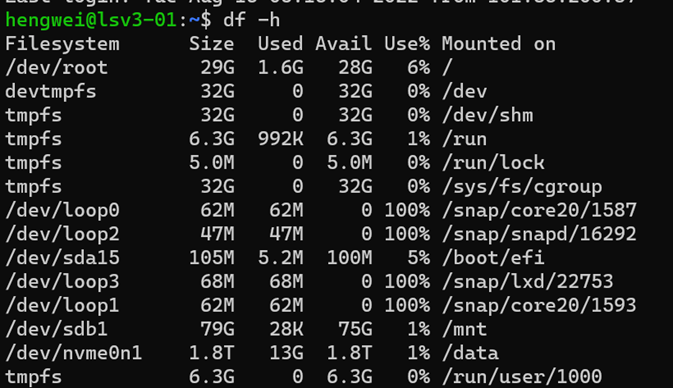
如果在VM内部重启,VM不更换底层硬件,磁盘上的内容应该保留: