

惯性聚合 高效追踪和阅读你感兴趣的博客、新闻、科技资讯
阅读原文 在惯性聚合中打开

推荐订阅源

T
Threat Research - Cisco Blogs
让小产品的独立变现更简单 - ezindie.com
月光博客
月光博客
V
Vulnerabilities – Threatpost
cs.CV updates on arXiv.org
S
Secure Thoughts
Microsoft Azure Blog
Blog — PlanetScale
Blog — PlanetScale
Exploit-DB.com RSS Feed
T
Tailwind CSS Blog
S
SegmentFault 最新的问题
钛媒体:引领未来商业与生活新知
钛媒体:引领未来商业与生活新知
云风的 BLOG
云风的 BLOG
The Last Watchdog
The Last Watchdog
L
LINUX DO - 热门话题
酷 壳 – CoolShell
酷 壳 – CoolShell
WordPress大学
WordPress大学
AWS News Blog
AWS News Blog
美团技术团队
G
Google Developers Blog
宝玉的分享
宝玉的分享
www.infosecurity-magazine.com
C
CXSECURITY Database RSS Feed - CXSecurity.com
Recent Commits to openclaw:main
I
InfoQ
小众软件
小众软件
Google DeepMind News
P
Privacy & Cybersecurity Law Blog
Stack Overflow Blog
Stack Overflow Blog
Webroot Blog
Webroot Blog
D
DataBreaches.Net
IT之家
IT之家
PCI Perspectives
PCI Perspectives
人人都是产品经理
人人都是产品经理
Hacker News: Ask HN
Hacker News: Ask HN
L
LangChain Blog
SecWiki News
SecWiki News
cs.CL updates on arXiv.org
C
Cisco Blogs
T
Threatpost
P
Proofpoint News Feed
Y
Y Combinator Blog
Cloudbric
Cloudbric
T
Tor Project blog
量子位
博客园_首页
B
Blog
Hugging Face - Blog
Hugging Face - Blog
GbyAI
GbyAI
D
Darknet – Hacking Tools, Hacker News & Cyber Security

博客园 - 衡子

Ubuntu24.04更改SSH端口 记录安装过程 Azure CLI创建管理员用户 创建VMSS中的instance 创建不带公网IP的VM Azure LSv3系列VM 自动挂载NVMe本地磁盘 Azure AD访问Azure Storage Azure Linux VM使用Managed Identity获取Key-vault的Secret Azure AD SSO with Google Cloud Identity 通过API获取Azure KeyVault Securet Azure Front Door添加自定义域名 VM间网络PPS和带宽测试 Azure获取access token的方法 VM间记录时延 Windows Terminal的一些配置 安装hping Azure解除不再使用Directory的关联 使用VSCode Remote Containers功能实现开发环境统一 Azure AKS容器网络详解
通过VM SWAP OS DISK升级VM
衡子 · 2022-03-01 · via 博客园 - 衡子

Azure的VM提供交换OS Disk的方式,对VM进行升级、测试等。这里介绍如何通过Azure CLI实现此功能。

一 环境准备

1  创建两台VM

两台VM如下,分别安装Apache2和Nginx

VM01: Ubuntu21.01 + Apache2

VM02: Ubuntu21.01 + Nginx

2 获取VM的相关参数

获取VM Disk的名称:

vm01diskname=$( az vm list -g switchdisk --query "[?name=='vm01']" \
   | jq -r .[].storageProfile.osDisk.name)

vm02diskname=$( az vm list -g switchdisk --query "[?name=='vm02']" \
   | jq -r .[].storageProfile.osDisk.name)

3 创建VM02 Disk Snapshot 

通过下面的命令创建VM02 Disk的Snapshot:

az snapshot create -g switchdisk -n vm02-s2 --source $vm02diskname \
   --hyper-v-generation V2

4 通过Snapshot创建新的Disk

从snapshot创建disk:

az disk create -g switchdisk -n vm02disk04 --location westus2 --zone 1 \
   --source vm02-s2 --hyper-v-generation V2

获取diskid: 

diskid=$(az disk list --query "[?name=='vm02disk04']" | jq -r .[].id)

二 交换OS Disk 

通过下面的命令交换OS Disk:

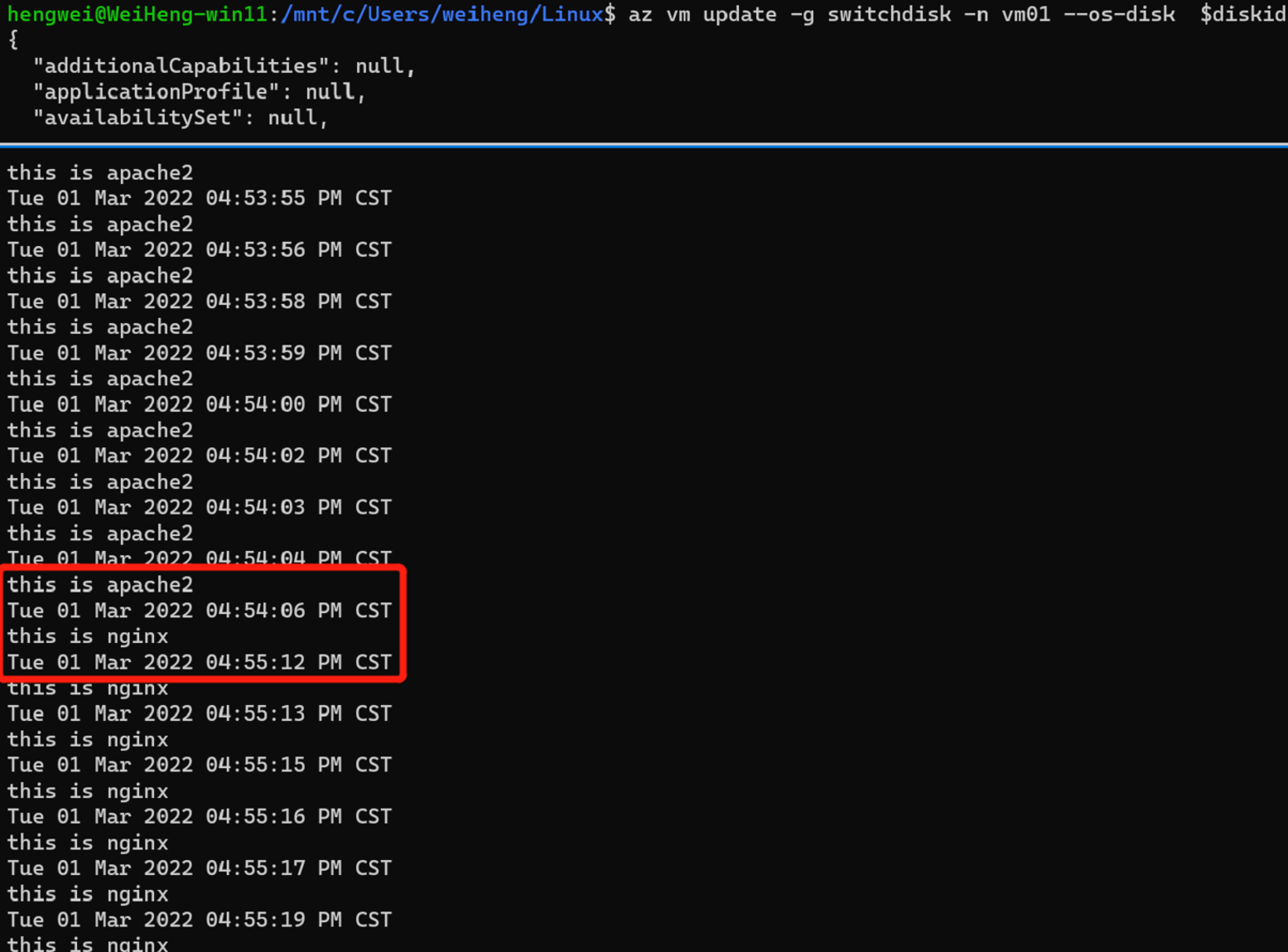
az vm update -g switchdisk -n vm01 --os-disk $diskid

可以观察到,大约1分钟左右,VM的OS更换成新的disk:
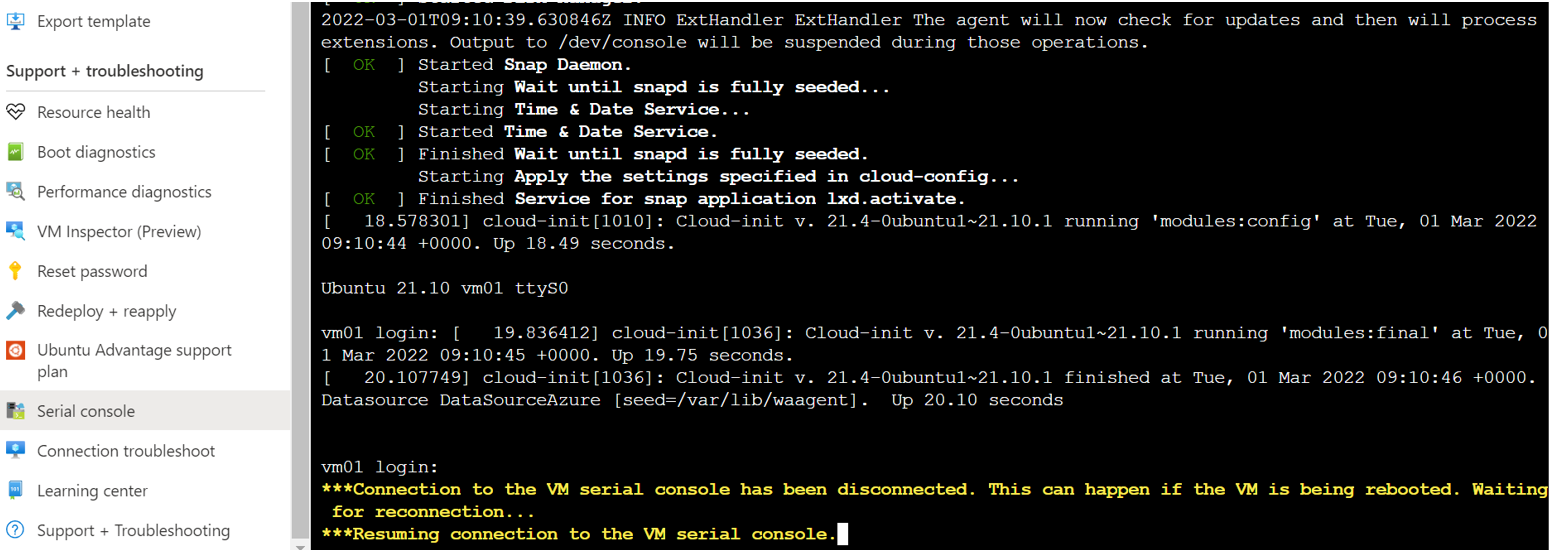
 同样,在VM的console中可以看到VM重新启动,挂载新系统:
 

三 总结

通过更换VM OS Disk的方式,可以非常方便的升级VM的系统。