





LangExtract是一个 Python 库,利用大型语言模型(LLMs)从非结构化文本中提取结构化信息
安装
import langextract as lx
import textwrap

# 1. 定义提示词
prompt = textwrap.dedent("""
Extract characters, emotions, and relationships in order of appearance.
Use exact text for extractions. Do not paraphrase or overlap entities.
Provide meaningful attributes for each entity to add context.
""")

# 2. 提供高质量示例
examples = [
    lx.data.ExampleData(
        text="ROMEO. But soft! What light through yonder window breaks? It is the east, and Juliet is the sun.",
        extractions=[
            lx.data.Extraction(extraction_class="character", extraction_text="ROMEO", attributes={"emotional_state": "wonder"}),
            lx.data.Extraction(extraction_class="emotion", extraction_text="But soft!", attributes={"feeling": "gentle awe"}),
            lx.data.Extraction(extraction_class="relationship", extraction_text="Juliet is the sun", attributes={"type": "metaphor"}),
        ],
    )
]

# 3. 对新文本进行抽取
input_text = "Lady Juliet gazed longingly at the stars, her heart aching for Romeo"

result = lx.extract(
    text_or_documents=input_text,
    prompt_description=prompt,
    examples=examples,
    language_model_type=lx.inference.OllamaLanguageModel,
    model_id="qwen2.5:7b",
    model_url="http://192.168.0.220:11434",
    temperature=0.3,
    fence_output=False,
    use_schema_constraints=False
)

for extraction in result.extractions:
      print(f"Class: {extraction.extraction_class}")
      print(f"Text: {extraction.extraction_text}")
      print(f"Attributes: {extraction.attributes}")

print("\n✅ SUCCESS! Ollama is working with langextract")

# 4. 保存并生成可视化报告
lx.io.save_annotated_documents([result], output_name="extraction_results.jsonl", output_dir=".")
html_content = lx.visualize("extraction_results.jsonl")
with open("visualization.html", "w", encoding="utf-8") as f:
    f.write(html_content)
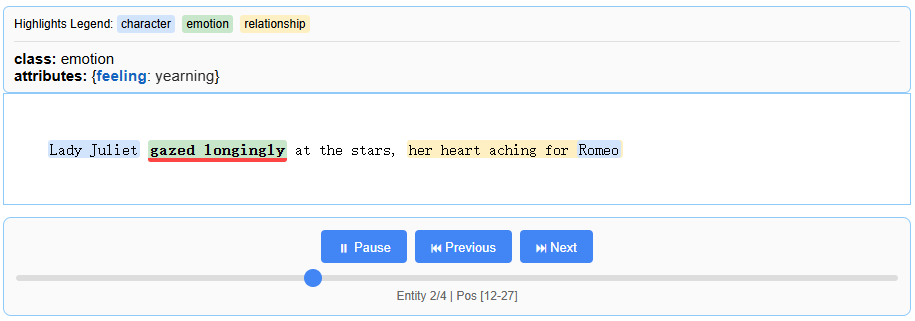
生成的报告
此内容由惯性聚合(RSS阅读器)自动聚合整理,仅供阅读参考。 原文来自 — 版权归原作者所有。