<…","url":"https://www.cnblogs.com/rdchen/p/17269376.html","mainEntityOfPage":{"@type":"WebPage","@id":"https://www.cnblogs.com/rdchen/p/17269376.html"},"image":"https://images.cnblogs.com/OutliningIndicators/ContractedBlock.gif","publisher":{"@type":"Organization","name":"惯性聚合","logo":{"@type":"ImageObject","url":"https://juhe.plus/apple-touch-icon.png"}},"author":{"@type":"Person","name":"爱跳舞的程序员"},"datePublished":"2023-03-29T08:19:00.000Z"}]}
惯性聚合 高效追踪和阅读你感兴趣的博客、新闻、科技资讯
阅读原文 在惯性聚合中打开

推荐订阅源

Google DeepMind News
Jina AI
Jina AI
WordPress大学
WordPress大学
博客园 - 聂微东
OSCHINA 社区最新新闻
OSCHINA 社区最新新闻
月光博客
月光博客
博客园 - 司徒正美
J
Java Code Geeks
博客园 - 叶小钗
美团技术团队
Last Week in AI
Last Week in AI
让小产品的独立变现更简单 - ezindie.com
The Cloudflare Blog
腾讯CDC
人人都是产品经理
人人都是产品经理
T
Tailwind CSS Blog
I
InfoQ
博客园 - 【当耐特】
大猫的无限游戏
大猫的无限游戏
奇客Solidot–传递最新科技情报
奇客Solidot–传递最新科技情报
V
V2EX
博客园_首页
D
Docker
U
Unit 42
Attack and Defense Labs
C
CERT Recently Published Vulnerability Notes
Scott Helme
Scott Helme
P
Privacy & Cybersecurity Law Blog
Simon Willison's Weblog
钛媒体:引领未来商业与生活新知
钛媒体:引领未来商业与生活新知
H
Help Net Security
A
About on SuperTechFans
L
Lohrmann on Cybersecurity
Recent Announcements
P
Privacy International News Feed
P
Proofpoint News Feed
F
Full Disclosure
G
Google Developers Blog
小众软件
小众软件
Security Latest
Security Latest
The GitHub Blog
The GitHub Blog
T
The Exploit Database - CXSecurity.com
宝玉的分享
宝玉的分享
freeCodeCamp Programming Tutorials: Python, JavaScript, Git & More
MongoDB | Blog
MongoDB | Blog
P
Proofpoint News Feed
云风的 BLOG
云风的 BLOG
酷 壳 – CoolShell
酷 壳 – CoolShell
L
LangChain Blog
Vercel News
Vercel News

博客园 - 爱跳舞的程序员

freemarker对数字格式的处理 FilePathJaxbUtil(xml文件转JavaBean对象工具) freemarker对日期的处理 PL_SQL常用快捷键 将博客搬至CSDN css+jquery右下角弹框提示框(工作需要就开发调式了) textarea文本居中的问题 bat批量复制文件(一键打包更新代码,避免手动一个个复制) url特殊字符传递参数解决方法(特指超链接) js 拼接字符串带变量(js方法参数单双引号拼接的问题记录) 表单提交由submit改为异步的方式 解决复制select下拉框时 值没法复制的问题 Jquery操作select汇总 博文阅读密码验证 - 博客园 ztree树添加右击菜单 ligerLayout布局(左右分栏) 模糊查询+首字母查询组合框 displayTag解决中文排序、和翻页查询出错的问题 java 根据word xml模板生成word(个人v2版本)
jquery之ztree树入门(输出最简单树形)
爱跳舞的程序员 · 2023-03-29 · via 博客园 - 爱跳舞的程序员

 api学习地址:

https://treejs.cn/v3/api.php

<script type="text/javascript" src="js/jquery-1.4.4.min.js"></script>
<script type="text/javascript" src="js/jquery.ztree.core-3.5.js"></script>
<script type="text/javascript" src="js/jquery.ztree.excheck-3.5.js"></script>
<script type="text/javascript" src="js/jquery.ztree.exedit-3.5.js"></script>
<link rel="stylesheet" href="css/zTreeStyle/zTreeStyle.css" type="text/css">

引入的js和css

jquery.ztree.core-3.5.js:zTree核心包
jquery.ztree.excheck-3.5.js:复选框功能包
jquery.ztree.exedit-3.5.js:编辑功能包
zTree核心包是必须引入的

    var zTreeObj;
    var setting = {};
    var zNodes = [{
        name: "test1",
        open: true,
        children: [{
            name: "test1_1"
        }, {
            name: "test1_2"
        }]
    }, {
        name: "test2",
        open: true,
        children: [{
            name: "test2_1"
        }, {
            name: "test2_2"
        }]
    }];
    $(document).ready(function() {
        zTreeObj = $.fn.zTree.init($("#treeDemo"), setting, zNodes);
    });

js

<div id="treeDemo"  class="ztree"></div> 
或者
<div>
   <ul id="treeDemo" class="ztree"></ul>
</div> 

html容器声明

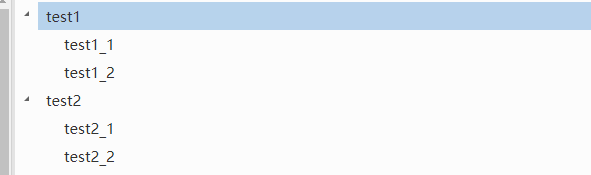
效果图: