


惯性聚合 高效追踪和阅读你感兴趣的博客、新闻、科技资讯
阅读原文 在惯性聚合中打开

推荐订阅源

Cisco Talos Blog
Cisco Talos Blog
奇客Solidot–传递最新科技情报
奇客Solidot–传递最新科技情报
Google Online Security Blog
博客园 - Franky
Hugging Face - Blog
Hugging Face - Blog
Security Archives - TechRepublic
博客园 - 司徒正美
N
News and Events Feed by Topic
OSCHINA 社区最新新闻
OSCHINA 社区最新新闻
WordPress大学
WordPress大学
博客园 - 三生石上(FineUI控件)
Help Net Security
Help Net Security
N
News and Events Feed by Topic
O
OpenAI News
L
LangChain Blog
F
Full Disclosure
A
About on SuperTechFans
The GitHub Blog
The GitHub Blog
GbyAI
GbyAI
Cloudbric
Cloudbric
W
WeLiveSecurity
Application and Cybersecurity Blog
罗磊的独立博客
Attack and Defense Labs
PCI Perspectives
PCI Perspectives
TaoSecurity Blog
TaoSecurity Blog
AI
AI
有赞技术团队
有赞技术团队
酷 壳 – CoolShell
酷 壳 – CoolShell
C
CXSECURITY Database RSS Feed - CXSecurity.com
C
Cisco Blogs
D
Darknet – Hacking Tools, Hacker News & Cyber Security
Apple Machine Learning Research
C
CERT Recently Published Vulnerability Notes
T
The Exploit Database - CXSecurity.com
T
Threatpost
P
Palo Alto Networks Blog
G
GRAHAM CLULEY
Last Week in AI
Last Week in AI
雷峰网
雷峰网
钛媒体:引领未来商业与生活新知
钛媒体:引领未来商业与生活新知
C
Cyber Attacks, Cyber Crime and Cyber Security
博客园 - 聂微东
P
Proofpoint News Feed
Latest news
Latest news
S
SegmentFault 最新的问题
J
Java Code Geeks
T
Threat Research - Cisco Blogs
H
Help Net Security
P
Privacy International News Feed

博客园 - 李小加

rapidocr_api 在windows下安装 MYSQL 创建用户 配置logging.properties解决浏览器访问tomcat日志文件出现中文乱码问题 linux 安装字体解决JAVA图形中文乱码问题 linux 系统上图形生成错误 java.lang.NoClassDefFoundError: Could not initialize class sun.awt.X11GraphicsEnvironment MySQL 按时间段统计SQL maven 本地库添加jar包 数据接口开发管理平台(starAPI) oracle 11g https://localhost:1158/em 无法访问 & 设置自增id 第三方开源小工具 静态代码检查 mysql 数据库集群连接配置 tomcat server.xml 配置优化 使用PowerDesigner16.5 逆向数据库生产表结构或导出word文档 SpringBoot、thymeleaf 国际化配置 解决 SpringBoot 跨域请求问题 在 centos7 系统中用 docker 创建 tomcat 服务镜像 JAVA 调用 com.google.protobuf mysql 删除多个字段重复的数据, 只保留最新的一条
Git linux服务端安装、windows 用户端使用
李小加 · 2021-08-24 · via 博客园 - 李小加

一、Git linux服务端安装

1、登录linux服务器后,执行以下命令安装git(注:没有yum命令得先安装yum):

2、执行以下命令初始化项目git仓库(在/home/gitdata/git/路径下初始化一个空的仓库gittest)

git init --bare /home/gitdata/git/gittest.git

3、创建git用户组

4、创建用户、设置密码、将用户添加到gitgroup组

5、禁用git用户的shell登录,防止用户通过Git用户登录服务器。编辑 /etc/passwd 文件,将文件后边的bash改成git-shell

lixj:x:1002:1003::/home/lixj:/bin/git-shell

6、修改git仓库所在目录  /home/gitdata/git/  的用户组为gitgroup

chgrp -R gitgroup /home/gitdata/git/

7、修改目录及其子文件的权限

chmod -R 777 /home/gitdata/git/

8、给  /home/gitdata/git/gittest.git/objects  文件目录授权

cd /home/gitdata/git/gittest.git/objects
chmod 777 -R *

二、Git  windows 用户端使用

 1、下载安装Git windows 最新版本,下载地址:https://www.git-scm.com/download/win

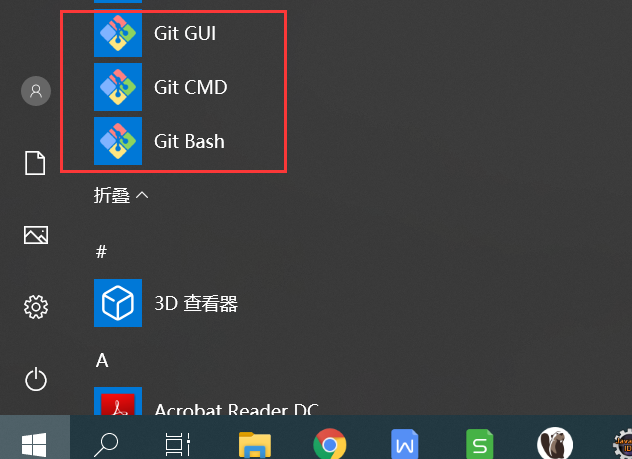
 安装好后在开始菜单可以看到Git GUI、Git CM、Git Bash
 2、运行Git Bash ,常用命令:

#查看git配置信息
$ git config --list

$ git config user.name "lixj"
$ git config user.email "19129107@qq.com"

#全局配置
$ git config --global user.name "lixj"
$ git config --global user.email "19129107@qq.com"

#进入项目所在目录
$ cd D:/project/xrh_git

#克隆远程服务项目
$ git clone lixj@47.107.**.***:/home/gitdata/git/gittest.git

$ git add *
$ git commit -m "代码提交信息"
$ git push origin master

#创建分支
$ git checkout -b branch01
#提交到分支代码
$ git add *
$ git commit -m "代码提交信息"
$ git push origin branch01

#切回主分支
$ git checkout master
$ git pull origin master

#查看历史提交记录
$ git log
#以列表形式查看指定文件的历史修改记录
$ git blame <file> 

3、可以选择安装TortoiseGit客户端工具及中文包(类似TortoiseSVN软件),下载地址:https://tortoisegit.org/download/

安装后效果: