

惯性聚合 高效追踪和阅读你感兴趣的博客、新闻、科技资讯
阅读原文 在惯性聚合中打开

推荐订阅源

S
Schneier on Security
cs.AI updates on arXiv.org
T
Threat Research - Cisco Blogs
C
Cyber Attacks, Cyber Crime and Cyber Security
C
CXSECURITY Database RSS Feed - CXSecurity.com
A
Arctic Wolf
Security Latest
Security Latest
Simon Willison's Weblog
I
Intezer
cs.CV updates on arXiv.org
T
Troy Hunt's Blog
Latest news
Latest news
Help Net Security
Help Net Security
S
Security Affairs
Webroot Blog
Webroot Blog
The Hacker News
The Hacker News
AI
AI
cs.CL updates on arXiv.org
T
Tor Project blog
Forbes - Security
Forbes - Security
Google DeepMind News
AWS News Blog
AWS News Blog
Attack and Defense Labs
P
Proofpoint News Feed
www.infosecurity-magazine.com
H
Help Net Security
L
Lohrmann on Cybersecurity
S
SegmentFault 最新的问题
Google Online Security Blog
MongoDB | Blog
MongoDB | Blog
Cyberwarzone
Cyberwarzone
The Last Watchdog
The Last Watchdog
S
Securelist
N
News and Events Feed by Topic
S
Secure Thoughts
F
Fortinet All Blogs
博客园_首页
C
Cybersecurity and Infrastructure Security Agency CISA
量子位
M
MIT News - Artificial intelligence
F
Full Disclosure
T
The Blog of Author Tim Ferriss
T
Tailwind CSS Blog
Recent Commits to openclaw:main
Microsoft Security Blog
I
InfoQ
P
Privacy International News Feed
L
LangChain Blog
Know Your Adversary
Know Your Adversary
C
CERT Recently Published Vulnerability Notes

博客园 - 至尊龙骑

Linux服务器离线安装Docker全攻略--离线安装(一件安装docker以及docker-compose--执行自定义脚本) C# 使用FFmpeg 命令录音录像时设置 水印以及水印位置 C# 使用FFmpeg 命令 水印以及水印位置 录音录像时设置分辨率-分辨率一般是宽高比是 4:3 和16:9 少数是 5:4 FFmpeg 命令 水印以及水印位置 FFmpeg 命令录音录像时分辨率 FFmpeg 查看分辨率以及指定分辨率 C# 中监听 IPv6 回环地址----HttpListener C# 中监听 IPv6 回环地址(Loopback Address)----socket和tcp IPv6 地址 后端设置了跨域但是还是提示跨域问题,原因是这里有两个独立的安全策略在起作用:Chrome和Edge浏览器安全策略强制修改方案 开放所有跨域 ----前端和后端 Win11 上遇到的 WinForm 文件拖拽功能失效,但在 Win10 或其他系统上正常的问题 设置iis的后缀名可以下载 linux执行systemctl enable redis.service 报 Failed to execute operation: Bad message linux redis 8.2.1软件开机启动redis.service与etc下的rc.local配置2种方式 Linux redis 8.2.1源码编译 Linux开机启动设置全攻略 Linux 设置nginx 以及java jar自启动 Linux系统简单源码安装NGINX版本1.28.0 DistributedLock 实现.Net分布式锁 Windows 10\11 离线安装.NET Framework 3.5(包括.NET 2.0和3.0) - 至尊龙骑 跨域处理
utools无法搜索快捷方式和部分软件问题
至尊龙骑 · 2021-07-06 · via 博客园 - 至尊龙骑

utools无法搜索快捷方式和部分软件问题

首先utools是通过扫描开始菜单下面的程序,目录C:\ProgramData\Microsoft\Windows\Start Menu\Programs文件夹里的内容来获取电脑中安装的软件,

所以只要将电脑中C:\ProgramData\Microsoft\Windows\Start Menu\Programs文件夹中没有的的软件快捷方式放进去,就可以通过utools打开了。

解决方式如下:

1、将电脑中需要通过utools打开的软件或者该软件的快捷方式,放到C:\ProgramData\Microsoft\Windows\Start Menu\Programs文件夹中即可,这样就可以通过utools打开了。注:此操作可能需要管理员权限。

2、可以将快捷方式放到桌面,utools也能搜索到了

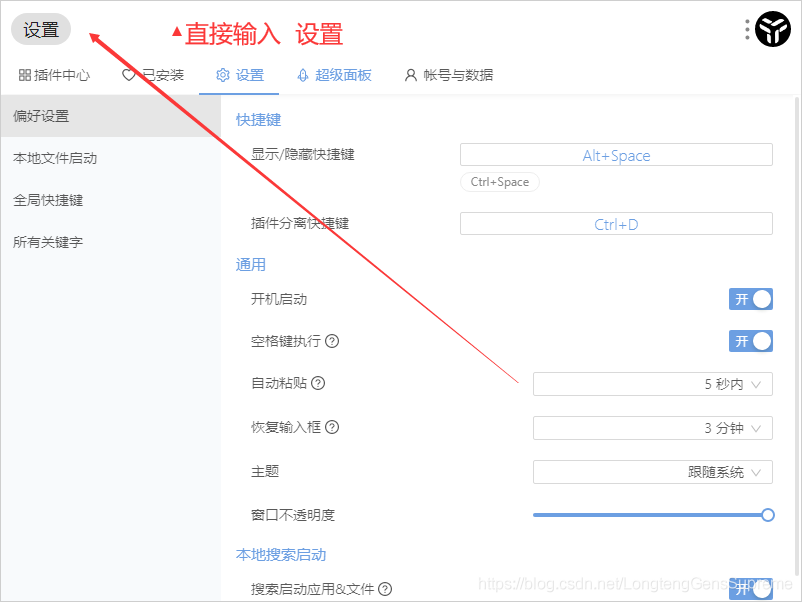
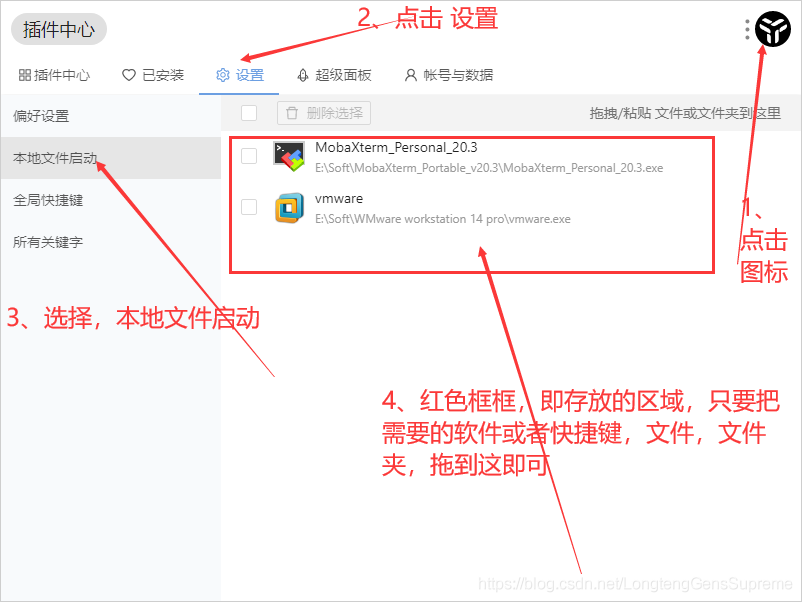
3、Alt+Sapce 打开utools,直接输入设置(下图1)或者点击右上角的utools图标,选择 设置 再选择 本地文件启动,将想要快捷打开的软件,快捷方式,文件,文件夹(下图2)快捷方式、文件或文件夹拖到此窗口即可。
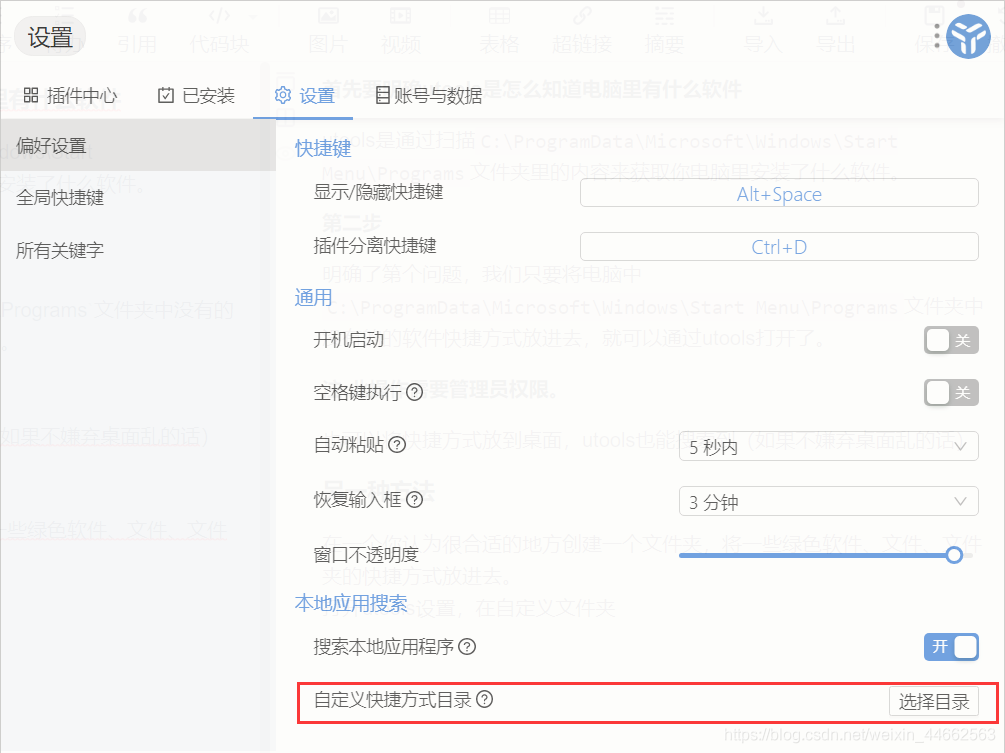
4、在一个你认为很合适的地方创建一个文件夹,将一些绿色软件、文件、文件夹的快捷方式放进去。打开utools设置,在自定义快捷方式目录中选择刚刚创建的文件夹。
 

自1.3.3版本之后可以打开Internet快捷方式

注:无法识别C:\ProgramData\Microsoft\Windows\Start Menu\Programs文件夹里面的url文件

无法打开Internet快捷方式

新建txt文件

@echo off
start *.url
exit

*.url改为Internet快捷方式名.url
另存为快捷方式名.bat
再将次bat文件的快捷方式放到上面创建的存放快捷方式的文件夹,这样就能实现utools打开Internet快捷方式。
注意:这种快捷方式一定要放到你建的存放快捷方式的文件夹,放到第一种方法的文件夹里不行