

惯性聚合 高效追踪和阅读你感兴趣的博客、新闻、科技资讯
阅读原文 在惯性聚合中打开

推荐订阅源

让小产品的独立变现更简单 - ezindie.com
T
The Blog of Author Tim Ferriss
博客园 - 司徒正美
freeCodeCamp Programming Tutorials: Python, JavaScript, Git & More
有赞技术团队
有赞技术团队
量子位
S
SegmentFault 最新的问题
博客园 - 聂微东
博客园 - 【当耐特】
J
Java Code Geeks
美团技术团队
Hugging Face - Blog
Hugging Face - Blog
H
Help Net Security
V
V2EX
人人都是产品经理
人人都是产品经理
博客园 - Franky
罗磊的独立博客
Engineering at Meta
Engineering at Meta
A
About on SuperTechFans
奇客Solidot–传递最新科技情报
奇客Solidot–传递最新科技情报
酷 壳 – CoolShell
酷 壳 – CoolShell
云风的 BLOG
云风的 BLOG
Y
Y Combinator Blog
Apple Machine Learning Research

博客园 - cnkker.com

Visual Studio 2026 激活码 / VS2026密钥(VS2026激活码) 沙箱环境安装dotnet Microsoft Office 2024 全家桶 docker-compose 部署 Redis 的一些警告 UFW防火墙规则对Docker映射端口无效 Nginx错误 open() "/usr/local/nginx/proxy_temp/x/xx/xxxxxxxx" failed (13: Permission denied) while reading upstream解决办法 NET8在CentOS7下无法执行的问题 Nginx配置文件中,如何配置启用SignalR Error: Failed to download metadata for repo ‘appstream’ – CentOS 8 Mikrotik ROS默认推荐防火墙规则firewall脚本 dotnet堆栈溢出通用排查方法 CMD下查所有3389连接的IP地址 Nginx的proxy_pass url 反向代理的配置 一些名词 NET CORE LINUX 部署 报 A connection was successfully established with the server, but then an error occurred during the pre-login handshake.解决方法 须先停止生成方可关闭解决方案(The build must be stopped before the solution can be closed) 安装最新版本NextCloud Docker、Nginx、整合LetsEncrypt SSL证书 MS SQL 去除字段中的大小写英文、数字、特定符号 MariaDB 配置示例文件 整理一些激活密钥
如何将 Windows 10 Enterprise LTSC 2021 评估版升级到完整版
cnkker.com · 2021-12-18 · via 博客园 - cnkker.com

如果您下载 Windows 10 Enterprise LTSC 2021 评估版,则没有密钥可以激活它。

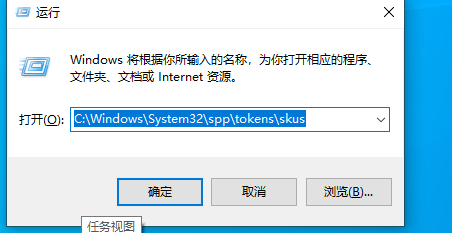
第一步:你按 Win + R 打开运行

然后输入:C:\Windows\System32\spp\tokens\skus
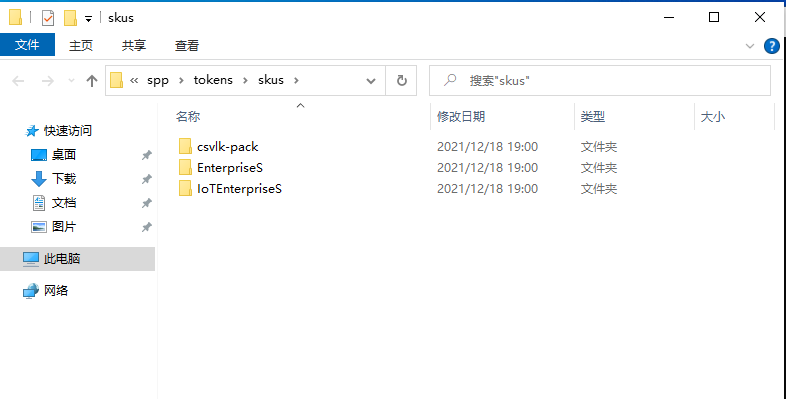
第 2 步:您在此处下载 Windows 10 Enterprise LTSC 2021 的 SKU:

下载激活文件  解压密码:www.cnkker.com

然后你解压并复制到 C:\Windows\System32\spp\tokens\skus 
第3步:你打开cmd(以管理员身份运行)

然后复制并粘贴这些代码:

cscript.exe %windir%\system32\slmgr.vbs /rilc
cscript.exe %windir%\system32\slmgr.vbs /upk >nul 2>&1
cscript.exe %windir%\system32\slmgr.vbs /ckms >nul 2>&1
cscript.exe %windir%\system32\slmgr.vbs /cpky >nul 2>&1
cscript.exe %windir%\system32\slmgr.vbs /ipk M7XTQ-FN8P6-TTKYV-9D4CC-J462D
sc config LicenseManager start= auto & net start LicenseManager
sc config wuauserv start= auto & net start wuauserv
clipup -v -o -altto c:\
echo

完成