


部署环境:NET5
数据库:SQL SERVER 2014
操作系统:Centos8
异常:
: System.Exception: A connection was successfully established with the server, but then an error occurred during the pre-login handshake. (provider: TCP Provider, error: 35 - An internal exception was caught)
---> Microsoft.Data.SqlClient.SqlException (0x80131904): A connection was successfully established with the server, but then an error occurred during the pre-login handshake. (provider: TCP Provider, error: 35 - An internal exception was caught)
---> System.Security.Authentication.AuthenticationException: Authentication failed, see inner exception.
---> Interop+OpenSsl+SslException: SSL Handshake failed with OpenSSL error - SSL_ERROR_SSL.
---> Interop+Crypto+OpenSslCryptographicException: error:1425F102:SSL routines:ssl_choose_client_version:unsupported protocol
--- End of inner exception stack trace ---
……………………………………
:line 62A connection was successfully established with the server, but then an error occurred during the pre-login handshake. (provider: TCP Provider, error: 35 - An internal exception was caught)Microsoft.Data.SqlClient.SqlException (0x80131904): A connection was successfully established with the server, but then an error occurred during the pre-login handshake. (provider: TCP Provider, error: 35 - An internal exception was caught)
---> System.Security.Authentication.AuthenticationException: Authentication failed, see inner exception.
---> Interop+OpenSsl+SslException: SSL Handshake failed with OpenSSL error - SSL_ERROR_SSL.
---> Interop+Crypto+OpenSslCryptographicException: error:1425F102:SSL routines:ssl_choose_client_version:unsupported protocol
--- End of inner exception stack trace ---
at Interop.OpenSsl.DoSslHandshake(SafeSslHandle context, ReadOnlySpan`1 input, Byte[]& sendBuf, Int32& sendCount) in /_/src/libraries/Common/src/Interop/Unix/System.Security.Cryptography.Native/Interop.OpenSsl.cs:line 282
at System.Net.Security.SslStreamPal.HandshakeInternal(SafeFreeCredentials credential, SafeDeleteSslContext& context, ReadOnlySpan`1 inputBuffer, Byte[]& outputBuffer, SslAuthenticationOptions sslAuthenticationOptions) in /_/src/libraries/System.Net.Security/src/System/Net/Security/SslStreamPal.Unix.cs:line 114
--- End of inner exception stack trace ---
at System.Net.Security.SslStream.ForceAuthenticationAsync[TIOAdapter](TIOAdapter adapter, Boolean receiveFirst, Byte[] reAuthenticationData, Boolean isApm) in /_/src/libraries/System.Net.Security/src/System/Net/Security/SslStream.Implementation.cs:line 393
at System.Net.Security.SslStream.ProcessAuthentication(Boolean isAsync, Boolean isApm, CancellationToken cancellationToken) in /_/src/libraries/System.Net.Security/src/System/Net/Security/SslStream.Implementation.cs:line 215
at System.Net.Security.SslStream.AuthenticateAsClient(SslClientAuthenticationOptions sslClientAuthenticationOptions) in /_/src/libraries/System.Net.Security/src/System/Net/Security/SslStream.cs:line 297
at System.Net.Security.SslStream.AuthenticateAsClient(String targetHost, X509CertificateCollection clientCertificates, SslProtocols enabledSslProtocols, Boolean checkCertificateRevocation) in /_/src/libraries/System.Net.Security/src/System/Net/Security/SslStream.cs:line 283
at System.Net.Security.SslStream.AuthenticateAsClient(String targetHost) in /_/src/libraries/System.Net.Security/src/System/Net/Security/SslStream.cs:line 264
at Microsoft.Data.SqlClient.SNI.SNITCPHandle.EnableSsl(UInt32 options)
at Microsoft.Data.ProviderBase.DbConnectionPool.TryGetConnection(DbConnection owningObject, UInt32 waitForMultipleObjectsTimeout, Boolean allowCreate, Boolean onlyOneCheckConnection, DbConnectionOptions userOptions, DbConnectionInternal& connection)
at Microsoft.Data.ProviderBase.DbConnectionPool.TryGetConnection(DbConnection owningObject, TaskCompletionSource`1 retry, DbConnectionOptions userOptions, DbConnectionInternal& connection)
at Microsoft.Data.ProviderBase.DbConnectionFactory.TryGetConnection(DbConnection owningConnection, TaskCompletionSource`1 retry, DbConnectionOptions userOptions, DbConnectionInternal oldConnection, DbConnectionInternal& connection)
……
原因:因为SQL SERVER2014不支持 不支持TLSv1.2
最终解决办法:
修改文件:/usr/share/crypto-policies/DEFAULT/opensslcnf.txt
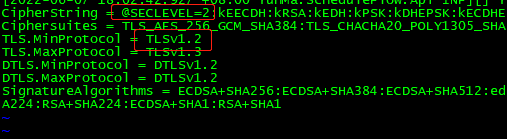
为:

1、 @SECLEVEL=2 修改为 @SECLEVEL=1
2、TLSv1.2 修改 TLSv1.0
再次运行,完美连接SQL SERVER
此内容由惯性聚合(RSS阅读器)自动聚合整理,仅供阅读参考。 原文来自 — 版权归原作者所有。