惯性聚合 高效追踪和阅读你感兴趣的博客、新闻、科技资讯
阅读原文 在惯性聚合中打开

推荐订阅源

Jina AI
Jina AI
大猫的无限游戏
大猫的无限游戏
T
Tailwind CSS Blog
酷 壳 – CoolShell
酷 壳 – CoolShell
WordPress大学
WordPress大学
Last Week in AI
Last Week in AI
Hugging Face - Blog
Hugging Face - Blog
阮一峰的网络日志
阮一峰的网络日志
让小产品的独立变现更简单 - ezindie.com
人人都是产品经理
人人都是产品经理
V
V2EX
博客园 - 叶小钗
雷峰网
雷峰网
小众软件
小众软件
量子位
V
Visual Studio Blog
H
Hackread – Cybersecurity News, Data Breaches, AI and More
The GitHub Blog
The GitHub Blog
Martin Fowler
Martin Fowler
G
Google Developers Blog
博客园_首页
博客园 - Franky
有赞技术团队
有赞技术团队
宝玉的分享
宝玉的分享

PCWorld

Best VPNs for torrenting: 5 top picks for speed, privacy, and security Windows 11’s desktop is now a full-screen ad for Harry Potter movies Windows 11’s new update finally fixes its biggest taskbar complaint 5 years later, I can finally use Windows 11 the way I want Microsoft’s September updates fix a record 973 security flaws Macrium Reflect 8 Free review: Fantastic image backup and recovery at no-cost Remember big box PC games? GOG’s bringing them back, sort of Someone might be in your PayPal account. Here’s a quick way to check 5-year VPN, 10 devices, $35 deal I test VPNs for a living and these are my top picks for Android 3 great USB-C monitors that are so much more than mere displays I tested Netgear's flagship 5G router. Most people don't need this much I built my own Steam Machine. It was way easier than I expected Windows 11 wants your trust. Microsoft keeps testing it How well do you know the world? This site makes geography trivia fun! Pay once for Microsoft Office 2024 Pro Plus and never renew, now $49.97 Autodesk Revit drops to $399 for a year For four days only, Windows 11 Pro only costs $9.97 This platform runs your whole agency, and a lifetime subscription is only $399 This PDF editor undercuts Adobe Acrobat, and it’s yours for life for $35 Monitor arms: Our tested picks for single- and dual-monitor setups Windows 11's next security feature may cost you gaming performance Sony's best noise-cancelling headphones are 50% off right now Is your USB port slowing down your Wi-Fi adapter? Here's the answer Windows 11 will soon tell apps how old you are. Here's how it works Japan eSIM checklist: Everything you need to know before you fly to Japan Windows 11's August update broke Teams and Outlook on Arm PCs Best of IFA 2026: 10 hot PC products and tech on the horizon Nvidia’s DLSS 5 looks incredible. I’m just not sure whose vision I’m seeing AI helps kids do better in school. That doesn’t mean they’re learning
Windows 11 can auto-adjust your monitor's refresh rate to...
Roland Freist · 2026-09-07 · via PCWorld

When you purchase through links in our articles, we may earn a small commission. This doesn't affect our editorial independence.

Windows 11's Dynamic Refresh Rate saves energy by lowering your screen's refresh rate when you're not gaming. Here's how to enable it.

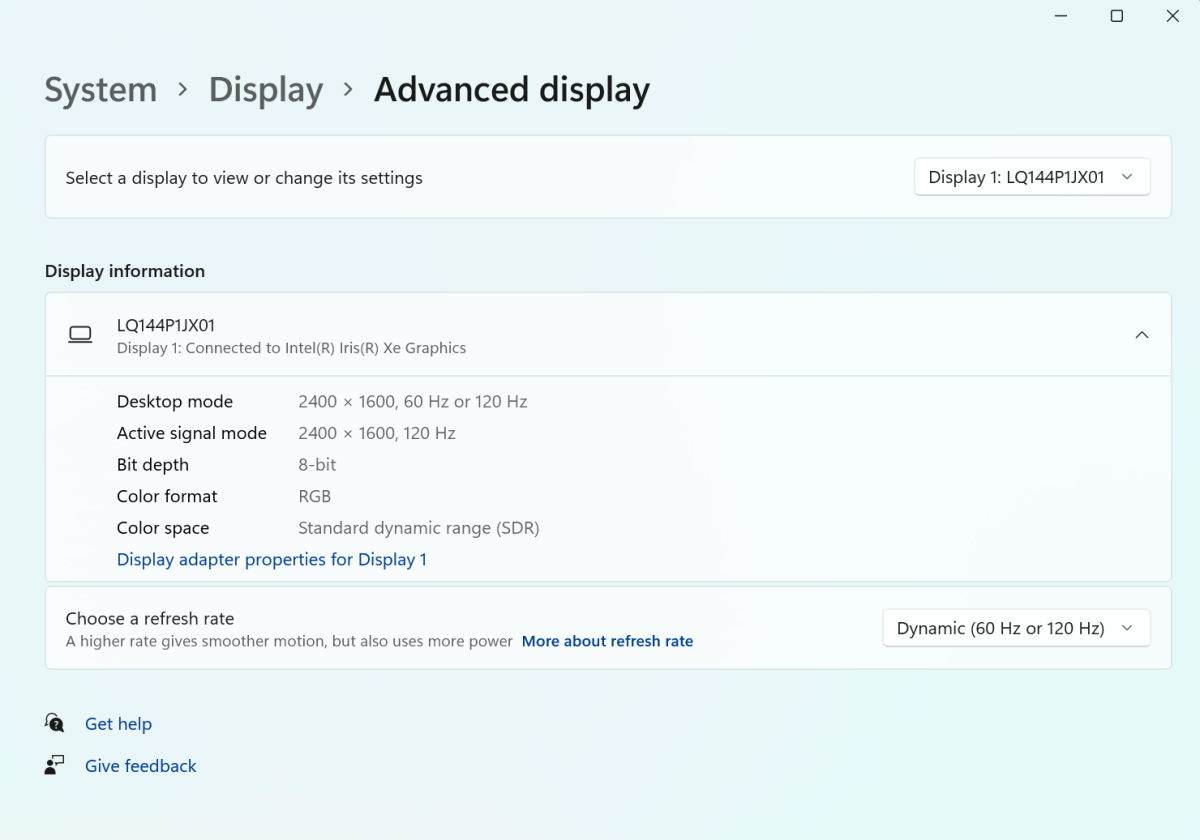
Windows 11 supports the activation of a dynamic refresh rate (DRR) on monitors equipped with the relevant technology. When this feature is enabled, the operating system automatically adjusts the refresh rate to suit the user’s activity. For example, while the user is working with standard desktop applications, Windows maintains the refresh rate at 60Hz.

However, as soon as a game starts, Windows automatically increases the rate to 120Hz to ensure a smooth display. For Windows to offer this feature in its settings, the monitor must support a variable refresh rate (VRR) and be capable of a refresh rate of at least 120Hz.
Windows 11 dynamic refresh rate

Foundry

Windows Erweiterte Anzeige

Windows 11 supports a dynamic refresh rate (DRR) for monitors to allow the screen to run at a lower power consumption.

Foundry

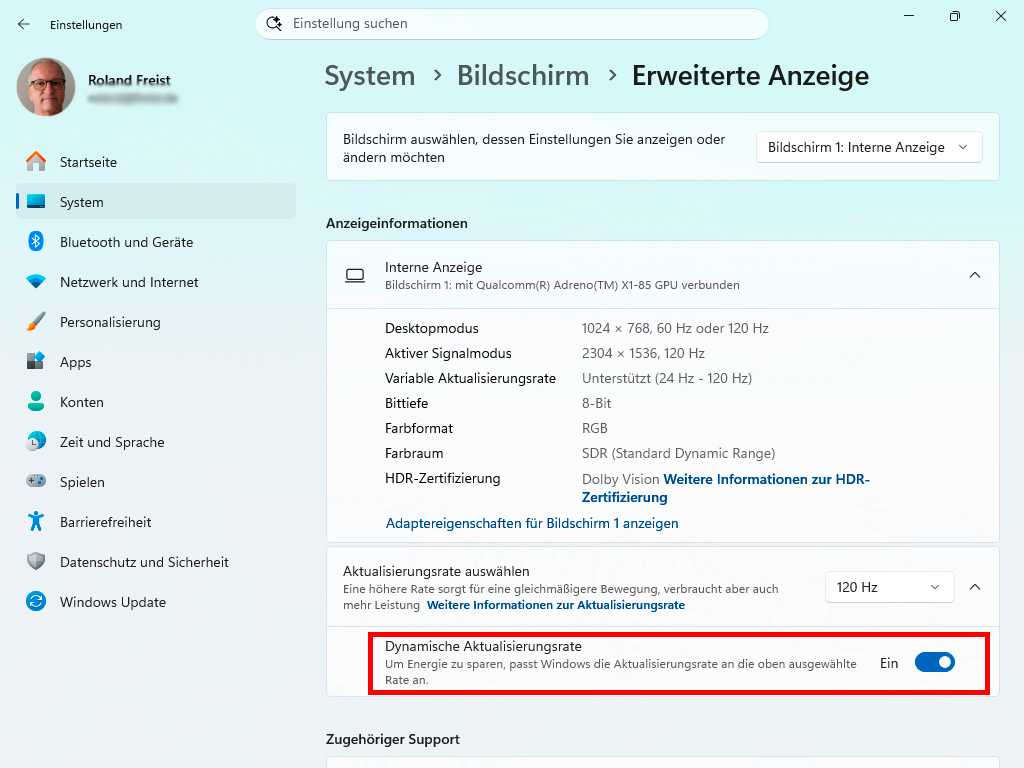
Only then can Windows adjust the refresh rate up or down depending on the application. The purpose of this technology is to save power by ensuring the monitor does not run at maximum performance when you’re not gaming. You’ll find this feature in ‘Settings’ in the Start menu. Click on ‘System > Display’ and scroll down to ‘Advanced display settings.’

Then set the toggle for “Dynamic Refresh Rate” to “On.” If this setting is grayed out and unavailable, select a refresh rate of at least 120Hz under “Select refresh rate.”  

This article originally appeared on our sister publication PC-WELT and was translated and localized from German.