



惯性聚合 高效追踪和阅读你感兴趣的博客、新闻、科技资讯
阅读原文 在惯性聚合中打开

推荐订阅源

钛媒体:引领未来商业与生活新知
钛媒体:引领未来商业与生活新知
Google DeepMind News
Martin Fowler
Martin Fowler
罗磊的独立博客
The GitHub Blog
The GitHub Blog
酷 壳 – CoolShell
酷 壳 – CoolShell
Google DeepMind News
Engineering at Meta
Engineering at Meta
P
Proofpoint News Feed
J
Java Code Geeks
小众软件
小众软件
Y
Y Combinator Blog
M
MIT News - Artificial intelligence
A
About on SuperTechFans
Last Week in AI
Last Week in AI
Jina AI
Jina AI
云风的 BLOG
云风的 BLOG
阮一峰的网络日志
阮一峰的网络日志
D
DataBreaches.Net
Threat Intelligence Blog | Flashpoint
Project Zero
Project Zero
美团技术团队
I
Intezer
Vercel News
Vercel News
CTFtime.org: upcoming CTF events
N
Netflix TechBlog - Medium
F
Fortinet All Blogs
T
Threatpost
P
Privacy International News Feed
Latest news
Latest news
K
Kaspersky official blog
博客园 - 聂微东
月光博客
月光博客
P
Palo Alto Networks Blog
T
The Exploit Database - CXSecurity.com
C
Cyber Attacks, Cyber Crime and Cyber Security
The Hacker News
The Hacker News
D
Docker
Cisco Talos Blog
Cisco Talos Blog
P
Privacy & Cybersecurity Law Blog
L
LINUX DO - 热门话题
Blog — PlanetScale
Blog — PlanetScale
Security Latest
Security Latest
Know Your Adversary
Know Your Adversary
Recent Announcements
T
Tenable Blog
B
Blog RSS Feed
Recorded Future
Recorded Future
雷峰网
雷峰网
SecWiki News
SecWiki News

Black Hills Information Security, Inc.

Bad Habits: An ANTISOC Operation Same Problem, Different Angles: When Red Team and Blue Team Actually Talk to Each Other How to Identify and Exploit New Vulnerabilities Swapper – A Pure Regex Match/Replace Burp Extension A Practical Guide to BloodHound Data Collection Network Engineering Basics Signed, Trusted, and Abused: Proxy Execution via WebView2 Getting Started In Pentesting – Advice From The BHIS Pentest Lead Cloud Security: Tips and Resources for Securing the Cloud Lessons From A Chatbot Incident How to Lead Effective Tabletops Understanding GRC: How to Navigate Risks and Compliance Standards The “P” in PAM is for Persistence: Linux Persistence Technique Malware Analysis: How to Analyze and Understand Malware OSINT: How to Find, Use, and Control Open-Source Intelligence What to Do with Your First Home Lab When the SOC Goes to Deadwood: A Night to Remember Social Engineering and Microsoft SSPR: The Road to Pwnage is Paved with Good Intentions Common Cyber Threats Finding the Right Penetration Testing Company Deceptive-Auditing: An Active Directory Honeypots Tool The Curious Case of the Comburglar How to Set Smart Goals (That Actually Work For You) Inside the BHIS SOC: A Conversation with Hayden Covington Abusing Delegation with Impacket (Part 3): Resource-Based Constrained Delegation Why You Got Hacked – 2025 Super Edition Abusing Delegation with Impacket (Part 2): Constrained Delegation Abusing Delegation with Impacket (Part 1): Unconstrained Delegation GoSpoof – Turning Attacks into Intel Model Context Protocol (MCP) Bypassing WAFs Using Oversized Requests Getting Started with AI Hacking Part 2: Prompt Injection Wrangling Windows Event Logs with Hayabusa & SOF-ELK (Part 2) DomCat: A Domain Categorization Tool Wrangling Windows Event Logs with Hayabusa & SOF-ELK (Part 1) Microsoft Store and WinGet: Security Risks for Corporate Environments Default Web Content MailFail Commonly Abused Administrative Utilities: A Hidden Risk to Enterprise Security Stop Spoofing Yourself! Disabling M365 Direct Send Bypassing CSP with JSONP: Introducing JSONPeek and CSP B Gone Offensive Tooling Cheatsheets: An Infosec Survival Guide Resource DNS Triage Cheatsheet GraphRunner Cheatsheet Burp Suite Cheatsheet Impacket Cheatsheet Wireshark Cheatsheet Hashcat Cheatsheet EyeWitness Cheatsheet Nmap Cheatsheet Netcat (nc) Cheatsheet Hunt for Weak Spots in Your Wireless Network with Airodump-ng from the Aircrack-ng Suite Detecting ADCS Privilege Escalation Vulnerability Scanning with Nmap Getting Started with NetExec: Streamlining Network Discovery and Access How to Use Dirsearch Augmenting Penetration Testing Methodology with Artificial Intelligence – Part 3: Arcanum Cyber Security Bot How to Design and Execute Effective Social Engineering Attacks by Phone Abusing S4U2Self for Active Directory Pivoting Why Use a Macro Pad? Espanso: Text Replacement, the Easy Way Caging Copilot: Lessons Learned in LLM Security Augmenting Penetration Testing Methodology with Artificial Intelligence – Part 2: Copilot Augmenting Penetration Testing Methodology with Artificial Intelligence – Part 1: Burpference Intercepting Traffic for Mobile Applications that Bypass the System Proxy How to Root Android Phones Communicating Security to the C-Suite: A Strategic Approach Offline Memory Forensics With Volatility Getting Started with AI Hacking: Part 1 Go-Spoof: A Tool for Cyber Deception How to Test Adversary-in-the-Middle Without Hacking Tools Canary in the Code: Alert()-ing on XSS Exploits How to Hack Wi-Fi with No Wi-Fi Why Your Org Needs a Penetration Test Program Burp Suite Extension: Copy For Light at the End of the Dark Web Wi-Fi Forge: Practice Wi-Fi Security Without Hardware Avoiding Dirty RAGs: Retrieval-Augmented Generation with Ollama and LangChain 5 Things We Are Going to Continue to Ignore in 2025 John Strand’s 5 Phase Plan For Starting in Computer Security Questions From a Beginner Threat Hunter GRC for Security Managers: From Checklists to Influence AI Large Language Models and Supervised Fine Tuning Attack Tactics 9: Shadow Creds for PrivEsc w/ Kent & Jordan One Active Directory Account Can Be Your Best Early Warning Introduction to Zeek Log Analysis Indecent Exposure: Your Secrets are Showing Creating Burp Extensions: A Beginner’s Guide Pitting AI Against AI: Using PyRIT to Assess Large Language Models (LLMs) The Top Ten List of Why You Got Hacked This Year (2023/2024) ICS Hard Knocks: Mitigations to Scenarios Found in ICS/OT Backdoors & Breaches Intro to Data Analytics Using SQL Finding Access Control Vulnerabilities with Autorize The Detection Engineering Process Cyber Risk Lessons We Can Learn From Hurricane Preparedness Intro to Desktop Application Testing Methodology What Is Penetration Testing? Adversary in the Middle (AitM): Post-Exploitation Pentesting, Threat Hunting, and SOC: An Overview QEMU, MSYS2, and Emacs: Open-Source Solutions to Run Virtual Machines on Windows
Gone Phishing: Installing GoPhish and Creating a Campaign
BHIS · 2025-02-14 · via Black Hills Information Security, Inc.

Nick has been tinkering with technology for the last 20 years in both professional and personal capacities. He has held a variety of technical roles and has experience with an array of software and hardware solutions used in enterprise environments. As a security analyst for Black Hills Information Security, Nick continues to pursue his passion of learning how a systems works, how to misuse it, and how to protect it.

GoPhish provides a nice platform for creating and running phishing campaigns. This blog will guide you through installing GoPhish and creating a campaign. 

For this blog we will target our fictitious company, InfoTekExpress. A look-a-like domain, infotekexpNess.com, was purchased for the sending domain and landing pages. Additionally, other things were done behind the scenes: 

  • DMARC and SPF records were configured in accordance with our third-party SMTP sending service provider. 
  • DNS A records for @ and online.microsoft were created and pointed towards the GoPhish server. 
  • Microsoft 365 email filter rules: 
    • Added mail flow rule to set SCL to 0 for “infotekexpness.com” 
    • Added the sender as “trusted” sender through PowerShell online 

Setup 

We are using Debian 12 and GoPhish version 0.12.1 for this blog. 

First, we downloaded GoPhish with the following command: 

wget "https://github.com/gophish/gophish/releases/download/v0.12.1/gophish-v0.12.1-linux-64bit.zip"

Next, we executed the following commands to extract the archive into a folder named GoPhish, open the directory, and add the execute permission to the GoPhish binary. 

unzip gophish-v0.12.1-linux-64bit.zip -d gophish
cd gophish
chmod +x gophish

Create a screen session and launch GoPhish: 

screen -S gophish
./gophish

Launching GoPhish

When GoPhish starts for the first time it will display the admin password and the admin URL. 

If your operating system has a GUI, you can connect to the URL with a browser. 

If your GoPhish server does not have a GUI, you can use a system with a GUI and SSH client you can create a local port forward using:

ssh -N -L 3333:127.0.0.1:3333 <username>@<GoPhishServer>

Log in to the GoPhish admin URL with the password from the terminal, and don’t forget to update the password. 
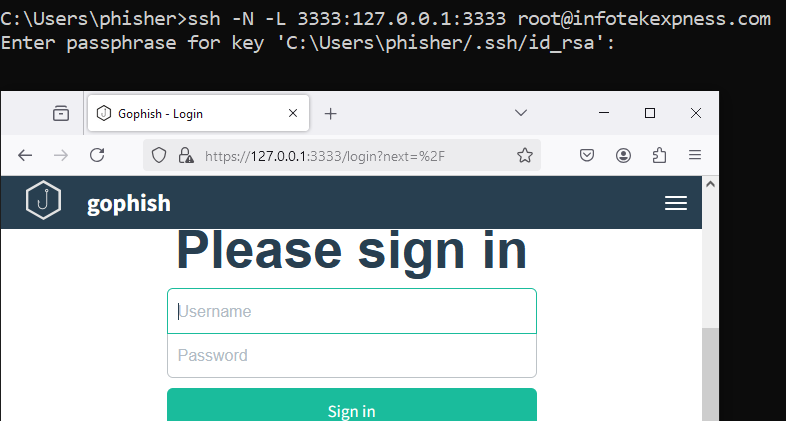
Log in to GoPhish

User Management 

Add your targets to GoPhish by creating a new group under User & Groups > New Group.  
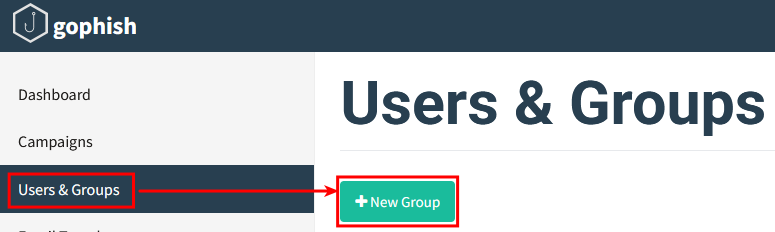
Add targets to GoPhish

You can import users through a comma-delimited CSV file or manually enter their information. 
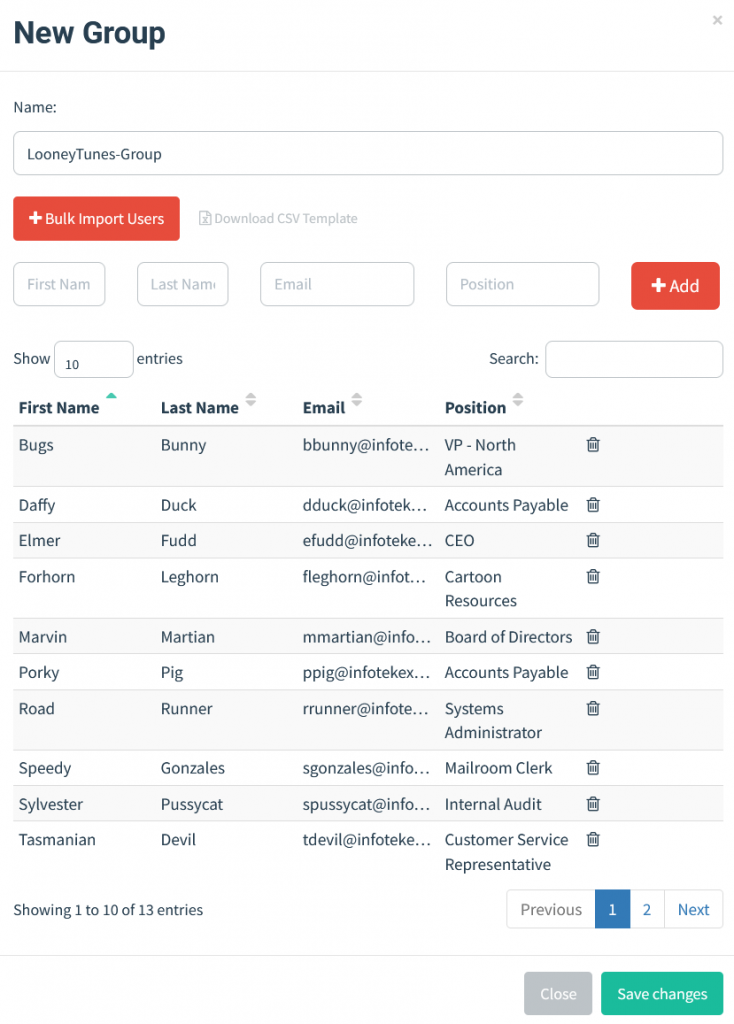
Sending Profile 

Create a new sending profile by navigating to Sending Profiles > New Profile. 
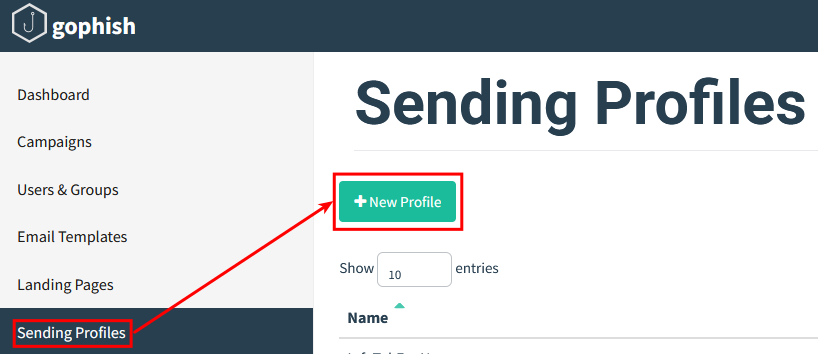
Configure sending profiles for any sending domain you’ll use. 
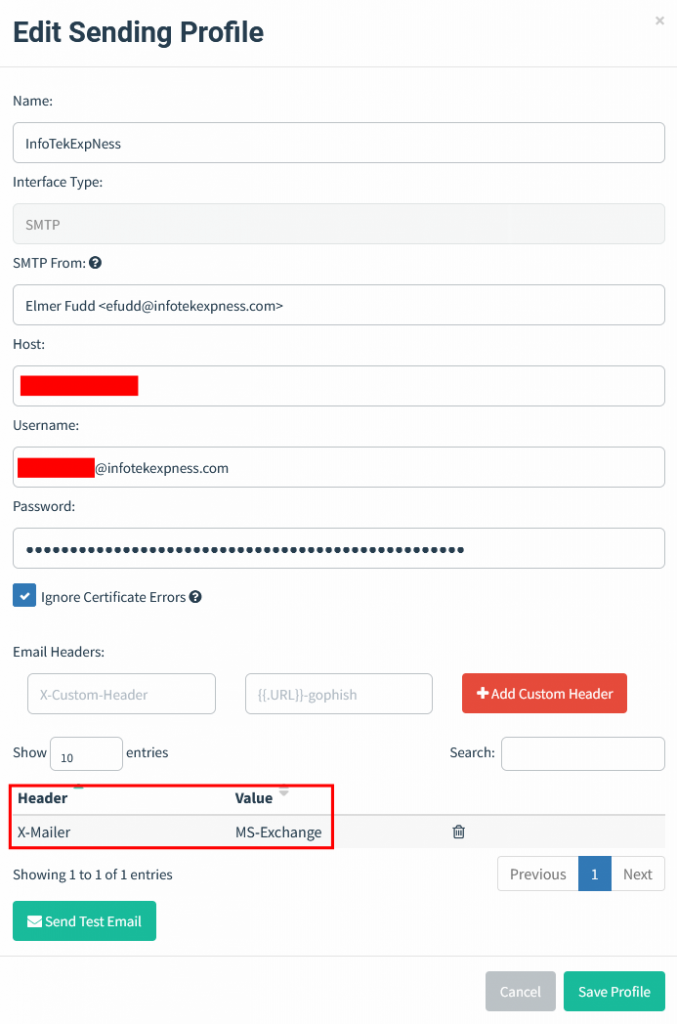
Make sure you configure the “SMTP From” to an email address with your sending domain. This domain will be used to perform SPF checks on sent messages.  

By default, GoPhish includes an X-Mailer header with a value of “GoPhish”. This is a huge red flag for most email security products. 

Email Templates 

Create an email template under Email Templates > New Template. 
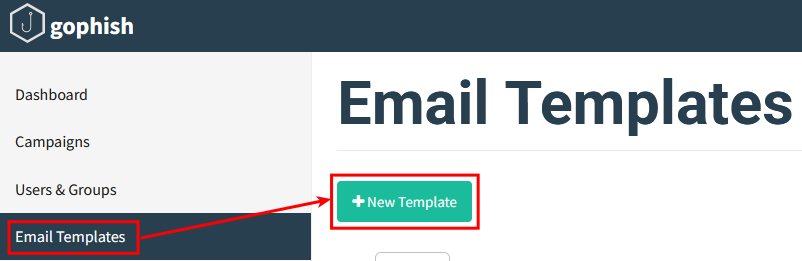
Templates can be created from scratch or imported from an email. 
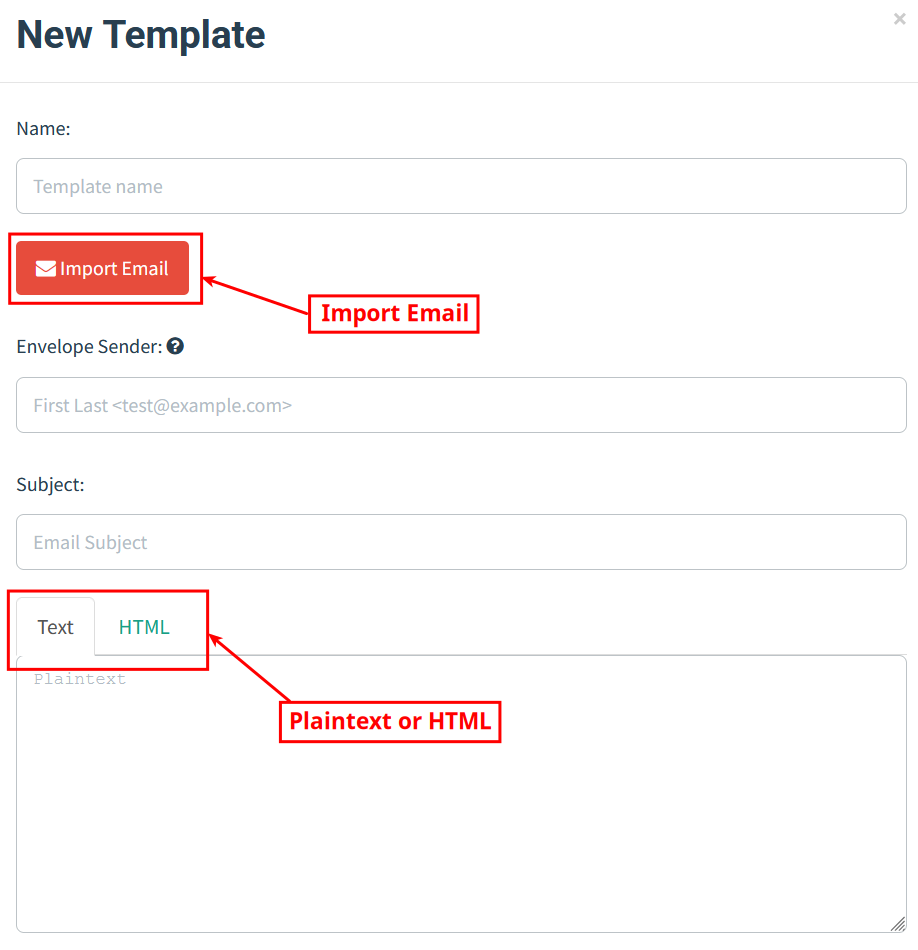
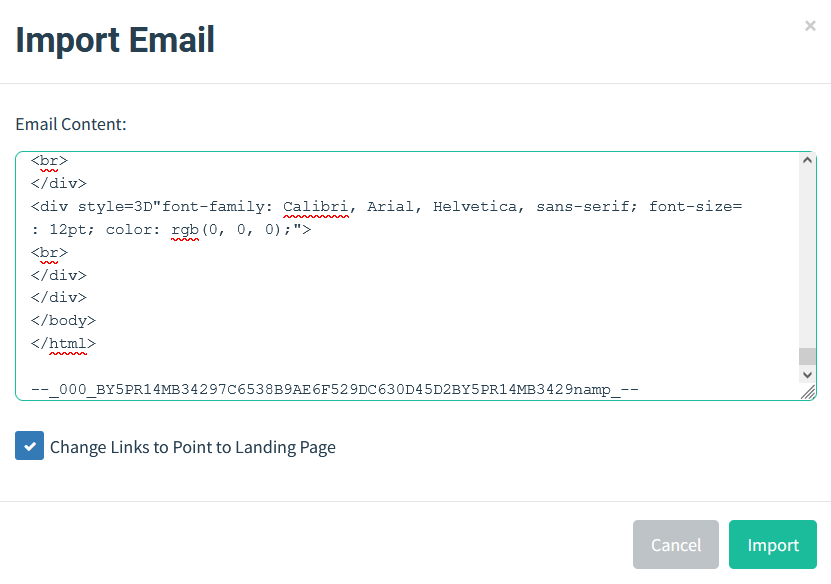
 To import an email, simply save the desired message as an .eml file and open it in a text editor. Next, copy the .eml file contents and paste them into GoPhish. 
The template configuration also includes an option for “Add Tracking Image” for capture “Email Opened” metrics. 

Template Variables 

GoPhish templates support Template Variables. Template Variables can personalize messages by inserting the target’s name, position, or email address. For this blog, we will use the “{{.FirstName}}” Template Variable in the greeting and specify the “{{.URL}}” Template Variable where we want the link for our landing page. 
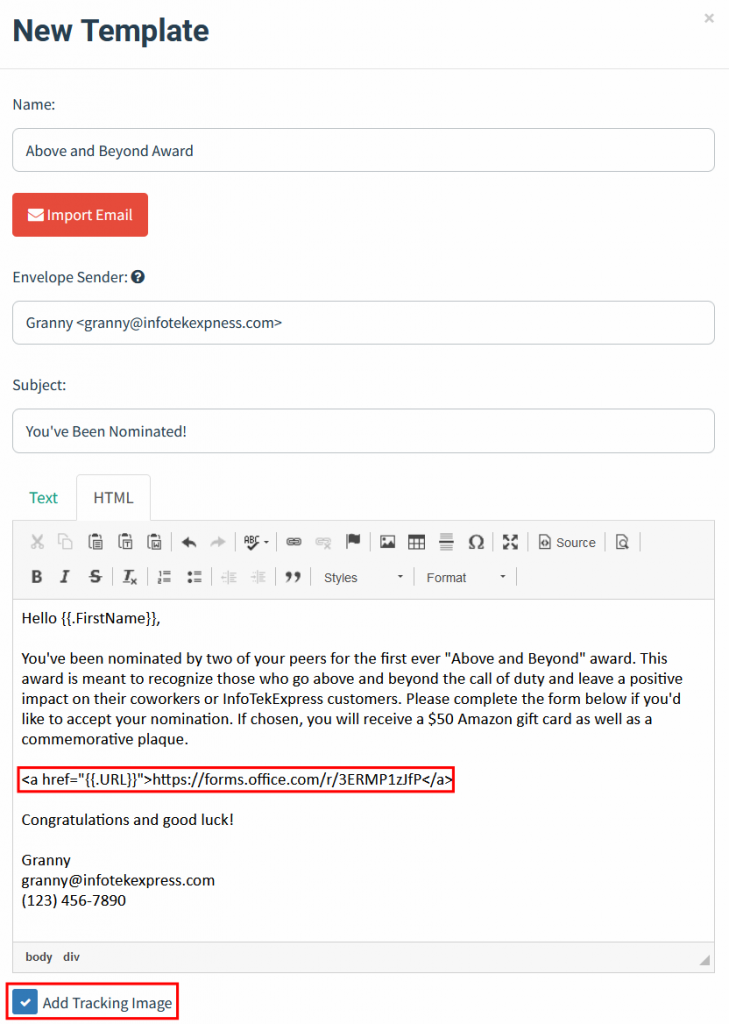
Email Templates also support file attachments, including Office, HTML, and ICS file types. Template Variables can also be used in Office files to track file opens or macros being enabled. 

Landing Page 

Create a landing page by navigating to Landing Page > New Page. 
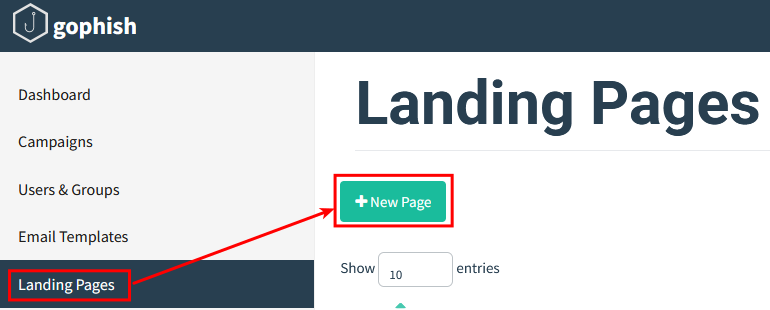
Create a landing page by supplying the HTML code for your desired landing page.  
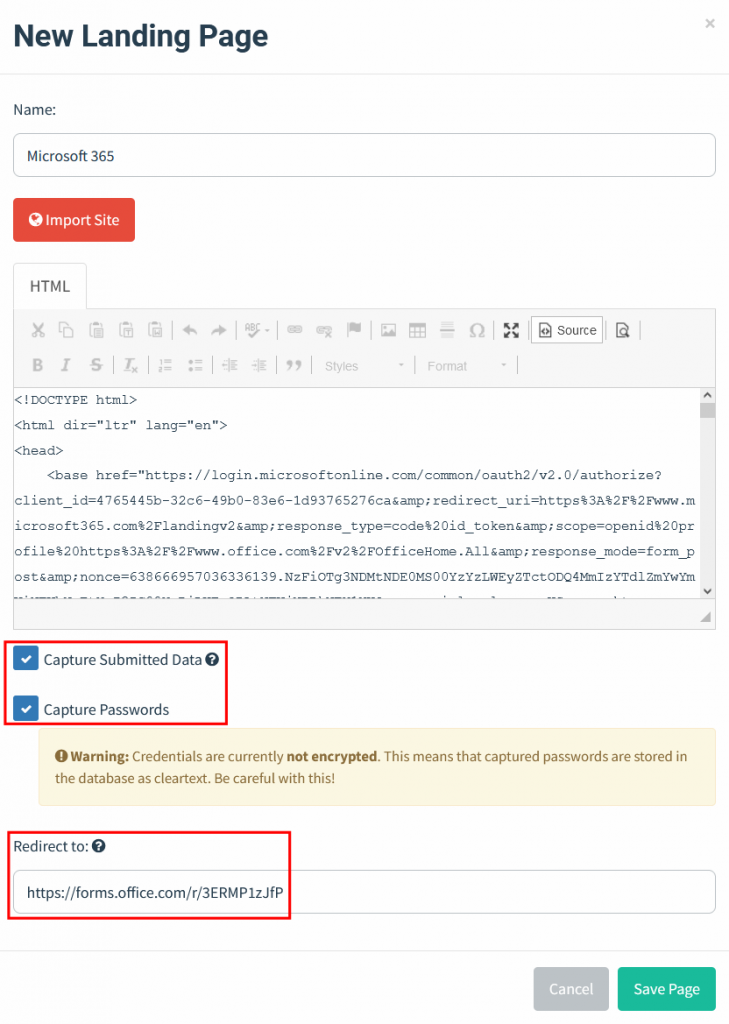
The Landing Page configuration supports capturing data that is submitted to the page, including passwords. 

For credential harvesting Landing Pages, make sure SSL is configured. 

Test your campaign 

Whether it’s your first phishing campaign or your 100th, make sure to send the ruse to yourself and other team members first. This will help ensure your message will go through and land in the target inbox as expected. Furthermore, it allows you an opportunity to verify the message looks like you expect and validate that the Email Opened and URL Clicked trackers are working properly. 

Launch Campaign 

Create a new Campaign under Campaigns > New Campaign 
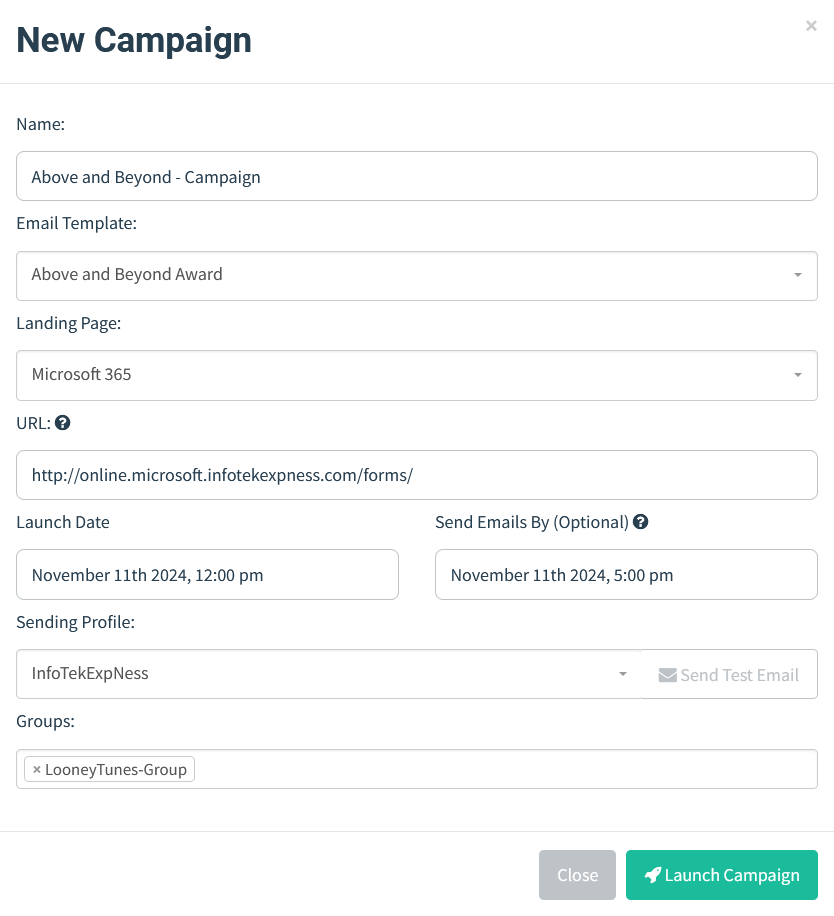
Configure your Campaign with the appropriate Email Template, Landing Page, and Sending Profile. The configured URL will be the GoPhish server URL that hosts the Landing Page and “Email Opened” image tracker. 
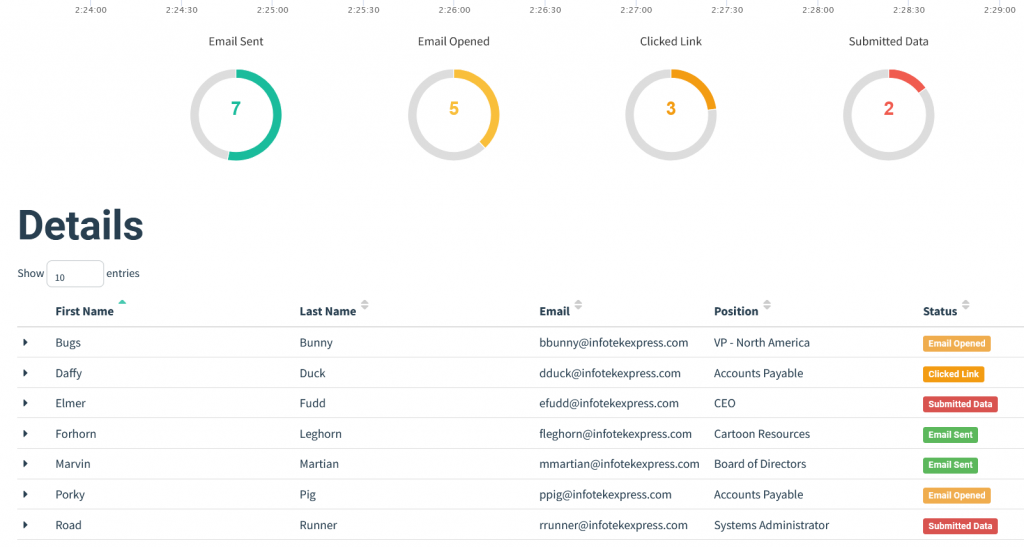
When your campaign is complete, you can export the results to CSV, and then build your own reporting tool using the Gophish API or use something like GoReport to generate reports about the campaign. 


Ready to learn more?

Level up your skills with affordable classes from Antisyphon!

Pay-What-You-Can Training

Available live/virtual and on-demand
