



惯性聚合 高效追踪和阅读你感兴趣的博客、新闻、科技资讯
阅读原文 在惯性聚合中打开

推荐订阅源

SecWiki News
SecWiki News
H
Help Net Security
罗磊的独立博客
Stack Overflow Blog
Stack Overflow Blog
M
MIT News - Artificial intelligence
Jina AI
Jina AI
L
LangChain Blog
K
Kaspersky official blog
I
Intezer
Martin Fowler
Martin Fowler
爱范儿
爱范儿
AWS News Blog
AWS News Blog
The Hacker News
The Hacker News
Recorded Future
Recorded Future
人人都是产品经理
人人都是产品经理
H
Hackread – Cybersecurity News, Data Breaches, AI and More
C
CXSECURITY Database RSS Feed - CXSecurity.com
Spread Privacy
Spread Privacy
Simon Willison's Weblog
U
Unit 42
N
News and Events Feed by Topic
A
Arctic Wolf
G
GRAHAM CLULEY
Microsoft Azure Blog
博客园 - 聂微东
F
Fortinet All Blogs
C
Cisco Blogs
美团技术团队
Vercel News
Vercel News
K
KPMG report finds enterprise disconnect between AI and its ROI | CIO
H
Hacker News: Front Page
T
Tailwind CSS Blog
I
InfoQ
宝玉的分享
宝玉的分享
Google DeepMind News
博客园 - 司徒正美
P
Palo Alto Networks Blog
A
About on SuperTechFans
Threat Intelligence Blog | Flashpoint
云风的 BLOG
云风的 BLOG
TaoSecurity Blog
TaoSecurity Blog
Google Online Security Blog
Exploit-DB.com RSS Feed
P
Privacy & Cybersecurity Law Blog
H
Heimdal Security Blog
cs.CV updates on arXiv.org
Hacker News: Ask HN
Hacker News: Ask HN
O
OpenAI News
博客园 - Franky
Scott Helme
Scott Helme

Black Hills Information Security, Inc.

Bad Habits: An ANTISOC Operation Same Problem, Different Angles: When Red Team and Blue Team Actually Talk to Each Other How to Identify and Exploit New Vulnerabilities Swapper – A Pure Regex Match/Replace Burp Extension A Practical Guide to BloodHound Data Collection Network Engineering Basics Signed, Trusted, and Abused: Proxy Execution via WebView2 Getting Started In Pentesting – Advice From The BHIS Pentest Lead Cloud Security: Tips and Resources for Securing the Cloud Lessons From A Chatbot Incident How to Lead Effective Tabletops Understanding GRC: How to Navigate Risks and Compliance Standards The “P” in PAM is for Persistence: Linux Persistence Technique Malware Analysis: How to Analyze and Understand Malware OSINT: How to Find, Use, and Control Open-Source Intelligence What to Do with Your First Home Lab When the SOC Goes to Deadwood: A Night to Remember Social Engineering and Microsoft SSPR: The Road to Pwnage is Paved with Good Intentions Common Cyber Threats Finding the Right Penetration Testing Company Deceptive-Auditing: An Active Directory Honeypots Tool The Curious Case of the Comburglar How to Set Smart Goals (That Actually Work For You) Inside the BHIS SOC: A Conversation with Hayden Covington Abusing Delegation with Impacket (Part 3): Resource-Based Constrained Delegation Why You Got Hacked – 2025 Super Edition Abusing Delegation with Impacket (Part 2): Constrained Delegation Abusing Delegation with Impacket (Part 1): Unconstrained Delegation GoSpoof – Turning Attacks into Intel Model Context Protocol (MCP) Bypassing WAFs Using Oversized Requests Getting Started with AI Hacking Part 2: Prompt Injection Wrangling Windows Event Logs with Hayabusa & SOF-ELK (Part 2) DomCat: A Domain Categorization Tool Wrangling Windows Event Logs with Hayabusa & SOF-ELK (Part 1) Microsoft Store and WinGet: Security Risks for Corporate Environments Default Web Content MailFail Commonly Abused Administrative Utilities: A Hidden Risk to Enterprise Security Stop Spoofing Yourself! Disabling M365 Direct Send Bypassing CSP with JSONP: Introducing JSONPeek and CSP B Gone Offensive Tooling Cheatsheets: An Infosec Survival Guide Resource DNS Triage Cheatsheet GraphRunner Cheatsheet Burp Suite Cheatsheet Impacket Cheatsheet Wireshark Cheatsheet Hashcat Cheatsheet EyeWitness Cheatsheet Nmap Cheatsheet Netcat (nc) Cheatsheet Hunt for Weak Spots in Your Wireless Network with Airodump-ng from the Aircrack-ng Suite Detecting ADCS Privilege Escalation Vulnerability Scanning with Nmap Getting Started with NetExec: Streamlining Network Discovery and Access How to Use Dirsearch Augmenting Penetration Testing Methodology with Artificial Intelligence – Part 3: Arcanum Cyber Security Bot How to Design and Execute Effective Social Engineering Attacks by Phone Abusing S4U2Self for Active Directory Pivoting Why Use a Macro Pad? Espanso: Text Replacement, the Easy Way Caging Copilot: Lessons Learned in LLM Security Augmenting Penetration Testing Methodology with Artificial Intelligence – Part 2: Copilot Augmenting Penetration Testing Methodology with Artificial Intelligence – Part 1: Burpference Intercepting Traffic for Mobile Applications that Bypass the System Proxy How to Root Android Phones Communicating Security to the C-Suite: A Strategic Approach Offline Memory Forensics With Volatility Getting Started with AI Hacking: Part 1 Go-Spoof: A Tool for Cyber Deception How to Test Adversary-in-the-Middle Without Hacking Tools Canary in the Code: Alert()-ing on XSS Exploits How to Hack Wi-Fi with No Wi-Fi Why Your Org Needs a Penetration Test Program Burp Suite Extension: Copy For Light at the End of the Dark Web Wi-Fi Forge: Practice Wi-Fi Security Without Hardware Avoiding Dirty RAGs: Retrieval-Augmented Generation with Ollama and LangChain Gone Phishing: Installing GoPhish and Creating a Campaign 5 Things We Are Going to Continue to Ignore in 2025 John Strand’s 5 Phase Plan For Starting in Computer Security Questions From a Beginner Threat Hunter GRC for Security Managers: From Checklists to Influence AI Large Language Models and Supervised Fine Tuning Attack Tactics 9: Shadow Creds for PrivEsc w/ Kent & Jordan One Active Directory Account Can Be Your Best Early Warning Introduction to Zeek Log Analysis Indecent Exposure: Your Secrets are Showing Creating Burp Extensions: A Beginner’s Guide Pitting AI Against AI: Using PyRIT to Assess Large Language Models (LLMs) The Top Ten List of Why You Got Hacked This Year (2023/2024) ICS Hard Knocks: Mitigations to Scenarios Found in ICS/OT Backdoors & Breaches Intro to Data Analytics Using SQL Finding Access Control Vulnerabilities with Autorize The Detection Engineering Process Cyber Risk Lessons We Can Learn From Hurricane Preparedness Intro to Desktop Application Testing Methodology What Is Penetration Testing? Adversary in the Middle (AitM): Post-Exploitation Pentesting, Threat Hunting, and SOC: An Overview
Wrangling the M365 UAL with SOF-ELK and CSV Data (Part 3 of 3)
Kassie Kimball · 2023-09-08 · via Black Hills Information Security, Inc.

Patterson Cake //

PART 1

PART 2

In part one of “Wrangling the M365 UAL,” we talked about acquiring, parsing, and querying UAL data using PowerShell and SOF-ELK. In part two, we discussed leveraging AWS EC2 for greater flexibility and accessibility for SOF-ELK deployment. Along the way, we learned how to specifically format our exported UAL data for easy, automated ingestion into SOF-ELK, but what if the data you’ve acquired or were provided is not in the proper format? Fortunately, if we have the “AuditData” blob, as part of a CSV export from Purview or PowerShell, we can extract, reformat, and feed it to SOF-ELK for automatic parsing.

We are frequently called to investigate an incident that occurred days, weeks, even months prior and, in many cases, the customer or a third party pulled the UAL data from the M365 Purview (aka Compliance) Portal and provides it for our analysis. Unfortunately, the only export option from Purview is CSV and wrangling the data elements in the CSV via Excel or command-line parsing tools can be extremely onerous. Armed with the information from Wrangling… Part One about the data format SOF-ELK expects, we can take the provided CSV, pull out the “AuditData” blob, change the encoding, and we’re back to efficient parsing and querying via SOF-ELK.

The first thing we need to do is extract the “AuditData” column from our CSV. If you have Excel handy, you can just open the CSV, copy/paste the “AuditData” column (do not include the column title) into a text editor and save it as a text file. Sometimes CSVs can be large and unwieldy, or you may not have Excel, in which case we can turn to “csvtool” to extract the “AuditData” column via command line on Linux.

NOTE: Although our CSV is “comma separated,” the “AuditData” column contains commas, which makes “cutting” on comma delimiter challenging. “Csvtool” handles this nicely.

I’m using WSL (Debian), installing “csvtool” via “sudo apt-get install csvtool”:

$sudo apt-get install csvtool

Let’s test our csvtool command just to validate our CSV column is correct, as sometimes, depending on how the UAL data was exported, the “AuditData” column number may vary. We’re hoping to see the “AuditData” blob in its entirety:

$csvtool col 6 your-csv-ual-data.csv | head -n 2

Checking csvtool “AuditData” output

Column 6 looks correct, so we’ll go ahead and extract all of column 6 to a text file, this time omitting the “AuditData” column heading. In the test above, you may have noticed the standard CSV double-quotes around values containing spaces. We’ll need to remove these to create our SOF-ELK ingestible JSON file, and remove the “AuditData” column heading:

$csvtool col 6 pc-purview-export.csv -o pc-purview-audit-data.csv
$csvtool readable pc-purview-audit-data.csv | sed ‘1d’ pc-purview-audit-data.json

Now we just need to copy the file to our SOF-ELK ingestion directory (changing the IP to match your SOF-ELK system):

$scp pc-purview-audit-data.json [email protected]:/logstash/microsoft365/pc-purview-audit-data.json

If everything goes according to plan, you should be able to check to see if your M365 indices show up in Elasticsearch within SOF-ELK. You can do this via SSH and command line or check the web UI:

$sof-elk_clear.py -i list

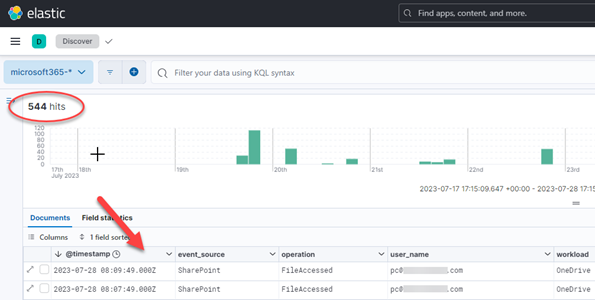
Checking SOF-ELK Indices
Checking SOF-ELK web UI

What now? You guessed it: UAL wrangling time! Go back to part one for some pointers or stick around for a couple additional SOF-ELK tidbits!

While I’ve got your attention, I just wanted to point out two quick items of note relative to SOF-ELK: geolocation and updates. Neither is complicated and both are useful.

There is MaxMind geolocation data prepopulated in the current version of SOF-ELK, but it is necessarily stale, not useless but not up to date. To remedy this, visit MaxMind and sign-up for a GeoLite2 account (or one of their other commercial solutions): https://www.maxmind.com/en/geolite2/signup. Once you’ve done that, you’ll receive an account ID and can then generate a license key: https://www.maxmind.com/en/accounts/current/license-key.  To easily apply this to your SOF-ELK deployment and update the geolocation data, just run the built-in “geoip_bootstrap.sh” script and enter your account info at the prompts. You’ll need to run this as root.

$sudo su
#/usr/local/sbin/geoip_bootstrap.sh
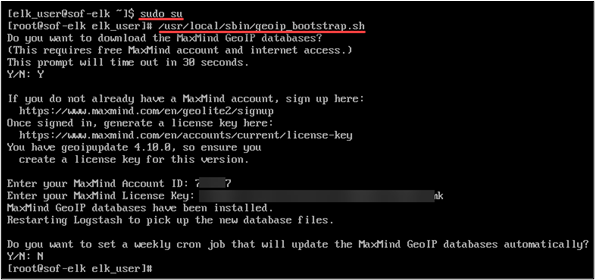
Setting up MaxMind SOF-ELK Configuration

Lastly, to keep your SOF-ELK installation up to date, you can run the built-in “sof-elk_update.sh” script, which must also be run as “root.”

As previously mentioned, we’ve only scratched the surface on SOF-ELK’s utility! When you get a moment, do an “ls /logstash” from your SOF-ELK system and ponder the log-wrangling possibilities (aws, azure, gcp, etc.)!

Viewing SOF-ELK’s Ingestion Possibilities

Until next time, thank you very much for reading!

READ:

PART 1

PART 2


Ready to learn more?

Level up your skills with affordable classes from Antisyphon!

Pay-What-You-Can Training

Available live/virtual and on-demand
