



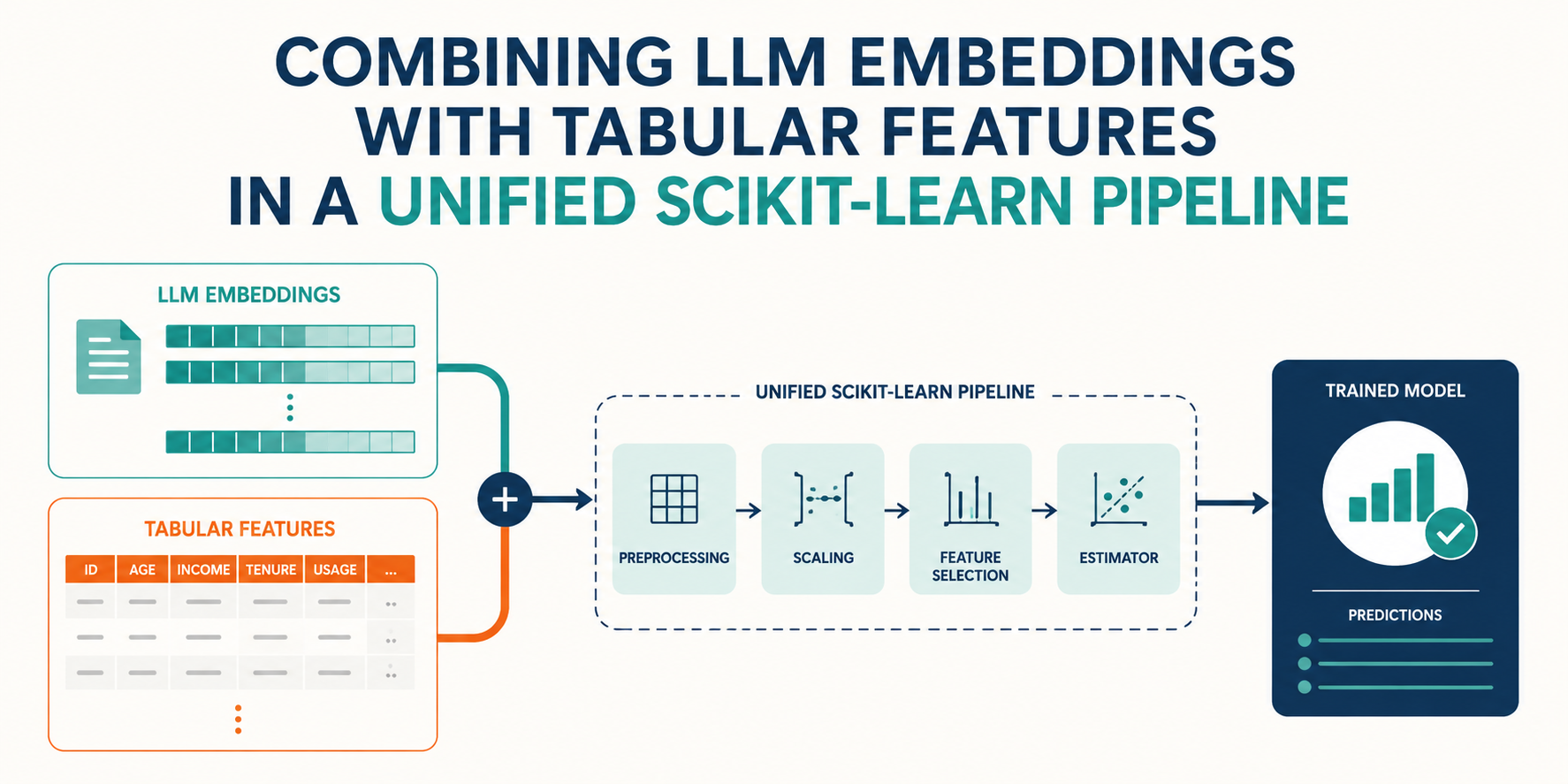
In this article, you will learn how to build a unified scikit-learn pipeline that combines text embeddings generated by a lightweight open-source language model with structured tabular features for classification tasks.
Topics we will cover include:
- How to generate text embeddings using Hugging Face’s
sentence-transformerslibrary and wrap them in a custom scikit-learn transformer class. - How to use a
ColumnTransformerto run parallel preprocessing branches for text, numeric, and categorical features simultaneously. - How to assemble and evaluate a complete, deployment-ready classification pipeline on a mixed dataset combining real text data with synthetic tabular features.
Introduction
Real-world tasks like ticket triage or customer churn prediction are typically addressed by building classification models. Yet, in an increasingly data-pervaded era, the data used to construct these models and perform inference on them rarely comes in a single flavor. We are often faced with a mix of tabular, structured data of numeric and qualitative nature, as well as unstructured data like text — for instance, ticket descriptions or customer messages. Feeding these data types together into machine learning models requires effective and unified pipelines that accommodate the latest data nuances and techniques to handle them.
This article shows you how to build a clean, deployment-ready solution that encapsulates embeddings generated by open-source LLMs (language models) into a unified scikit-learn pipeline, bringing together text representations and tabular features of distinct types — all based on the use of a ColumnTransformer. To illustrate its use, we will consider a classification scenario for detecting spammer users in a customer base.
Prerequisites
Instead of resorting to a paid API like OpenAI’s or Google Gemini’s, or a massive open-source LLM like LLaMA 3, we will use a more lightweight, CPU-friendly solution to generate embeddings from a collection of texts: Hugging Face’s sentence-transformers. Depending on your running environment, all you may need is to install the following libraries and dependencies:
!pip install -q sentence-transformers scikit-learn pandas numpy |
Remove the ! if you are working in your own Python IDE rather than a cloud notebook environment like Google Colab.
Step-by-Step Guide
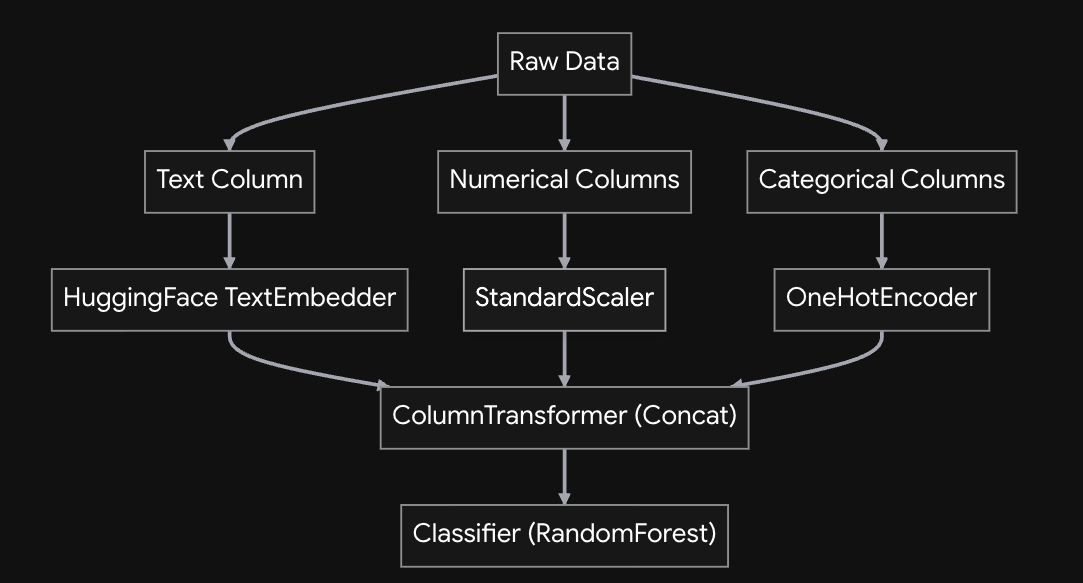
Here’s what our intended, unified scikit-learn pipeline architecture looks like:
But first, we need a mixed dataset that looks reasonably realistic. For this, we adopt a hybrid approach: we pull a real dataset available on GitHub — the well-known SMS Spam Collection dataset containing users’ text messages labeled as spam or not — and augment it with synthetic tabular data features. Put together, the data will serve us to set up a customer churn/triage scenario.
The code excerpt required for data generation is a bit large, but there are plenty of comments to help you understand every decision behind the synthetic data creation process:
|
1 2 3 4 5 6 7 8 9 10 11 12 13 14 15 16 17 18 19 20 21 22 23 24 25 26 27 28 29 30 31 32 33 34 35 36 37 38 |
import pandas as pd import numpy as np # 1. Loading base text dataset from GitHub url = "https://raw.githubusercontent.com/justmarkham/pycon-2016-tutorial/master/data/sms.tsv" df = pd.read_csv(url, sep='\t', header=None, names=['label', 'message']) # 2. Encoding original target variable first (0 for normal/ham, 1 for spam) df['target'] = df['label'].map({'ham': 0, 'spam': 1}) # 3. Synthesising meaningful tabular features WITH realistic overlap (noise) # Without noise and some degree of overlap, the classifier we will build would # easily achieve perfection: something not quite realistic in practice. np.random.seed(42) # Account Age: Normal users can be brand new, and spammers sometimes use older hacked accounts df['account_age_days'] = np.where( df['target'] == 1, np.random.randint(1, 365, df.shape[0]), # Spam: 1 to 365 days np.random.randint(1, 1500, df.shape[0]) # Ham: 1 to 1500 days (Massive overlap) ) # Premium Status: Adding a bit more noise here df['is_premium'] = np.where( df['target'] == 1, np.random.choice(['no', 'yes'], df.shape[0], p=[0.95, 0.05]), # Spam: 95% free np.random.choice(['no', 'yes'], df.shape[0], p=[0.80, 0.20]) # Ham: 80% free, 20% premium ) # Priority Score: Overlapping distributions so the model can't rely on this feature alone to classify customers df['priority_score'] = np.where( df['target'] == 1, np.random.uniform(0.4, 1.0, df.shape[0]), # Spam: 0.4 to 1.0 np.random.uniform(0.0, 0.7, df.shape[0]) # Ham: 0.0 to 0.7 (Overlap between 0.4 and 0.7) ) # Viewing a sample of the logically cohesive mixed data df.head(3) |
Example output:

The next step is key, as this is where we create the custom text transformer — see the leftmost branch in the previous diagram. In scikit-learn, this is done by creating a custom class that inherits from TransformerMixin and BaseEstimator. The requirement is to define fit() and transform() methods, just like any pre-existing data transformation class in the library (e.g. standard scalers and one-hot encoders).
|
1 2 3 4 5 6 7 8 9 10 11 12 13 14 15 16 17 18 19 20 21 22 23 |
from sklearn.base import BaseEstimator, TransformerMixin from sentence_transformers import SentenceTransformer class TextEmbedder(BaseEstimator, TransformerMixin): def __init__(self, model_name='all-MiniLM-L6-v2'): self.model_name = model_name self.model = None def fit(self, X, y=None): # Initializing the model in fit() to comply with sklearn cloning rules if self.model is None: self.model = SentenceTransformer(self.model_name) return self def transform(self, X, y=None): # Handling pandas DataFrame (extract the first column as a list of strings) if isinstance(X, pd.DataFrame): texts = X.iloc[:, 0].astype(str).tolist() else: texts = pd.Series(X).astype(str).tolist() # Using the specified LLM, generate and return embeddings as a 2D numpy array return self.model.encode(texts, show_progress_bar=False) |
Notice that we specify the Hugging Face sentence-transformer model to use — namely all-MiniLM-L6-v2 — in the constructor method, and call the model in transform() to map texts into embeddings.
Next, once we have our embeddings, we apply the parallel data preprocessing required by the other features. Since this relies entirely on already-implemented classes in scikit-learn, we can directly assemble all the type-specific preprocessing steps into an overarching, unified pipeline. We distinguish numerical columns from categorical ones, applying standard scaling to the former and one-hot encoding to the latter. Together with the previously implemented text embedding step, this gives us three processing branches that run in parallel. The way to implement this is through a ColumnTransformer object that contains a list of three “processing branches.” This mechanism keeps the whole dataset together, without the need to manually split and re-unify features.
After that, we add the final stage: a random forest classifier. The entire process looks as follows:
|
1 2 3 4 5 6 7 8 9 10 11 12 13 14 15 16 17 18 19 20 21 22 23 24 25 26 27 28 29 30 31 32 |
from sklearn.compose import ColumnTransformer from sklearn.pipeline import Pipeline from sklearn.preprocessing import StandardScaler, OneHotEncoder from sklearn.ensemble import RandomForestClassifier from sklearn.model_selection import train_test_split from sklearn.metrics import classification_report # Split data X = df[['message', 'account_age_days', 'priority_score', 'is_premium']] y = df['target'] X_train, X_test, y_train, y_test = train_test_split(X, y, test_size=0.2, random_state=42) # Define column groups text_features = ['message'] numeric_features = ['account_age_days', 'priority_score'] categorical_features = ['is_premium'] # Build the ColumnTransformer preprocessor = ColumnTransformer( transformers=[ ('text', TextEmbedder(), text_features), ('num', StandardScaler(), numeric_features), ('cat', OneHotEncoder(handle_unknown='ignore'), categorical_features) ], remainder='drop' # Drop any columns not explicitly defined ) # Assemble the final pipeline pipeline = Pipeline(steps=[ ('preprocessor', preprocessor), ('classifier', RandomForestClassifier(n_estimators=100, random_state=42)) ]) |
Now that we have assembled the entire pipeline, it’s time to try it out! The final piece of code trains the model — a process that, thanks to the pipeline encapsulation, implicitly carries out all the preceding data preparations — and evaluates it on the test set we set aside earlier:
# Training the model (this will take a moment to download the HF model and embed the texts) print("Training pipeline...") pipeline.fit(X_train, y_train) # Evaluating on test examples print("Predicting and evaluating...") y_pred = pipeline.predict(X_test) print(classification_report(y_test, y_pred)) |
Results:
Predicting and evaluating... precision recall f1-score support 0 0.99 1.00 0.99 966 1 1.00 0.91 0.95 149 accuracy 0.99 1115 macro avg 0.99 0.95 0.97 1115 weighted avg 0.99 0.99 0.99 1115 |
These results are pretty decent. Part of the reason is that the real dataset used for the labeled texts is known for being easily class-separable and therefore not hard to classify with high accuracy. We also intentionally added noise and overlap when creating the other synthetic attributes to introduce a bit of challenge for our classifier — otherwise, it might have achieved 100% accuracy, which would not be very informative.
Conclusion
This article tackled an increasingly common problem in the AI and data science landscape: leveraging text data and combining it with structured data features traditionally fed to downstream machine learning models for predictive tasks like classification. We used scikit-learn’s transformer classes and a pre-trained language model to build a unified pipeline that cleanly and elegantly processes these mixed data types, yielding a robust and easily reusable solution.