





FILE PHOTO: The Google logo | Photo Credit: Hannah McKay
Google Chrome’s home page on the desktop can be customised to display any picture or GIFs, and also changed to a chosen colour theme offered by Google.
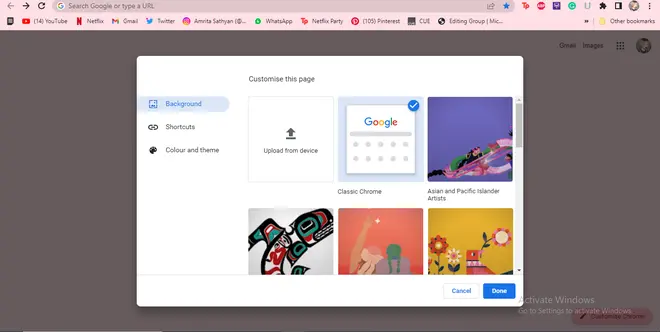
Also read: How to clear Chrome cache, cookies on Android devices
Users can also make their Google Chrome home background display a GIF (animated picture loop). To do so, while saving the GIF from a website or app, manually change the extension to .PNG. Then, upload the saved GIF from the ‘Upload from device’ option stated above. To fit the home page, make sure that the aspect ratio of the GIF is 16:9 (landscape).
Published on May 11, 2023
此内容由惯性聚合(RSS阅读器)自动聚合整理,仅供阅读参考。 原文来自 — 版权归原作者所有。