惯性聚合 高效追踪和阅读你感兴趣的博客、新闻、科技资讯
阅读原文 在惯性聚合中打开

推荐订阅源

WordPress大学
WordPress大学
酷 壳 – CoolShell
酷 壳 – CoolShell
小众软件
小众软件
Vercel News
Vercel News
Last Week in AI
Last Week in AI
H
Help Net Security
The Cloudflare Blog
L
LangChain Blog
Microsoft Security Blog
B
Blog RSS Feed
云风的 BLOG
云风的 BLOG
I
InfoQ
U
Unit 42
美团技术团队
人人都是产品经理
人人都是产品经理
雷峰网
雷峰网
OSCHINA 社区最新新闻
OSCHINA 社区最新新闻
博客园 - 叶小钗
Y
Y Combinator Blog
Hugging Face - Blog
Hugging Face - Blog
A
About on SuperTechFans
宝玉的分享
宝玉的分享
量子位
博客园_首页

Infotech News, How To Guide News | The HinduBusinessLine

Today’s Stock Recommendation: April 04, 2025 RBI’s UDGAM portal: How to register, check unclaimed deposits PMFBY: Farmers Can Calculate Crop Insurance for Crop Loss How to get crop insurance under Pradhan Mantri Fasal Bima Yojna How can you apply for learner licence in Parivahan Sewa? Union Home Minister Launches Online Portal for Sahara Depositors to Claim Refunds Google Chrome Update: Add Website Tabs to Home Screen on iOS and iPadOS Devices How to Deactivate Your Threads Account: Step-by-Step Guide Shazam Update Enables Integration with YouTube, TikTok, and Instagram for Music Recognition Never Miss a Payment Deadline with Google Pay Payment Reminders Amazon joins its peers to introduce travel ticket booking Kotak Mahindra Bank Introduces WhatsApp Banking for Instant and Convenient Services: How to Access? PAN-Aadhaar linking: Know how to pay penalty How to unload ₹2,000 notes through Amazon Pay? Xpression Camera: A Virtual App That Transforms Faces into Anything or Anyone with Real-Time Facial Expressions iOS 17 introduces screen distance feature to protect users’ eyesight Instagram Introduces 30-Second Music Option for Notes Feature, Allowing Users to Add Songs of Their Choice Know how to check IPO allotment status How to Create Chat Folders on Telegram: A Step-by-Step Guide Google Pay Enables RuPay Credit Card UPI Transactions: A Step-by-Step Guide Customize Apple iPhone App Icons Using Shortcuts App: A Step-by-Step Guide How to check Aadhaar update history? How to lock a WhatsApp chat on iOS? Aadhaar update: How to update address on your Aadhaar card for free Google Search Labs: How to join waitlist Reliance Jio: How to switch from Jio prepaid to JioPlus postpaid on the same number Gmail: How to unsend an email Google Street View in India: How to access Paytm: How to open a fixed deposit (FD) Netflix: How to transfer profile to a new account
Paytm Introduces ‘Pin Recent Payments’ Feature for Quick ...
By Aneeka Chatterjee · 2023-06-29 · via Infotech News, How To Guide News | The HinduBusinessLine
SENSEX   73,983.18

+ 64.42

NIFTY   23,214.95

 -27.15

CRUDEOIL   8,684.00

+ 263.00

GOLD   148,107.00

 -4,336.00

SILVER   236,004.00

 -2,524.00

SENSEX   73,983.18

+ 64.42

NIFTY   23,214.95

 -27.15

NIFTY   23,214.95

 -27.15

CRUDEOIL   8,684.00

+ 263.00

CRUDEOIL   8,684.00

+ 263.00

GOLD   148,107.00

 -4,336.00

Paytm: Know how to pin contacts for quick pay

Guide to pin contacts in Paytm app

Updated - June 29, 2023 at 01:13 PM.

Paytm logo and the app is seen in the picture

Paytm logo and the app is seen in the picture | Photo Credit: cueapi

Also Read:How to unload ₹2,000 notes through Amazon Pay?

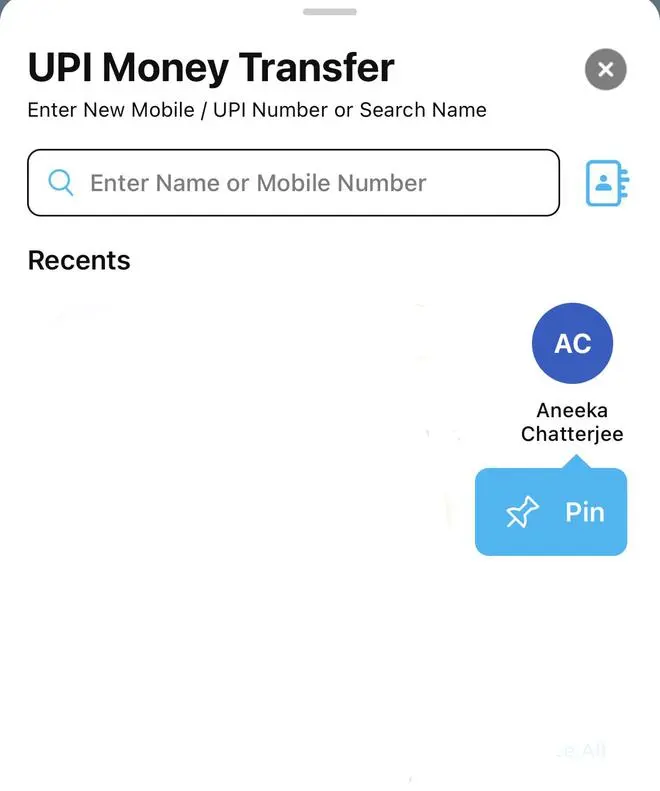
Paytm has rolled out a new ‘pin recent payments’ feature, enabling customers to pin their most used contacts for quick and smooth pay.

Paytm’s “ ‘pin contact’ feature is aimed at facilitating even faster UPI payments,” said Paytm spokesperson.

Also Read: EbixCash IPO to debut in July. Know how to apply

Also Read: IndusInd Bank, Wise partners to enable NRIs transfer fund to India
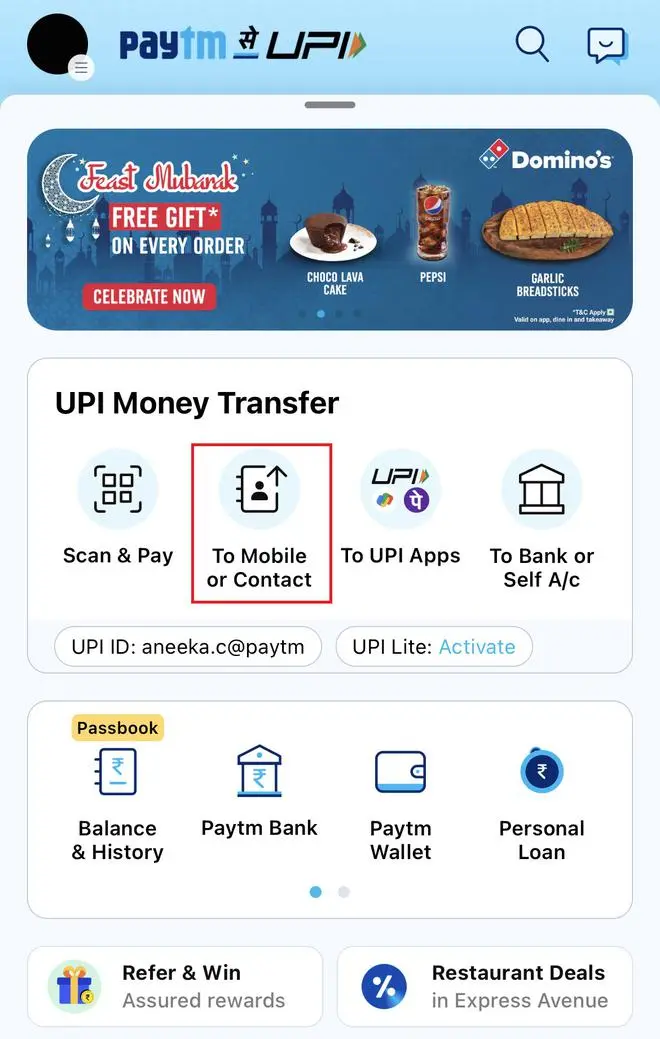
Pin contacts for easy money transfer

  • Launch the Paytm app
  • Tap ‘To Mobile or Contact’

  • Under ‘Recents’, select the contact you wish to ‘Pin’ for quick transaction

  • Once you select pin option, the particular contact will appear first on the list

Published on June 29, 2023

THIS AD SUPPORTS OUR JOURNALISM. SUBSCRIBE FOR MINIMAL ADS.

THIS AD SUPPORTS OUR JOURNALISM. SUBSCRIBE FOR MINIMAL ADS.