


惯性聚合 高效追踪和阅读你感兴趣的博客、新闻、科技资讯
阅读原文 在惯性聚合中打开

推荐订阅源

Threat Intelligence Blog | Flashpoint
W
WeLiveSecurity
O
OpenAI News
N
News and Events Feed by Topic
K
KPMG report finds enterprise disconnect between AI and its ROI | CIO
cs.CV updates on arXiv.org
Webroot Blog
Webroot Blog
Google Online Security Blog
云风的 BLOG
云风的 BLOG
N
News | PayPal Newsroom
H
Hacker News: Front Page
博客园_首页
Exploit-DB.com RSS Feed
The Last Watchdog
The Last Watchdog
钛媒体:引领未来商业与生活新知
钛媒体:引领未来商业与生活新知
H
Heimdal Security Blog
cs.AI updates on arXiv.org
S
Schneier on Security
宝玉的分享
宝玉的分享
H
Hackread – Cybersecurity News, Data Breaches, AI and More
Recent Commits to openclaw:main
Y
Y Combinator Blog
Cyberwarzone
Cyberwarzone
Microsoft Security Blog
C
CXSECURITY Database RSS Feed - CXSecurity.com
GbyAI
GbyAI
Cloudbric
Cloudbric
TaoSecurity Blog
TaoSecurity Blog
人人都是产品经理
人人都是产品经理
P
Palo Alto Networks Blog
M
MIT News - Artificial intelligence
G
GRAHAM CLULEY
C
Check Point Blog
Apple Machine Learning Research
Last Week in AI
Last Week in AI
T
Troy Hunt's Blog
L
Lohrmann on Cybersecurity
www.infosecurity-magazine.com
P
Proofpoint News Feed
Blog — PlanetScale
Blog — PlanetScale
量子位
博客园 - 聂微东
S
Securelist
博客园 - 三生石上(FineUI控件)
F
Full Disclosure
G
Google Developers Blog
L
LINUX DO - 热门话题
P
Proofpoint News Feed
AI
AI
PCI Perspectives
PCI Perspectives

Infotech News, How To Guide News | The HinduBusinessLine

Today’s Stock Recommendation: April 04, 2025 RBI’s UDGAM portal: How to register, check unclaimed deposits PMFBY: Farmers Can Calculate Crop Insurance for Crop Loss How to get crop insurance under Pradhan Mantri Fasal Bima Yojna How can you apply for learner licence in Parivahan Sewa? Union Home Minister Launches Online Portal for Sahara Depositors to Claim Refunds Google Chrome Update: Add Website Tabs to Home Screen on iOS and iPadOS Devices How to Deactivate Your Threads Account: Step-by-Step Guide Shazam Update Enables Integration with YouTube, TikTok, and Instagram for Music Recognition Never Miss a Payment Deadline with Google Pay Payment Reminders Amazon joins its peers to introduce travel ticket booking Kotak Mahindra Bank Introduces WhatsApp Banking for Instant and Convenient Services: How to Access? Paytm Introduces ‘Pin Recent Payments’ Feature for Quick and Smooth Transactions PAN-Aadhaar linking: Know how to pay penalty How to unload ₹2,000 notes through Amazon Pay? Xpression Camera: A Virtual App That Transforms Faces into Anything or Anyone with Real-Time Facial Expressions iOS 17 introduces screen distance feature to protect users’ eyesight Instagram Introduces 30-Second Music Option for Notes Feature, Allowing Users to Add Songs of Their Choice Know how to check IPO allotment status How to Create Chat Folders on Telegram: A Step-by-Step Guide Google Pay Enables RuPay Credit Card UPI Transactions: A Step-by-Step Guide Customize Apple iPhone App Icons Using Shortcuts App: A Step-by-Step Guide How to check Aadhaar update history? How to lock a WhatsApp chat on iOS? Aadhaar update: How to update address on your Aadhaar card for free Google Search Labs: How to join waitlist Reliance Jio: How to switch from Jio prepaid to JioPlus postpaid on the same number Gmail: How to unsend an email Google Street View in India: How to access Paytm: How to open a fixed deposit (FD) Netflix: How to transfer profile to a new account WhatsApp users can now edit messages within 15 minutes Know how to migrate emails from Gmail to Outlook EPFO: How nominee can withdraw PF money of a deceased member ITR refund status: Know your income tax refund status Chennai Metro WhatsApp ticketing: Know how to book tickets What is Sanchar Saathi? How to use, track and block your lost phone Google to delete inactive accounts; Know how to protect your account Zomato UPI offering: How to use Google’s Help Me Write feature: How to use in Gmail RuPay CVV-less payments for tokenized cards: How it works Google Bard AI in India: How to use Google Chrome: Know how to customise home page with pictures, GIFs EPFO: How to link Aadhaar to EPF on UMANG iPhone: How to lock specific apps using Shortcuts? Paytm: How to split bills among friends RuPay Credit Card on UPI: How to link credit card with Paytm Paytm Postpaid: How to book train ticket on IRCTC and pay later How to clear Chrome cache, cookies on Android devices Paytm: Know how to complete KYC on Paytm Instagram: How to download Reels without third-party apps Google: How to set passkey for Gmail? iPhone: Know how to make GIFs using Shortcuts UIDAI: How to book appointment for Aadhaar? NPS: How to add nominee to National Pension Scheme (NPS) account iPhone: How to set screen time limit, improve focus EPFO: How to activate UAN on UMANG How to find Voter ID number online? EPFO: How to view EPF passbook online?
Twitter: How to send encrypted DM
By Madhu Balaji · 2023-05-15 · via Infotech News, How To Guide News | The HinduBusinessLine

Twitter recently launched the encrypted direct messages (DMs) feature to verified users on its platform. Elon Musk briefed that users could respond to any messages in a tweet thread using the Instagram-like feature. 

Alongside, Elon Musk also announced that the microblogging platform will remove inactive accounts

How does it work?

Twitter claimed in a blog post that the latest version of Twitter on Android, iOS, and the web will generate a pair of device-specific keys called private and public key pair. “In addition to this, there is a per-conversation key that is used to encrypt the content of messages. The private-public key pairs are used to exchange the conversation key securely between participating devices,” the microblogging platform said.

The platform employs cryptographic schemes to encrypt every single message, link, and reaction that are part of an encrypted conversation before they leave the sender’s device, and remain encrypted while stored on Twitter’s infrastructure.

Who can use

Both the sender and recipient must be verified users and show have the latest Twitter app. They should be connected as a follower or should have accepted a Direct Message (DM) request.

How to send encrypted messages?

Eligible users will see a toggle within Twitter’s messages tab. The sender of the message will have to enable the “encrypted” mode and choose an eligible receiver to compose a message.
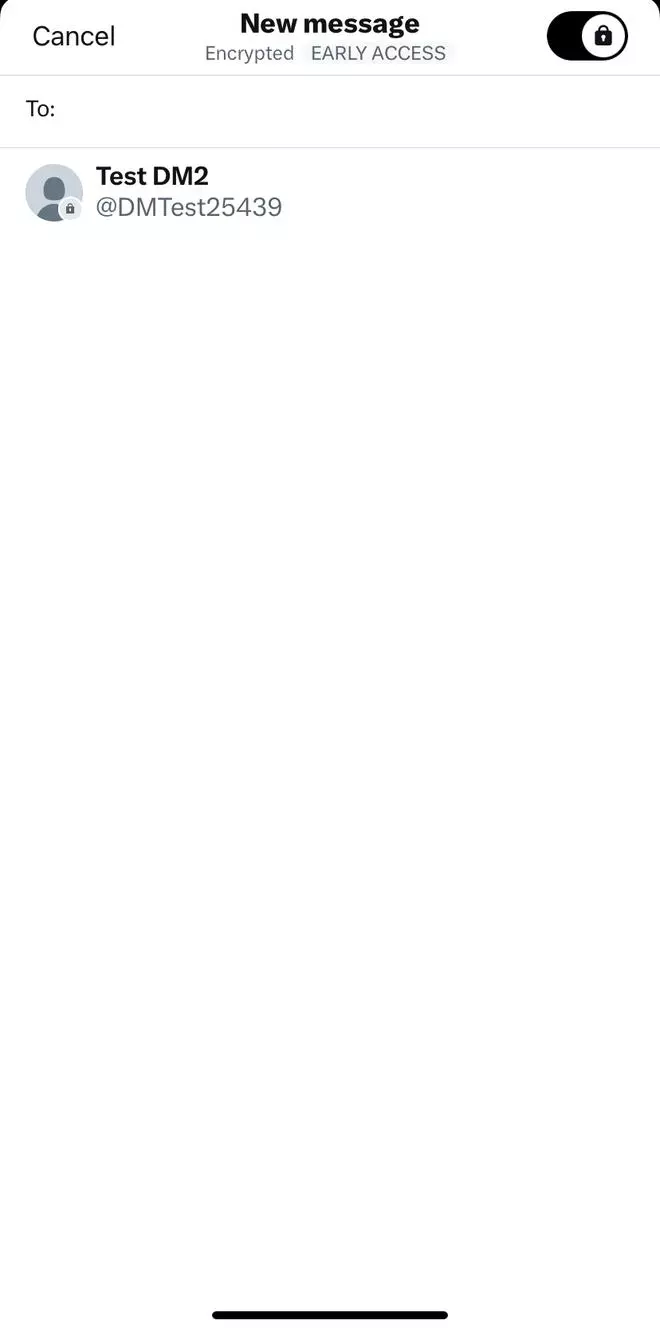
Toggle to enable encryption mode

Toggle to enable encryption mode

Twitter revealed an alternative method for users to send an encrypted message through the conversation settings page of an unencrypted conversation
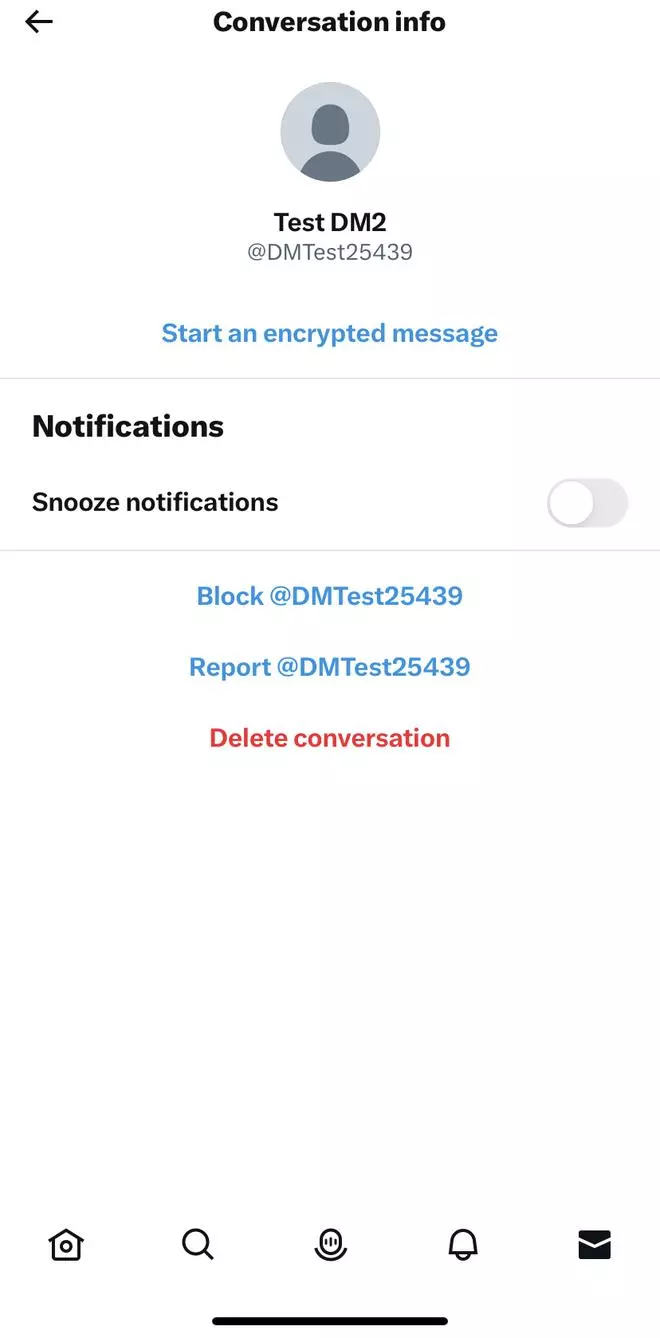
  • Tap into an unencrypted conversation from your inbox.
  • Tap on the information icon.
  •  Select “Start an encrypted message”

Click to start an encrypted message

Click to start an encrypted message

Limitations of the feature include;

  • Users can send encrypted messages only to a single recipient at present. The feature would likely expand to group conversations soon.
  • Encrypted messages only support text and links and not media attachments.
  • Twitter only allows a maximum of ten devices per user for encrypted messages.
  • Users cannot report encrypted messages. However, they may block user accounts from sending one.

More Like This

Published on May 15, 2023