







Bitdefender rolled out new functionality in Bitdefender GravityZone, a unified cybersecurity platform that provides prevention, protection, detection, and response capabilities for organizations of all sizes. These features, consistent with our multi-layered security strategy, are intended to ease the workload of security analysts, administrators, and users.
In a dynamic cybersecurity landscape, security analysts are responsible for uncovering any signs of potential sophisticated attacks to make the invisible visible. This section describes new functionality designed to elevate analysts' capabilities, offering enhanced tools for threat detection, investigation, and response.
GravityZone Endpoint Detection and Response (EDR) gives security analysts the tools to detect, investigate, and respond to threats across managed endpoints, with raw event telemetry that supports historical querying and incident investigation.
With this release, four new Windows raw events are available in the Configuration > Raw Events page. The Device category adds Hardware mount and Hardware unmount; the Other category adds Initiate agent uninstall and Driver module load.
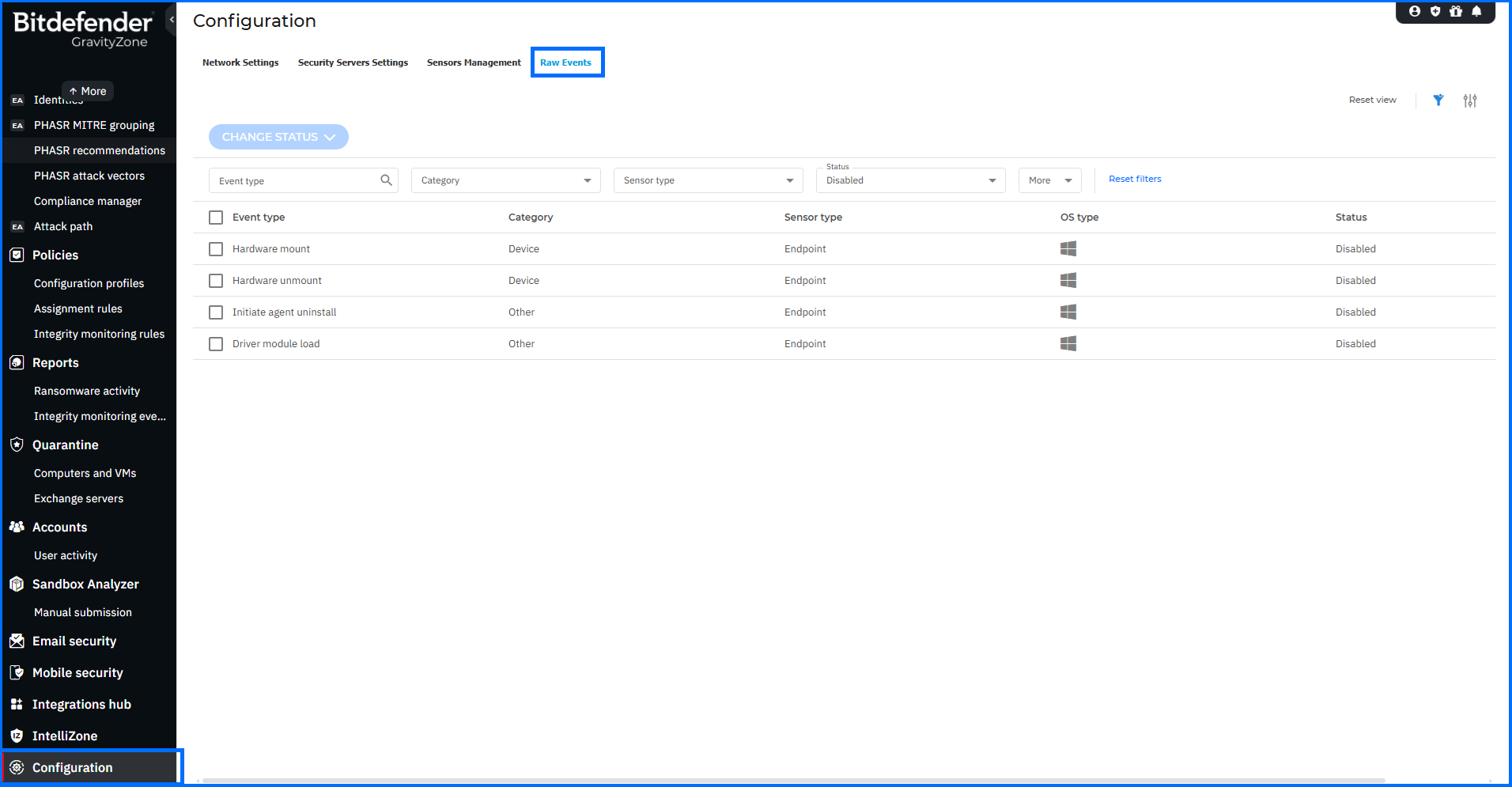
Additionally, the Modify group policy raw event has been renamed to Modify Windows Group Policy for consistency across all related views.
With these additions, analysts can trace hardware mounting and unmounting activity, agent uninstall attempts, and driver module loads alongside existing raw event telemetry during historical queries and incident investigations.
For comprehensive insights into detection and response with GravityZone EDR and XDR, we invite you to watch our masterclasses here.
With administrators constantly juggling numerous responsibilities, tools that make their daily work easier are highly appreciated. This section describes new functionality designed to facilitate the management of features responsible for prevention, protection, and detection in a defense-in-depth security architecture.
Proactive Hardening and Attack Surface Reduction (PHASR) proactively hardens systems by analyzing user behavior to prevent Living off the Land (LotL) attacks and targeted threats. It applies anomaly detection to enforce tailored, application-level action blocking that narrows the attack surface without disrupting operations. This update adds contextual navigation from recommendation details, expands policy output options, and aligns PHASR terminology across the platform.
From the PHASR recommendation details panel, administrators can now navigate directly to Risk Management > Resources or Risk Management > Accounts. Selecting either option opens the corresponding page with the relevant search pre-applied — scoped to the resource name or identities associated with the recommendation — reducing the steps needed to investigate a specific finding in context.
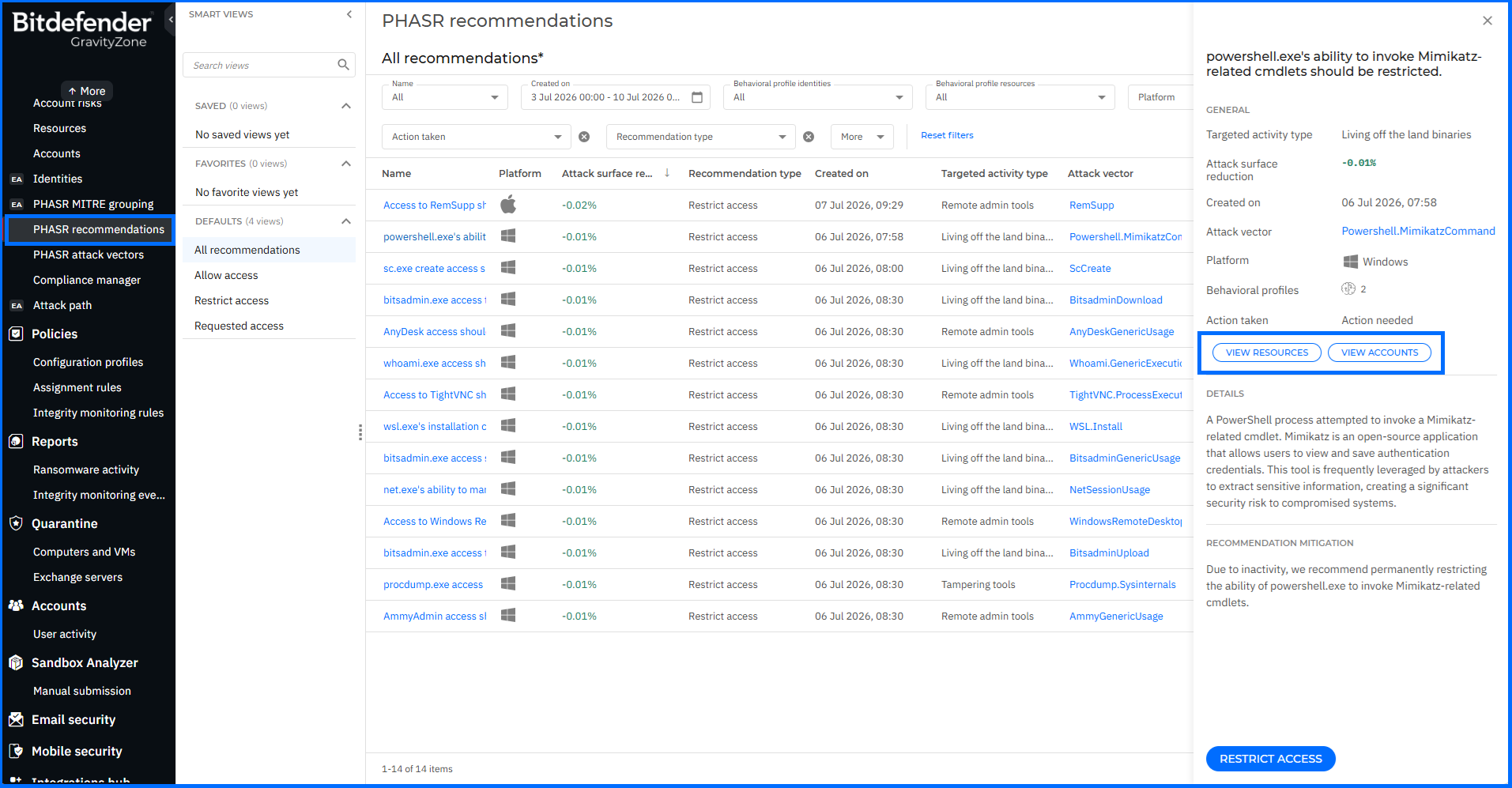
New PHASR policy options add configuration of whether restricted behavioral profiles generate alerts, incidents, or both. Existing behavior is preserved by default; administrators can adjust the output for their environment after the update. The term monitored rules has been replaced with attack vectors across all PHASR pages, filters, grids, details panels, MITRE grouping views, and User activity entries.
For comprehensive insights into PHASR, we invite you to watch our masterclasses here.
The Compliance Manager in GravityZone maps endpoint findings to regulatory and industry compliance standards, providing administrators with a structured view of their organization's compliance posture across managed assets.
A new Indonesian regulatory compliance standard, POJK No. 4/POJK.05/2021 (ID), is now available across the Findings, Identity risks, and Compliance Manager pages. Issued by Indonesia's Financial Services Authority (Otoritas Jasa Keuangan — OJK), this regulation governs the application of IT risk management by non-bank financial institutions, covering IT governance, risk assessment, and oversight of outsourced IT activities.
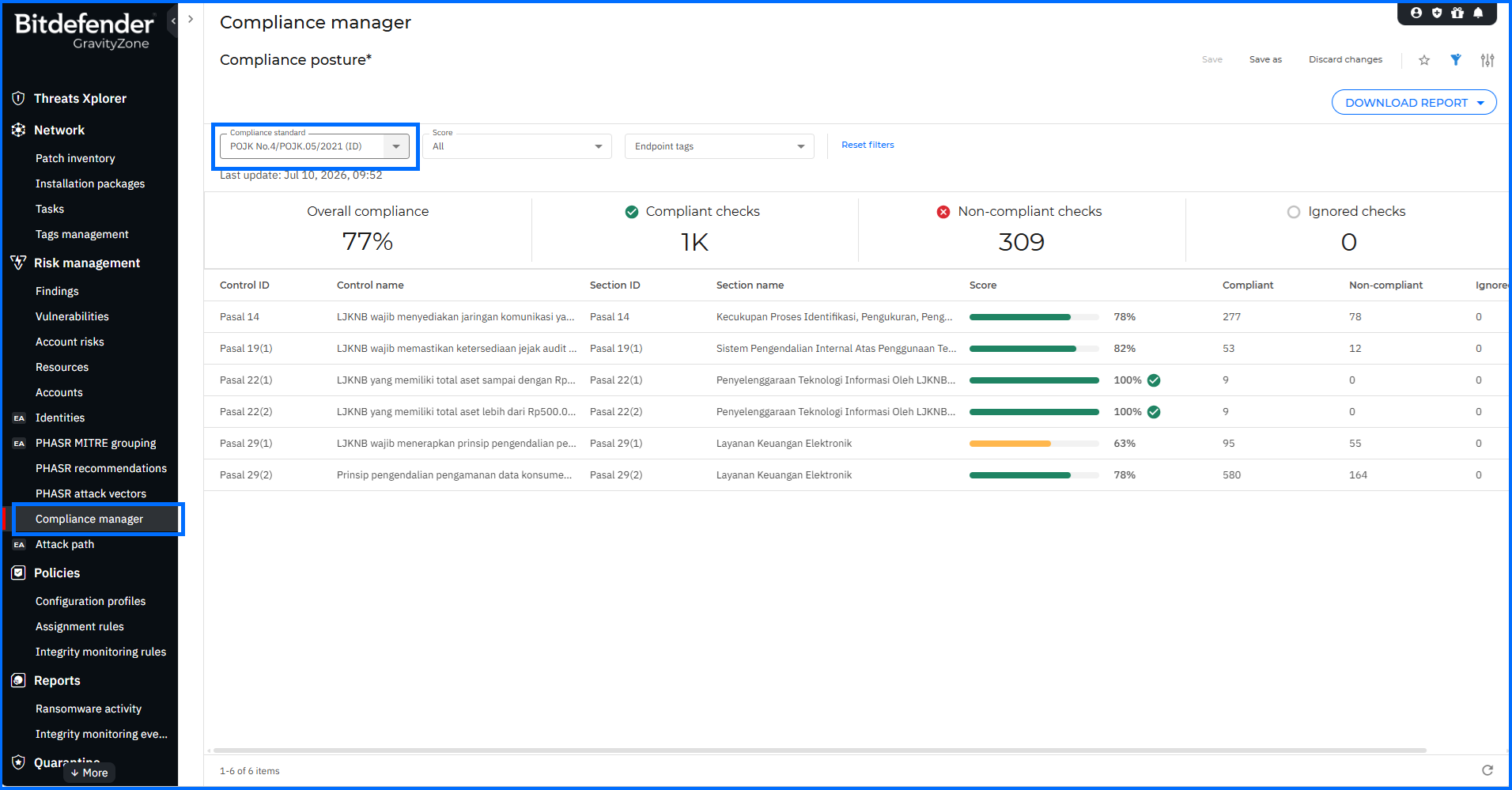
Organizations operating under OJK oversight can now track IT risk management posture against POJK No. 4/POJK.05/2021 (ID) alongside existing standards, using the same Findings, Account risks, and Compliance Manager views already in place for other regulatory frameworks.
For comprehensive insights into Compliance Manager, we invite you to watch our masterclasses here.
Managed Detection and Response (MDR) in GravityZone provides 24/7 threat monitoring and response by Bitdefender's SOC team, operating on top of endpoint protection deployed across customer companies. This update introduces automatic provisioning of MDR-recommended policies during company onboarding.
For newly created Customer companies with an active MDR license or subscription, GravityZone automatically generates two MDR-recommended policies — one for workstations and one for servers — along with two endpoint tags and two assignment rules that apply the appropriate policy based on endpoint type. If no primary account is added during company creation, all generated objects are owned by an MDR Service account.
For Partners newly enrolled in MDR and existing Customers transitioning to the service, GravityZone automatically creates the MDR-recommended workstation and server policies; in this case, policy assignment is not performed automatically, and ownership is assigned to an existing company account.
Companies onboarded to MDR before this update will receive the MDR-recommended policies shortly after the update rolls out; policy assignment is not performed automatically in this case. All policy, endpoint tag, and assignment rule creation events are recorded in the User activity section. Policy provisioning that previously required manual setup now occurs automatically during onboarding. Until policies become available, administrators can configure them manually by following the MDR recommended policy documentation at Bitdefender Support Center.
For a comprehensive overview of the MDR onboarding process, we invite you to watch our masterclass here.
The GravityZone Network inventory gives administrators a consolidated view of all managed endpoints, containers, and network assets across their environment. This update adds two capabilities to the Network page: container host folder deletion and CSV data export.
Administrators can now remove container host folders from Containers > Custom Container Groups — available only for hosts that have been offline for more than 24 hours. If the deleted folder is the last container host in Custom Container Groups, the Containers hierarchy is removed from the view entirely. Individual containers within a host cannot be deleted.
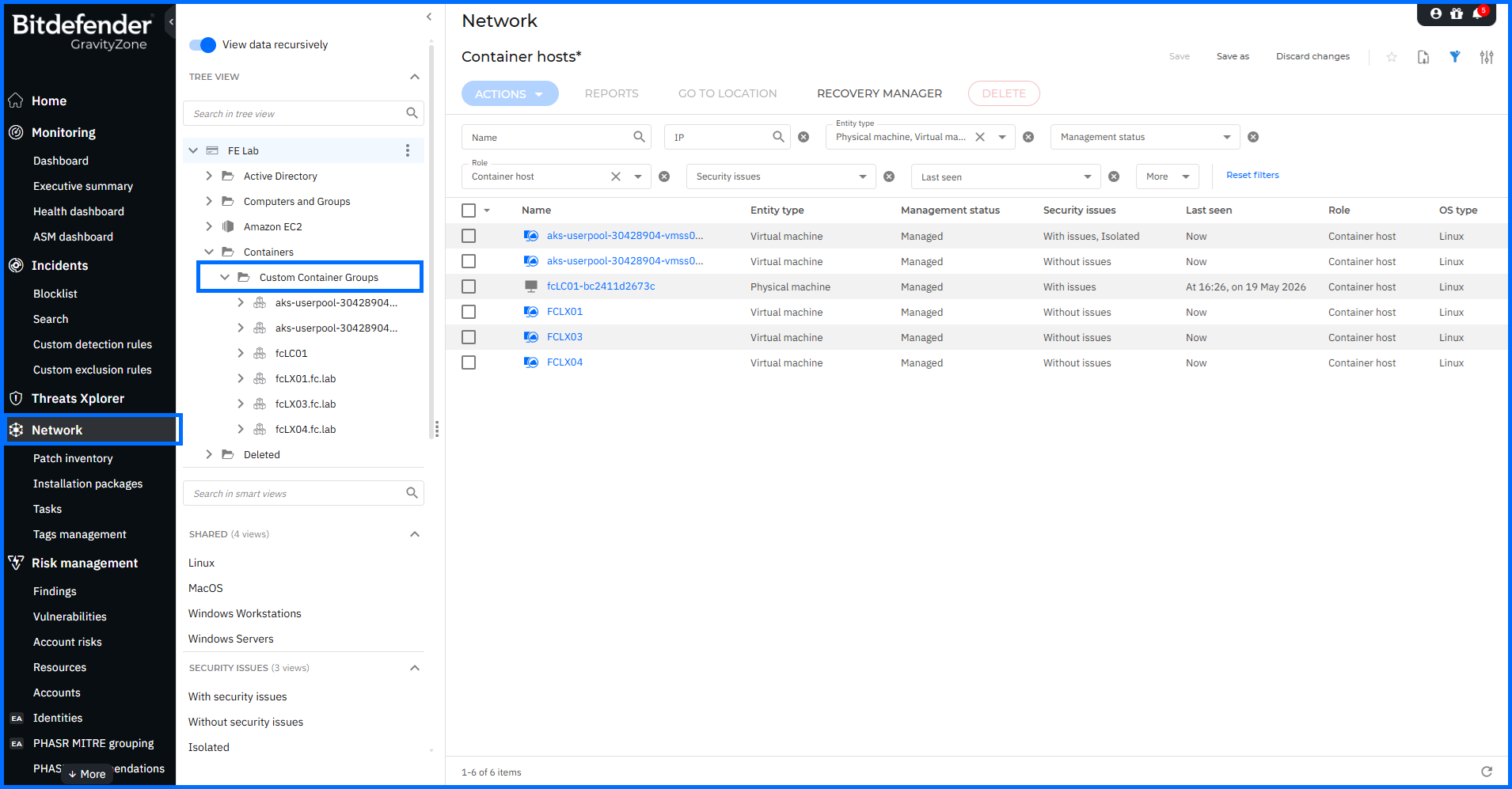
The Network page now includes CSV export, capturing all available columns with filters and sorting order applied and capped at 500,000 rows per export. This gives administrators a way to pull filtered, sorted network inventory data into external reporting or audit workflows without manual reconstruction.
GravityZone Identity Provider (IdP) is an authentication service that supports single sign-on (SSO) for Bitdefender service providers, using SAML 2.0 and System for Cross-domain Identity Management (SCIM) to manage and verify digital identities across the GravityZone ecosystem. This update extends SSO to the MDR portal, with support for Okta, Microsoft Entra ID, and Active Directory Federation Services (ADFS) as identity providers.
The Authentication page in company settings now separates SSO configuration into two sections:
For users to sign in to the MDR portal with a third-party identity provider, the Login with your Identity Provider option must be enabled in their GravityZone account settings by an administrator. This removes the need for separate credential sets across GravityZone Control Center and the MDR portal; authentication is consolidated under the organization's existing identity infrastructure.
Managed Service Providers (MSPs) operating in GravityZone manage security for multiple customer companies under a single partner account, provisioning each with its own licensing, policies, and configuration. This release updates onboarding template management, add-on availability, licensing visibility, and product trials for MSPs.
The MSP Simplified Customer Onboarding Early Access program, introduced in May 2026, continues to evolve with new template management capabilities and an updated Companies table view. A new dedicated Onboarding templates page now lists all templates owned by the current Partner company in a table view, giving administrators a consolidated location to manage saved configurations. For partners enrolled in the Early Access program, the Companies table now includes an Onboarding template column, showing which template was used to provision each company.
The Cloud Security Posture Management Plus (CSPM+) add-on is now available as a yearly add-on for MSP monthly subscriptions, extending coverage options for partners operating under a monthly billing model.
The External Attack Surface Management (EASM) add-on is now available for companies on a monthly subscription that use the Bitdefender PHASR product type. The EASM toggle is now present in the create and edit company flows for both own use and reselling. A new EASM Usage column has been added to the Monthly License Usage report and the Simplified Monthly License Usage report, and EASM-related company events and partner change notifications are recorded in the User activity section.
Partners can now start Extended Email Security trials directly from the Products hub page for qualifying managed companies with a monthly subscription. There is no minimum or maximum seat or mailbox count required to qualify for the trial.
For comprehensive insights into MSP management in GravityZone, we invite you to watch our masterclasses here.
Bitdefender Control Center APIs enable developers to automate business workflows. These APIs are exposed via the JSON-RPC 2.0 protocol. You can find usage examples and documentation in our Support Center, located, here.
This update introduces new and extended methods across Companies, Incidents, Licensing, and Network areas, and applies rate limiting to HTTP-based endpoints.
API rate limits for HTTP endpoints:
API rate limits now apply to HTTP-based Public API endpoints exposed under GET /api/v1.0/http/<handler>. The rate limit is 5 requests per minute per API key, with no burst or delay mechanism available. Separate rate limit counters are used for JSON-RPC and HTTP methods; requests to a JSON-RPC endpoint are not counted against the rate limit for HTTP endpoints, and vice versa. The following endpoints are affected:
Companies:
Incidents:
Licensing:
Network:
For comprehensive insights into automating workflows with the Control Center API, we invite you to watch our masterclasses here.
The Bitdefender GravityZone security platform offers a one-stop solution for all your organization's security needs. As the digital landscape evolves, Bitdefender remains proactive, providing prevention, protection, detection, and response capabilities to ensure the ongoing safety of organizations of all sizes worldwide.
To learn more about the Bitdefender GravityZone platform, contact us or a Bitdefender partner for more information. You can also start a free trial by requesting a demo here.
此内容由惯性聚合(RSS阅读器)自动聚合整理,仅供阅读参考。 原文来自 — 版权归原作者所有。