



惯性聚合 高效追踪和阅读你感兴趣的博客、新闻、科技资讯
阅读原文 在惯性聚合中打开

推荐订阅源

T
Tenable Blog
博客园_首页
Vercel News
Vercel News
WordPress大学
WordPress大学
美团技术团队
G
Google Developers Blog
大猫的无限游戏
大猫的无限游戏
小众软件
小众软件
Y
Y Combinator Blog
博客园 - 【当耐特】
量子位
酷 壳 – CoolShell
酷 壳 – CoolShell
The Cloudflare Blog
T
The Blog of Author Tim Ferriss
奇客Solidot–传递最新科技情报
奇客Solidot–传递最新科技情报
Google DeepMind News
云风的 BLOG
云风的 BLOG
腾讯CDC
M
MIT News - Artificial intelligence
爱范儿
爱范儿
Recent Announcements
雷峰网
雷峰网
Last Week in AI
Last Week in AI
宝玉的分享
宝玉的分享
The Register - Security
Jina AI
Jina AI
CTFtime.org: upcoming CTF events
cs.CL updates on arXiv.org
Hugging Face - Blog
Hugging Face - Blog
P
Privacy & Cybersecurity Law Blog
Recorded Future
Recorded Future
Help Net Security
Help Net Security
N
News and Events Feed by Topic
博客园 - Franky
P
Proofpoint News Feed
L
LINUX DO - 热门话题
S
SegmentFault 最新的问题
The GitHub Blog
The GitHub Blog
K
KPMG report finds enterprise disconnect between AI and its ROI | CIO
钛媒体:引领未来商业与生活新知
钛媒体:引领未来商业与生活新知
月光博客
月光博客
D
Docker
Google DeepMind News
有赞技术团队
有赞技术团队
IT之家
IT之家
Security Latest
Security Latest
L
LangChain Blog
V
V2EX
阮一峰的网络日志
阮一峰的网络日志
J
Java Code Geeks

OpenRouter Blog

DeepSeek V4 Is Earning Agentic Token Share — OpenRouter Blog The Open Weight Models that Matter: June 2026 — OpenRouter Blog The OpenRouter MCP Server — OpenRouter Blog Introducing the Unified Image API — OpenRouter Blog The AI Governance Checklist That Maps to Your Stack — OpenRouter Blog Enforce AI Data Residency at the Routing Layer — OpenRouter Blog OpenRouter vs Portkey: Routing Network vs Control Plane — OpenRouter Blog OpenRouter vs LiteLLM: Managed vs Self-Hosted Gateway — OpenRouter Blog Connect OpenClaw to OpenRouter: One Key, Failover, Free Models — OpenRouter Blog Connect SillyTavern to OpenRouter: Setup, Models, Fixes — OpenRouter Blog A Robot is Sprinting Towards You: Do You Want it Running on Claude or Grok? Kilo Code + OpenRouter: Setup, Routing, and Free Models — OpenRouter Blog Codex CLI with OpenRouter: config.toml Setup and Models — OpenRouter Blog Claude Code with OpenRouter: Setup, Models, and Costs — OpenRouter Blog How to Use OpenRouter With Any Coding Agent or AI Tool — OpenRouter Blog Subagent: Let Your Model Delegate the Busywork — OpenRouter Blog Free LLM API in 2026: 13 Options Ranked and Compared — OpenRouter Blog How to Enforce Agentic AI Governance at the API Layer — OpenRouter Blog Keep Your Agent Running When Models Disappear — OpenRouter Blog Hermes Agent + OpenRouter: Setup, Model Choice & Routing Config — OpenRouter Blog Lowest-Cost LLM Inference: The Complete OpenRouter Guide — OpenRouter Blog How OpenRouter Model Routing Works: Providers, Fallbacks & Auto Router — OpenRouter Blog OpenRouter Failover: Provider Failover vs Model Fallbacks Explained — OpenRouter Blog Surpassing Frontier Performance with Fusion — OpenRouter Blog Dinner is Served — OpenRouter Blog LLM Gateway: What It Is and How to Choose One — OpenRouter Blog Advisor: Give Any Model a Lifeline to a Smarter One — OpenRouter Blog Gemini 2.5 Flash API - Pricing, Quickstart & Provider Comparison — OpenRouter Blog EU AI Act & Colorado ADMT Compliance: Human Oversight for AI Agents — OpenRouter Blog May Release Spotlight — OpenRouter Blog Guardrails: Protect your Agents, Data, and Costs — OpenRouter Blog OpenRouter Raises $113M Series B — OpenRouter Blog Human-in-the-Loop Tools for the Agent SDK — OpenRouter Blog Consistent Web Search and Fetch Across Every Model — OpenRouter Blog GPT-5.5 Price Increase: What It Actually Costs — OpenRouter Blog New Audio APIs for Speech and Transcription — OpenRouter Blog Response Caching: Zero Cost for Identical Requests — OpenRouter Blog April Release Spotlight — OpenRouter Blog Create OpenRouter Accounts via CLI with Stripe Projects — OpenRouter Blog Opus 4.7 Agent SDK: Building Multi-turn Agent Workflows on OpenRouter — OpenRouter Blog Build Your Own Harness with the Agent SDK — OpenRouter Blog Introducing Workspaces — OpenRouter Blog Announcing Video Generation — OpenRouter Blog Auto Exacto: Adaptive Quality Routing, On by Default — OpenRouter Blog February Release Spotlight — OpenRouter Blog OpenRouter Outages on February 17 and 19, 2026 — OpenRouter Blog January Release Spotlight — OpenRouter Blog Distillable Models and Synthetic Data Pipelines with NeMo Data Designer — OpenRouter Blog December Release Spotlight — OpenRouter Blog Response Healing: Reduce JSON Defects by 80%+ — OpenRouter Blog The 2025 State of AI Report — OpenRouter Blog Is Implicit Caching Prompt Retention? — OpenRouter Blog Provider Variance: Introducing Exacto — OpenRouter Blog 1 million free BYOK requests per month — OpenRouter Blog The First-Ever Image Model Is Up on OpenRouter — OpenRouter Blog GPT-5 is now live — OpenRouter Blog Audio Inputs and PDF URLs for Apps — OpenRouter Blog Presets: How To Seamlessly Transfer Model Configurations Across Apps — OpenRouter Blog New Privacy-Focused Provider Drop: Venice — OpenRouter Blog Use OpenRouter Models in Cursor: Try it with Moonshot AI Updates to Our Free Tier: Sustaining Accessible AI for Everyone — OpenRouter Blog New Stealth Model: "Cypher Alpha" — OpenRouter Blog Introducing Presets: Manage LLM Configs from Your Dashboard! — OpenRouter Blog Dev & BYOK Updates: Uptime API + Smarter Key Management — OpenRouter Blog Simplifying Our Platform Fee — OpenRouter Blog GIF Prompts, Omni Search, Tool Caching, and BYOK Flags — OpenRouter Blog New Features: Reasoning Streams, Crypto Invoices, End-User IDs & More — OpenRouter Blog Passkeys, DevEx Upgrades, and a New Guide for TypeScript Agents — OpenRouter Blog New Provider Drop: Cerebras Is Here — OpenRouter Blog Better Insights, Faster Metrics, and New Developer Power Tools — OpenRouter Blog Privacy Clarity, New Providers, OAuth Upgrade, and Gemini Gets Parallel Tools — OpenRouter Blog Universal PDF Support — OpenRouter Blog Smarter Charts, Inline SVGs, and Live Usage Accounting — OpenRouter Blog Quasar Alpha and Optimus Alpha Reveal — OpenRouter Blog "Stealth" model: Optimus Alpha — OpenRouter Blog “Stealth” model: Quasar Alpha — OpenRouter Blog Never Pay for Empty AI Responses Again — OpenRouter Blog Deep Research & Many New Models — OpenRouter Blog Introducing Nitro and Floor Price Shortcuts — OpenRouter Blog Introducing Cloudflare as a new provider — OpenRouter Blog Reasoning Tokens for Thinking Models — OpenRouter Blog Introducing Web Search via the API — OpenRouter Blog Standardized finish reasons — OpenRouter Blog Happy New Year! Introducing a new Auto Router — OpenRouter Blog Holiday launches: Web Search & Price Cuts — OpenRouter Blog Bring Your Own API Keys — OpenRouter Blog Crypto Payments API — OpenRouter Blog Structured Outputs & Free Gemini Flash 2.0 — OpenRouter Blog Price Drops and Llama 3.3 70b — OpenRouter Blog Author Pages & Amazon Nova — OpenRouter Blog
Choosing the Optimal Image Input Detail Level in LLMs — OpenRouter Blog
Abhinav Pola · 2026-07-07 · via OpenRouter Blog

If you set detail: low on your image inputs to cut costs, you may not be getting the improvements you expect. We benchmarked the image detail parameters for OpenAI and Google’s latest models and found some surprising relationships between detail levels, reasoning, and costs.

For example, when we benchmarked gpt-5.5’s low versus auto image detail on MMMU-Pro Vision, low detail scored 13.8 points worse (65.2% vs 79.0%) and cost more per question (5.1¢ vs 4.5¢). The model compensated for the downsampled images by thinking 1.6x harder. The cost of these reasoning tokens outweighed the image tokens saved on input.
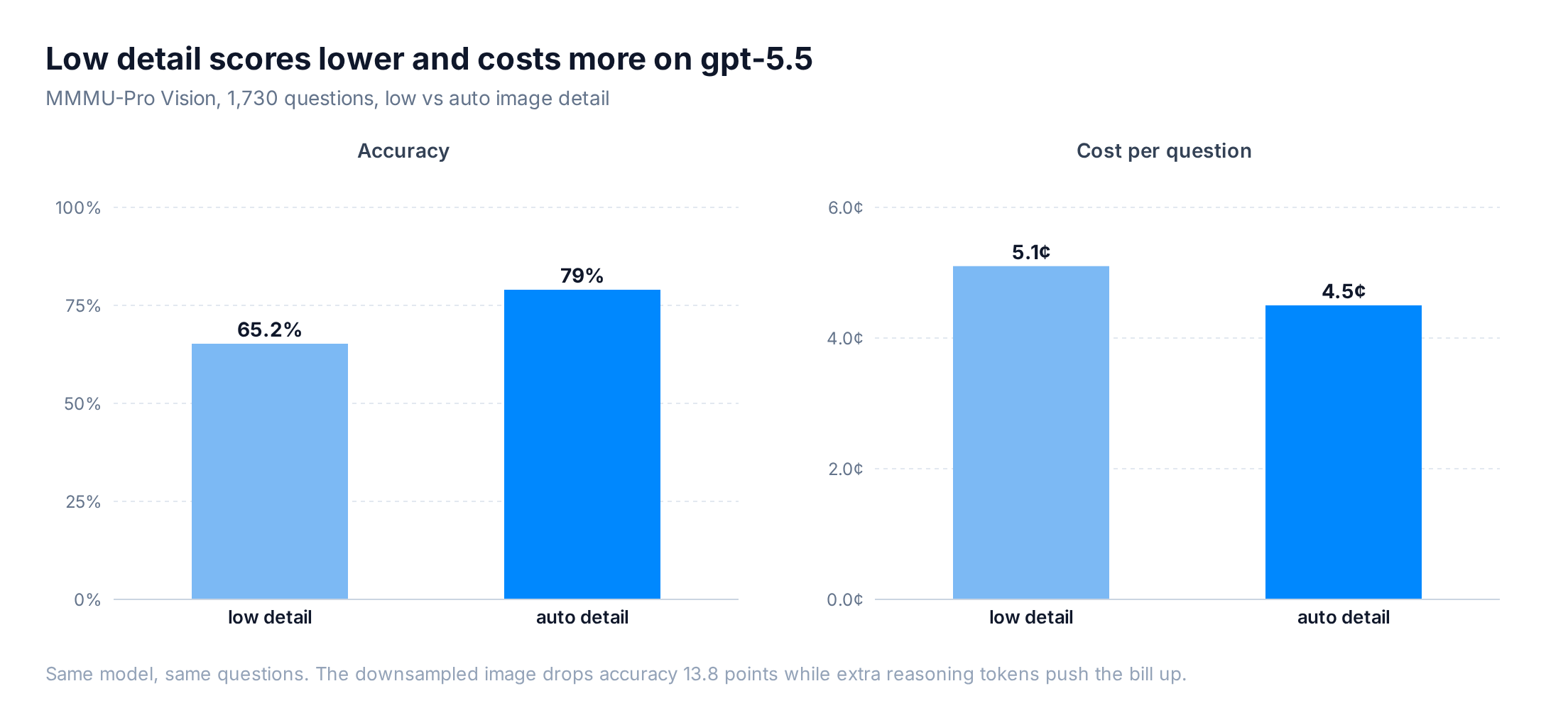
gpt-5.5 accuracy and cost per question, low versus auto image detail

We found a more effective path for saving costs on image processing in reasoning models: send a clearer image (auto or high), and adjust reasoning effort instead.

Auto detail produces better results on every model, and sometimes costs less

We ran five models from OpenAI and Google at both low and auto, temperature 0, one epoch. Every model scored higher on auto.
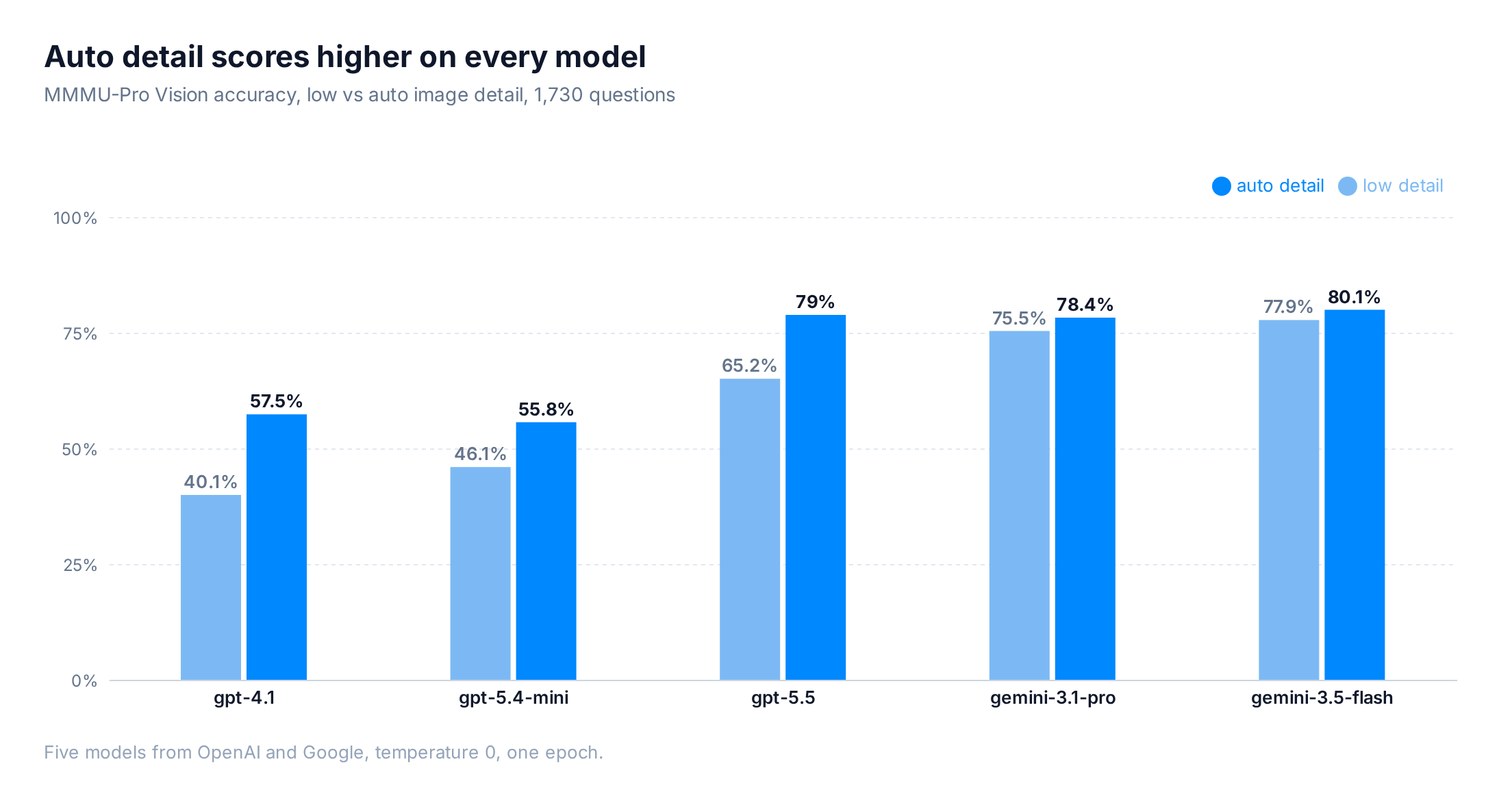
MMMU-Pro Vision accuracy by model, low versus auto image detail, across 1,730 questions

ModelDetailAccuracyCost / questionReasoning tok/req
gpt-5.5low65.2%5.1¢1,180
gpt-5.5auto79.0%4.5¢730
gpt-5.4-minilow46.1%0.08¢0
gpt-5.4-miniauto55.8%0.14¢0
gpt-4.1low40.1%0.43¢0
gpt-4.1auto57.5%0.66¢0
gemini-3.5-flashlow77.9%2.96¢2,876
gemini-3.5-flashauto80.1%2.80¢2,602
gemini-3.1-prolow75.5%9.53¢6,344
gemini-3.1-proauto78.4%11.12¢6,964

Low detail makes gpt-5.5 think harder

Per OpenAI’s vision docs, detail: low gives the model a low-resolution 512x512 version of the image, regardless of the original size, and bills it at a small fixed token cost. While this saves on input tokens, it also means that useful fine details may not survive the downscale.

On gpt-5.5, low detail produced 1,180 reasoning tokens per request versus 730 on auto, a 1.6x jump, plus 39% more completion tokens (489 vs 351). The model spent that extra effort squinting at small text and diagrams it could no longer read cleanly.
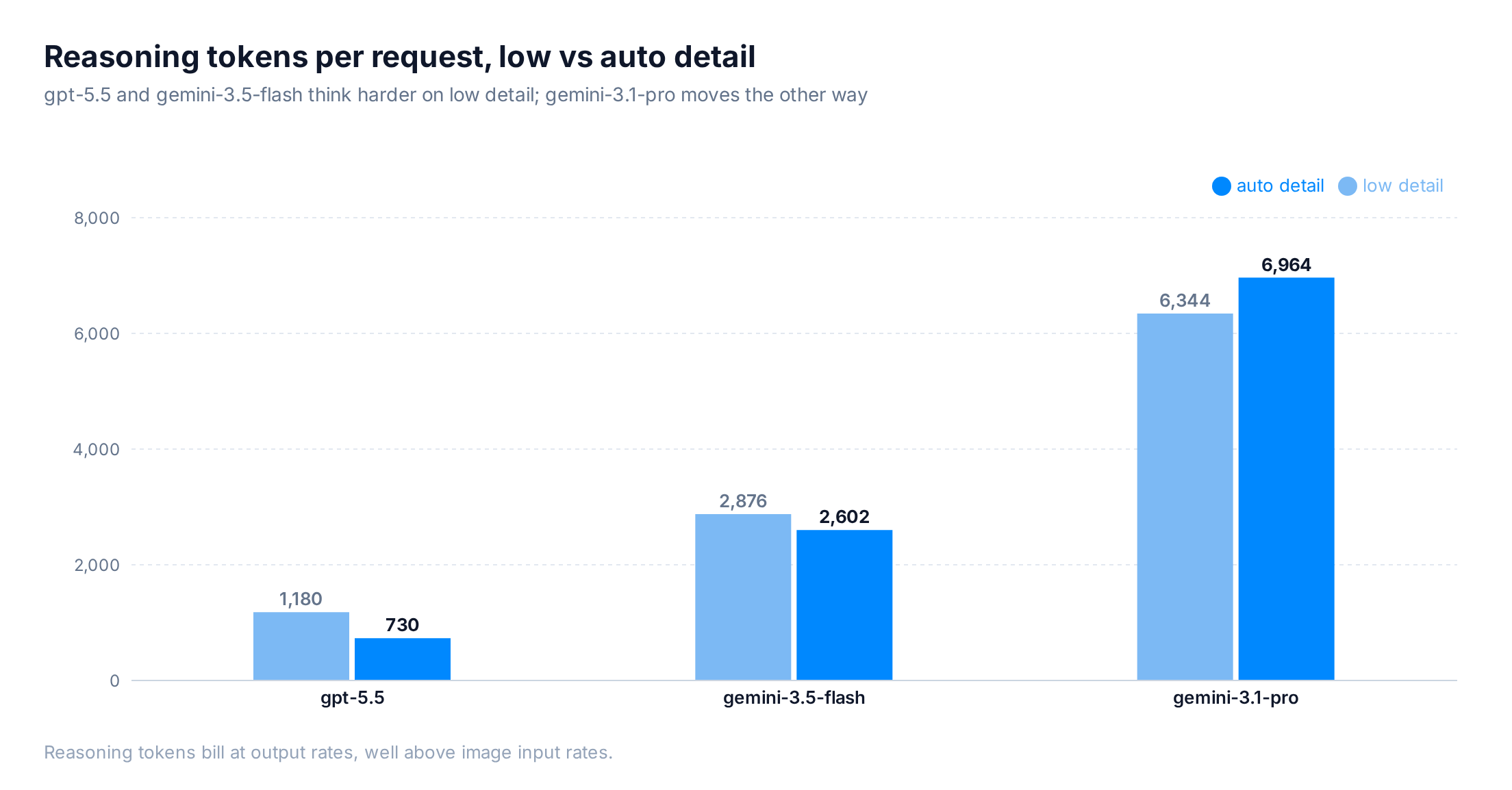
Average reasoning tokens per request at low versus auto detail, for gpt-5.5, gemini-3.5-flash, and gemini-3.1-pro

Output tokens bill higher than image tokens, so the cheaper input cost was offset. The same model asking same questions at low detail cost 0.6¢ per question more than auto. You paid more and scored worse.

One caution before generalizing: the token pattern varies by model. gemini-3.5-flash also used more reasoning tokens on low (2,876 vs 2,602), but gemini-3.1-pro used slightly fewer (6,344 vs 6,964), and its low run came out cheaper.

gpt-5.4-mini and gpt-4.1 don’t reason, so they sat at 0 thinking tokens on both settings. With no output side to grow, the input savings survive (more on that below).

What accuracy gains can you get from clearer images?

Switching from low to auto bought between 2 and 17 points of accuracy, depending on the model.
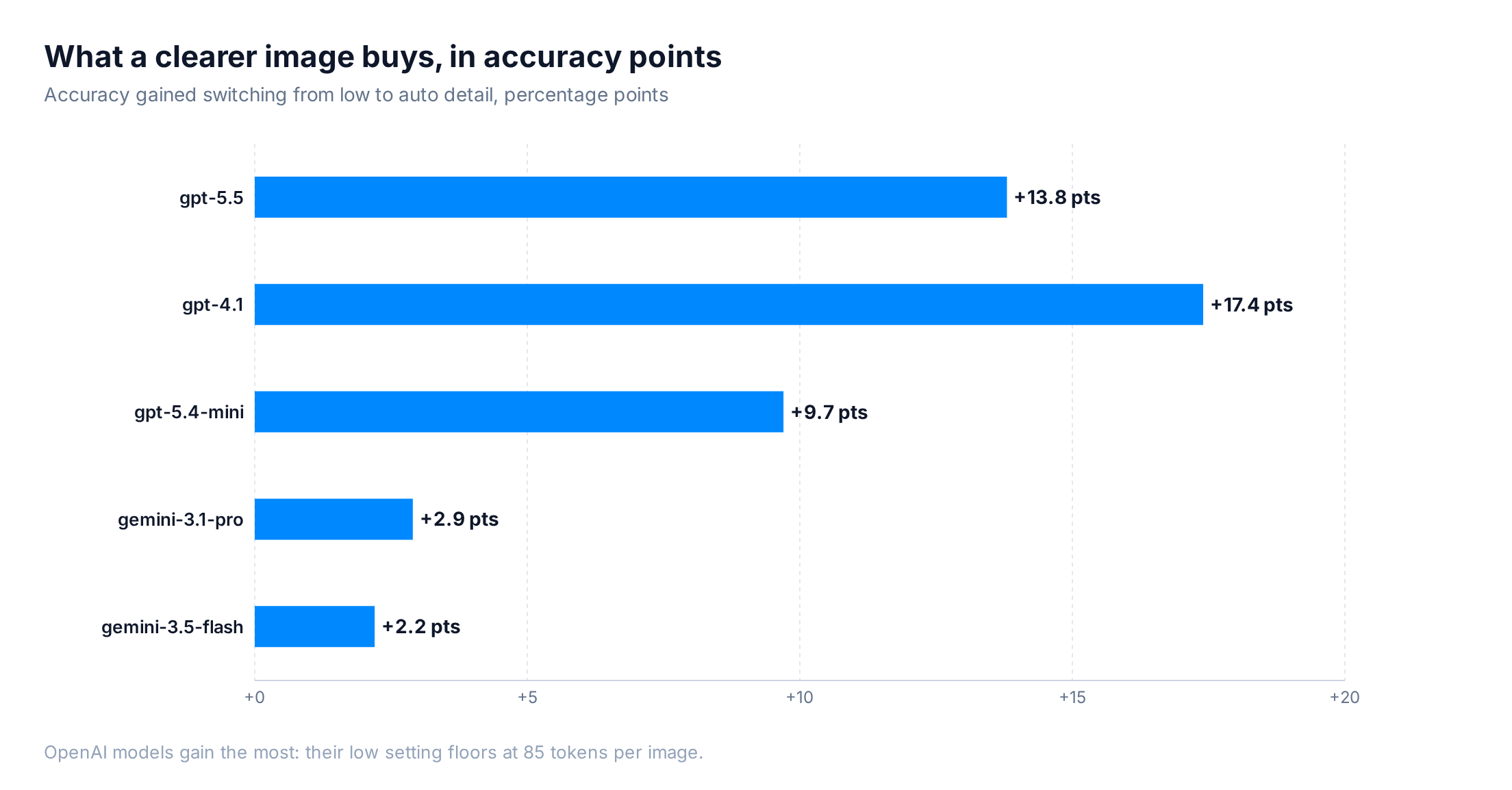
Accuracy gained by switching from low to auto detail, in percentage points, per model

The OpenAI models gain the most because their low setting downscales every image to 512x512 with a small fixed token cost (85 tokens on gpt-4.1). Gemini’s low resolution keeps roughly 273 tokens per part, so it starts from a sharper baseline and has less to lose.

The gains concentrate by image type. The dataset is 76% text and OCR, plus another 19% screenshots, so most questions already sit near the model’s ceiling and barely move with detail. The clearest jump lands on charts and graphs: gemini-3.1-pro climbed from 78.6% to 91.7% on those with auto detail. Diagrams stay the hardest category either way, around a third correct (on a small sample of 21 questions).
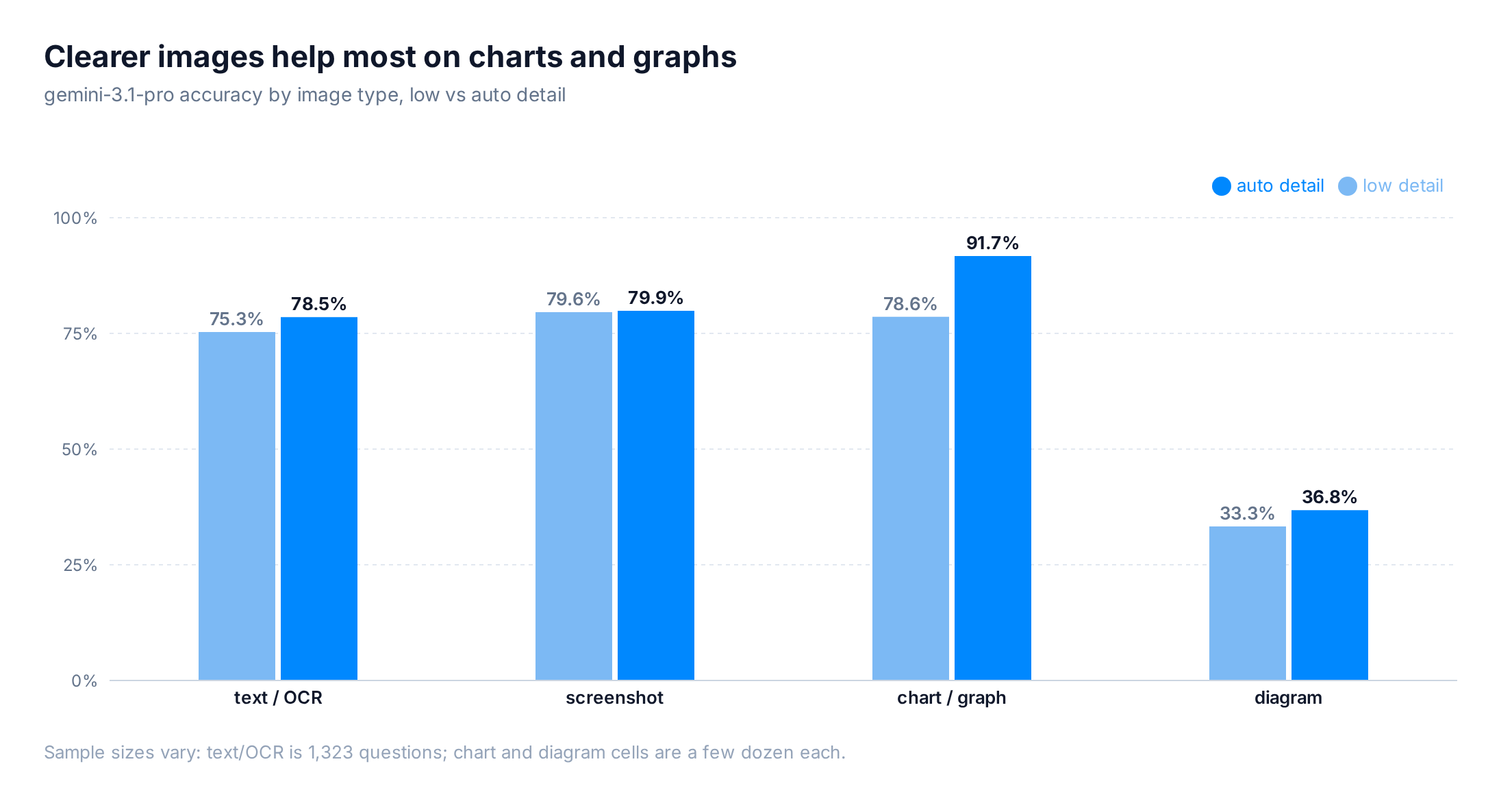
Gemini accuracy by image type, low versus auto detail

Here’s one of those questions, a 2239×1279 mechanical engineering figure that asks you to pick the correct main view from four near-identical orthographic projections:
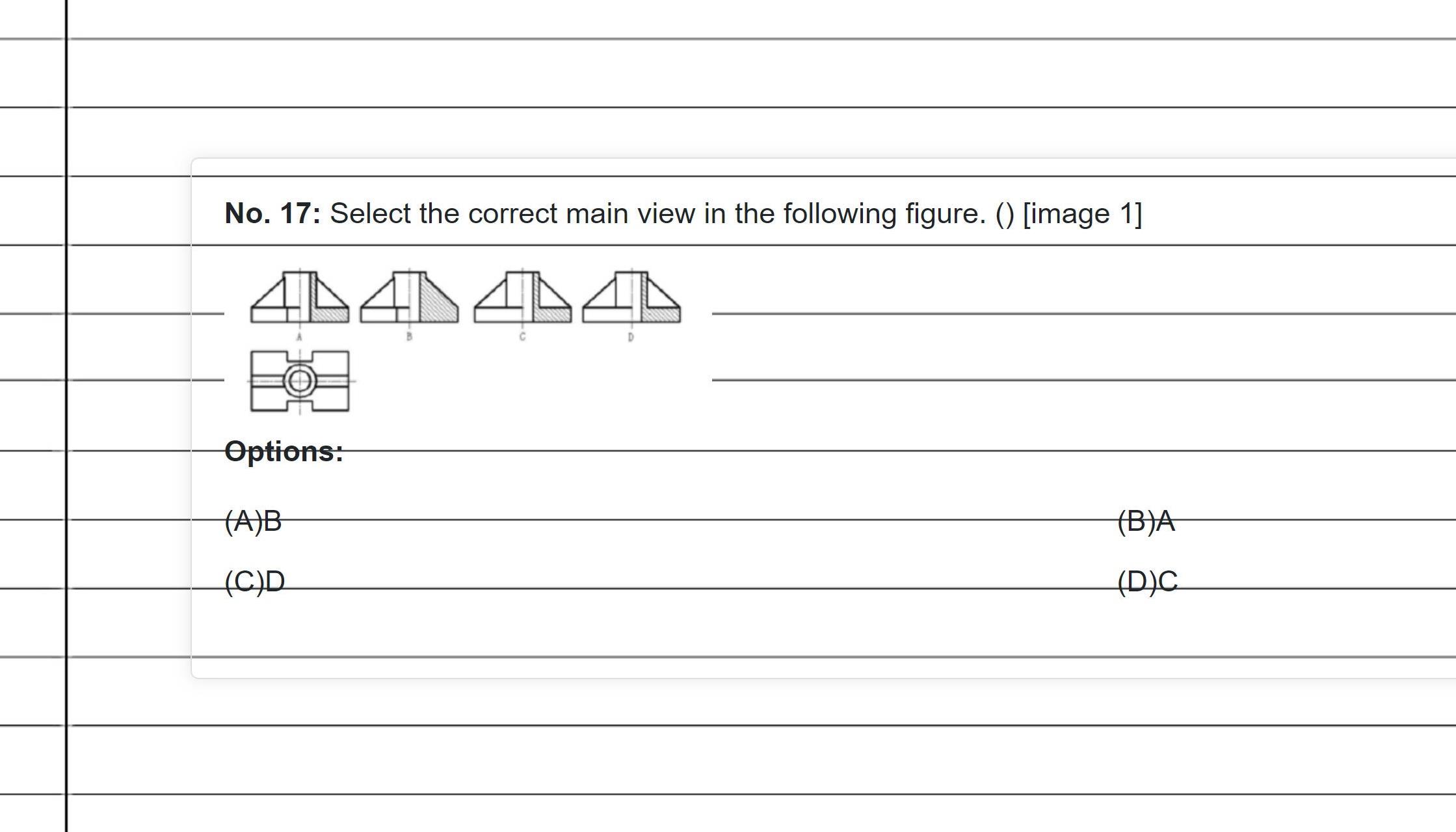
A mechanical engineering question from MMMU-Pro Vision asking which orthographic projection is the correct main view

The four candidate views differ only in where the hatching and hidden lines sit. At auto detail, gpt-5.5 picks B, the right answer. At low, the same figure collapses to a 512px thumbnail, those thin lines blur together, and the model lands on C after a longer chain of thought. Longer reasoning is a poor substitute for a legible image.

Reasoning level has the most significant effect on cost

Detail level and reasoning effort look like they do similar jobs, but in our runs they landed in very different places. Changing detail swung accuracy by 2 to 17 points while barely touching the bill. Changing reasoning effort swung the bill by 50 to 75 percent while accuracy wandered 1 to 2 points, within noise.
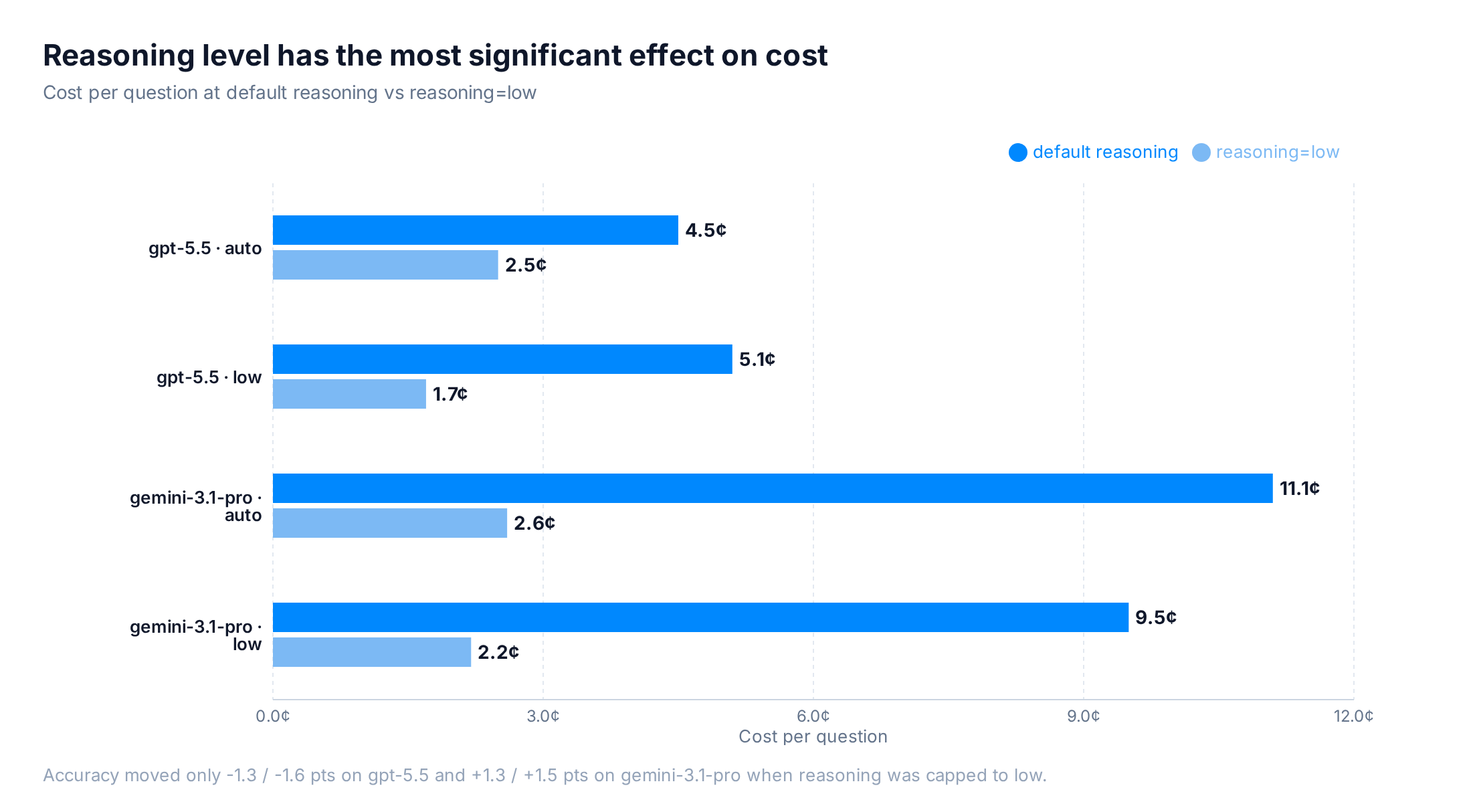
Run cost at default reasoning versus reasoning=low for gpt-5.5 and gemini-3.1-pro

Capping gpt-5.5 to reasoning=low took the low-detail cost from 5.1¢ down to 1.7¢ per question, a 67% cut, while accuracy moved 1.3 points (65.2% to 63.9%). On gemini-3.1-pro the auto run dropped from 11.1¢ to 2.7¢ and accuracy rose 1.5 points. So if you want a cheaper image pipeline, cap reasoning effort and keep the image sharp.

Low detail still pays off on non-reasoning models

On a non-reasoning model, low detail does what you’d expect. gpt-5.4-mini ran 0.08¢ per question on low versus 0.14¢ on auto, about 40% cheaper, because there’s no reasoning loop to inflate the bill. The trade is accuracy, which fell from 55.8% to 46.1%.

Latency moves the same way. gpt-4.1 averaged 960ms per request on low against 1,148ms on auto, and gpt-5.4-mini ran 1,348ms against 1,776ms. Low detail caps the image at a small fixed prompt-token cost (85 tokens on gpt-4.1), so there’s far less to read in before the model starts writing. With no reasoning loop to drag out the tail, that shorter prefill shows up as a faster response.

Picking the right detail level for your workload

The choice comes down to whether your model reasons:

  • Reasoning models (gpt-5.5 and similar): keep auto or high, and use reasoning effort to control cost. In our runs, low detail scored worse on every reasoning model and cost more on two of the three.
  • Non-reasoning models (gpt-5.4-mini and similar): low detail cuts cost and shaves latency, yet has reduced accuracy on text-heavy images.

Either way, the detail setting has a much smaller impact on final cost when compared to more expensive output tokens. In most cases, you’re better off leaving image detail on auto and adjusting reasoning.

OpenRouter’s image input API is unified across models, and model-specific parameters like detail level pass through via provider options, so you can tune these settings without changing your integration.

How we tested

  • Benchmark: MMMU-Pro Vision (MMMU/MMMU_Pro, vision config, test split), 1,730 ten-option visual reasoning questions.
  • Models: gpt-5.5, gpt-5.4-mini, gpt-4.1, gemini-3.5-flash, gemini-3.1-pro, each at low and auto detail, temperature 0, one epoch.
  • Detail: OpenAI image_url.detail low/auto; Gemini per-part mediaResolution. No max-token cap.
  • Image types: classified by gpt-5.4-mini vision (text/OCR, screenshot, diagram, chart, illustration, photo). Per-type accuracy was computed for the Gemini models; OpenAI per-type cells were not scored in this run.
  • Metrics: accuracy from eval logs; tokens and latency from OpenRouter generation records.
  • Cost: reported as cost per question, the total run cost divided by the number of questions scored in that run. Normalizing this way keeps the comparison fair across runs of slightly different size.