





You’re building an app that needs to answer questions in chat, generate product images, search a knowledge base, and turn voice memos into text. The default path is 4 provider SDKs, 4 billing relationships, and 4 auth schemes to wire up before you write a line of feature code. One developer on r/Bard went looking for a unified API for LLMs, image, and video generation models. Another on r/ShowYourApp built the thing themselves and reported that an all-in-one AI API was way harder than expected once text, image, video, TTS, STT, and embeddings all had to coexist.
On OpenRouter, every one of those modalities runs through a single OpenAI-compatible base URL: https://openrouter.ai/api/v1. You set it once. After that, you change the model string and the content type. The catalog spans 400+ models across 70+ providers, and the same routing controls that protect a chat call protect an embeddings call.
https://openrouter.ai/api/v1) and call image, video, audio, embeddings, and transcription through it. Switch modality by changing the model string and the content type./chat/completions endpoint. Five have dedicated endpoints: /images, /videos, /audio/speech, /audio/transcriptions, and /embeddings.data_collection: "deny", cost/latency sort) works on an embeddings call exactly as it does on a chat call.Yes. One base URL serves every modality, and you switch between them by changing the model string and the request content type. Set https://openrouter.ai/api/v1 as your base URL, pass your API key as a Bearer token, and you reach the full catalog through one OpenAI-compatible interface.
Wiring up 4 provider SDKs means each provider brings its own auth refresh, retry and backoff semantics, rate-limit headers, streaming format, and error schema. You write that glue 4 times, maintain it 4 times, and a change from one provider only ever fixes its own corner.
We’re a drop-in replacement for the OpenAI Chat API, so the same request format carries across every modality that rides /chat/completions, and the TTS endpoint follows the OpenAI Audio API. The dedicated endpoints (image generation, video generation, transcription, and embeddings) each have their own request shape, but our official SDKs (@openrouter/sdk for TypeScript, openrouter for Python) wrap all of it behind one interface.
Most input modalities ride /chat/completions and differ only by content type. Five modalities have dedicated endpoints. Here’s the full map, grounded in our multimodal overview and embeddings reference.
| Modality | Endpoint | How you call it |
|---|---|---|
| Text / chat | POST /api/v1/chat/completions | messages array |
| Image input (vision) | POST /api/v1/chat/completions | image_url content type |
POST /api/v1/chat/completions | file content type | |
| Audio input | POST /api/v1/chat/completions | input_audio content type |
| Video input | POST /api/v1/chat/completions | video_url content type |
| Image generation | POST /api/v1/images | prompt in, base64 images out |
| Video generation | POST /api/v1/videos (async) | submit prompt, get job ID, poll |
| Text-to-speech | POST /api/v1/audio/speech | text in, MP3/PCM bytes out |
| Transcription (STT) | POST /api/v1/audio/transcriptions | base64 audio in, JSON text + usage out |
| Embeddings | POST /api/v1/embeddings | text or text+image, vectors out |
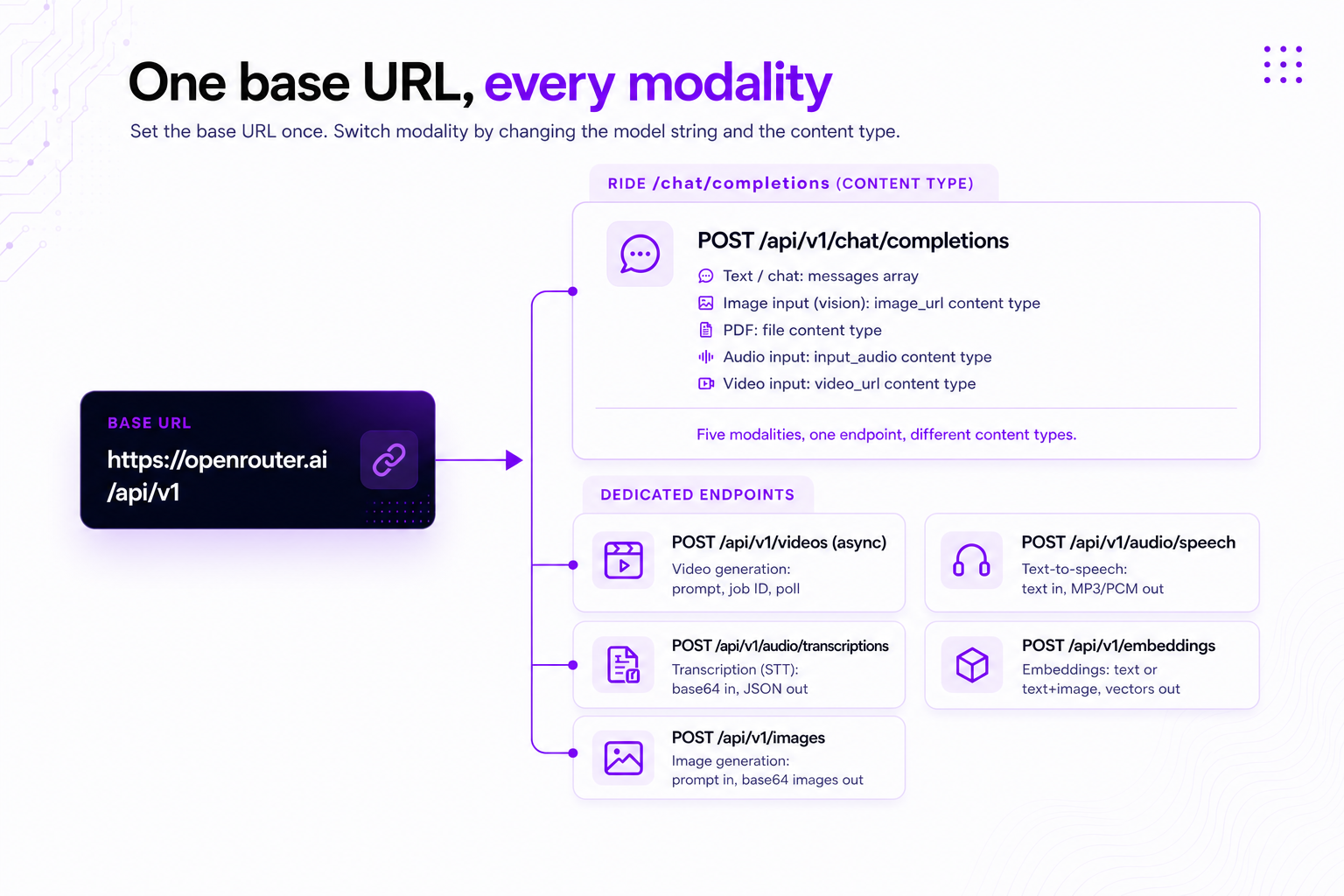
Five of these modalities run on /chat/completions and change only the content type in the message array. Five have their own endpoints because their call shape is different: image generation takes a prompt plus image-specific knobs (resolution, aspect ratio, output format) and returns base64 images, video generation is asynchronous (you poll a job), speech and transcription move raw audio bytes, and embeddings return vectors instead of completions. Single-provider docs rarely lay this out side by side, because no single provider serves all of them.
You can test multimodal inputs without paying. The free tier needs no credit card, and free models run under low daily rate limits that rise once you’ve added credits. That’s enough to send an image to a vision model or generate a batch of embeddings before you commit.
Generation and understanding are different tasks even within the same media type, and the endpoint you reach for depends on which one you’re doing.
Image: generation vs. understanding. Use image generation when you need a new image, and image input when you have one to analyze. Generation produces assets, mockups, and illustrations from a text prompt through a POST to the dedicated /api/v1/images endpoint, with optional reference images for image-to-image work. Vision input goes the other way: you send an image_url on /chat/completions, and the model does OCR, description, or detection. See the image generation docs for the full walkthrough.
Video: input vs. generation. Use the async /videos endpoint to produce clips and video_url on chat to understand them. Video generation submits a prompt and returns a job ID you poll until the clip is ready, with configurable resolution, aspect ratio, and duration. Video understanding sends a video_url to a video-capable model for analysis, action recognition, or object detection. More in the video generation announcement.
Audio and speech: output vs. analysis. Use /audio/speech for voice output and audio input on chat for analysis. Text-to-speech sends text to /api/v1/audio/speech and returns MP3 or PCM bytes through an OpenAI Audio-compatible endpoint, so OpenAI client libraries work against it. Audio input rides /chat/completions with the input_audio content type for tasks like sentiment or content analysis. Details in the audio APIs announcement.
Embeddings: retrieval and similarity. Use embeddings when you need retrieval or similarity, not generation. The embeddings docs name 6 jobs: RAG, semantic search, recommendations, clustering, duplicate detection, and anomaly detection. You can batch many inputs in one request, and some models accept text and an image together to produce a single joint vector (nvidia/llama-nemotron-embed-vl-1b-v2 is one).
Transcription: speech to text. Use /audio/transcriptions for speech-to-text. You send base64-encoded audio and get back JSON with the transcribed text plus usage statistics. It fits meeting notes, voice commands, and captioning.
Yes. The same provider object you use on a chat call works identically on an embeddings call: provider order, automatic failover, data-collection policy, and cost or latency sort. Here’s the exact shape from the embeddings docs:
{
  "model": "openai/text-embedding-3-small",
  "input": "Your text here",
  "provider": {
    "order": ["openai", "azure"],
    "allow_fallbacks": true,
    "data_collection": "deny"
  }
}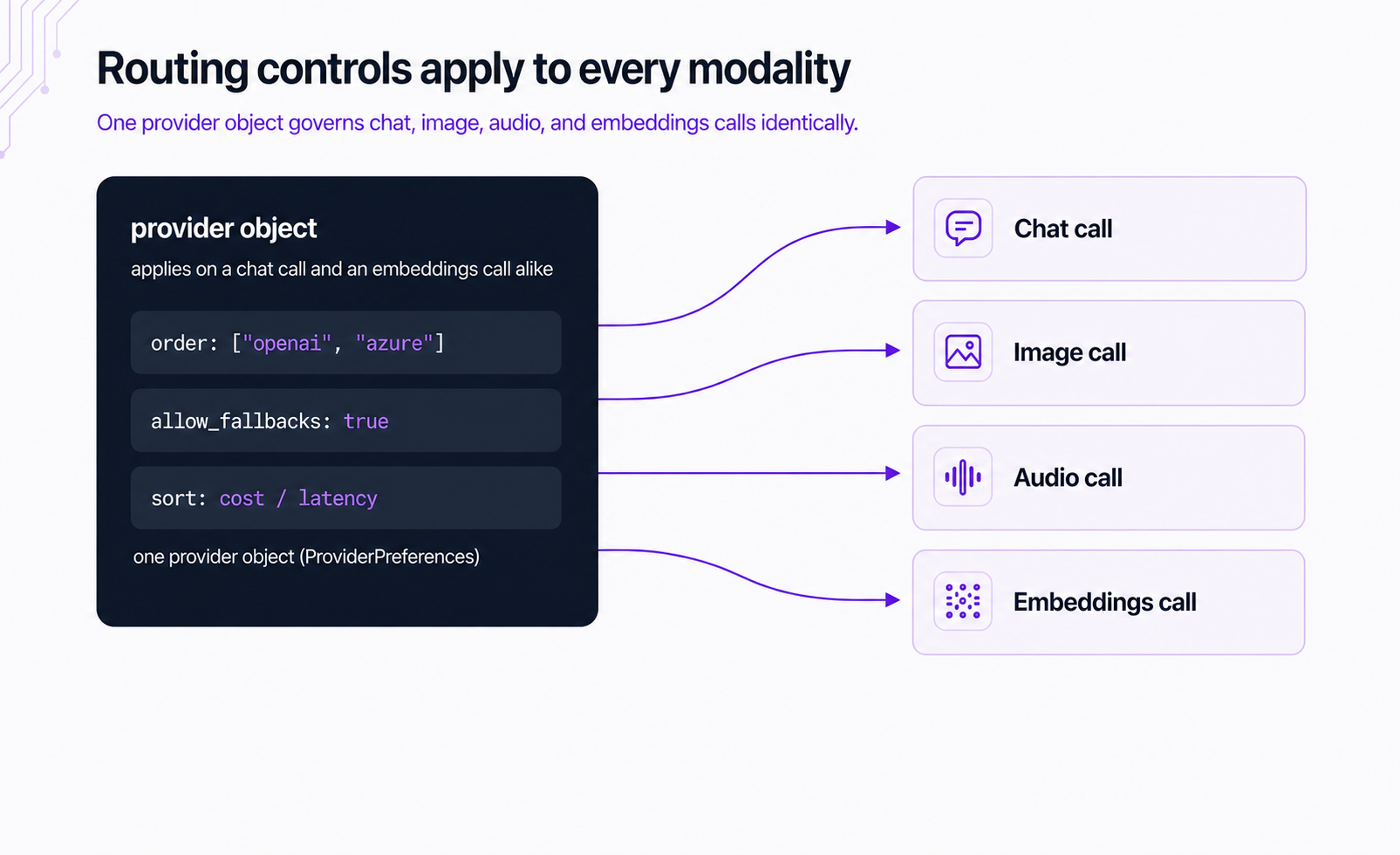
The routing controls carry to the dedicated image endpoint too: /api/v1/images accepts provider.order, provider.allow_fallbacks, provider.only, provider.ignore, and provider.sort, so failover, ordering, and cost/latency sort work the same way on an image generation call as on a chat call.
An embedding model served by more than one provider can fall back from one to another when the first returns an error. The same cross-provider failover applies to embeddings, image, audio, and chat alike through the provider object.
We don’t mark up provider pricing: the rate in the model catalog is what you pay. Zero Completion Insurance means a failed run isn’t billed, so a request that fails over and never completes costs nothing. That holds across modalities.
One API key, one bill, one request format across every modality.
The same Bearer token authorizes a vision call, a TTS call, and an embeddings call. There’s no separate key vault per provider and no per-modality onboarding. When you add a new capability, say you start doing RAG, you call /embeddings with the key you already have.
Consolidated billing means usage across modalities lands on a single OpenRouter statement at catalog rates. You can compare what image generation cost versus embeddings in one place, rather than exporting CSVs from 4 dashboards. That reconciliation friction is exactly what the r/ShowYourApp builder ran into when the all-in-one stack got harder than expected.
Each modality has constraints worth knowing before you build. These are our own current limits, stated plainly so you can design around them rather than discover them in production.
| Limit | Modality | What it means for you |
|---|---|---|
| No streaming | Embeddings | Responses come back complete, not token by token. Plan synchronous handling. |
| Deterministic output | Embeddings | Same input gives the same vector. Cache aggressively. |
| Base64 only | Audio input | Audio can’t be passed by URL. Encode local files first. |
| Provider-specific URLs | Video input | URL support varies. Gemini on AI Studio accepts only YouTube links. |
| Model-by-model support | All | Not every model supports every modality. We auto-filter by content. |
| Free-tier rate limits | All | Free models have low daily limits that rise once you add credits. |
The unified API earns its place when you need more than one media type, when swapping models is a one-string change, or when a provider outage shouldn’t take your feature down. If your entire app is a single chat feature against one general-purpose model from one provider, a direct integration is simpler and the consolidation upside is thinner.
Send a single embeddings request against the base URL.
import requests

response = requests.post(
    "https://openrouter.ai/api/v1/embeddings",
    headers={
        "Authorization": "Bearer <OPENROUTER_API_KEY>",
        "Content-Type": "application/json",
    },
    json={
        "model": "openai/text-embedding-3-small",
        "input": "The quick brown fox jumps over the lazy dog",
    },
)

print(response.json()["data"][0]["embedding"][:5])
import { OpenRouter } from '@openrouter/sdk';
const openRouter = new OpenRouter({ apiKey: process.env.OPENROUTER_API_KEY });
const response = await openRouter.embeddings.generate({
model: 'openai/text-embedding-3-small',
input: 'The quick brown fox jumps over the lazy dog',
});
console.log(response.data[0].embedding);curl https://openrouter.ai/api/v1/embeddings \
-H "Authorization: Bearer $OPENROUTER_API_KEY" \
-H "Content-Type: application/json" \
-d '{"model": "openai/text-embedding-3-small", "input": "The quick brown fox jumps over the lazy dog"}'From here, go deeper per modality with the multimodal overview, or browse models by output modality to find what fits each call.
Yes. All three run through our base URL at https://openrouter.ai/api/v1, with one API key. Image generation uses the dedicated /images endpoint, embeddings use /embeddings, and transcription uses /audio/transcriptions. You change the endpoint and content type, not the integration, the auth, or the API key.
Yes. Embeddings run through POST /api/v1/embeddings and return vectors for RAG, semantic search, recommendations, clustering, duplicate detection, and anomaly detection. You can batch multiple inputs in one request, and some models accept text and an image together for a joint vector.
Text, image input, PDF, audio input, and video input all use /chat/completions and differ only by content type. Image generation (/images), video generation (/videos), text-to-speech (/audio/speech), transcription (/audio/transcriptions), and embeddings (/embeddings) use dedicated endpoints, because their call shapes differ: prompt-to-image requests, async jobs, raw audio bytes, or returned vectors instead of completions.
Yes. We have a free tier at OpenRouter, no credit card required. Free models run under low daily rate limits that rise once you’ve added credits, which is enough to send images, generate embeddings, or test other modalities before you commit.
Yes, with multimodal embedding models. You wrap the input in a content array containing text and image_url objects, and the model returns a single joint vector that captures both. nvidia/llama-nemotron-embed-vl-1b-v2 is one model, useful when you want text and images to share a single retrieval space.
Yes. The same provider routing controls (order, allow_fallbacks, cost/latency sort) apply to embeddings, image, audio, and chat calls. If a provider errors, the call falls over to the next one serving that model, and a failed run is never billed.
此内容由惯性聚合(RSS阅读器)自动聚合整理,仅供阅读参考。 原文来自 — 版权归原作者所有。